


Explore 100+ Frameworks
SmartSuite’s control mapping means any compliance framework, standard, or regulation is available at your fingertips—yes, even custom ones you may need to create.

Frequently Asked Questions About Framework Library
Not necessarily. This page is an industry reference to the frameworks teams commonly use to structure controls and compliance programs. SmartSuite provides the operating system for putting those frameworks into action: controls, mappings, evidence collection, assessments, remediation, dashboards, and audit-ready history.
Many standards and regulations have copyrighted or licensed text, so organizations typically import and manage framework content from their approved sources (licensed copies, internal interpretations, policy language, advisor-provided content, etc.). SmartSuite is built to support that “bring-your-own-content” model without losing structure or traceability.
SmartSuite can provide CRI Profile content within the Controls & Frameworks solution. That means you can start with CRI as a structured set of diagnostic statements, then map controls, link evidence, run assessments, and report progress directly inside SmartSuite.
Everything else in the library can still be supported in SmartSuite — but the framework text/content is typically customer-provided or separately licensed.
A major benefit of the CRI Profile is that CRI maintains a Mappings Catalog and publishes companion mapping resources that connect CRI diagnostic statements to other authoritative standards, guidance, and regulatory references.
At a high level, CRI’s published mapping resources include (examples that are publicly referenced and/or downloadable from CRI and partners):
Core foundations and standards
- NIST Cybersecurity Framework (CSF) — CRI Profile is explicitly based on NIST CSF (and CRI’s more recent releases reference CSF v2.0 alignment).
- ISO and CPMI-IOSCO Guidance — CRI materials cite these as “core standards” referenced in the Profile tooling context (alongside NIST CSF).
Security control libraries / control catalogs
- NIST SP 800-53 Rev. 5 — CRI publishes an “OLIR” style mapping resource to NIST 800-53r5.
- CIS Critical Security Controls v8.1 — CRI has referenced this mapping as part of v2.1-related updates, and CIS has published a mapping document to CRI Profile v2.0.
Regulatory alignment
- EU DORA — CRI provides DORA mapping resources and a DORA guide/gap analysis to support alignment efforts.
- CRI also notes it connects to regulatory expectations worldwide and adds/updates mappings over time (the mappings catalog was moved to a separate document to support more frequent updates).
Threat mapping
- MITRE ATT&CK — CRI provides a mapping resource to help connect threats to compliance.
Financial-services guidance examples
- CRI has publicly called out additional mappings such as the FFIEC Development, Acquisition, and Maintenance Handbook as part of its v2.1 release communications (among others).
Cloud-specific extension
- CRI’s Cloud Profile work includes mapping to the Cloud Security Alliance (CSA) Cloud Controls Matrix (CCM) (via CRI Cloud Profile extension resources).
How this shows up in SmartSuite (the practical benefit):
- You can use CRI as your baseline (controls, evidence, tests, issues, remediation) and then use CRI’s published mappings/crosswalk references to help demonstrate alignment to other frameworks—without duplicating the underlying control work.
- In SmartSuite terms, this is “one controls system of record,” with reporting views/dashboards that roll up status by CRI domain, mapped framework, owner, system, business unit, and audit period.
Note: The exact set of mappings can evolve by CRI Profile version and catalog updates—your page can point to the CRI Mappings Catalog as the source of truth for “current mappings.”
Yes. SmartSuite is designed to make framework content easy to bring in and maintain over time.
Typical approaches include:
- Importing requirements via CSV/Excel (IDs, titles, categories, applicability, version, etc.)
- Creating internal control statements and policy requirements directly in SmartSuite
- Using linked records to structure relationships (Framework → Requirements → Controls → Evidence/Test Results)
- Maintaining updates as versions change (new requirements, deprecated items, revised language)
This keeps framework content structured like data (not static documents), so it stays searchable, reportable, and auditable.
Most teams treat their Controls Library as the single source of truth, then map those controls to any frameworks they need to satisfy.
A common SmartSuite setup:
- Controls Library (one record per internal control)
- Framework Requirements (one record per requirement/clause)
- Mappings (linked records connecting controls requirements, including coverage notes)
- Evidence linked to controls (attachments, links, attestations, exports)
- Testing / Assessments as structured workflows (status, owners, due dates, findings)
- Dashboards to report coverage, gaps, and readiness by framework, business unit, system, owner, and time period
The key is that evidence and testing stay anchored to the control, so you avoid duplicating work for each framework.
Yes. Teams commonly manage cross-framework alignment in SmartSuite in two ways:
- Control-centered crosswalk: map each internal control to multiple frameworks, then use SmartSuite reporting to show overlap and gaps.
- Requirement-to-requirement crosswalk: create a table that links a requirement in Framework A to a related requirement in Framework B (useful when your organization or advisor provides a published mapping).
Either way, SmartSuite’s linked data model makes it straightforward to answer questions like:
- “Which requirements are not covered by any controls?”
- “Which controls support multiple frameworks?”
- “Where do we have duplicate controls that could be simplified?”
Absolutely. Many organizations need internal frameworks (company standards, regulator interpretations, business-unit overlays, vendor control models, etc.). SmartSuite supports this with:
- A structured way to define framework categories/domains and requirements
- Ownership, review cycles, and approvals
- Versioning patterns (e.g., clone a version, update requirements, publish the new active version)
- Reporting across internal + external frameworks in a single place
SmartSuite treats evidence as part of the workflow, not a pile of files.
Common evidence workflows in SmartSuite include:
- Evidence requests assigned to control owners (with due dates and reminders)
- Evidence records that store metadata (period, system, owner, review status) and link to controls
- Attachments and links to supporting artifacts (policies, tickets, reports, exports, screenshots)
- Review/approval steps for evidence quality and completeness
- Dashboards that show missing evidence, upcoming deadlines, overdue items, and exceptions
It’s usually a shared responsibility:
- Accountable: GRC / Compliance leader (or CISO for cyber programs)
- Responsible: control owners across Security, IT, Engineering, and Operations
- Consulted: Internal Audit, Legal/Privacy, Risk, vendor management
- Informed: executive stakeholders and business leaders
Get A Demo Of Controls And Frameworks In SmartSuite
See how SmartSuite helps you import or structure framework requirements, map controls once, track evidence and assessments, and report readiness across the frameworks your organization uses.
Featured Frameworks
Based on our experience with real-world controls programs and audits, these featured frameworks are the most common starting points. Each section below highlights what the framework is best for and how teams run it in SmartSuite — including where crosswalks can accelerate multi-framework alignment.

The financial services baseline for cyber controls — with CRI content and crosswalk mappings available in SmartSuite.
We recommend starting with the CRI Profile because it was built to help regulated organizations reduce fragmentation across overlapping cyber requirements. Through our relationship with CRI, CRI Profile content and CRI crosswalk mappings are available in SmartSuite, giving your team a proven baseline you can operationalize immediately — and then extend to the other frameworks your organization uses without rebuilding your program from scratch.
- Use CRI content inside SmartSuite as a structured set of diagnostic statements your teams can assess, track, and improve over time
- Map controls once and keep evidence, testing, and remediation linked to the control — so reporting rolls up cleanly by framework
- Run repeatable assessment cycles with owners, due dates, review steps, and audit-ready change history
- Report readiness with dashboards that show coverage, gaps, evidence freshness, exceptions, and remediation progress by function, system, business unit, or audit period
Frequently Asked Questions About Featured Frameworks
“Featured Frameworks” are the frameworks we see most often as starting points for controls programs, audits, and customer security requirements. We highlight these because they are widely adopted and because they map well to a structured controls program in SmartSuite.
Not always. Many standards and regulations are copyrighted or licensed. SmartSuite provides the system to manage frameworks operationally — mapping requirements to controls, tracking evidence, running assessments, and reporting readiness — while customers typically bring in the framework content they are licensed or authorized to use.
Exception: CRI Profile content (and related crosswalk resources) can be available in SmartSuite through our relationship with CRI.
These frameworks show up repeatedly across regulated industries and enterprise security programs. They are commonly used to establish a control baseline, guide assessments, and support audits — and they are frequently referenced in customer security reviews and procurement processes.
It depends on your goals:
- CRI Profile if you want a financial-services-oriented baseline with crosswalk benefits
- NIST CSF if you want a widely adopted program structure for cyber risk
- ISO 27001 if certification and ISMS governance are priorities
- SOC 2 if customer assurance (especially for SaaS) is a driver
- NIST 800-53 if you need a detailed control catalog for high-assurance environments
- CIS Controls if you want a practical, prioritized baseline to build momentum quickly
Teams typically:
- add/import the framework requirements (or use provided CRI content where applicable)
- map requirements to internal controls
- connect evidence and testing to controls
- track issues and remediation
- report coverage, gaps, and readiness by framework and audit period
Control mapping is the traceable link between:
- Framework requirements (what the framework expects), and
- Internal controls (what your organization actually does).
A strong mapping includes the control(s) that satisfy the requirement, a coverage status (fully/partial/gap/not applicable), and brief rationale.
When controls are mapped correctly, you test the control once for the appropriate scope and period, attach evidence once, and then roll that result up to every framework requirement the control supports. This reduces duplicate testing and inconsistent reporting across frameworks.
Yes. Most teams crosswalk by mapping their internal controls to multiple frameworks and then reporting overlap and gaps. In addition, CRI publishes crosswalk/mapping resources, which can accelerate multi-framework alignment when CRI is used as a baseline.
Yes. The Featured Frameworks list is not the limit. Many organizations add:
- additional standards and regulations
- internal policies and control baselines
- regulator overlays and interpretations
- customer/contract security requirements
SmartSuite supports bringing these in as structured requirement sets and mapping them to your controls.
Yes. A custom framework is any structured set of requirements your organization wants to manage like a framework — with ownership, traceability to controls, evidence, testing, issues, and reporting. Common examples include internal policies, customer requirements, and regulator overlays.
Frameworks evolve. Teams typically track version/effective dates, maintain a review cadence, and keep prior versions for audit traceability. SmartSuite supports this by keeping requirements and mappings structured and reportable by audit period.
Yes. Because requirements map to controls and controls link to evidence and tests, SmartSuite can generate clean “evidence pack” views filtered by framework, audit period, scope, and ownership — making audits and customer requests faster and more consistent.
Get A Demo Of Featured Frameworks In SmartSuite
See how teams use CRI, NIST, ISO, SOC 2, NIST 800-53, and CIS to build one controls system of record — map controls once, keep evidence current, and report readiness across frameworks.
Mapping & Crosswalks
The fastest path to audit-ready compliance is a single controls system of record — mapped to the frameworks your organization must satisfy.
Control Framework and Regulatory Libraries
Connect controls to requirements, evidence, and testing.
SmartSuite’s Control Framework and Regulatory Libraries solution gives you the structure to manage controls, framework requirements, and mappings in one connected system — with workflows for evidence, assessments, issues, and reporting built on top.
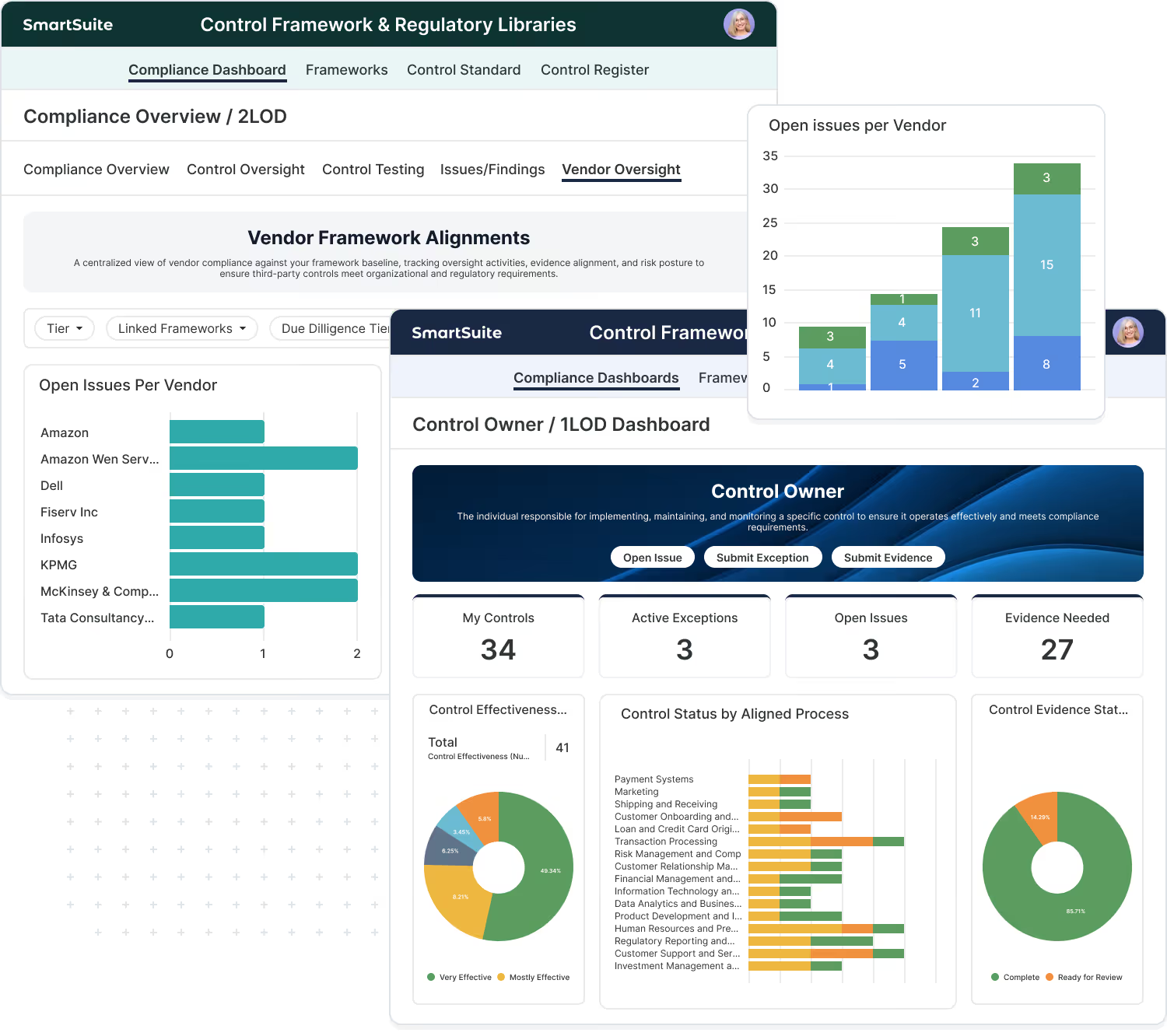
Оwners, cadence, scope, systems, and status.
Оrganized requirements by framework, version, domain, and applicability.
Мany-to-many control ↔ requirement relationships with coverage notes and rationale.
Requests, due dates, review/approval, and evidence freshness tracking.
Repeatable cycles with results tied back to controls and requirements.
Coverage, gaps, exceptions, remediation progress — by framework or by program.
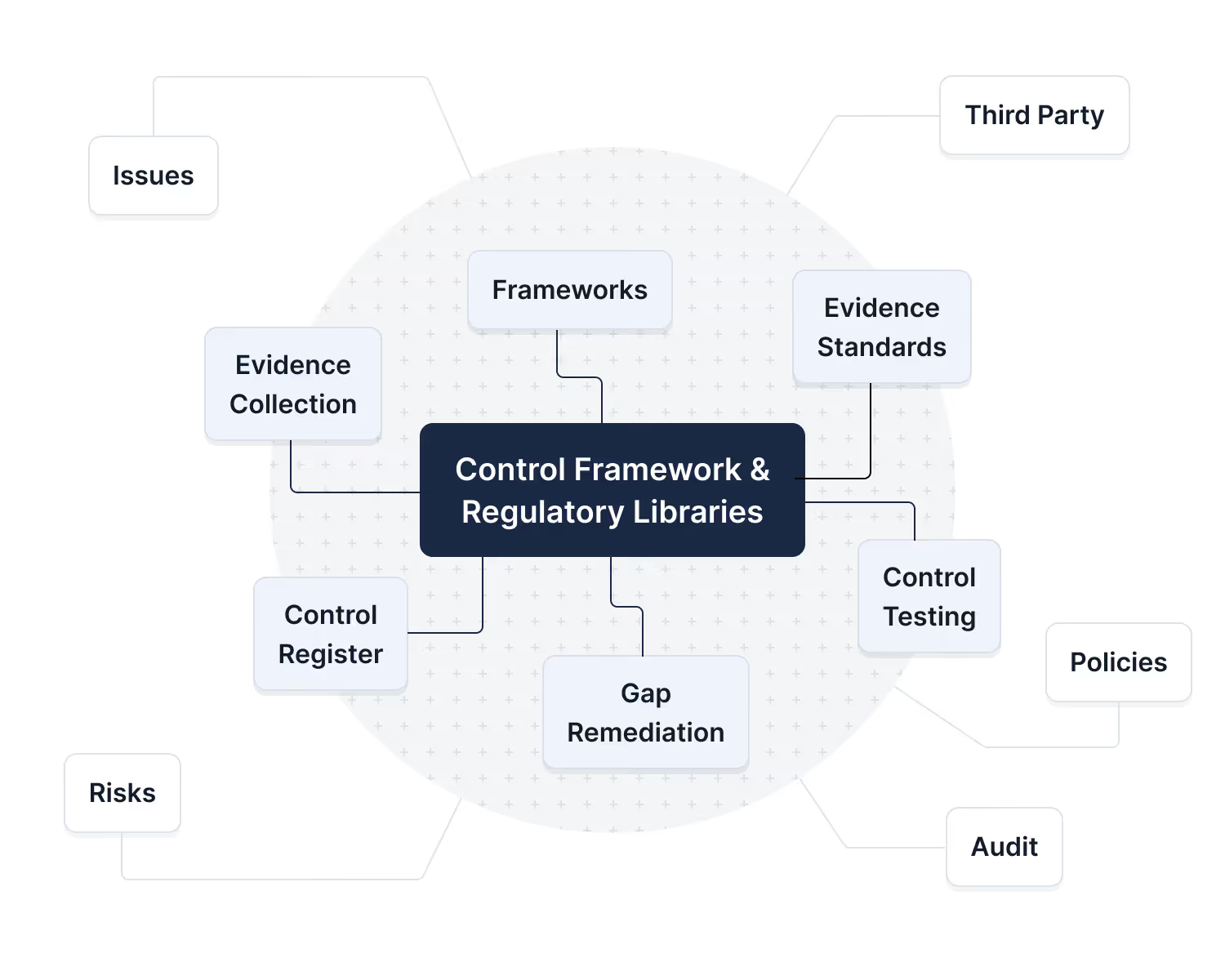
Control Mapping Is Where GRC Becomes Operational
Map controls to requirements for traceability, testing, and audit-ready proof.
Frameworks tell you what you need to achieve. Controls define how your organization achieves it. When controls are mapped to framework requirements, you get the traceability that every mature GRC program depends on: clear ownership, measurable coverage, repeatable testing, and evidence that stands up to audit and regulatory review.
- Creates a single source of truth: one controls library instead of duplicating controls per framework.
- Connects strategy to execution: controls link directly to evidence, testing, issues, and remediation.
- Makes gaps visible: unmapped requirements and weak coverage stand out immediately.
- Scales across the enterprise: control ownership and accountability are clear across teams and systems.
- Improves audit outcomes: auditors can trace requirement → control → test → evidence → result without friction.
What Is A Mapping?
Connect framework requirements to the controls you operate.
We refer to a mapping as the connection between the frameworks you must satisfy and the controls you actually operate. Framework requirements describe expected outcomes. Internal controls describe the processes, safeguards, and checks your organization performs. A mapping links the two together with traceability so you can test, collect evidence, and report consistently.
- Framework requirements
What a standard, regulation, or profile expects
- Internal controls
What your organization does to meet those expectations
- Mappings
The traceable relationship between the two, including coverage notes and ownership
- Evidence & testing
Attach to the control, then roll up to every mapped framework requirement
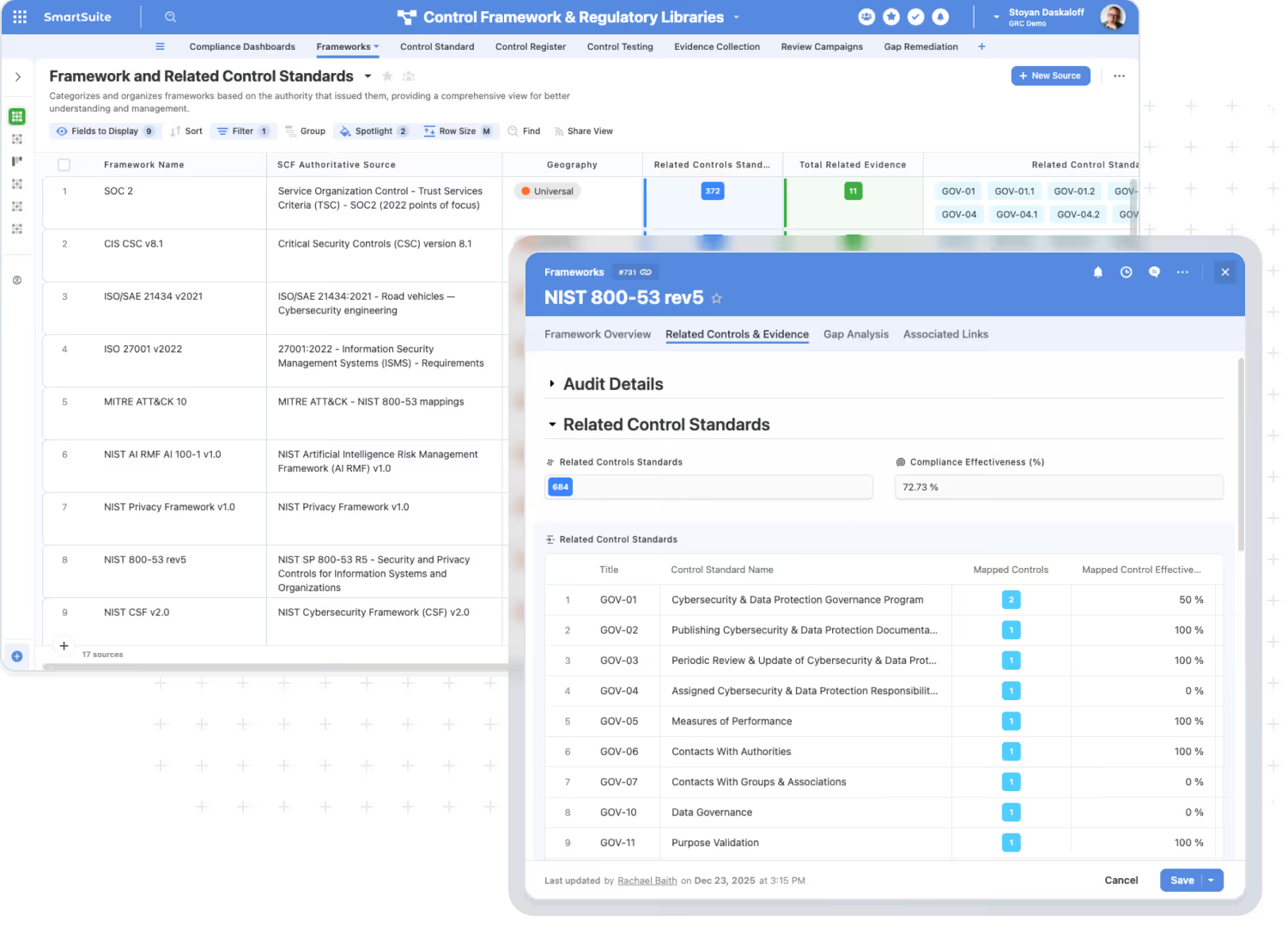
Test Once. Comply Many.
Reuse evidence and testing across frameworks with one mapped controls baseline.
Once your controls are mapped correctly, you stop treating each framework as a separate checklist. You test the control one time (for the right period and scope), attach the evidence once, and then report that result everywhere the control applies. This reduces duplicate testing, duplicate evidence collection, and inconsistent reporting across frameworks.
- Reuse Evidence
One evidence record can support multiple frameworks when mapped to the same control.
- Reduce Duplicate Testing
Control tests roll up across multiple requirements and standards.
- Consistent Results
The same control outcome drives reporting across frameworks.
- Faster Audits and Exams
Reporting packages become views and dashboards, not manual compilation.
- Cleaner Remediation
One issue/remediation plan ties back to every impacted requirement.
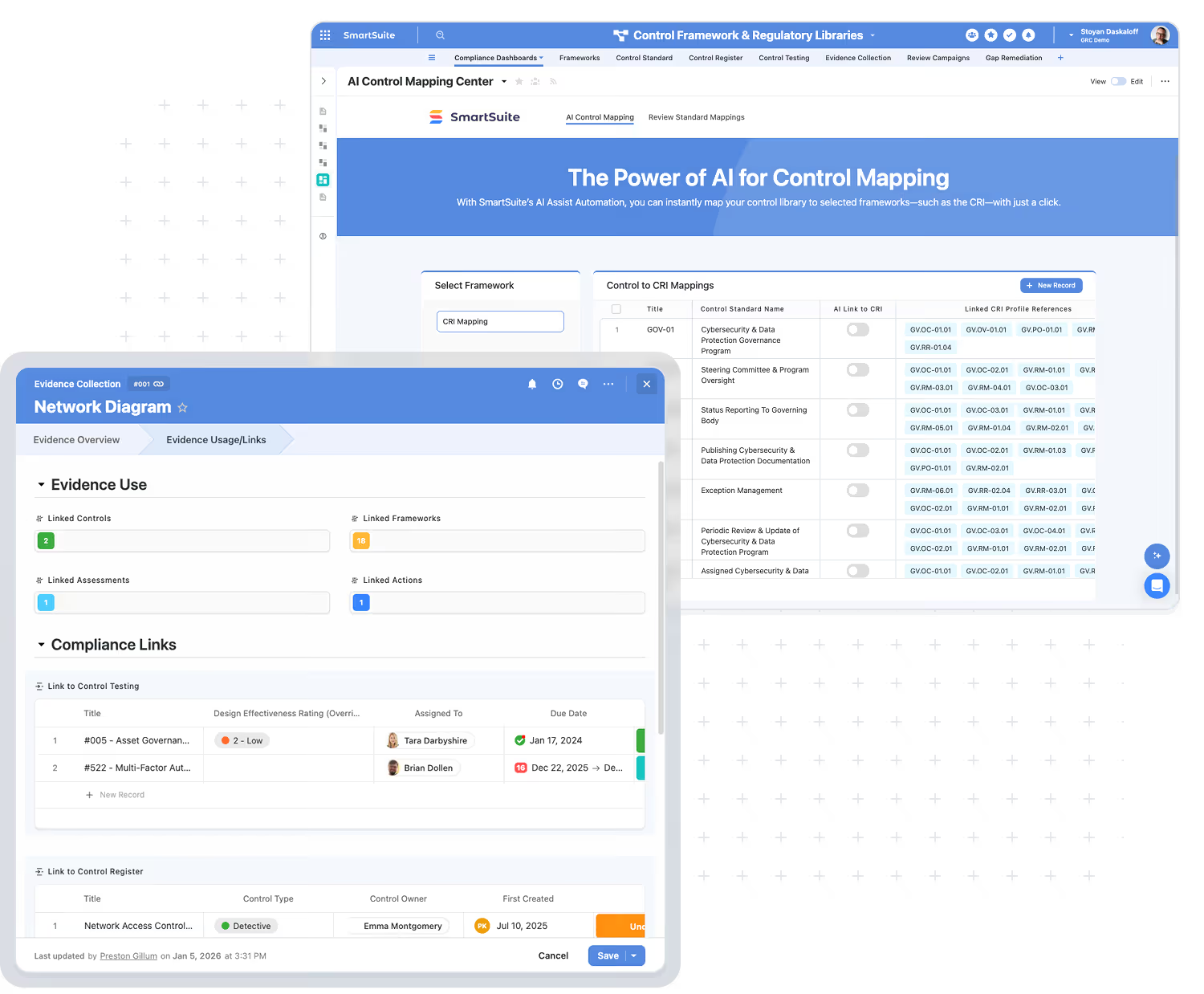
Mapping Quality Levels That Stand Up To Audit
Standardize mapping status so audits trace cleanly from requirement to proof.
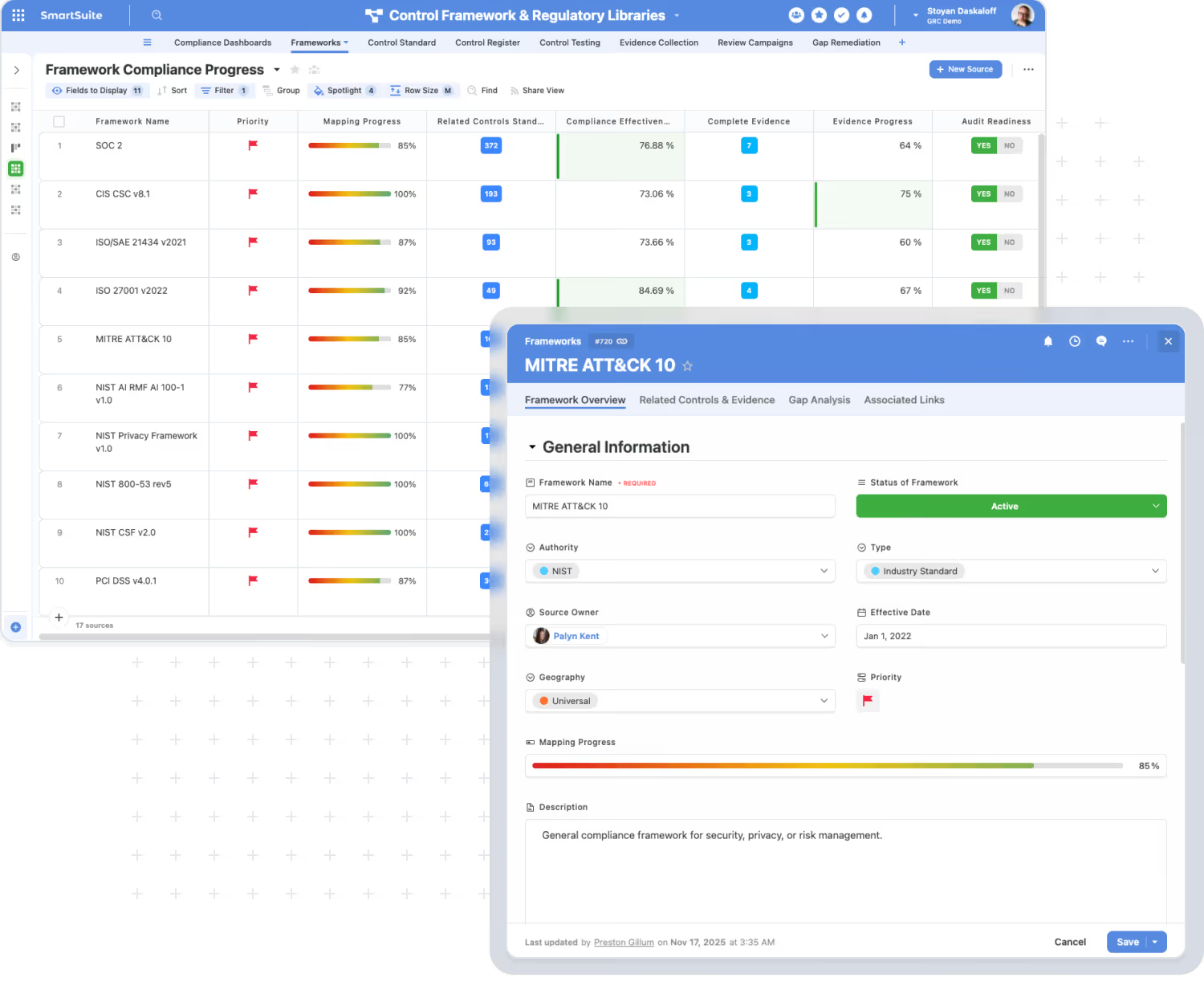
Not every mapping is equal. Mature programs track coverage explicitly so teams can prioritize gaps, avoid over-claiming, and produce clean audit evidence. In SmartSuite, mapping records can capture a coverage status and the rationale behind it.
Commonly Used Statuses:
- Fully Covered
The control satisfies the requirement as written.
- Partially Covered
The control contributes, but additional controls or procedures are needed.
- Not Covered
A clear gap exists and requires remediation planning.
- Not Applicable
Excluded with documented justification and approval.
How Crosswalks Accelerate Multi-Framework Alignment
Accelerate alignment using crosswalks while keeping one controls baseline.
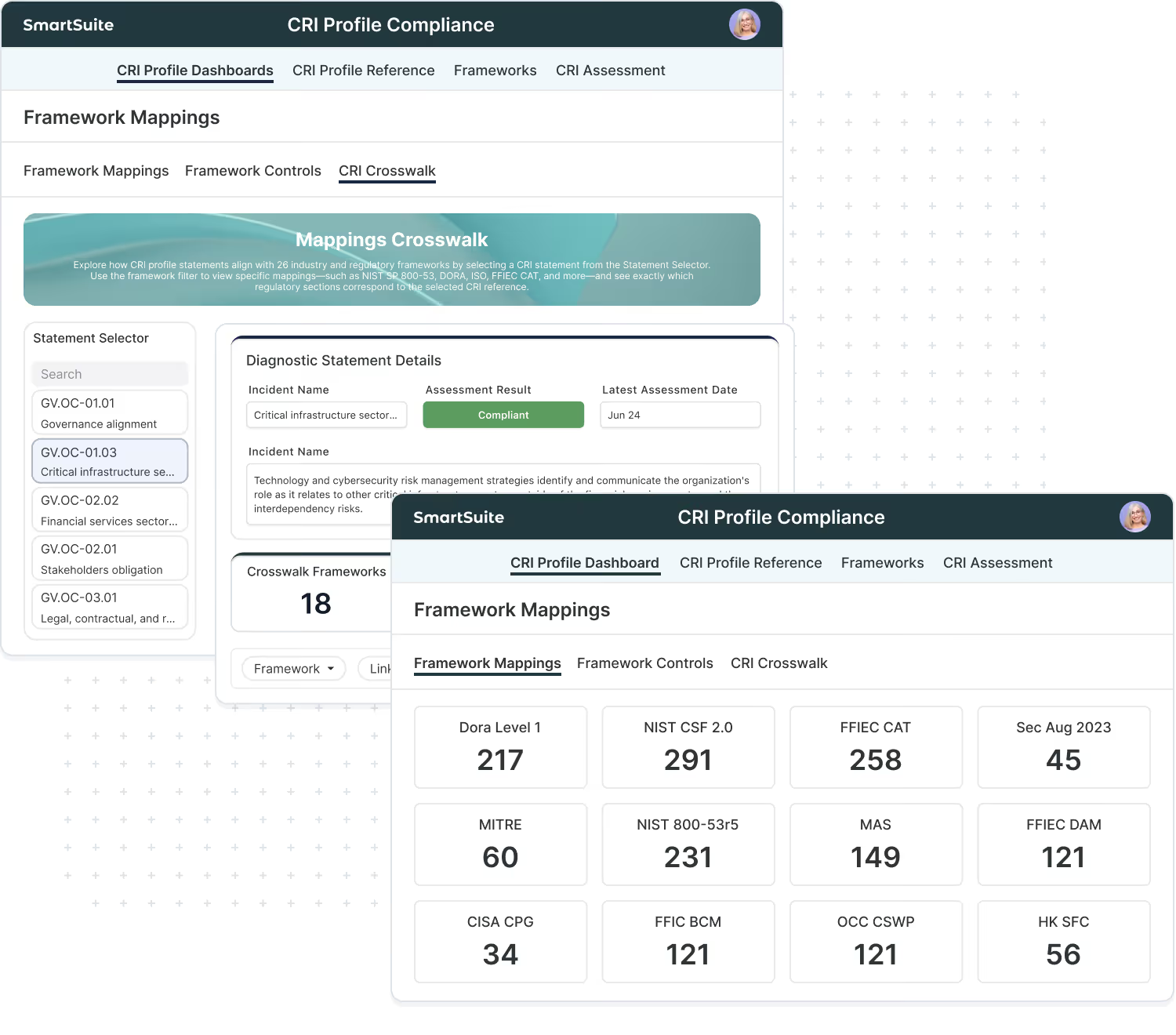
The CRI Profile is an example of a framework that provides a crosswalk that is used at scale across leading banks, credit unions and fintech companies. CRI publishes mapping resources that help teams use CRI as a baseline and then demonstrate alignment to additional frameworks and references without duplicating the underlying control work.
Benefits:
- Use CRI as your baseline and map your internal controls once.
- Leverage CRI crosswalk resources to support alignment across commonly used frameworks and references, including NIST CSF, NIST 800-53, DORA, CIS Controls, and MITRE ATT&CK.
- Roll up reporting by framework using the same controls, evidence, tests, and remediation workflows.
Keep Mappings Accurate As Frameworks Evolve
Govern mapping ownership, versions, and approvals as requirements change.
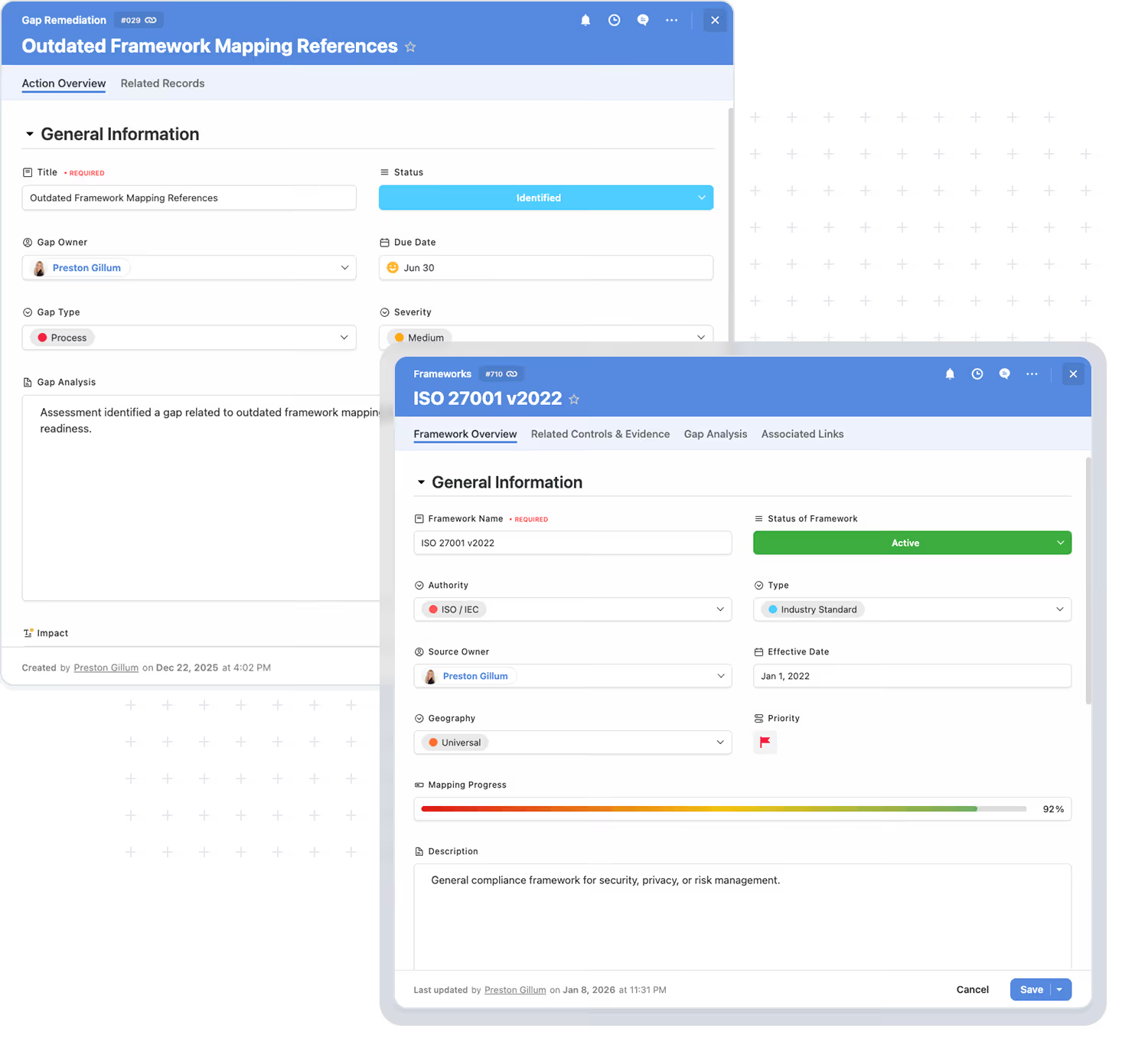
Control mapping is not a one-time exercise. Framework versions change, systems and processes change, and controls mature over time. SmartSuite supports the governance needed to keep mappings current and defensible.
With SmartSuite you can:
- Assign Ownership
Assign control owners and mapping reviewers
- Set Review Cadences
Schedule quarterly/biannual reviews by framework or control family
- Maintain Versioning
Track which framework version and requirement set a mapping applies to
- Track Approvals
Require sign-off for “Fully covered” and “Not applicable” determinations
- View Audit Trails
Maintain history of mapping changes, evidence updates, and test results
Compliance Reporting
Report coverage, gaps, evidence, testing, and remediation by framework.
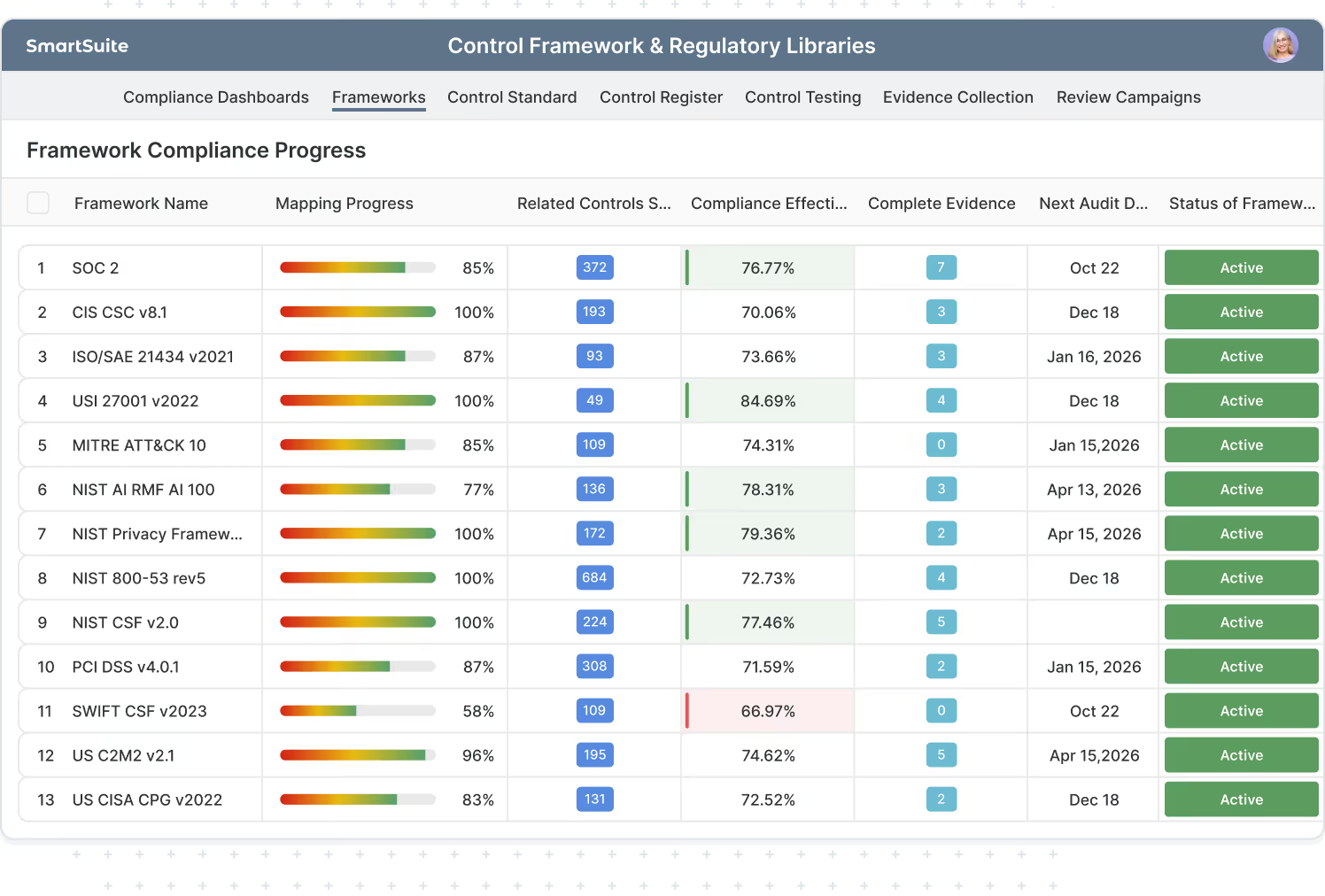
Control mappings turn compliance into reporting. Instead of rebuilding checklists for every framework, you can generate consistent views and dashboards from the same underlying control system.
Example Reporting:
- Coverage By Framework/Domain — see what’s covered, partially covered, and missing.
- Unmapped Requirements (gaps) — identify what has no supporting control yet.
- Evidence Freshness — track what’s current, expiring, overdue, or awaiting review.
- Testing Results By Period — compare outcomes across quarters or audit cycles.
- Exceptions & Remediation SLAs — monitor findings, aging, and closure progress.
- Audit-Ready Evidence — create a clean “show me” view per framework and period.
Frequently Asked Questions About Mapping & Crosswalks
Control mapping is the traceable link between framework requirements (what a standard/regulation expects) and your internal controls (what your organization actually does). It matters because it turns GRC from a checklist into an operating model: you can assign ownership, collect evidence consistently, test controls on a cadence, and report coverage and gaps with audit-ready traceability.
Mapping connects your internal controls to framework requirements so you can operate and report your program.
A crosswalk is a reference mapping between two frameworks (Framework A → Framework B), typically published by an authoritative source.
In practice, mapping is how you run the program. Crosswalks help you accelerate multi-framework alignment, but they don’t replace control testing or evidence.
Once controls are mapped correctly, you test the control once for the right scope and period, attach evidence once, and then roll that result up wherever the control is mapped across frameworks. That reduces duplicate testing, duplicate evidence collection, and inconsistent answers when different audits or assessments ask similar questions.
Most mature programs use explicit coverage levels so reporting is defensible:
- Fully covered (the mapped control satisfies the requirement)
- Partially covered (the control contributes, but additional controls/procedures are needed)
- Not covered (gap)
- Not applicable (with documented justification)
- This is also how teams prioritize remediation and avoid over-claiming during audits.
No — and that’s the point. SmartSuite is designed around a single controls library. You maintain your controls once, then map them to as many frameworks as needed. The same control can support multiple requirements across multiple frameworks, and reporting rolls up by framework without duplicating the control work.
In most programs, evidence should be linked primarily to the control (the thing you actually execute), then rolled up to mapped requirements. This makes “test once, comply many” possible and prevents the same artifact from being uploaded repeatedly for every framework requirement that references the same control.
Crosswalks help you understand overlap between frameworks and identify where one baseline (like CRI or NIST) can support alignment to other requirements. In SmartSuite, crosswalks become actionable when paired with control mapping: you can show how a control supports multiple frameworks and produce reporting views that highlight overlap and remaining gaps.
Yes. CRI is a strong baseline because CRI publishes mapping resources that can help accelerate multi-framework alignment. In SmartSuite, teams typically map their internal controls to CRI and then use crosswalk references to support alignment reporting across other frameworks and obligations.
Mapping requires governance. Teams typically assign mapping ownership, define a review cadence (quarterly or biannually), track framework versions/effective dates, and require approval for key mapping changes. SmartSuite supports these workflows by keeping mappings as structured records and maintaining change history alongside evidence and test results.
Yes. SmartSuite supports customer-provided framework content (licensed standards, internal requirements, regulator overlays, customer obligations). Once requirements are in SmartSuite, you can map them to controls the same way, track evidence and testing, and report coverage and gaps consistently.
It’s the SmartSuite solution designed specifically to operationalize mapping at scale. It provides the structure to manage a controls library, framework/requirement libraries, mappings, evidence workflows, assessments/testing, issues/remediation, and dashboards — all connected in one system of record.
Once mappings are in place, teams commonly report:
- Coverage and gaps by framework/domain
- Unmapped requirements (clear gaps)
- Evidence freshness (current, expiring, overdue)
- Test results by period with reviewer sign-off
- Exceptions/findings and remediation SLAs
- Audit-ready evidence pack views per framework and period
Turn framework requirements into an operational controls program
SmartSuite’s Control Framework and Regulatory Libraries helps you map controls to requirements, keep evidence and testing connected, and report readiness across the frameworks your organization uses — without duplicating work for every audit or assessment cycle.
Custom Frameworks Are The Norm
Most organizations run on a blend of external standards and internal requirements. SmartSuite is built to manage both in a single controls system of record.
Real-World Programs Aren’t “One Framework”
Your controls program is shaped by internal policy, regulators, customers, and risk decisions — not just a single published standard.
In practice, teams maintain one or more custom frameworks alongside industry frameworks to reflect how the organization actually operates and what it must prove. SmartSuite makes it easy to manage this reality without separate spreadsheets, disconnected checklists, or duplicated controls.
- Combine external frameworks with internal policy requirements.
- Capture regulator-specific overlays and interpretations.
- Standardize expectations across business units, products, or systems.
- Turn customer security requirements and contract obligations into a structured requirement set.
- Maintain a single controls baseline while reporting across multiple requirement sources.
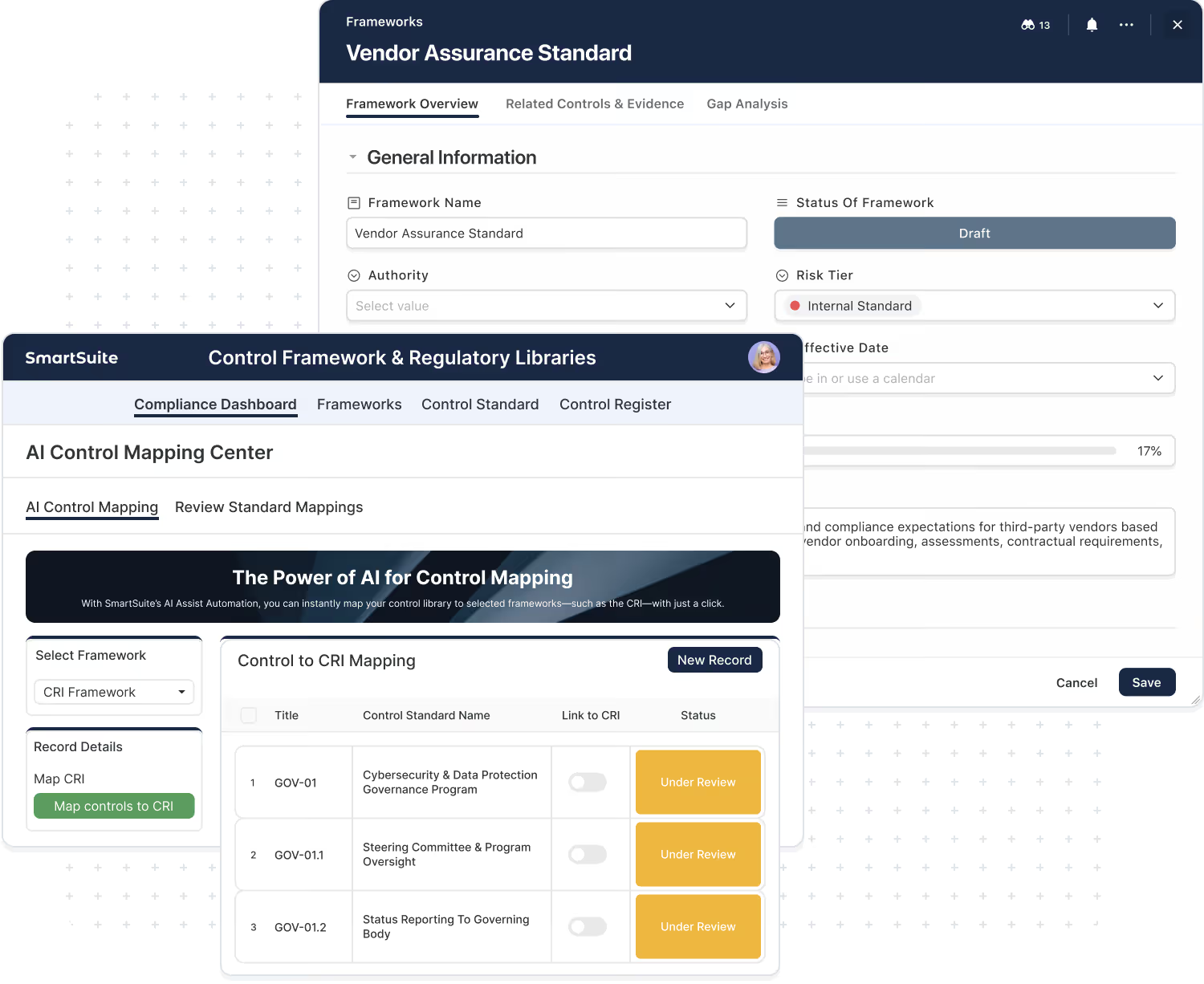
What Is A Custom Framework?
A custom framework is any structured set of requirements your organization wants to manage like a framework — with traceability to controls, evidence, testing, and reporting.
“Custom” doesn’t mean informal. It means your approved source of truth — whether it comes from internal policy, customer expectations, or how you interpret regulatory requirements.
Your company’s baseline controls.
Сpecific “shall” statements pulled from internal policies.
Your interpretation of what a regulator expects
Security addendums, questionnaires, contract obligations
Cloud controls, vendor controls, SDLC controls
Requirements unique to a team, region, or product line
How To Add Custom Frameworks To SmartSuite
Import requirements in bulk, keep them structured, and map them to controls so evidence and testing roll up cleanly for reporting.
SmartSuite supports multiple ways to bring custom framework data into your workspace, depending on how you manage requirements today. Once added, custom requirements behave like any other framework: they can be mapped to controls, linked to evidence and testing, and reported on by domain, owner, and audit period.
Upload requirements in bulk and maintain them as structured records.
Add requirements directly in SmartSuite with templates and bulk editing.
Sync requirements from another system if you maintain them elsewhere.
Frequently Asked Questions About Custom Frameworks
A custom framework is any structured set of requirements your organization wants to manage like a framework — with ownership, mapping to controls, linked evidence and testing, exceptions, remediation, and reporting. It can be internal (policies/standards) or external (customer obligations, regulator overlays) as long as it’s the “source of truth” your teams need to manage.
Because real-world programs are shaped by more than one standard. Most teams must combine:
- internal policies and control baselines
- regulatory expectations and interpretations
- customer requirements and contract obligations business-unit or product-line standards
- Custom frameworks let you capture those requirements in a structured way and operate them alongside industry standards.
Not necessarily. “Custom” usually means you’re formalizing requirements you already have — such as policy statements, contractual obligations, or regulator interpretations — into a structured set you can map, test, evidence, and report. The goal is consistency and traceability, not inventing new requirements.
Common custom frameworks include:
- internal control standards (your baseline controls)
- policy requirement sets (security, privacy, resilience, vendor management)
- regulator overlays (how you interpret and implement regulatory expectations)
- customer security requirements (addendums, questionnaires, contractual obligations)
- program-specific baselines (cloud controls, SDLC controls, vendor controls)
- BU/team standards (requirements unique to a region, product, or business unit)
Most teams use one of three approaches:
- CSV/Excel import (fastest for large sets)
- Manual creation for smaller frameworks (with bulk editing)
- API-driven import if requirements live in another system
- Once imported, requirements become structured records you can map to controls and manage over time.
A simple starter set works well:
- Requirement ID (optional but helpful)
- Requirement title/statement
- Category/domain (so you can report)
- Applicability (BU/system/region)
- Priority/tier (optional)
- Version/effective date
- Notes/rationale (optional)
Custom requirements are mapped to your internal controls the same way external frameworks are. Evidence and test results typically attach to the control, then roll up to every mapped requirement. That’s what enables consistent reporting and avoids duplicating evidence for each requirement.
Yes. Once custom requirements are mapped to the same underlying controls, testing and evidence can be reused across requirements and frameworks. This is especially useful when customer requirements overlap with internal policies or industry standards.
Yes. Many organizations maintain multiple custom frameworks — for different business units, product lines, regions, or customer segments. SmartSuite supports this by keeping requirements structured and reportable, with filters and dashboards that slice by scope, owner, and audit period.
Teams typically maintain an “active” version and keep prior versions for audit traceability. SmartSuite supports this by tracking version/effective dates, change history, and review workflows so you can update requirements and mappings in a controlled, auditable way.
Ownership varies, but common owners include GRC, Security, Compliance, and Internal Audit — often with contributors from IT and business process owners. SmartSuite supports clear ownership by assigning framework owners, requirement owners, and control owners with review and approval workflows.
That’s common. SmartSuite supports role-based access and data governance so you can restrict who can view or edit frameworks, requirements, mappings, and evidence. Many organizations manage sensitive internal requirements and customer obligations this way.
Build And Maintain Custom Frameworks Alongside Industry Standards
Import your requirements, map them to controls, connect evidence and testing, and report readiness from a single connected system.
Frameworks Power Consistent Reporting Across Your Programs
When frameworks are structured as data in SmartSuite, they don’t just live in a library — they drive dashboards, evidence packs, assessments, resilience, and third-party oversight across your solutions.
One Readiness View Across Frameworks And Teams
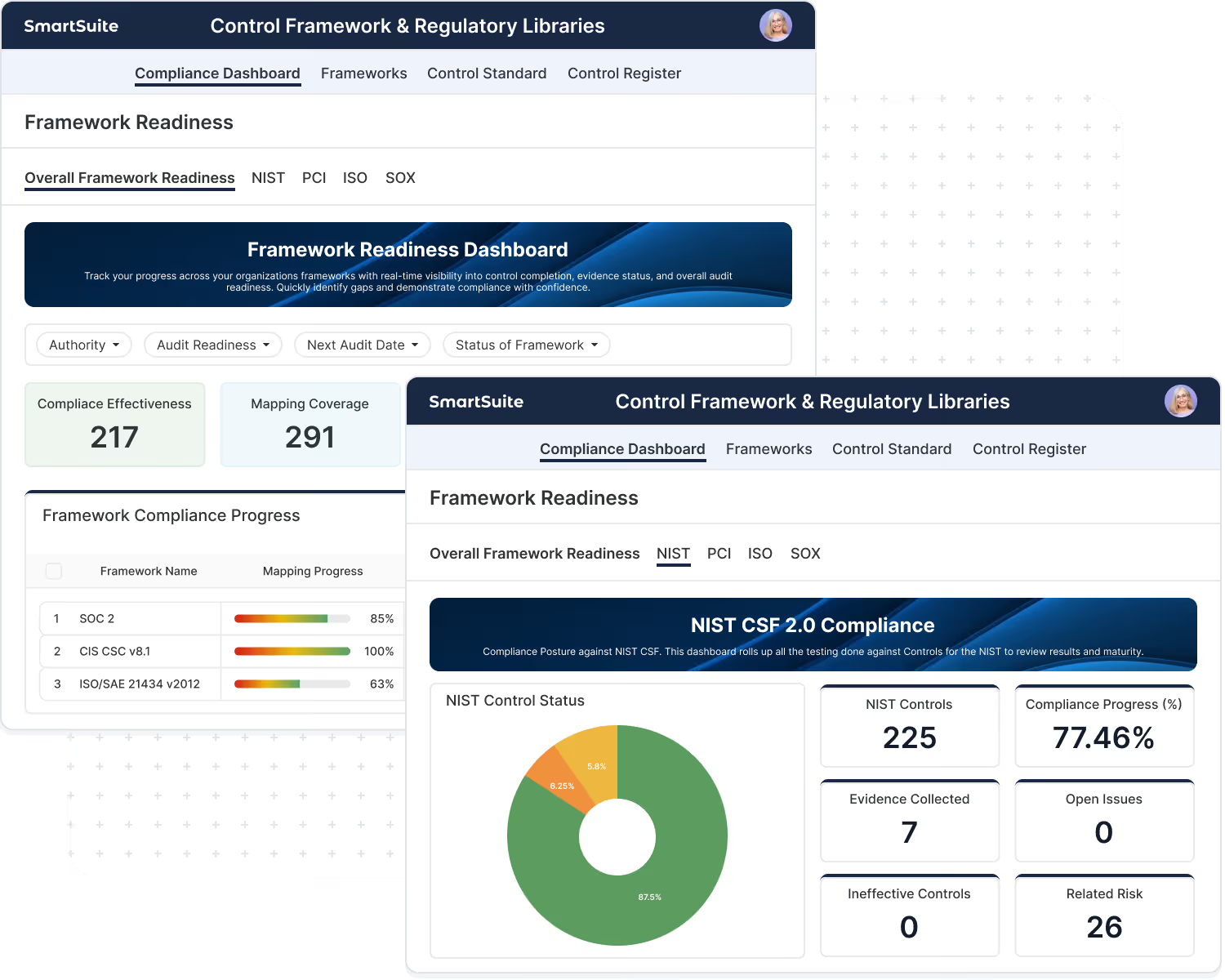
Roll up coverage, gaps, evidence freshness, and risk exceptions by framework, business unit, system, and audit period.
Executives don’t want a checklist — they want a clear view of readiness. SmartSuite dashboards let you report program status at-a-glance while still allowing teams to drill into the underlying controls, evidence, tests, and remediation work that drives the numbers.
- Coverage and gaps by framework and domain
- Evidence freshness and overdue items by owner
- High-risk exceptions and remediation status
- Drill-through from KPI → framework requirement → control → evidence/test
Evidence Packs That Roll Up By Framework
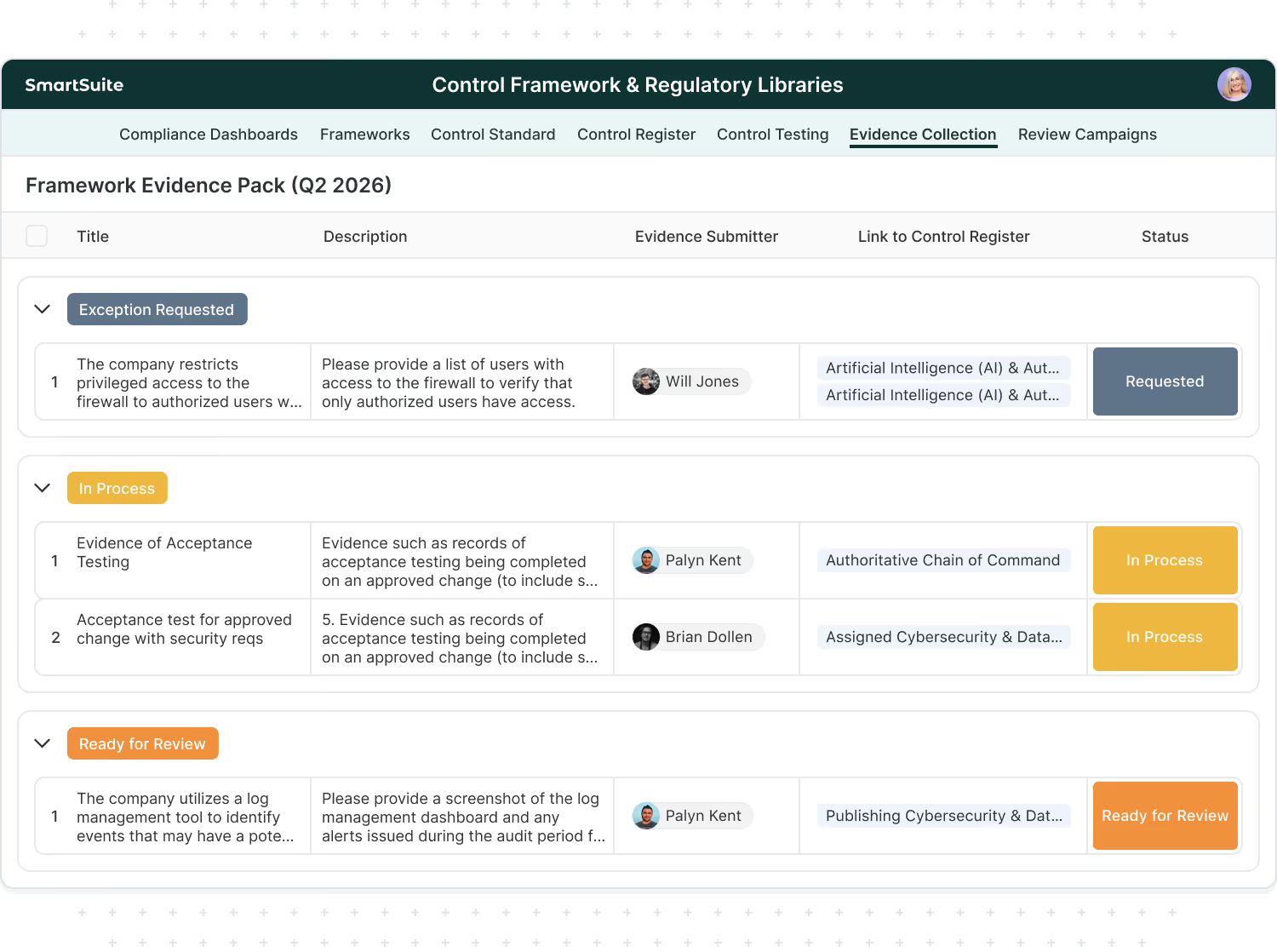
Attach evidence once to the control, then generate audit-ready views by framework and period.
Evidence collection becomes manageable when it’s connected to the control and governed by workflow. In SmartSuite, evidence is tracked as structured records with owners, due dates, review status, and supporting files — then rolled up into “evidence packs” by framework, audit period, and scope.
- Evidence requests, due dates, and approvals in one workflow
- Evidence freshness tracking for continuous readiness
- Auditor-ready views by framework and period
- Clear traceability from requirement → control → evidence
Evidence Packs That Roll Up By Framework
Attach evidence once to the control, then generate audit-ready views by framework and period.
Evidence collection becomes manageable when it’s connected to the control and governed by workflow. In SmartSuite, evidence is tracked as structured records with owners, due dates, review status, and supporting files — then rolled up into “evidence packs” by framework, audit period, and scope.
- Evidence requests, due dates, and approvals in one workflow
- Evidence freshness tracking for continuous readiness
- Auditor-ready views by framework and period
- Clear traceability from requirement → control → evidence
Test Once, Comply Many Reporting
When controls are mapped correctly, one test result supports multiple framework requirements.
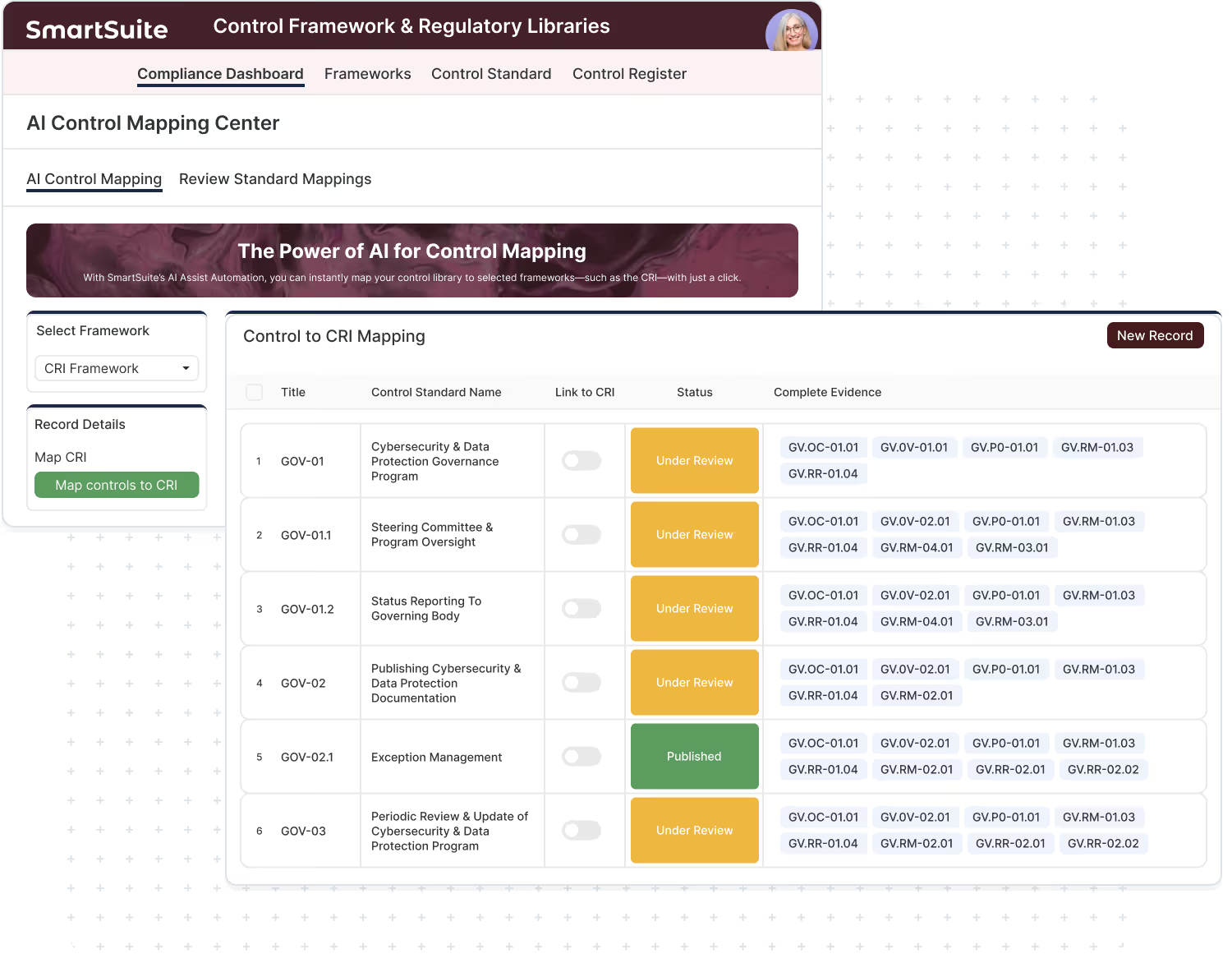
The biggest efficiency gain in GRC comes from testing controls once and reusing the results across every framework that relies on that control. SmartSuite ties test plans and results to the control, then automatically rolls up the outcome wherever that control is mapped — reducing duplicate testing and inconsistent reporting.
- One control test → multiple mapped requirements
- Test results tracked by period with reviewer sign-off
- Failed controls automatically surface impacted requirements
- Reporting stays consistent across frameworks
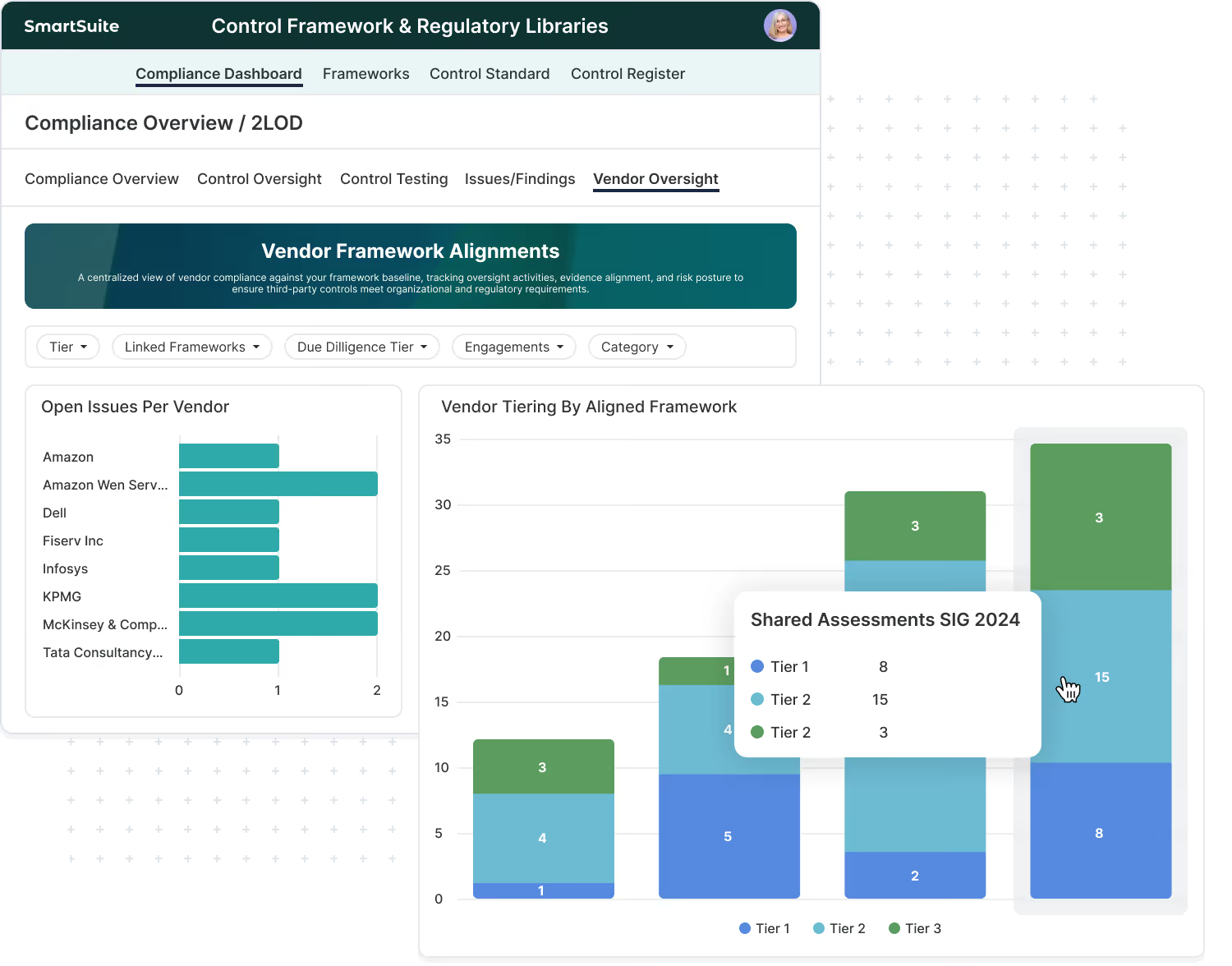
Vendor Oversight Aligned To Your Framework Baseline
Standardize vendor requirements, evidence requests, and findings using the same controls your program runs on.
Framework-aligned controls become even more valuable when applied to third parties. SmartSuite lets you use your internal control baseline to drive vendor assessments, evidence requests, issue tracking, and ongoing monitoring — all while maintaining a consistent, audit-ready record of third-party compliance and risk.
- Vendor assessments mapped to your control baseline
- Evidence requests and due dates assigned to vendor owners
- Findings, exceptions, and remediation tracked end-to-end
- Reporting by vendor tier, criticality, and framework domain
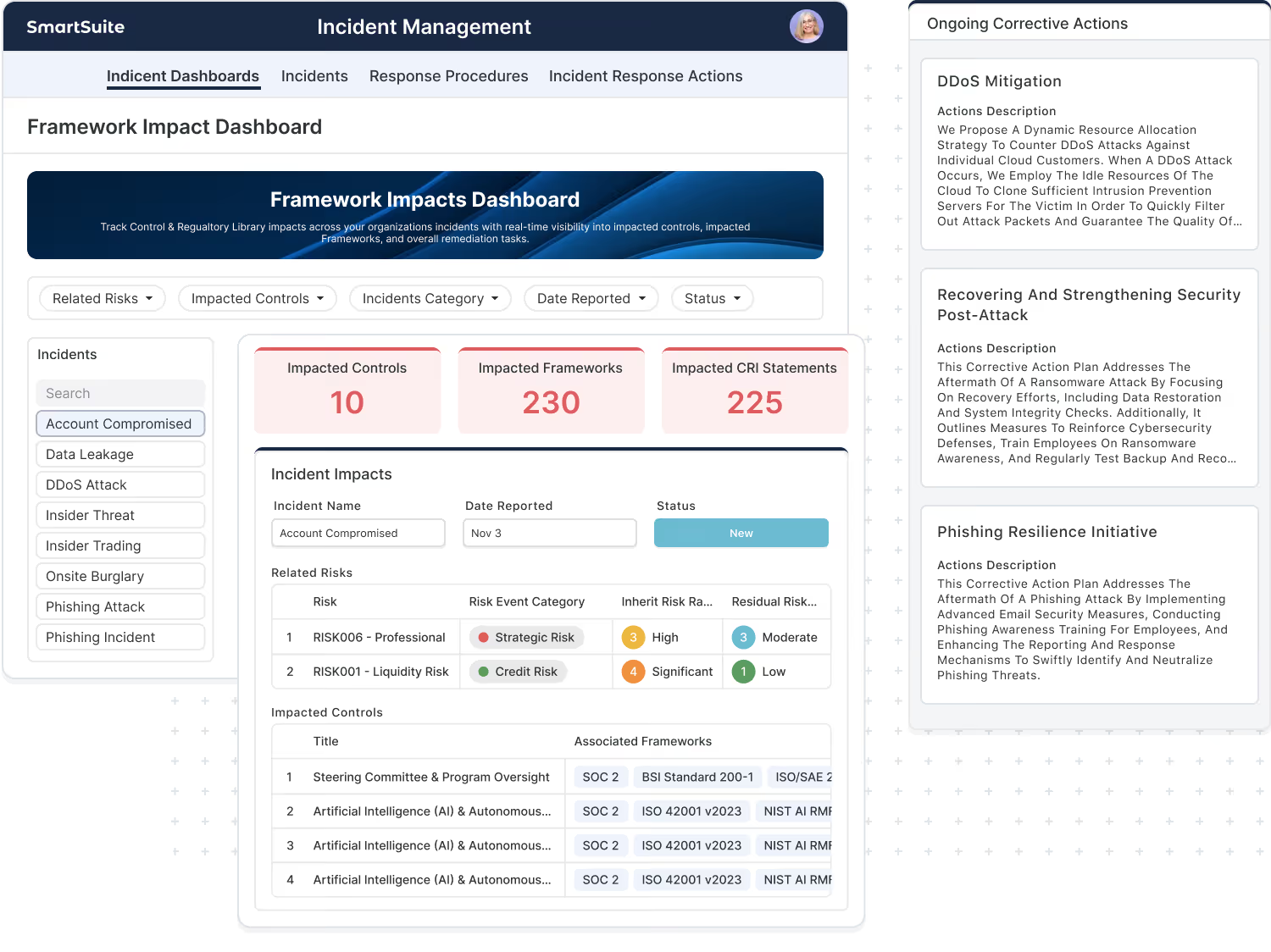
Framework-Driven Reporting For Incidents And Operational Resilience
Connect incidents, corrective actions, and resilience activities back to the controls and requirements they impact.
When incidents happen, leadership needs to know what was impacted and what changes are required to prevent recurrence. SmartSuite connects incident records to impacted systems, controls, and requirements — so corrective actions and resilience improvements are tied directly to your framework-driven controls program.
- Incidents linked to impacted controls and requirements
- Corrective actions tracked through closure with owners and deadlines
- Post-incident reviews captured with evidence and approvals
- Resilience reporting that ties back to control health
Gap Remediation Tracked Like A Program
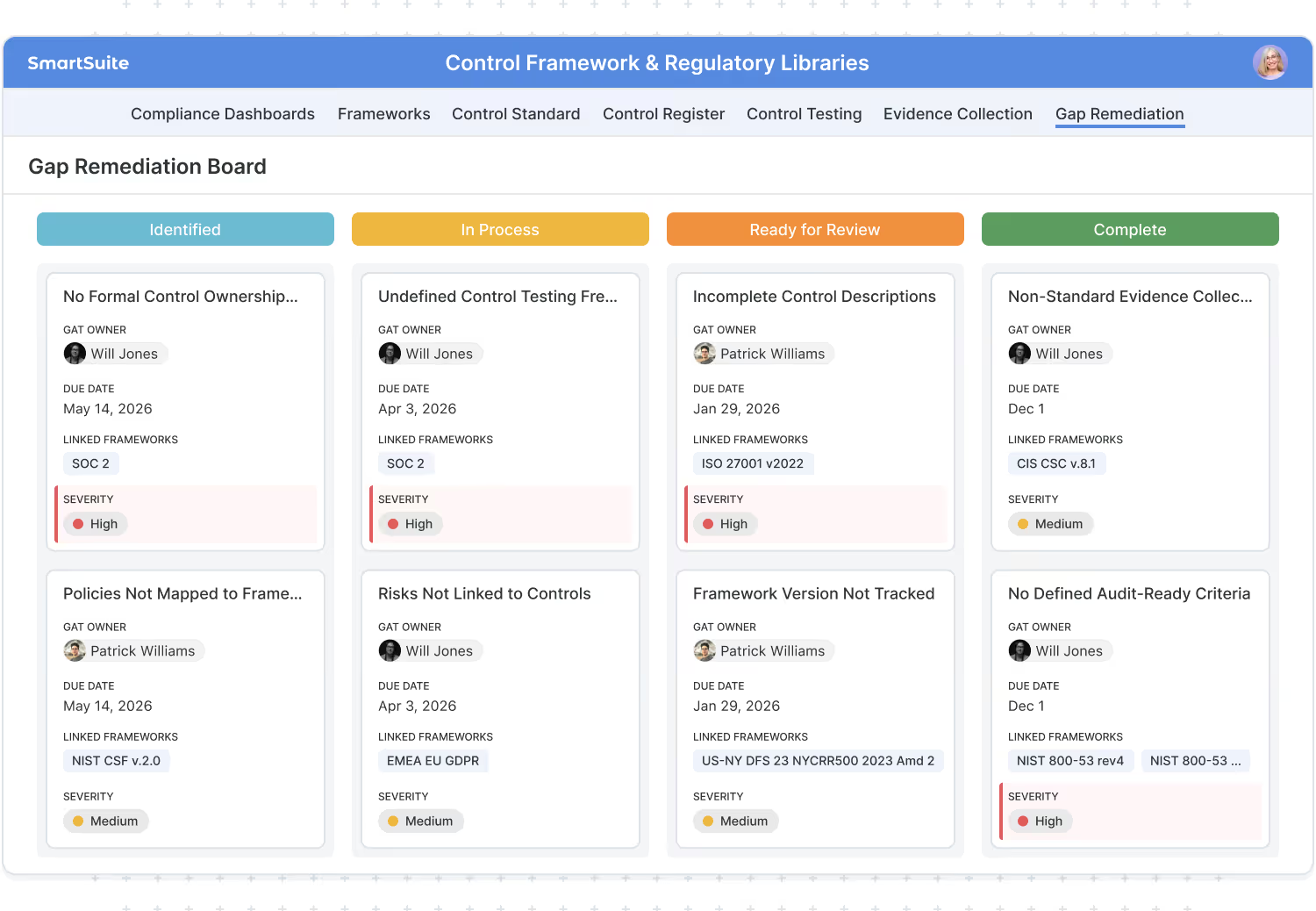
Convert gaps into owned work with timelines, dependencies, and rollup reporting for stakeholders.
Framework gaps shouldn’t live as red items on a spreadsheet. In SmartSuite, gaps become tracked work — with owners, milestones, dependencies, approvals, and progress reporting. As remediation completes, coverage reporting updates automatically based on control and evidence status.
- Gaps automatically turn into remediation workstreams
- Ownership, milestones, and approvals built into the workflow
- Rollup reporting shows progress by framework and team
- Clear traceability from gap → remediation → evidence/test
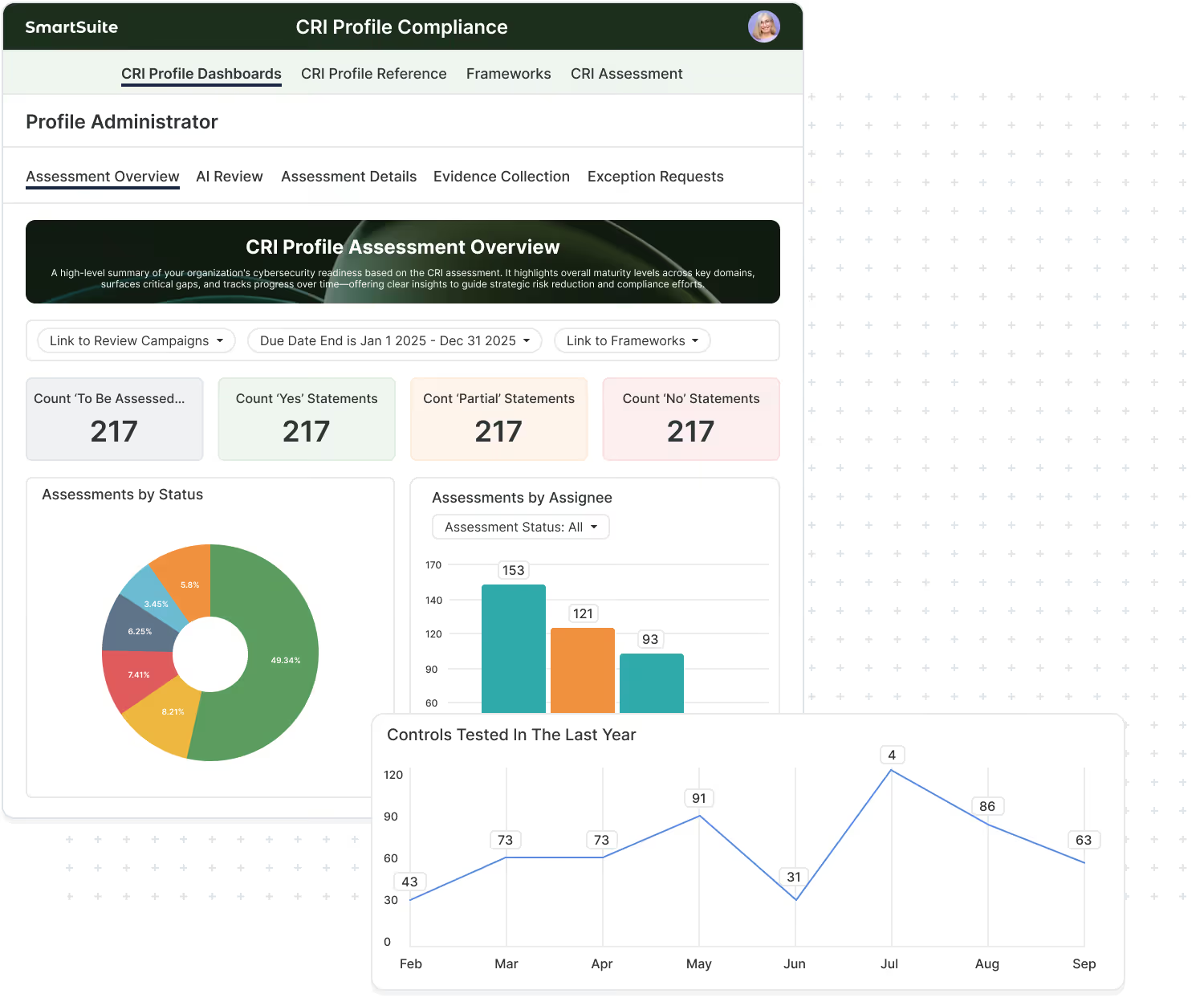
Evidence Freshness And Control Health At A Glance
Spot stale evidence and overdue control activities before audits and exams do.
Framework reporting is only as strong as the evidence behind it. SmartSuite tracks evidence freshness, upcoming expirations, review status, and overdue items — so teams can maintain continuous readiness and reduce the last-minute scramble before audits.
- Evidence freshness by control owner and domain
- Overdue evidence and expiring artifacts highlighted automatically
- Review/approval workflows maintain evidence quality
- Readiness stays current across audit periods
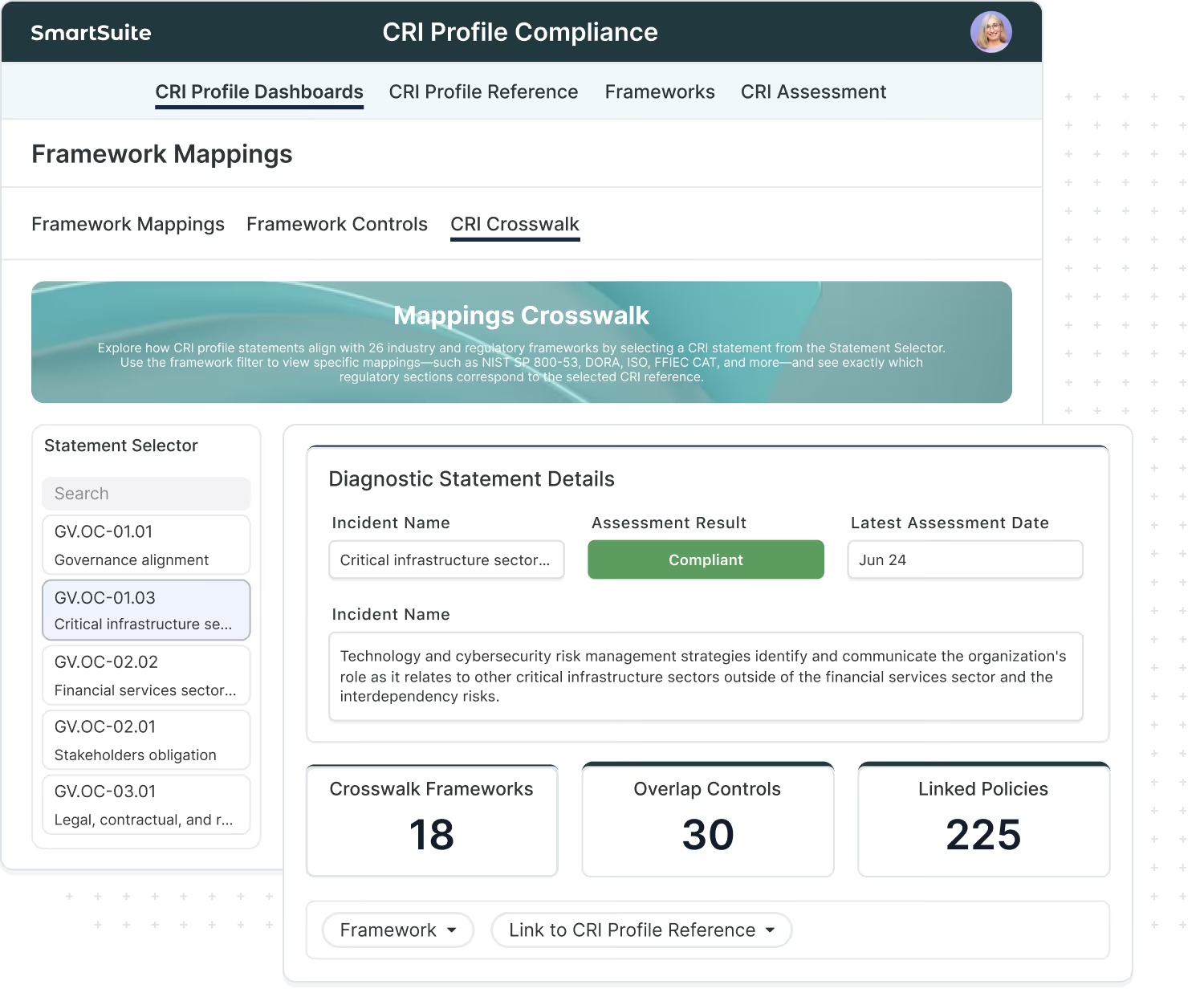
Crosswalk Reporting That Makes Framework Investment Pay Off
When a baseline like CRI includes crosswalk mappings, you can show alignment to additional frameworks without duplicating the underlying work.
Crosswalks turn frameworks from “one more requirement set” into a multiplier. When you start with a baseline and apply published mappings, SmartSuite can roll up coverage and readiness views across additional frameworks using the same underlying controls, evidence, and test results — helping teams respond faster to audits, exams, and customer requests.
- Start with a baseline (like CRI), map controls once
- Use crosswalk references to support alignment reporting across frameworks
- Show overlap, gaps, and coverage without duplicating evidence collection
- Maintain consistent reporting as programs evolve
Frequently Asked Questions About Framework Reporting
Framework reporting means you can report readiness, coverage, gaps, evidence status, and remediation progress by framework — because framework requirements are mapped to controls, and controls are connected to evidence, testing, issues, and dashboards. It turns frameworks into live reporting inputs instead of static documents.
No. Most teams maintain a single controls program and then report it in multiple ways. Because SmartSuite keeps controls, mappings, evidence, and testing connected, you can use shared dashboards with filters (framework, audit period, business unit, system) rather than recreating dashboards for every standard.
Common reporting views include:
- coverage and gaps by framework/domain
- evidence freshness (current, expiring, overdue)
- testing results by period (pass/fail, reviewer sign-off)
- open exceptions and remediation SLAs
- executive readiness scorecards by business unit or system
- audit-ready evidence packs by framework and audit period
Evidence typically attaches to the control (the thing you actually execute). When controls are mapped to framework requirements, SmartSuite can roll up evidence status to those requirements and generate evidence pack views filtered by framework, audit period, and scope — making audit preparation much faster and more consistent.
When one control supports multiple frameworks, a single test result can roll up to every mapped requirement. That means:
- fewer duplicate tests
- fewer duplicate evidence requests
- consistent results across standards and audits
- clearer impact when a control fails (you can see every requirement affected)
Framework-aligned controls can be applied to vendors and third parties. SmartSuite can track vendor assessments, evidence requests, findings, remediation tasks, and ongoing monitoring — and roll those results up into dashboards by vendor tier, criticality, and framework domain.
Yes. Many teams link incidents, corrective actions, and resilience improvements to the controls and requirements they affect. This creates a stronger story for leadership and regulators: incidents aren’t just tracked — they drive control improvements, remediation closure, and measurable readiness reporting over time.
When a requirement is partially covered or not covered, teams can treat it as a gap and track remediation as owned work: tasks, milestones, due dates, dependencies, approvals, and closure evidence. Reporting then rolls up by framework to show progress, aging, and reduction in gaps over time.
Evidence freshness tracks whether supporting artifacts are current for the period you’re reporting. Even if a control exists, stale evidence can create audit findings. SmartSuite helps teams track evidence due dates, expirations, and review status so they can maintain continuous readiness rather than scrambling before audits.
Crosswalks help show alignment across frameworks without duplicating the underlying control work. When you start from a baseline and apply crosswalk references, reporting can highlight overlap and show where the same controls and evidence support multiple frameworks — which is especially valuable for audits, exams, and customer requests.
Yes. SmartSuite reporting typically includes scope filters such as business unit, system, region, product line, vendor tier, or audit period. This is essential for enterprise programs where frameworks apply differently across environments.
SmartSuite provides the system for mapping and reporting. Many frameworks require customer-provided or separately licensed content. Where content is provided (such as CRI Profile), SmartSuite can support that baseline and then extend reporting through mappings to other frameworks your organization uses.
Explore Reporting Powered By Controls And Frameworks
Connect frameworks to controls, evidence, assessments, and remediation — then report readiness across programs from a single connected system.
Getting Started with SmartSuite

Learn the SmartSuite layout: workspace, Solutions, Views, Records. See how to navigate, search, filter, and create items to get productive fast.

Understand the Homepage layout: sidebar, header, search, and activity. Pin favorites, review assignments, and launch Solutions with one click. Make it your daily command center.

See your data from every angle. Learn Grid, Kanban, Calendar, and more. Switch views, sort and filter, group records, and save personal or shared views for repeatable workflows.

Explore SmartSuite field types: text, number, date, select, user, files, links, formulas, lookups, and more. Learn when to use each to capture, calculate, relate, and display data clearly.

Your command center: one Dashboard to track goals, tasks, and dependencies. Mix charts with lists, watch trends over time, and click through to fix issues immediately.

Automations do the busywork. Set a trigger, choose actions—notify people, update fields, create records, send webhooks—and let SmartSuite run it whenever conditions are met.

Set permissions once, scale safely. Use solution roles, table permissions, and saved views with filters to expose only relevant records to each team or stakeholder group.

Prompt-driven automations. Provide instructions with placeholders for record fields; AI uses that context to produce exactly what you need, then the automation stores or sends it.

Use Formula fields to calculate values from other fields. Combine math, logic, and text to automate totals, statuses, scores, and dynamic results across records. Quickly.

Use Power Search to instantly find records across fields and Solutions. Combine keywords, filters, and operators to pinpoint exactly what you need in seconds.

Stay informed with SmartSuite notifications. Get real-time alerts for updates, assignments, comments, and changes so you never miss important activity.

Star items you use most to access them fast. Keep important Solutions, Views, and records pinned for quick access and a more focused daily workflow.
Explore Further
Great GRC reporting starts with structured frameworks and well-mapped controls. These resources explain the concepts behind control mapping, crosswalks, evidence readiness, and “test once, comply many” — so your team can build a program that scales across audits, exams, and customer requirements.
Explore these topics to see how SmartSuite turns framework content into connected workflows for controls, evidence, assessments, remediation, and executive reporting.
Frequently Asked Questions About Frameworks
SmartSuite provides a mix of practical enablement resources to help teams operationalize frameworks: guided onboarding content, templates, best-practice setup guidance, and reference articles that explain mapping, evidence readiness, assessments, and reporting.
Start by establishing a basic structure: a controls library, a framework/requirements set (imported or custom), and mappings between the two. From there, add evidence workflows and an assessment cadence. If you’re not sure where to begin, start with one baseline framework and expand outward.
Yes. Many teams start with SmartSuite templates for controls programs, evidence tracking, assessments, and remediation workflows. Templates help you launch quickly and then tailor the structure to your environment.
Absolutely. If you already have a controls library or framework content, you can import it into SmartSuite and use these resources to standardize structure, improve traceability, and strengthen reporting and audit readiness.
Most teams import requirements via CSV/Excel and organize them by framework, domain/category, and version. Once requirements are in SmartSuite, you map them to controls and connect evidence and testing so reporting can roll up by framework and period.
Attach evidence to the control, track owners and due dates, and use review/approval steps to maintain quality. Evidence freshness reporting helps you spot what’s stale or overdue before audits do, so readiness stays continuous.
Use a lightweight governance approach: track framework versions/effective dates, assign mapping ownership, schedule periodic reviews, and keep a record of changes. This ensures your mappings and reporting remain defensible as requirements evolve.
Use the Mapping & Crosswalks content to understand how control mapping reduces duplicate testing and evidence collection. Crosswalk resources can accelerate multi-framework alignment, but they work best when paired with a strong internal controls library.
Yes. Many teams use SmartSuite services and partners for onboarding, framework imports, control mapping workshops, dashboard setup, and program rollouts — especially when consolidating multiple frameworks and teams into one system.
If you don’t see a resource that matches your scenario, you can explore related Solution Suites or contact SmartSuite for guidance. Many organizations also build internal “playbooks” in SmartSuite using the same framework/mapping structure.
Get A Demo And See The Framework Program In Action
alk through how SmartSuite operationalizes controls and frameworks — from imports and mapping to evidence workflows, assessments, and readiness reporting — and leave with a clear path to launch.