


Modernizing SOX Compliance Management
SmartSuite helps organizations manage SOX compliance with confidence by connecting risks, controls, testing, evidence, and remediation in one unified platform. Replace spreadsheets and disconnected tools with structured workflows, real-time visibility, and audit-ready execution across the entire SOX lifecycle.
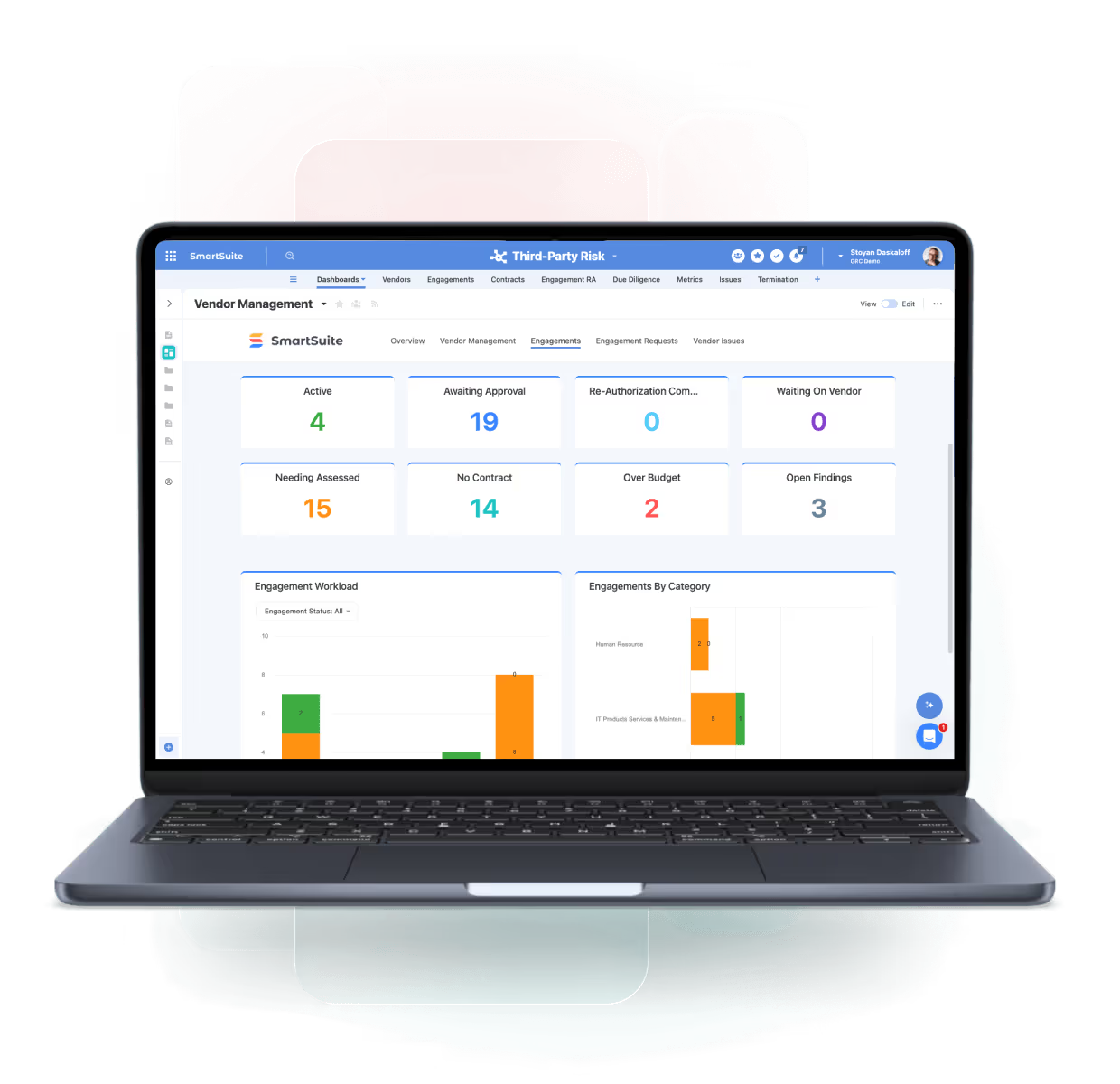
One Platform for Connected SOX Compliance
SmartSuite modernizes SOX compliance by connecting financial processes, risks, controls, testing, and remediation in one unified system. Eliminate spreadsheets, improve execution discipline, and maintain continuous audit readiness throughout the year.
SOX Scoping
Define and manage in-scope entities, processes, and controls.
Control Testing
Standardize testing and evidence collection across cycles.
Deficiency Tracking
Identify, escalate, and remediate control failures.
Audit Reporting
Deliver real-time insights for management and auditors.
Core Capabilities of the SOX Management Suite
SmartSuite provides an end-to-end solution for managing SOX compliance — from control scoping and testing to deficiency remediation and executive certification — in one flexible, no-code platform.
Execute SOX compliance with confidence, consistency, and continuous readiness.
Unify SOX scoping, control execution, testing, evidence collection, deficiency management, and reporting in one connected workspace. SmartSuite links SOX controls directly to financial processes, risks, remediation actions, and certifications — providing real-time visibility, audit-ready documentation, and confidence at every stage of the SOX lifecycle.
Maintain a structured inventory of SOX controls mapped to financial processes, risks, entities, and reporting assertions.
Assign clear ownership for each control and track execution status across teams, entities, and reporting periods.
Plan and execute management and audit testing with standardized procedures, reviewer workflows, and documented outcomes.
Centralize control evidence, approvals, and supporting documentation in an audit-ready repository with full traceability.
Capture control failures, assess severity, assign remediation actions, and track resolution through closure.
Support sub-certifications, management certifications, and executive sign-off with documented approvals and accountability.
Generate real-time dashboards and standardized reports showing testing progress, open deficiencies, remediation status, and readiness for leadership and auditors.
Link SOX controls and deficiencies directly to financial processes and enterprise risks to ensure complete context and defensible compliance.
Define Scope and Ownership Across the SOX Program
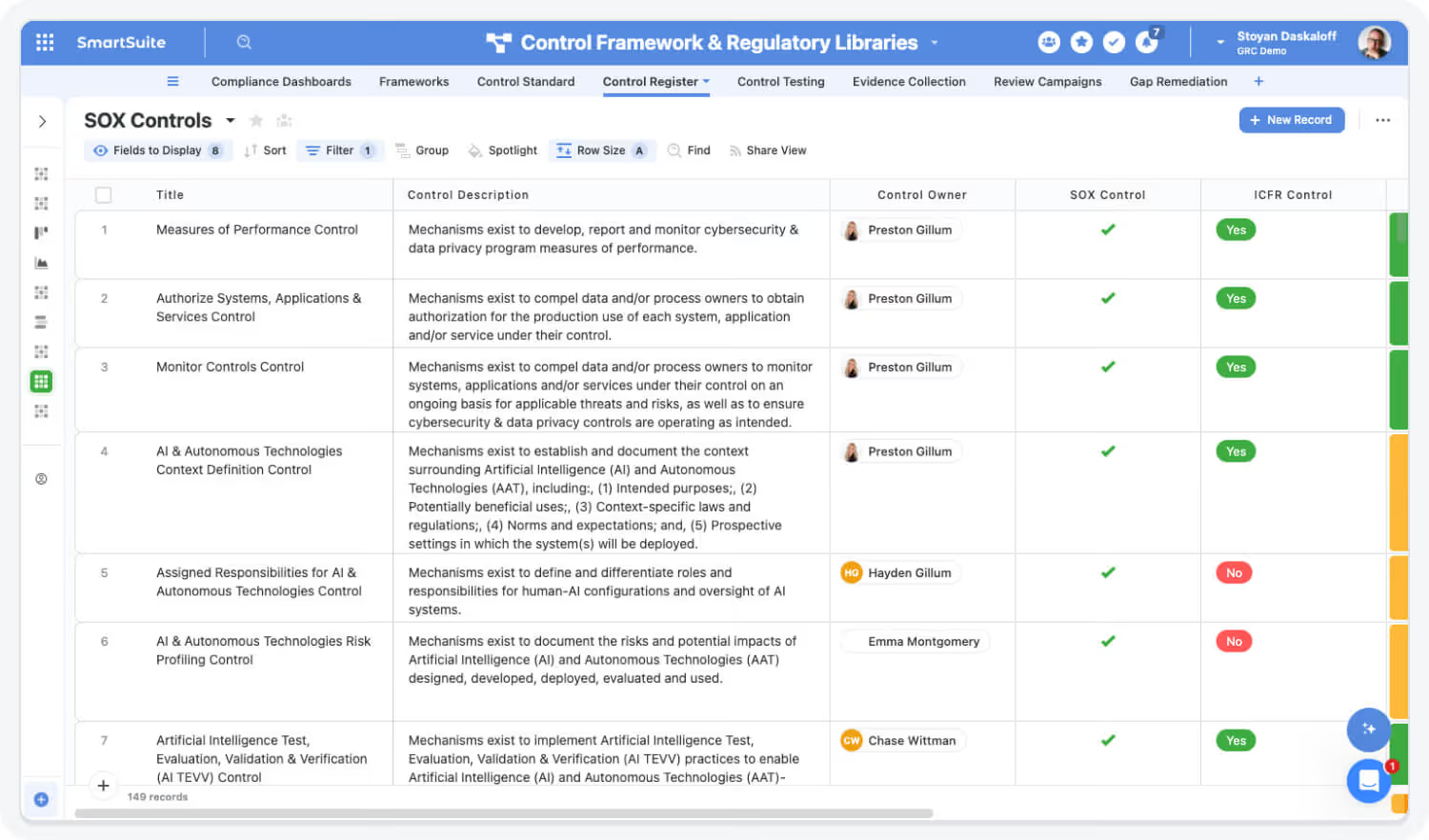
Establish a clear, defensible SOX scope with defined ownership across entities, processes, and controls. SmartSuite centralizes SOX scoping so nothing falls through the cracks.
Highlights:
- Centralized SOX control inventory mapped to financial processes and assertions.
- Clear control ownership by entity, process, and reporting period.
- Linked records connecting controls to risks, processes, and documentation.
Execute Control Testing with Consistency and Efficiency
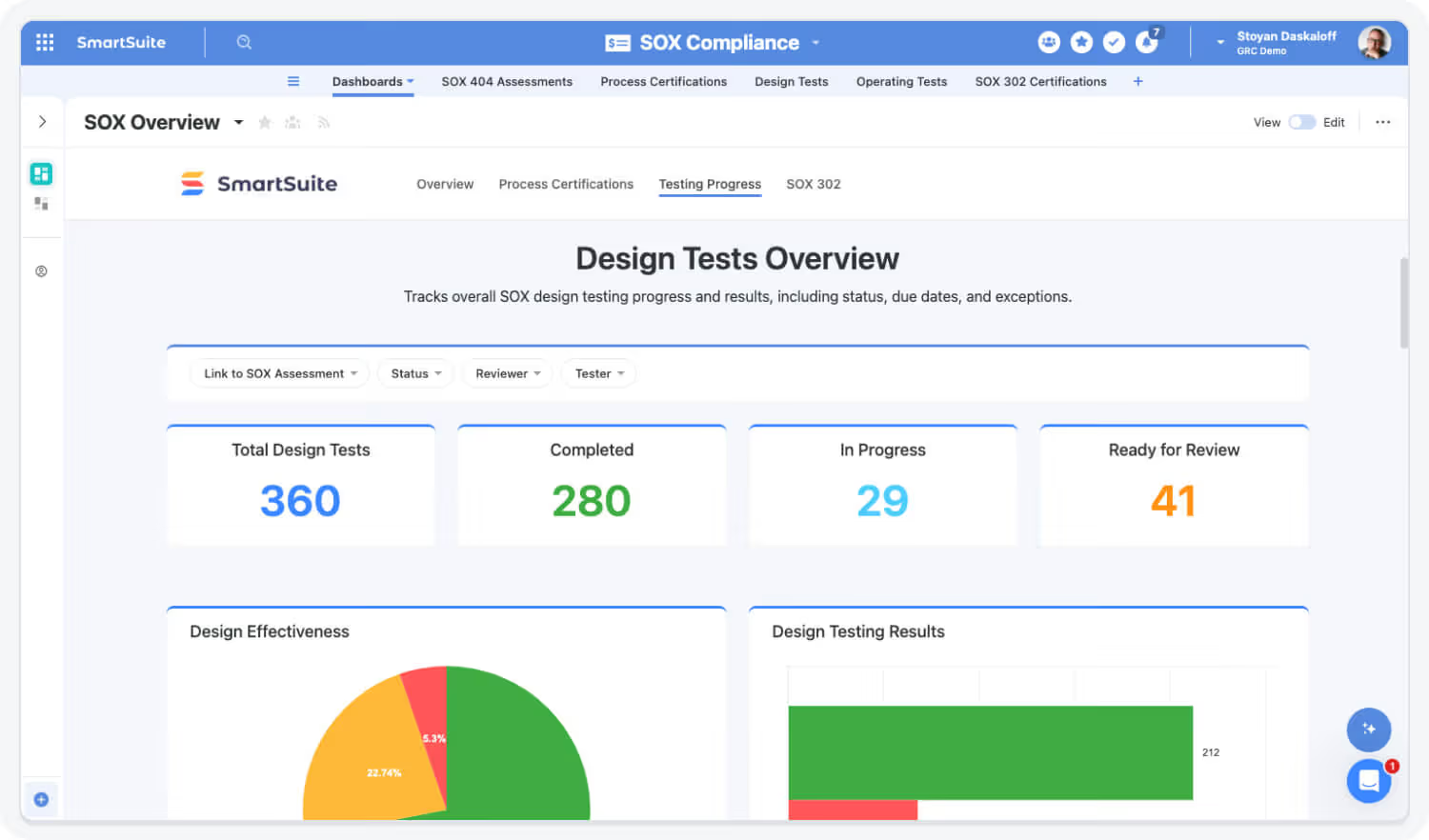
Standardize SOX testing workflows for management and audit teams. SmartSuite automates testing steps while maintaining full traceability and reviewer oversight.
Highlights:
- Standardized SOX testing procedures and templates.
- Automated task assignments, review routing, and reminders.
- Linked testing results, evidence, and reviewer sign-offs.
See SOX Management in Action
Watch how SmartSuite simplifies SOX compliance by connecting controls, testing, evidence, and remediation in one unified platform.

Capture Evidence and Manage Deficiencies in One Place
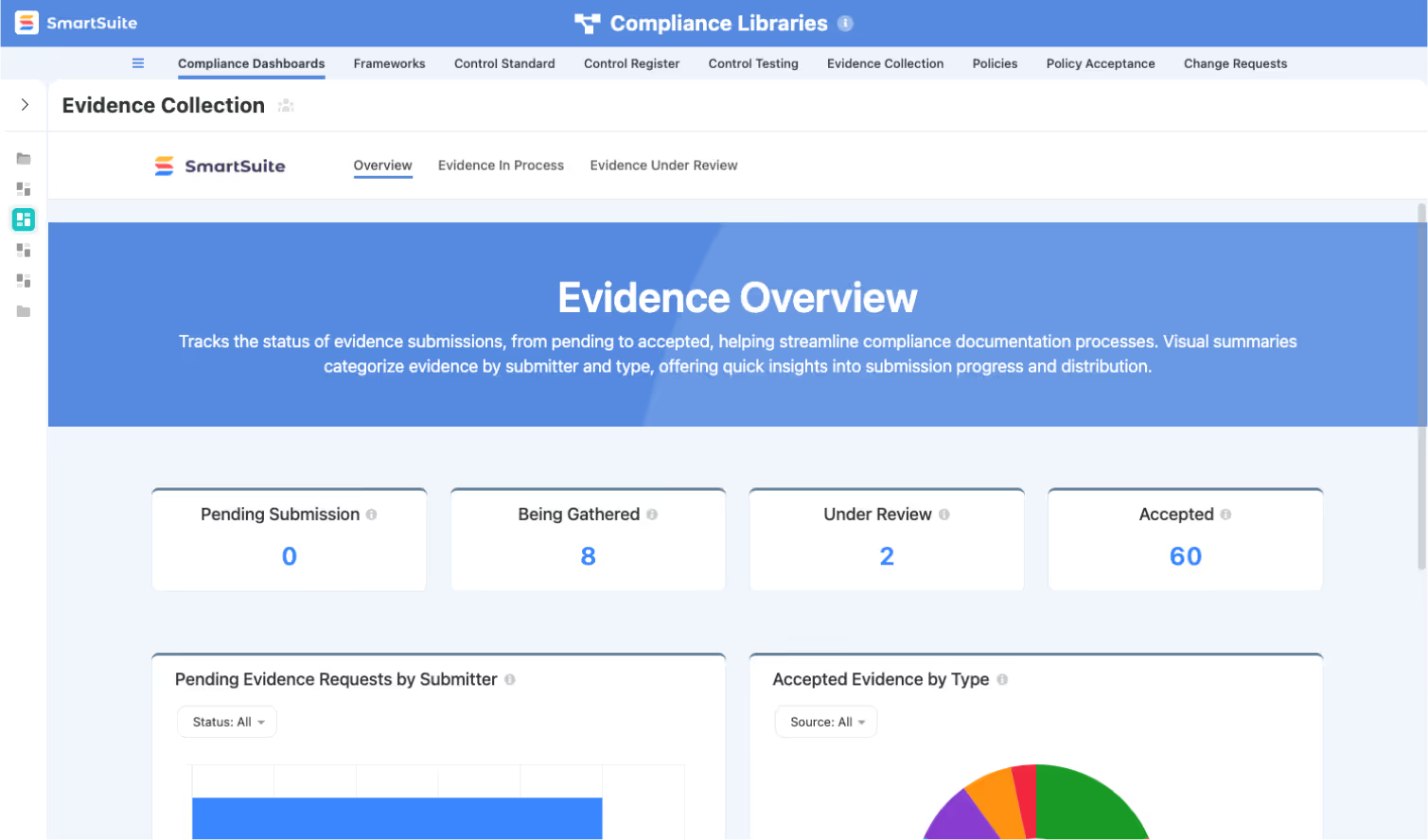
Eliminate scattered evidence and manual follow-ups. SmartSuite centralizes documentation and deficiency management to keep your SOX program audit-ready at all times.
Highlights:
- Centralized evidence repository with version history.
- Deficiency tracking with severity assessment and root cause documentation.
- Linked remediation plans with owners, deadlines, and validation steps.

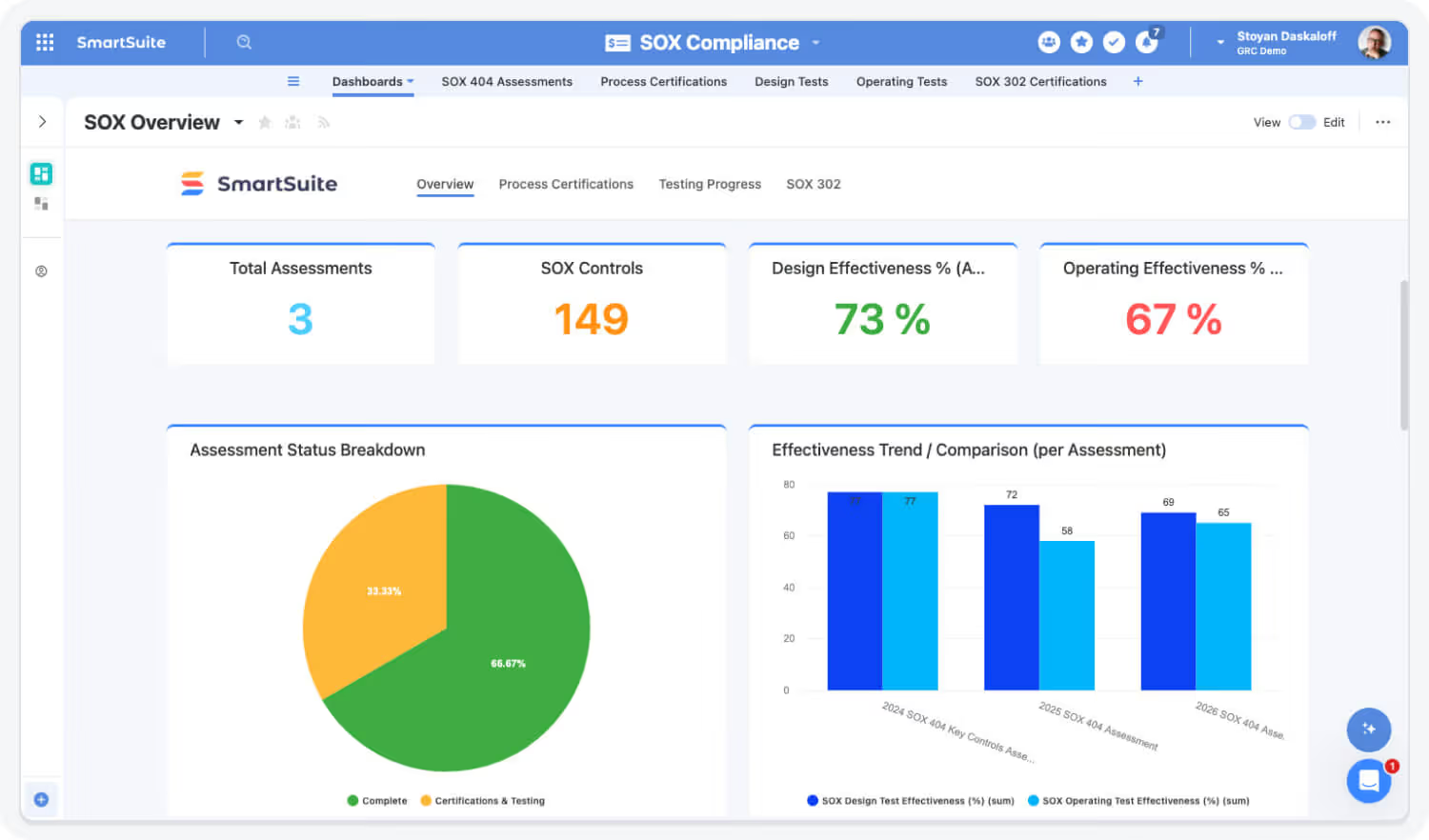
Monitor SOX Readiness with Real-Time Dashboards
Replace spreadsheets and static reports with live visibility into SOX execution, testing progress, and remediation status across the enterprise.
Highlights:
- Real-time dashboards for testing progress and open deficiencies.
- Drill-down views by entity, process, control, or owner.
- Executive-ready reporting for leadership and audit committees.
Support Certifications and Executive Sign-Off with Confidence
Enable structured sub-certifications, management certifications, and executive sign-offs with full documentation and accountability.
Highlights:
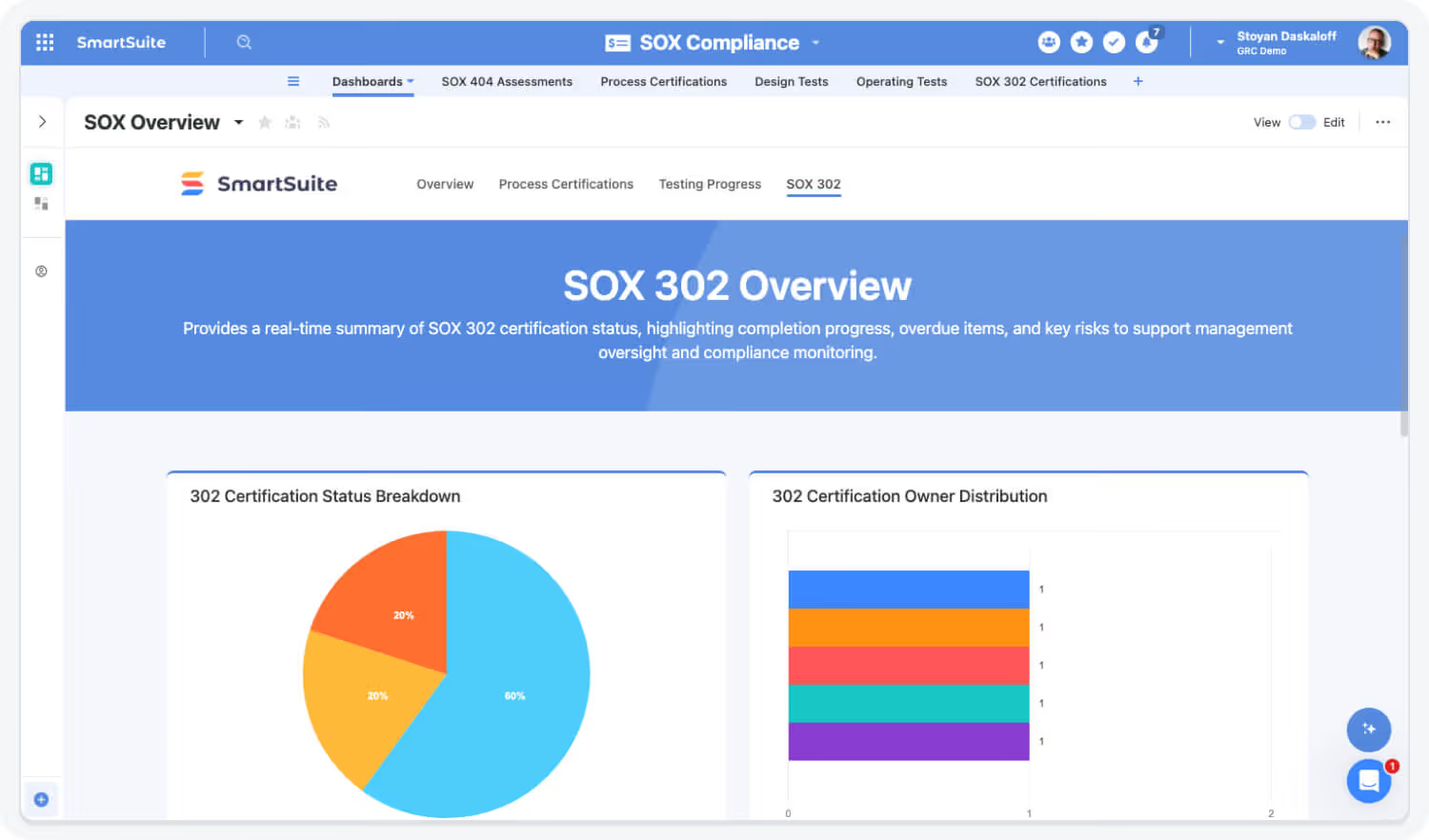
- Automated certification and attestation workflows.
- Documented approvals and decision history for auditors.
- Linked certifications tied to control status, testing, and remediation outcomes.
Built For Modern SOX Programs
SmartSuite delivers enterprise-grade SOX compliance with the flexibility teams need to adapt to evolving requirements. Start where you need, scale as complexity grows, and unify SOX with the rest of your governance ecosystem when you’re ready.
Adopt a Core SOX Capability
Begin with SOX Control Management, Control Testing, or Evidence Collection to replace spreadsheets and manual tracking—demonstrating fast, measurable improvement in control execution and audit readiness.
Roll Out the Full SOX Program
Manage SOX end-to-end—from scoping and testing to deficiencies, remediation, and certifications—with standardized workflows, ownership, and real-time visibility across entities and processes.
Connect SOX to Enterprise GRC
Link SOX controls, testing, and deficiencies to enterprise risks, compliance obligations, audits, and remediation activities—creating a single source of truth for financial governance and assurance.
Explore Further
Learn more about how SmartSuite helps organizations modernize SOX compliance, strengthen internal controls, and maintain continuous audit readiness with connected workflows and real-time visibility.
Frequently Asked Questions
Answers to the most common questions about SmartSuite’s SOX Management capabilities.
Traditional SOX programs often rely on spreadsheets, point tools, or rigid GRC platforms that create manual effort and risk gaps. SmartSuite replaces fragmented processes with a single, connected system for SOX scoping, controls, testing, evidence, and remediation.
With a no-code platform, real-time dashboards, and automated workflows, teams maintain continuous SOX readiness without spreadsheet sprawl or last-minute scrambles.
Yes. SmartSuite supports the full SOX lifecycle — from entity and process scoping to control design, testing, deficiency tracking, remediation, and management reporting.
All activities are linked in one data model, ensuring traceability from financial statement assertions through final remediation.
Absolutely. SmartSuite supports SOX Business Process Controls (e.g., revenue, procurement, financial close) as well as IT General Controls (access, change, operations).
You can manage both in one platform or segment workflows by control type while maintaining shared evidence, testing history, and reporting.
SmartSuite provides structured testing workflows with automated task assignments, reviewer sign-offs, and evidence attachment.
Control owners, testers, and reviewers collaborate in one workspace, with full visibility into testing status, overdue items, and review outcomes — all tracked with audit-ready history.
Deficiencies are tracked from identification through remediation and validation. SmartSuite automatically assigns owners, tracks due dates, escalates overdue actions, and updates dashboards in real time.
Each deficiency links back to the impacted control, test, evidence, and financial assertion — ensuring complete context and accountability.
See How SmartSuite Modernizes SOX Management
Experience how SmartSuite unifies SOX scoping, control management, testing, and remediation in one connected platform — giving Finance, SOX, and Audit teams continuous visibility and confidence.
The Connected Value of SmartSuite SOX Management
Quantifiable improvements achieved when organizations unify SOX scoping, control testing, evidence, and remediation in SmartSuite.
Source: Protiviti SOX Benchmark Study, 2023 — organizations using integrated SOX platforms reduced testing cycle time by 25–35%.
Faster SOX Testing & Close Cycles
Automated workflows, centralized evidence, and standardized testing reduce delays across quarterly and annual SOX cycles.
Source: Deloitte SOX Optimization Survey, 2023 — automation reduced evidence collection effort by ~25–30%.
Reduction in Manual Evidence Collection
Connected control records and automated reminders eliminate repetitive follow-ups and email-based evidence tracking.
Source: PwC Internal Controls Insights, 2022 — structured remediation workflows improved closure times by ~30%.
Improved Control Issue Resolution Time
Linked findings, ownership, and remediation workflows accelerate issue closure and reduce repeat deficiencies.
Source: KPMG SOX Readiness Report, 2023 — centralized SOX platforms improved audit confidence and reduced rework by 30–35%.
Increased Audit Readiness & Confidence
Real-time dashboards and audit-ready documentation improve transparency with internal and external auditors.
Key Benefits of the SOX Management Suite
Public companies need consistent control execution, disciplined testing, and defensible documentation. SmartSuite delivers a connected SOX system that strengthens compliance while reducing operational burden.
SOX Visibility, Control Coverage & Readiness
Centralize SOX scope, processes, risks, controls, testing, evidence, and issues in one connected system.
Monitor control coverage, testing status, deficiencies, and remediation progress live.
Link financial processes, risks, controls, tests, evidence, and findings for full audit transparency.
Track progress across quarters, interim testing, and year-end readiness without manual status reporting.
Give Finance, IT, Internal Audit, and Compliance shared visibility into SOX responsibilities.
Ensure every SOX control has a clear owner, frequency, and accountability.
Testing Efficiency, Automation & Execution
Run SOX tests using consistent procedures, templates, and scoring across cycles.
Route evidence requests with reminders and deadlines to reduce follow-ups.
Automate quarterly, semi-annual, and annual SOX testing cycles.
Test ITGCs and business controls within the same connected workflow.
Surface control failures early and route issues automatically for remediation.
Use AI Assist to generate testing summaries, deficiency narratives, and auditor responses.
Governance, Audit Confidence & Executive Assurance
Maintain complete histories of testing, evidence, approvals, and changes.
Track significant deficiencies, material weaknesses, and corrective actions to closure.
Capture control updates, process changes, and retesting decisions with full traceability.
Provide auditors controlled access to testing results and supporting evidence.
Support single-entity or complex multi-entity SOX environments.
Update SOX scope, controls, workflows, and dashboards without IT dependency.
Move Beyond Spreadsheets with Connected SOX Workflows
SmartSuite helps SOX teams eliminate manual tracking and disconnected tools. Automate testing, centralize evidence, track remediation in real time, and maintain audit-ready SOX compliance year-round.
How the SmartSuite Platform Powers SOX Management
SmartSuite connects SOX scoping, controls, testing, evidence, and remediation into one integrated platform — reducing complexity while strengthening internal controls.
Customize SOX processes, control libraries, testing templates, and dashboards without engineering.
Automate testing schedules, evidence requests, reminders, and escalation workflows.
Generate deficiency summaries, testing narratives, and auditor-ready explanations instantly.
Connect processes → risks → controls → tests → evidence → issues → remediation.
Monitor SOX readiness, test completion, deficiencies, and remediation trends in real time.
Protect sensitive financial and SOX data with role-based access and audit trails.
Link SOX Scoping, Controls & Evidence for Complete Traceability
SmartSuite’s relational data model links SOX entities, processes, risks, controls, testing activities, evidence, and deficiencies into a single source of truth. Teams always have full context — from financial statement assertions down to supporting documentation.
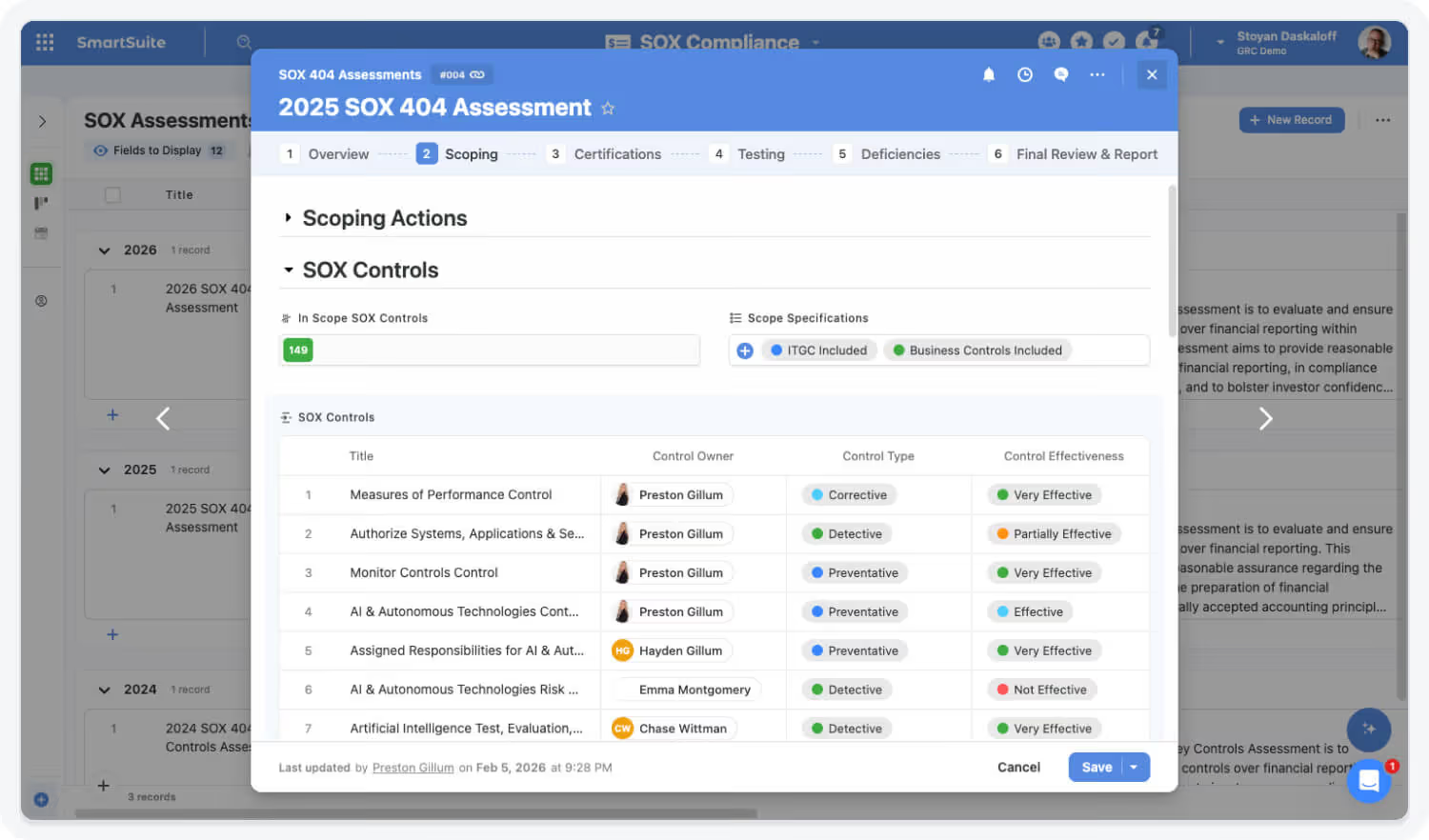
Streamline SOX Testing & Reviews
SmartSuite simplifies SOX execution with structured testing workflows, automated assignments, and collaborative reviews. Control owners, testers, and reviewers work in one system — eliminating spreadsheets, email chains, and version confusion.
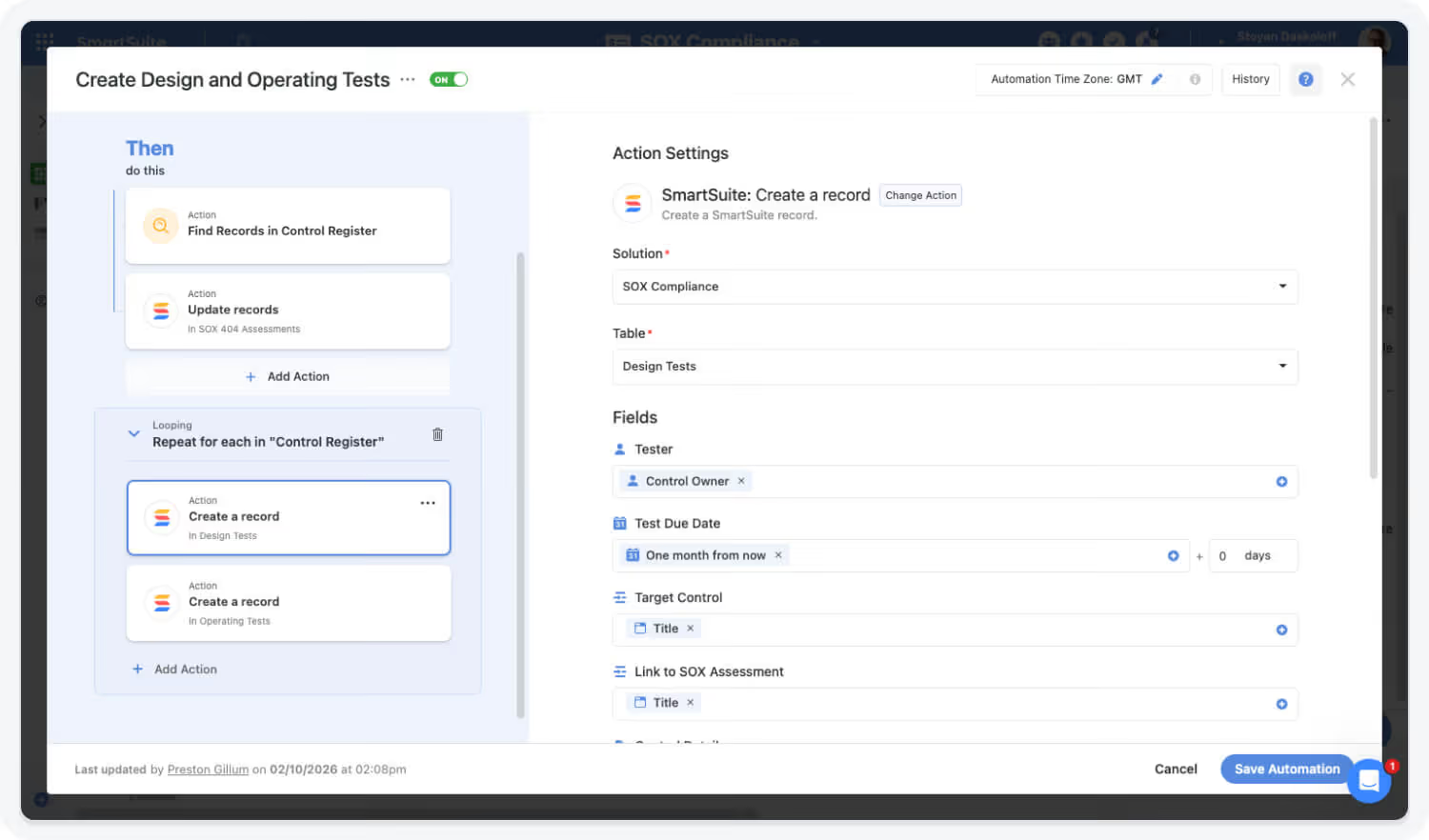
Maintain Continuous SOX Readiness with Dashboards
Real-time dashboards give SOX leaders visibility into testing progress, control effectiveness, deficiency status, and remediation timelines — enabling proactive management instead of last-minute fire drills.
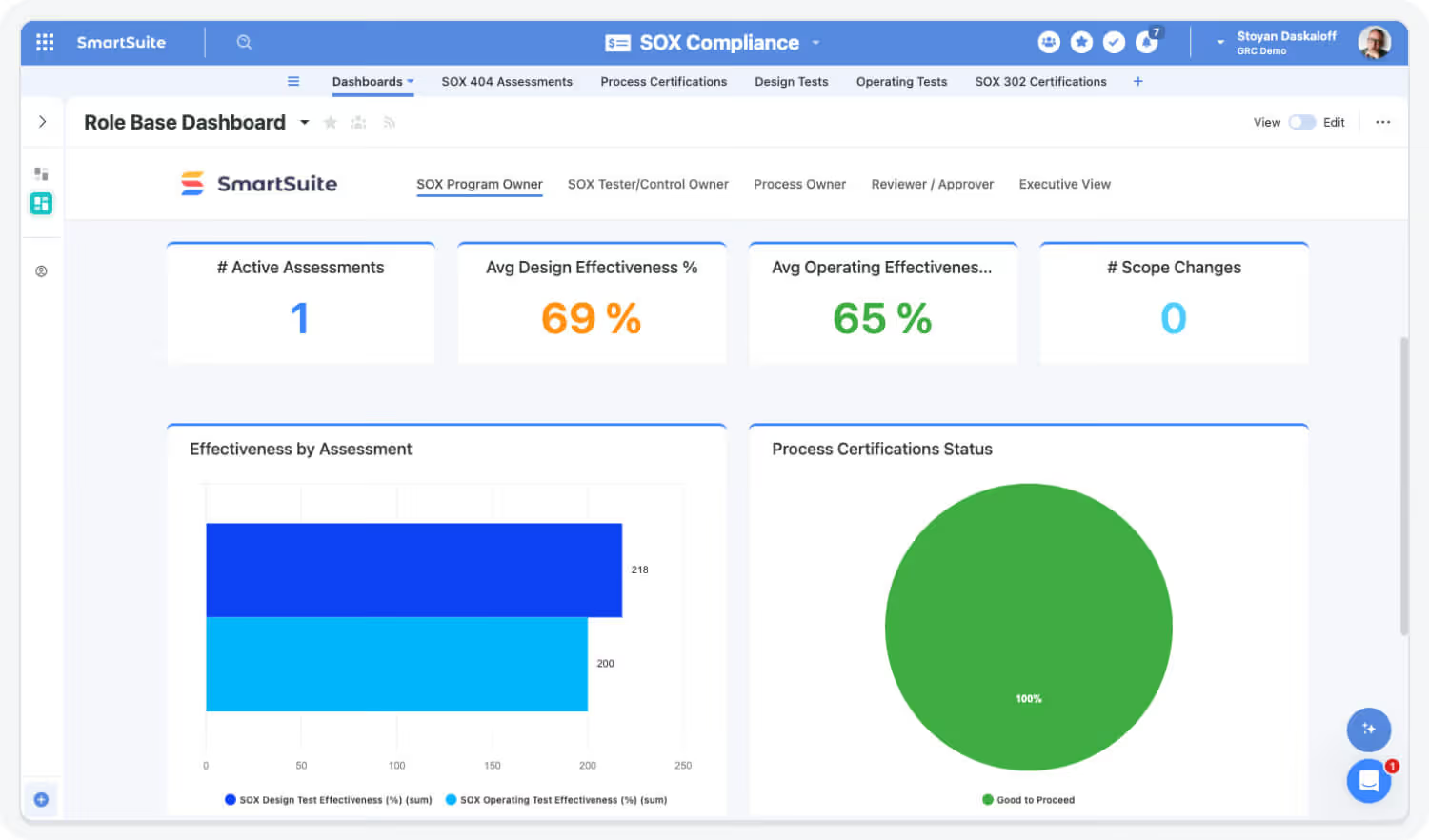
AI Assist and Governance Strengthen SOX Confidence
AI Assist accelerates documentation, deficiency analysis, and reporting, while SmartSuite’s governance features — role-based permissions, version history, and audit logs — ensure accuracy, accountability, and audit-ready SOX execution year-round.

The SmartSuite Platform:
Powered by Eight Interconnected Frameworks
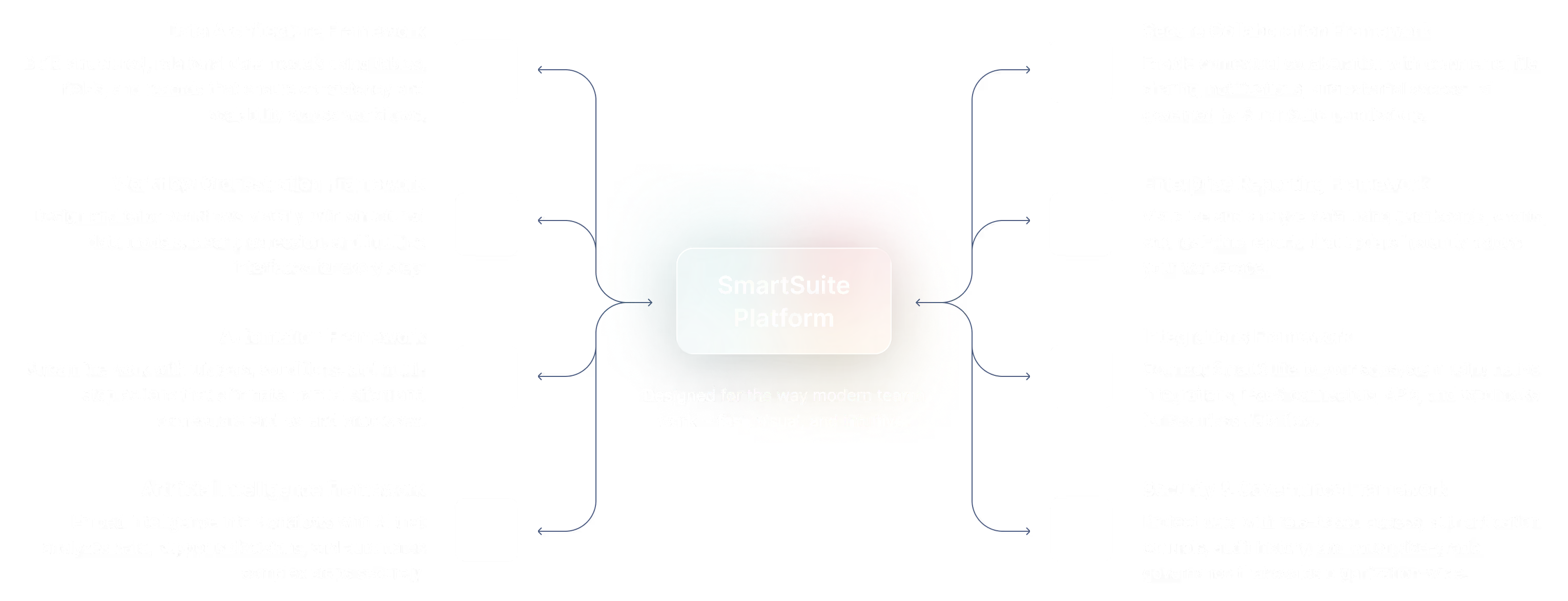
The SmartSuite Platform consists of eight interconnected frameworks that provide a foundation for designing, automating, analyzing, and governing connected workflows.
Build structured, relational data models using tables, fields, and records that ensure consistency and scalability across workflows.
Design and tailor workflows visually with structured data models, clear progression, and intuitive interfaces for every step.
Streamline work with triggers, conditions, and multi-step actions that eliminate manual effort and orchestrate end-to-end processes.
Embed intelligence into workflows with AI that analyzes data, supports decisions, and automates complex steps securely.
Platform
Enable contextual collaboration with comments, file sharing, notifications, and external access—all governed by SmartSuite permissions.
Visualize and analyze data using dashboards, charts, and real-time reports that update instantly across your workspace.
Connect SmartSuite to your ecosystem using native integrations, iPaaS connectors, APIs, and webhooks so data flows between systems.
Protect data with role-based access, authentication controls, audit history, and enterprise-grade governance that scales organization-wide.
Security and Governance, Built for Enterprise Scale
SmartSuite provides fine-grained, role-based permissions that protect data without slowing innovation. Define access down to the record, field, or workflow level, enforce compliance with SSO, 2FA, and IP restrictions, and maintain a complete audit trail of every action. With SmartSuite, governance and agility work together — innovation moves fast, and your security moves with it.

Control visibility by user, role, or team.
SSO, 2FA, and IP restrictions built-in.
Track every change for 3+ years.
SOC 2, GDPR, and enterprise governance ready.
Work Anytime, Anywhere, on Any Device
Stay connected and productive wherever you are. SmartSuite works flawlessly across web, tablet, and mobile, so your team can manage projects, collaborate, and automate workflows in real time — whether in the office, remote, or on the go.


The Platform That Connects SOX, Finance, IT, and Audit
SmartSuite brings controls, testing, evidence, and deficiencies together in one secure system. Link SOX controls to risks, financial assertions, ITGCs, and remediation actions for complete traceability and stronger governance.
Role-Based Capabilities for SOX Management
SmartSuite empowers finance leaders, SOX program owners, control owners, and auditors with connected workflows that ensure disciplined execution, continuous readiness, and confident SOX compliance across the organization.
Executive Leadership

Chief Financial Officer (CFO)
Oversees financial strategy, performance, and risk across the organization.
- Benefit Statement:
SmartSuite gives CFOs unified financial visibility across budgets, spend, forecasts, and approvals — enabling faster, more confident decisions.
- Benefit Source:
Dashboards, analytics, linked workflows, and audit-ready reporting.
Financial Oversight
Reviews real-time views of budgets, spend, forecasts, and financial risks across the business.
Budget Alignment
Ensures financial plans align with strategic initiatives, departmental needs, and operational priorities.
Reporting
Produces executive and board-level summaries with consistent, up-to-date financial data.
Executive Leadership

Chief Audit Executive (CAE)
Oversees the annual audit plan and reports to the board and audit committee.
- Benefit Statement:
SmartSuite gives CAEs complete visibility across the audit lifecycle — enabling them to manage coverage, track risk trends, and deliver data-backed insights to leadership.
- Benefit Source:
Risk-linked audit planning, real-time dashboards, automated issue tracking, and executive-grade reporting tools.
Audit Oversight
Monitors coverage, engagement status, key risk indicators, and open issues.
Strategic Alignment
Links annual audit plans to enterprise risks and strategic objectives.
Board & Executive Reporting
Generates automated reports summarizing assurance activities and remediation progress.
SOX & Controls Leadership

SOX Program Manager
Manages SOX scope, testing cycles, timelines, coordination, and overall execution.
Benefit Statement
SmartSuite centralizes SOX execution and eliminates spreadsheet-driven tracking and follow-ups.
Benefit Source
Testing workflows, automated reminders, control libraries, dashboards.
Cycle Management
Launches quarterly and annual testing cycles with automated assignments
Testing Coordination
Tracks completion, exceptions, and evidence submission across entities
Status Reporting
Monitors readiness and escalates risks before deadlines
SOX & Controls Leadership

Internal Controls Manager
Owns control design, documentation, consistency, and ongoing effectiveness.
Benefit Statement
SmartSuite ensures controls are executed consistently and documented with full traceability.
Benefit Source
Control libraries, testing history, evidence repositories, version control.
Control Design Oversight
Maintains standardized control definitions and frequencies
Test Review
Reviews results, validates evidence, and approves outcomes
Change Management
Tracks control updates and re-testing requirements
Operational & Line-of-Business Roles

Control Owner / Process Owner
Maintains ownership over controls, ensuring they are designed and operating effectively within their assigned processes.
- Benefit Statement:
Reduces quarterly attestation effort by 50% through automated workflows that collect control evidence, testing results, and sign-offs in one connected workspace.
Forrester Compliance ROI Analysis, 2023 — organizations adopting automated attestations reduced manual attestation time by half.
Control Monitoring
Reviews assigned controls and updates testing results within the platform.
Evidence Documentation
Uploads and maintains supporting evidence for audit and compliance reviews.
Attestation Tracking
Completes and certifies quarterly control attestations through automated workflows.
Built for Every Role in SOX Management
Whether you’re a Controller, SOX Program Manager, Control Owner, or External Auditor, SmartSuite provides the clarity, accountability, and automation needed to execute SOX with confidence.
Flexible Pricing Designed for Every Organization
Whether you’re a growing team or a global enterprise, SmartSuite’s pricing adapts to how your business works.
Choose platform-wide access with user-based pricing or tailor licenses to your organization’s scale and structure with our solution-based model.
User-Based Pricing
provides access to the entire SmartSuite platform under one per-user license, perfect for connected workflows across teams and departments.
Solution-Based Pricing
is purpose-built for enterprises with thousands to tens of thousands of users, offering the flexibility to license only the specific SmartSuite Solutions needed for scale, compliance, and control.
User-Based Pricing: Simplify Access Across Every Team
Our Team, Pro, and Enterprise plans make it easy to scale access across your organization. Each licensed user
can access all SmartSuite solutions — with predictable pricing that grows as you do.
- One per-user license for all SmartSuite solutions.
- Ideal for organizations connecting workflows across departments.
- Scalable across teams and business functions.
- Available in Team, Pro, and Enterprise plan tiers.
unified access.
- SmartSuite AI
- Min 3 Billable Users
- Unlimited Solutions
- 5,000 Records per Solution
- 50GB of File Storage
- 30 Days Recycle Bin
- SmartSuite AI
- Min 5 Billable Users
- Unlimited Solutions
- 100,000 Records per Solution
- 100GB of File Storage
- 45 Days Recycle Bin
- Folders
- Gmail and Outlook Integrations
- Advanced Permissions
- SmartSuite AI
- Min 10 Billable Users
- Unlimited Solutions
- 400,000 Records per Solution
- 500GB of File Storage
- 60 Days Recycle Bin
- SSO
- SCIM User Provisioning
- SCIM-Synced User Groups
- Audit Logs
- IP Address Restrictions
- Data Loss Prevention (DPL)
- European Data Residency
- Premium Support
Solution-Based Pricing: Purpose-Built for Enterprise Scale
For global organizations and regulated industries requiring complex governance or large-scale rollouts, SmartSuite offers a Solution-Based Pricing model. This model allows enterprises to license specific SmartSuite Solutions — such as GRC, ITSM, or Procurement — for tens of thousands of users, tailored to their exact needs.
- Tailored Licensing — Structure licenses by department, region, or regulatory requirement.
- Purpose-Built for Scale — Designed for enterprises managing thousands of users.
- Customizable Agreements — Includes the ability to tailor terms and access levels to meet unique business needs.
- Enterprise Confidence — Built for large financial institutions, insurers, and global enterprises who require high-performance
and governance.
- Audit Management
- Issues Management
- Operational Resilience
- Business Impact Analysis (BIA)
- Incident Management
- Crisis Management
- Enterprise Risk Management:
- Third-Party Risk
- Vendor Portal
- Cyber Threat Management
- RCSA (Risk & Control Self-Assessment):
- Issues Management
- Business Structure
- Contract Management
- Policy Management
- Regulatory Change Management
- SOC 2 Compliance
- CRI Profile Compliance
- Control Framework & Regulatory Libraries
- Compliance Assessments & Testing
- ESG & Sustainability Management
Compare Our Pricing Models
Frequently Asked Questions
Answers to common questions about SmartSuite’s pricing models, plan options, and onboarding programs.
SmartSuite offers four plan types: Team, Pro, Enterprise, and Signature.
- Team, Pro, and Enterprise Plans use a per-user pricing model with feature and usage limits designed to scale as your organization grows.
- Signature Plan provides per-solution pricing for enterprises that need to license specific SmartSuite Solutions — such as GRC, ITSM, or Procurement — for large user populations with advanced governance and support requirements.
You can start by filling out the partner program registration form here.
By signing up to the Service Provider Partner Program you agree to our terms and conditions.
There is no cost. However, there are additional eligibility requirements to join.
First, you must be a customer of SmartSuite to be eligible to participate in the Service Provider Partner program. We believe it is important for all of our partners to be active SmartSuite users (minimum 5 active account members). It’s difficult to recommend a SaaS product that you do not see value in using yourself!
Additionally, you must have 15+ employees and $1.5M in annual revenue to join our network of solution partners.
You will be able to work leads through your sales process to a closed-won or closed-lost state.
You will be able to work leads through your sales process to a closed-won or closed-lost state.
Flexible Pricing for Scalable SOX Programs
SmartSuite offers both per-user and solution-based pricing to support SOX programs of any size — from emerging public companies to complex, multi-entity enterprises.
Featured Resources
Explore through leadership, case studies, and insights from financial services leaders.
See SOX Management in Action
Watch how SmartSuite simplifies SOX compliance by connecting controls, testing, evidence, and remediation in one unified platform.


-min.jpeg)
-min.avif)
-min.jpeg)
-min.avif)
-min.jpeg)
-min.avif)

SmartSuite Resources
Everything you need to learn, build, connect, and grow with SmartSuite — from expert guidance and self-paced learning to community collaboration and continuous innovation.
SmartSuite Academy
Demo Center
Support
Customer Stories
Feature Requests
Community
Developer Resources
Frequency Asked Questions
Explore Further
Learn more about how SmartSuite helps organizations modernize SOX compliance, strengthen internal controls, and maintain continuous audit readiness with connected workflows and real-time visibility.
Getting Started with SmartSuite

Learn the SmartSuite layout: workspace, Solutions, Views, Records. See how to navigate, search, filter, and create items to get productive fast.

Understand the Homepage layout: sidebar, header, search, and activity. Pin favorites, review assignments, and launch Solutions with one click. Make it your daily command center.

See your data from every angle. Learn Grid, Kanban, Calendar, and more. Switch views, sort and filter, group records, and save personal or shared views for repeatable workflows.

Explore SmartSuite field types: text, number, date, select, user, files, links, formulas, lookups, and more. Learn when to use each to capture, calculate, relate, and display data clearly.

Your command center: one Dashboard to track goals, tasks, and dependencies. Mix charts with lists, watch trends over time, and click through to fix issues immediately.

Automations do the busywork. Set a trigger, choose actions—notify people, update fields, create records, send webhooks—and let SmartSuite run it whenever conditions are met.
Set permissions once, scale safely. Use solution roles, table permissions, and saved views with filters to expose only relevant records to each team or stakeholder group.

Prompt-driven automations. Provide instructions with placeholders for record fields; AI uses that context to produce exactly what you need, then the automation stores or sends it.

Use Formula fields to calculate values from other fields. Combine math, logic, and text to automate totals, statuses, scores, and dynamic results across records. Quickly.

Use Power Search to instantly find records across fields and Solutions. Combine keywords, filters, and operators to pinpoint exactly what you need in seconds.

Stay informed with SmartSuite notifications. Get real-time alerts for updates, assignments, comments, and changes so you never miss important activity.
Star items you use most to access them fast. Keep important Solutions, Views, and records pinned for quick access and a more focused daily workflow.
Resources to Strengthen Your SOX Program
Explore guides, webinars, and customer stories that show how teams modernize SOX management, reduce audit friction, and maintain continuous compliance with SmartSuite.