



Smartsheet vs. Trello vs. SmartSuite: Which One Is Better? [2026]
![Smartsheet vs. Trello vs. SmartSuite: Which One Is Better? [2026]](https://cdn.prod.website-files.com/60db0944651d4b59a704ef93/6ad5a968de5beb92b748e15e_6ad5a95cb0cdd6789f642447_smartsheet-vs-trello-vs-smartsuite-thumbnail-image-7b6f9f.webp)

SmartSuite provides work platform for standardizing workflows in the following areas:
-
Governance, Risk & Compliance
-
IT & Service Ops
-
Project / Portfolio Management
-
Business Operations

Are you trying to choose between Smartsheet and Trello to manage your team’s operations and workflow in 2026?
- Smartsheet has gained recognition with its enterprise-grade project control and is easy to use for simpler tasks. However, things can get messy when it comes to customizing the platform and setting up automations. The platform is a good option for organizations looking for portfolio and process management capabilities.
- Trello is best for managing tasks across multiple projects with an intuitive interface and budget-friendly pricing plans. I found the platform to be ideal for smaller teams who are looking for a more affordable solution and a generous free plan.
- SmartSuite offers the best value for money with its comprehensive features at a reasonable price point with built-in team communication and an intuitive interface. Our platform is ideal for teams of all sizes looking for an all-in-one solution at an affordable price.
With Atlassian’s Trello and Smartsheet being two of the biggest players in the market, each offering unique features and capabilities, making the right choice can be tricky.
In this in-depth comparison, I’ll review the key features, pricing, and user feedback for each software to help you make an informed decision.
➡️ I’ll also introduce you to a third option, a new contender in the project management space that covers both tools’ weaknesses with its all-in-one project management capabilities: SmartSuite (that’s us).
How do Smartsheet, Trello and SmartSuite compare on features?
Key takeaways
- Smartsheet offers a good range of features, but some aspects of the platform need improvement, such as built-in collaboration functionality.
- Trello’s platform offers fundamental project management features but has less functionality than Smartsheet and SmartSuite. The software lacks built-in collaboration and reporting capabilities.
- SmartSuite offers an all-in-one project management solution for teams to plan, manage, and track projects, resources, and stakeholders.
Let’s go over the 3 platforms’ features in detail, starting with SmartSuite: 👇
SmartSuite Features
SmartSuite offers a comprehensive project management solution that lets you manage all your projects on a centralized platform with built-in automation and a communication center.
But we are not trying to add to the noise of other project management tools like Trello and Smartsheet.
Our solution aims to create one unified no-code platform that runs the entire operation, from project management to process automation to real-time collaboration.

Comprehensive Project Management
SmartSuite’s project management feature helps you plan, track, and manage simple to complex projects.
To simplify the process, you get numerous built-in intuitive features to execute your tasks perfectly.
Here’s what SmartSuite has in store for you.
- Smart task management: You can turn any item field into a task—a checklist item, comments, or sub-item.
With this flexibility, you and your team can build a solid task list and assign it to the right person with a due date and priority status.

- Project phases and milestones: Having milestones ensures your project stays on track and moves toward the objective.
With SmartSuite, your leadership team can set the phases and milestones, monitor them through your reporting dashboard, and flag issues.

- Files and project deliverables: With SmartSuite, you can manage and organize all your documents.
It is also possible to attach project-related files, share feedback with your team, and manage version history, all within your work context.
SmartSuite supports formats like PDF, GIF, CSV, PNG, and MP4. The tool also integrates with Dropbox, Google Drive, Box, and Microsoft OneDrive, making adding files to your workflows easy.
Also, you can add images directly in SmartSuite by connecting your social media and Unsplash accounts.

- Native time tracking: Monitor and evaluate task and project completion times. Built-in tracking helps group time entries, see estimates, and segment billable and non-billable entries.

💡 Are you interested in how other team leaders are using SmartSuite? You can check out our video walkthrough:
Native Team Collaboration
SmartSuite outperforms Smartsheet and Trello with its built-in communication and collaboration features.
You can connect with peers through record comments and @mentions for quick feedback and to keep stakeholders updated.

The platform’s members’ directory provides a holistic view of the project team by examining each teammate’s details, such as availability status, job profile, and other relevant information.
Like the other two tools, you can use comments and @mentions to share updates, nudge teammates, or add new people to the conversation.

Comprehensive Project Reporting
Unlike Trello and Smartsheet, the platform offers a dynamic project analytics tool with configurable charts and graphs.
The reporting dashboard helps you track project performance, understand resource allocation, and identify slow-moving projects.
Based on these insights, you can quickly develop plans to overcome roadblocks and get the project back on track.

You can visualize reporting in Grid, Card, Kanban, Timeline, Map, Calendar, or Dashboard views. Add as many as needed to build a visual storyboard for your project’s progress.
To share reports with stakeholders or clients, you can make the report public and share the necessary access.
The platform also supports printing or exporting PDF, Excel, Google Sheets, or CSV format.

Advanced Workflow Automation

The platform's no-code automation builder is one of the most intuitive, running neck and neck with the competition on automation.
You can assemble automation at the task and project level and automate repetitive tasks based on triggers like changing dates, sending notification emails, or updating statuses.
There are six pre-defined triggers and 15+ actions, with options to build custom ones.
SmartSuite is the right choice if you:
✅ Need a user-friendly interface with drag-and-drop customization.
✅ Need a platform that can adapt to various business processes.
✅ Are looking to centralize team communication and collaboration.
SmartSuite isn’t the best option if you:
❌ Are looking for a well-established platform with a long track record, as SmartSuite is relatively new.
❌ Need extensive third-party integrations, as SmartSuite offers fewer native integrations than Trello and Smartsheet.
Trello’s Features
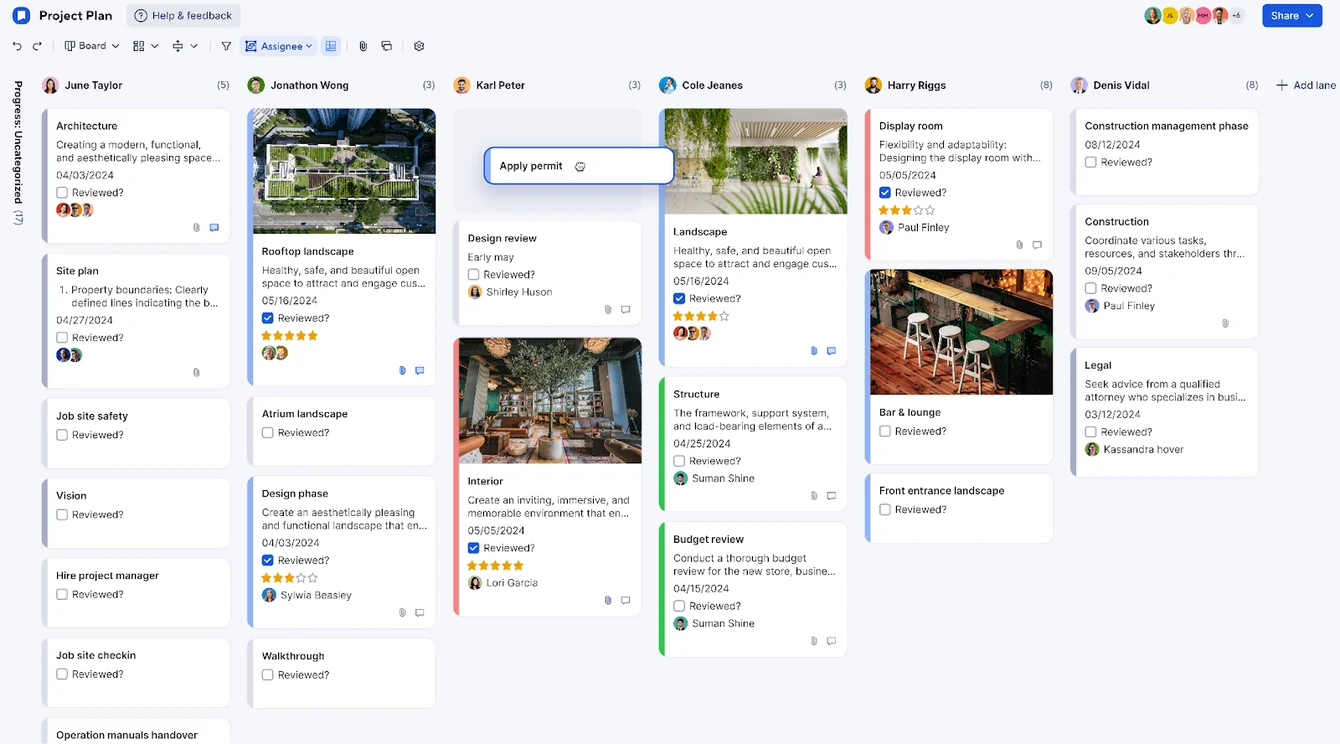
Drag-&-Drop Task Management
Trello offers an intuitive drag-and-drop functionality that allows you to move tasks (represented as cards) between different stages of completion (represented as lists) effortlessly.
You and your team can move one card from the “To Do" to the "In Progress" to the "Completed" lists, ensuring timely updates and tracking of each task’s status.

Advanced Task Checklists
Checklists allow you to build up a series of sub-tasks within each task card, breaking down complex tasks into manageable subtasks – making it ideal to be used as an IT project management tool.
You can assign specific deadlines to individual checklist items; add files, documents, or multimedia relevant to the checklist items; and use labels for visual organization.

Workflow Automation
Trello offers a built-in automation tool, Butler, which allows you to create multi-step automation without coding knowledge.
You can set up if-then rules to automate repetitive tasks, such as moving cards from To-do to in-progress when certain conditions are met.

Trello is the ideal choice if you:
✅ Have a team that works well using a visual project management approach and is familiar with Kanban boards.
✅ Are looking for an intuitive, easy-to-use, flexible dashboard to move tasks around.
✅ Want affordable task management software to plan and manage routine projects.
Trello isn't the best option if you:
❌ Work on large-scale, complex projects that demand advanced features like Gantt charts or resource allocation tools.
❌ Are looking for native team communication and collaboration tools so you don’t switch between tools.
❌ Need advanced reporting and analytics capabilities, as Trello's native reporting features are relatively basic.
Smartsheet’s Features
Formulas and functions
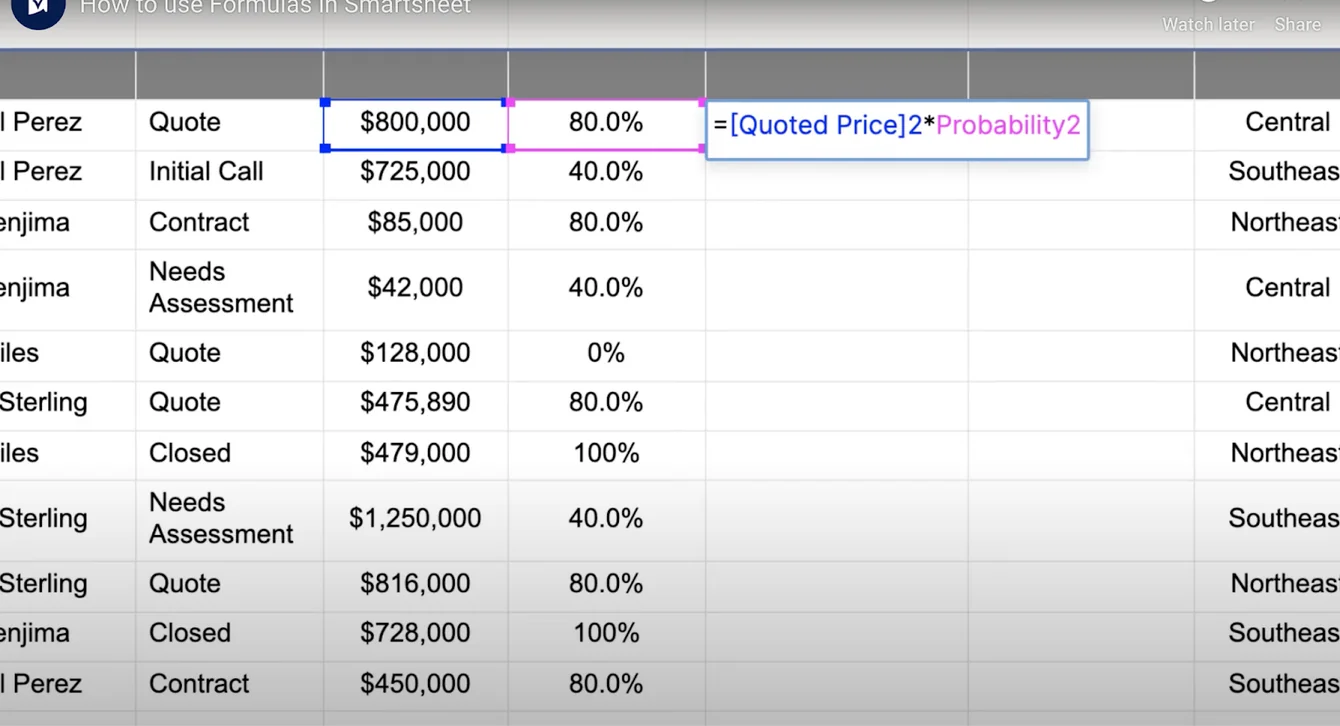
As a spreadsheet-focused project management tool, Smartsheet offers some of the most advanced and dynamic formulas and functions.
The platform lets you perform complex calculations and fetch relevant data within a single sheet or multiple sheets at once.
Team collaboration
Smartsheet is loaded with team collaboration tools. You can build a library of files, loop in stakeholders for proofing, share attachments, and leave comments.
Admin control to share access is flexible and allows collaboration with internal and external users.
The platform supports file types such as .jpg, .png, .gif, .pdf, .docx, .pptx, and .xlsx and lets you upload content from Brandfolder, Google Drive, Dropbox, OneDrive, and more.
Dashboards
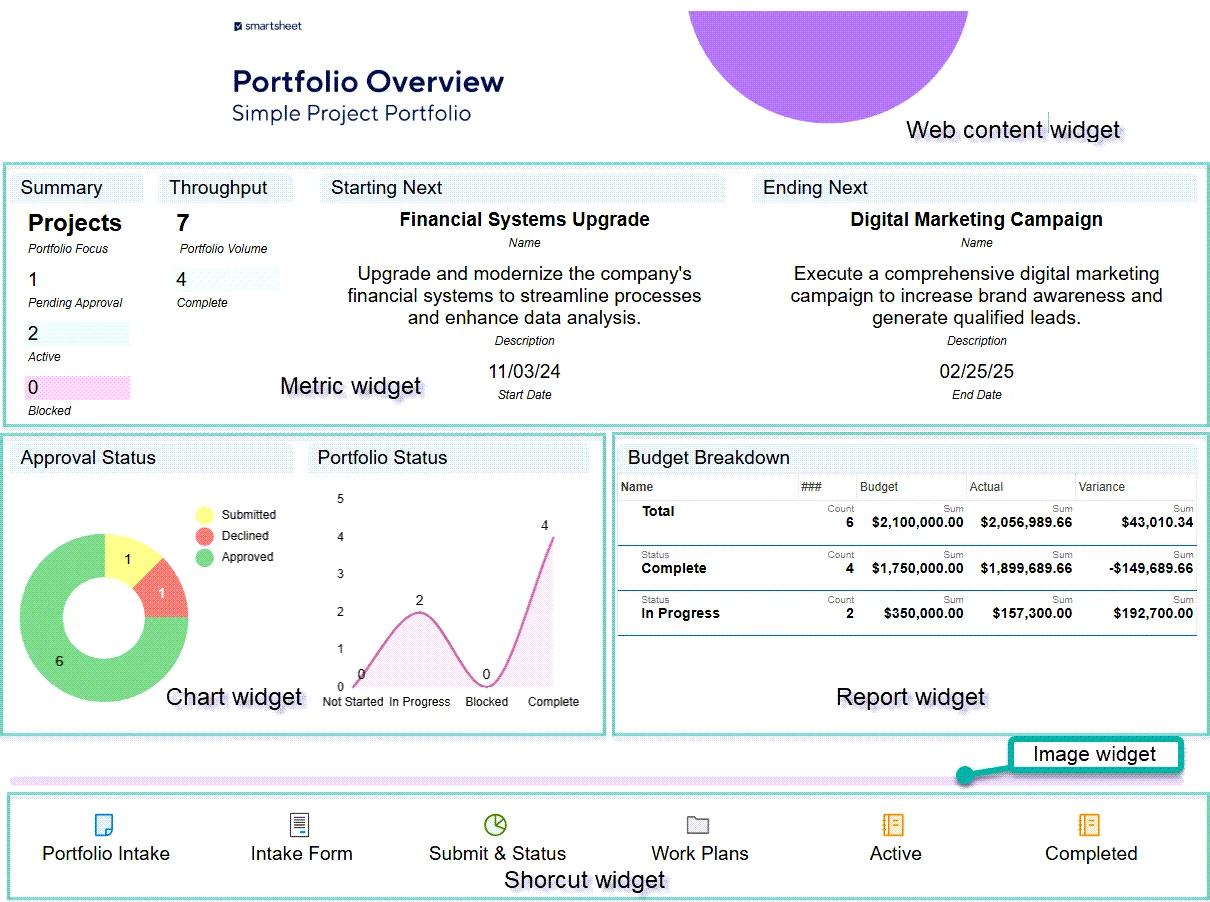
Dashboards in Smartsheet help you consolidate your work and build a visualization for the project's performance.
You can add interactive widgets, which are the building blocks of a dashboard. Some common widgets include reports, charts, metrics, images, and web content.
Your team can also share dashboards with users who might not have the actual report, allowing you to maintain complete control over privacy.
Workload Tracking
Workload tracking helps teams monitor team members’ availability and balance workloads, enhancing team performance.
Smartsheet provides you with a workload heat map as a visual snapshot of your team’s availability, while the workload schedule offers an expanded view of project assignments.

Smartsheet is ideal if you:
✅ Need advanced formulas and functions to evaluate the project’s performance.
✅ Need a versatile project management tool with multiple views (Grid, Gantt, Kanban, Calendar).
✅ Require advanced collaboration features for real-time teamwork and file sharing across departments.
Smartsheet isn't the best option if you:
❌ Are a small team looking for an intuitive interface with a low learning curve, which is why some brands have been looking for Smartsheet alternatives.
❌ Operate with a limited budget.
❌ Need advanced data analysis and reporting capabilities.
➡️ Learn more about Smartsheet with our honest Smartsheet review, where I cover the platform’s features, integrations, and pricing structure in more detail, including user testimonials.
Integrations: Smartsheet vs. Trello vs. SmartSuite
SmartSuite Integrations
It integrates with major platforms, from communication to social media.
Our platform offers five connectors, including Zapier, Ply, Integrately, Relay, and Make, to connect with 1,000s of apps to transfer data.
Some of the notable integrations include:
- Salesforce.
- Slack.
- Twilio.
- Jira Cloud.
- HubSpot.
- Intercom.

Trello’s Integrations
Trello offers over 500 integrations and ‘’Power-Ups’’ encompassing different categories, including sales, social media, productivity, and communication.
Some of Trello's notable integrations for managing projects include:
- Slack.
- Jira Cloud.
- Microsoft.
- Github.
- Miro.
- Google Drive.
- Pipedrive.

The tool offers what they call ‘’Power-Ups’’ which are tools built for Trello to help you improve your productivity.
Some of these solutions were built by Trello themselves, while others have been created by third-party developers.

Smartsheet Integrations
Smartsheet offers two connectors, Jira and Salesforce, that enable bi-directional data synchronization.
In addition to these, there are 100+ native integrations, including Google Workspace, Microsoft Teams, Adobe Creative Cloud, and Tableau.
Other notable integrations are
- Okta.
- Power BI.
- Oculus.
- Miro.
- DocuSign.

Winner: Trello.
Trello, as a product of Atlassian, offers 500+ integrations with various productivity apps and Power-Ups.
Pricing: Smartsheet vs. Trello vs. SmartSuite
SmartSuite Pricing
Unlike Smartsheet, the platform offers a 14-day free trial of its Professional plan, with no credit card required.
The trial gives you the Professional plan’s team collaboration tools, 7+ task views (Dashboard, table, boards, cards, list, calendar, and grid), automations, time tracking, and more.
We offer three per-seat plans plus a per-solution Signature plan, each available through the 14-day free trial.
- Team: $15/user/month billed annually ($20 billed monthly, minimum 3 users), including 5,000 records per solution, 50GB of file storage, and 25,000 automation runs and API calls per month.
- Professional: $32/user/month billed annually ($36 billed monthly, minimum 5 users), adding 100,000 records per solution, 100GB of file storage, two-factor authentication, and Gmail & Outlook integrations.
- Enterprise: Custom pricing with no seat minimum, adding 400,000 records per solution, 500GB of file storage, audit logs, data loss prevention, SSO, and SCIM provisioning.
- Signature: Customized plan tailored to your organization’s needs and team size.

Trello Pricing
Trello offers a free plan with built-in automation and 10 workspace collaborators.
To get access to Trello’s advanced features and premium customer support and security features, your team will need to be on one of the tool’s 3 paid plans:
- Standard: $5/month/seat, which adds unlimited workspace collaborators and one card view.
- Premium: $10/month/seat, which adds unlimited card views, AI, and data export options.
- Enterprise: $17.50/month/seat for up to 50 users, which adds unlimited workspaces, multi-board guest access, and public board management.

Smartsheet pricing
Unlike Trello, Smartsheet doesn’t offer a free plan; it offers a 30-day free trial, while SmartSuite offers a 14-day free trial of its Professional plan.
For pricing plans, Smartsheet charges based on the number of users and offers four paid plans:
- Pro: Starts at $9 per member/month when billed annually, including private sheet creation and unlimited form access with a 10-user limit.
- Business: Starts at $19 per member/month with a minimum of 3 user seats when billed annually, which adds unlimited automated workflows, PowerBI, Tableau, and Adobe Creative Cloud integration.
- Enterprise: Unlimited storage, enterprise plan manager, and AI tools. Contact sales for a quote.
- Advanced work management: Portfolio management and premium support package. Contact sales for a quote.

Winner: SmartSuite.
The platform wins with its generous free plan and lower entry point for business-grade paid plans. The price-to-feature ratio is well distributed across tiers compared to the other two platforms.
Lastly, our project management tool offers flexible per-user pricing, not locking you in unused seats.
What are Customers Saying about Smartsheet, Trello, and SmartSuite?
Key takeaways:
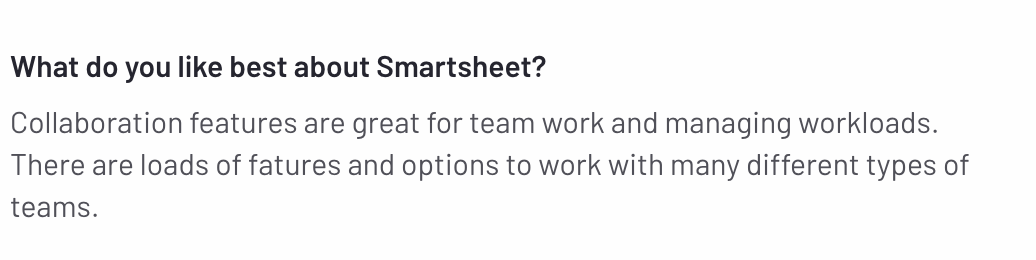
- Smartsheet reviews praise the customizability and collaborative features but are not satisfied with its complicated automation setup.
- Trello is praised for its intuitive interface with its Kanban boards and budget-friendly pricing structure but is criticized for its limited reporting capabilities and lack of clarity in user permission and roles.
- SmartSuite customers are satisfied with its intuitive interface, built-in communication features, customization options, and value for money when compared to alternatives. Despite this, some users are not happy with the platform’s range of integrations.
SmartSuite Reviews
G2 Rating: 4.8/5.
What users love:
- Intuitive interface and quick setup.
- Built-in communication features.
- Flexible customization options.
- Value for money compared to competitors.


Common complaints:
- Limited integration options compared to established competitors.
- Some advanced features are still in development.
- Newer platform with a smaller user community.

Trello Reviews
G2 rating: 4.4/5
What users love:
- The platform has an intuitive interface with a focus on Kanban boards.
- Budget-friendly task management tool.
- There are free power-ups to extend the tool’s functionality, such as adding charts and other visuals.
- Ease of dragging and dropping cards across different lists.


Common complaints:
- Lack of clarity in user permission and roles.
- Limited reporting capabilities that make users rely on paid integrations.
- Lacks a clear separation between private items and shared team boards.


Smartsheet Reviews
G2 Rating: 4.4/5.
What users love:
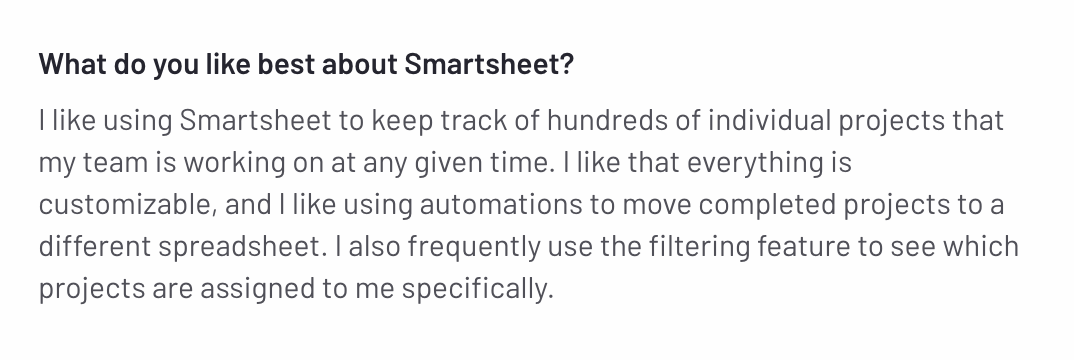
- Customizability and adaptation to user’s business processes.
- Ease of collaboration across the organization with its integrations and intuitive interface.
- Ease of use due to its spreadsheet-like interface, making it ideal for finance and accounting professionals.
Common complaints:
- Complicated automation setup with no version history to track changes.
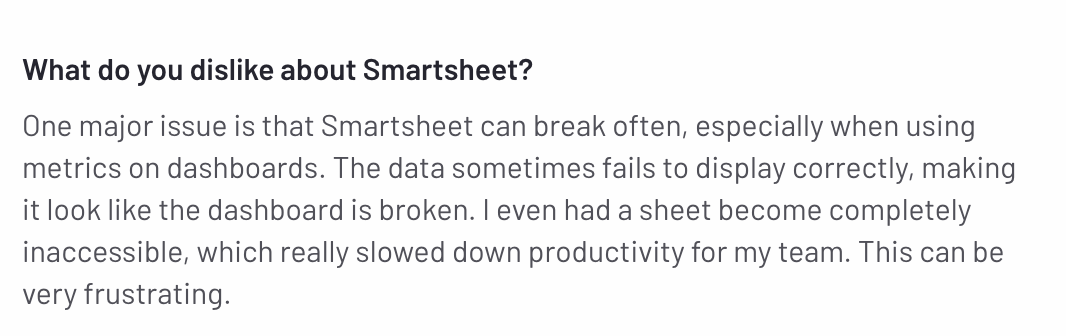
- Performance issues when working on dashboards.
- Limited native integrations.
Smartsheet, Trello, or SmartSuite: which should you choose?

Get Started with SmartSuite For Free Today
➡️ If you want to operate within a spreadsheet-like interface with your accounting team, Smartsheet can be a good choice with its range of integrations.
➡️ On the other hand, if you’re looking for a more affordable solution with a larger range of integrations for your engineering team, Trello might be the better option for you.
Despite this, both Smartsheet and Trello lack critical project management features, such as collaboration features and reporting.
SmartSuite helps you tackle this by offering just the right customization, native collaboration capabilities and a library of 200+ project management templates to get your projects up and running.
Here’s what's in it for your team when you try SmartSuite:
- A 14-day free trial of the Professional plan with multi-board views (Kanban, Chart, Map, Timeline, Card, and Calendar), automations, and 40+ field types, including formula and linked record fields.
- No-code automation builder to set up to 500,000 trigger/action workflows.
- Built-in productivity tools, including time tracking, status tracking, and checklists.
- Team collaboration and planning tools such as whiteboards and SmartSuite docs (unlike Asana, which does not have them).
- Resource management across projects and teams.
- 40+ field types, including the option to add your custom fields.
Start a 14-day free trial to explore all its features.
Or, if you’d like to talk to our team of experts, schedule a demo.
Read More
- Smartsheet vs. Monday: We also dive deeper into how Smartsheet compares to Monday.com to help you make an informed decision.
- Trello vs. Asana: Find if Trello or Asana are the ideal project management solution for your team with our detailed guide.
- Trello vs. Monday: Learn more about Monday.com and how it compares to Trello.
- Smartsheet Pricing: Learn more about Smartsheet’s pricing structure and find out if the project management software provides a good value for money.
- Top 10 Teamwork Alternatives and Competitors In 2026: Learn why some companies are looking to switch from Teamwork and its best alternatives on the market.
- 10 Best Healthcare Project Management Tools in 2026: Find out the best healthcare project management solutions on the market.
- 10 Best Project Management Software for Construction in 2026: A useful guide if you operate in the construction industry and you’re looking for a project management app.






Put these ideas to work
Start a free trial, or book a demo and see how it runs in SmartSuite.

