



Feature Improvement
AI Field Agent: SmartDoc Prompt Experience
All plans
Summarize with
In this article
Published
April 2, 2026
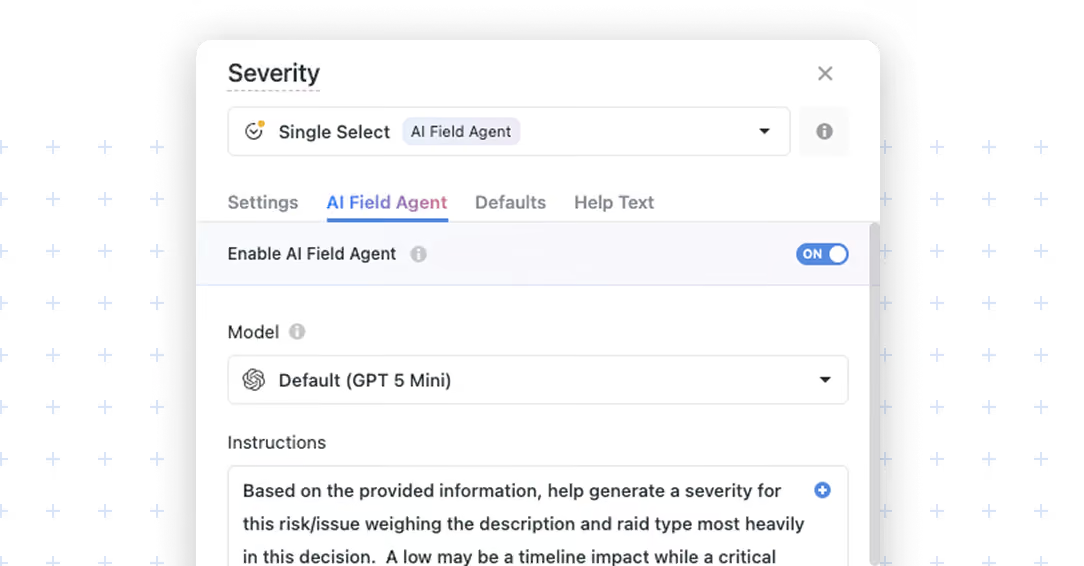
We’re excited to introduce an improved prompt-writing experience for AI Field Agent. Prompt input now uses a SmartDoc-powered editor, giving teams a more flexible and intuitive way to write, organize, and refine instructions. This enhancement makes it easier to create clearer prompts, include field references, and work with rich formatting when configuring AI-driven fields.
Key highlights
- Better prompt writing: Create more structured, readable prompts with a richer editing experience.
- Improved clarity: Use formatting tools to organize instructions so prompts are easier to review and maintain.
- Familiar editing experience: Work in a SmartDoc-style input that feels consistent with the rest of SmartSuite.
- Easier context insertion: Add field references directly into the prompt so the AI can use record data in its response.
How it works
- Open the AI Field Agent settings for your field.
- In the Instructions area, write your prompt using the SmartDoc-powered editor.
- Use the toolbar to format your instructions with options such as bold, italic, underline, strikethrough, text color, quotes, bullet lists, numbered lists, links, and clear formatting.
- Insert field references directly into the prompt, such as related fields like Project Tasks, Stage, and Due Date, to give the AI the right business context.
- Combine written instructions and field references to guide how the AI should generate, classify, summarize, or evaluate content.
This updated experience is especially useful when prompts need more structure, such as step-by-step guidance, clearly defined expectations, or dynamic context pulled from record fields.
Released
April 2, 2026
Feature Improvement
More updates
The newest releases and improvements across the platform, each with its video and help article.
See all updates


Put these ideas to work
Start a free trial, or book a demo and see how it runs in SmartSuite.