



Feature Improvement
Formulas: Date Formatting
All plans
Summarize with
In this article
Published
March 3, 2026
We've introduced a new update that gives you more control over how formula field date outputs are displayed. Now, when your formula produces a date value, you can apply formatting options to make sure the result appears exactly the way you want.
Key highlights
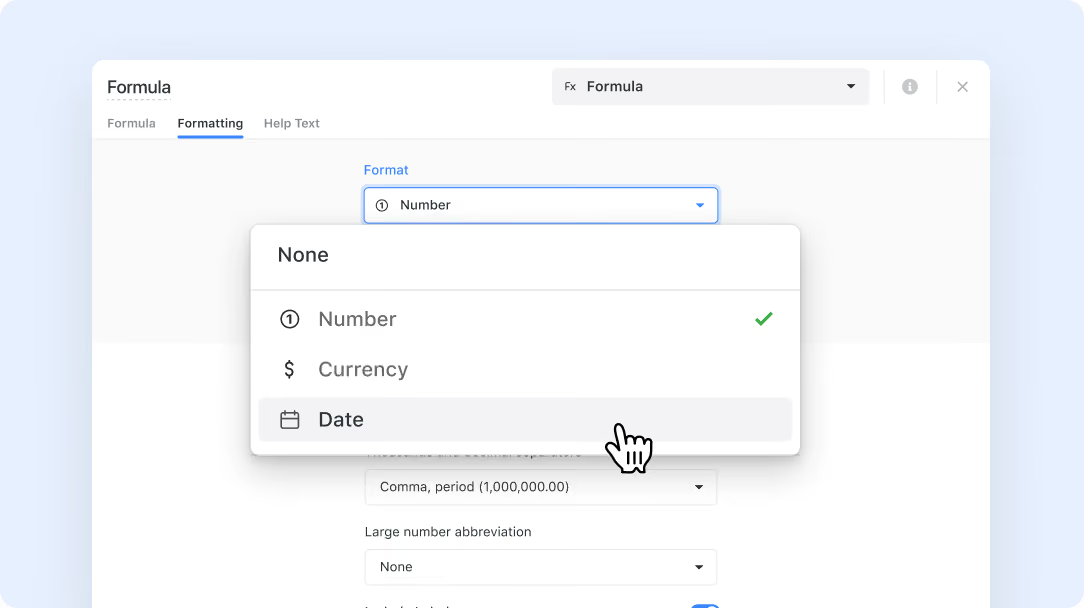
- A new Formatting tab has been added to the advanced editor in formula fields.
- Date formatting is now available for formula fields that return a date value.
- You can choose how date results are displayed, helping create a more polished and consistent experience across your solution.
- Formatting is optional, and the default setting keeps the formula result displayed as-is.
- Your formatting settings are preserved even if the formula changes temporarily while you are editing it.
How it works
- Open a formula field and go to the Formatting tab in the advanced editor.
- If the formula returns a date value, date formatting options will appear automatically.
- If the formula is incomplete or SmartSuite cannot yet determine the result type, you will see a message prompting you to finish configuring the formula first.
- Once the formula returns a valid date result, you can apply date formatting to control how the output is displayed.
- These formatting settings are preserved as you continue editing, so you do not need to reconfigure them if the formula temporarily becomes invalid or changes before returning to a date result.
This update makes it easier to present formula-based dates clearly and consistently throughout your workspace. Enjoy a cleaner and more customizable formula field experience!
Released
March 3, 2026
Feature Improvement
More updates
The newest releases and improvements across the platform, each with its video and help article.
See all updates


Put these ideas to work
Start a free trial, or book a demo and see how it runs in SmartSuite.