



New Feature
SmartSuite AI: Field Agents
All plans
Summarize with
In this article
Published
March 12, 2026
We’re excited to announce the general availability of AI Field Agents. AI Field Agents bring intelligence directly into your workflows by embedding AI-powered assistants into individual fields, so SmartSuite can analyze record context, generate structured results automatically, and help teams move faster on repeatable work. They can run manually when needed or automatically when relevant field values change, with results saved directly in the field and tracked in activity history.
Key highlights
- Bring AI directly into the flow of work by embedding intelligent assistants into supported fields.
- Automate repeatable tasks such as summaries, classifications, recommendations, and other structured outputs based on record data.
- Configure agents to run automatically when trigger fields change, or launch them manually when you want more control.
- Extend AI results with optional Internet Search, giving teams access to broader context beyond the record when enabled.
- Get started quickly with included free AI requests, then continue usage with your own API key as needs grow.
- Maintain visibility and trust with AI-generated values stored in the field, logged in activity history, and supported by SmartSuite’s audit trail.
How it works
- Enable AI Field Agents for your workspace. Workspace admins can turn on AI Field Agents, optionally add an API key for expanded usage, enable Internet Search, and view remaining free AI requests.
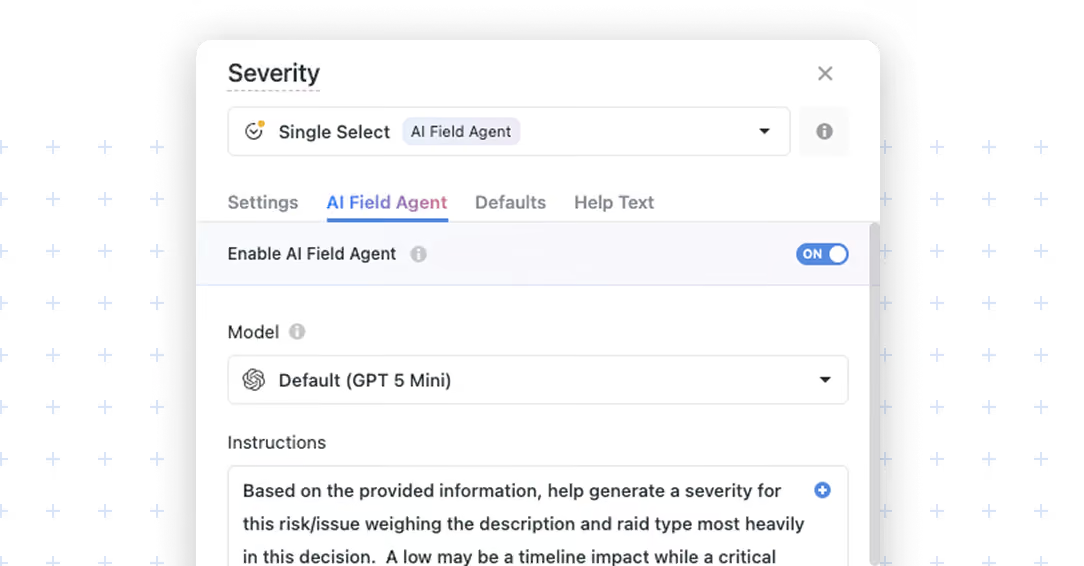
- Configure the agent on a supported field. Open Field Settings, select the AI Field Agent tab, and turn on Enable AI Field Agent for a SmartDoc, Text Area, or Single Select field.
- Build the prompt. Combine static instructions with values from other fields so the AI can use live record context to generate useful, structured outcomes. Prompts must include at least one field variable.
- Choose how it runs. Set the agent to run automatically when referenced field values change, or let users run it manually from Grid view, the Record page, or a Record Details widget.
- Review the result in context. The AI-generated output is written directly to the field, labeled as AI-generated, and recorded in the activity trail for traceability and governance.
Released
March 12, 2026
New Feature
More updates
The newest releases and improvements across the platform, each with its video and help article.
See all updates


Put these ideas to work
Start a free trial, or book a demo and see how it runs in SmartSuite.