



Feature Improvement
Webhook & Custom Prompt JSON Node Editing
All plans
Summarize with
In this article
Published
June 10, 2025
SmartSuite automation builders can now edit any JSON node in Webhook triggers/actions and the Custom Prompt AI action without deleting and rebuilding it.
Key Points
- Inline edit option replaces the old “delete-and-recreate” workflow.
- Supports Webhook (trigger & action) and Custom Prompt AI action.
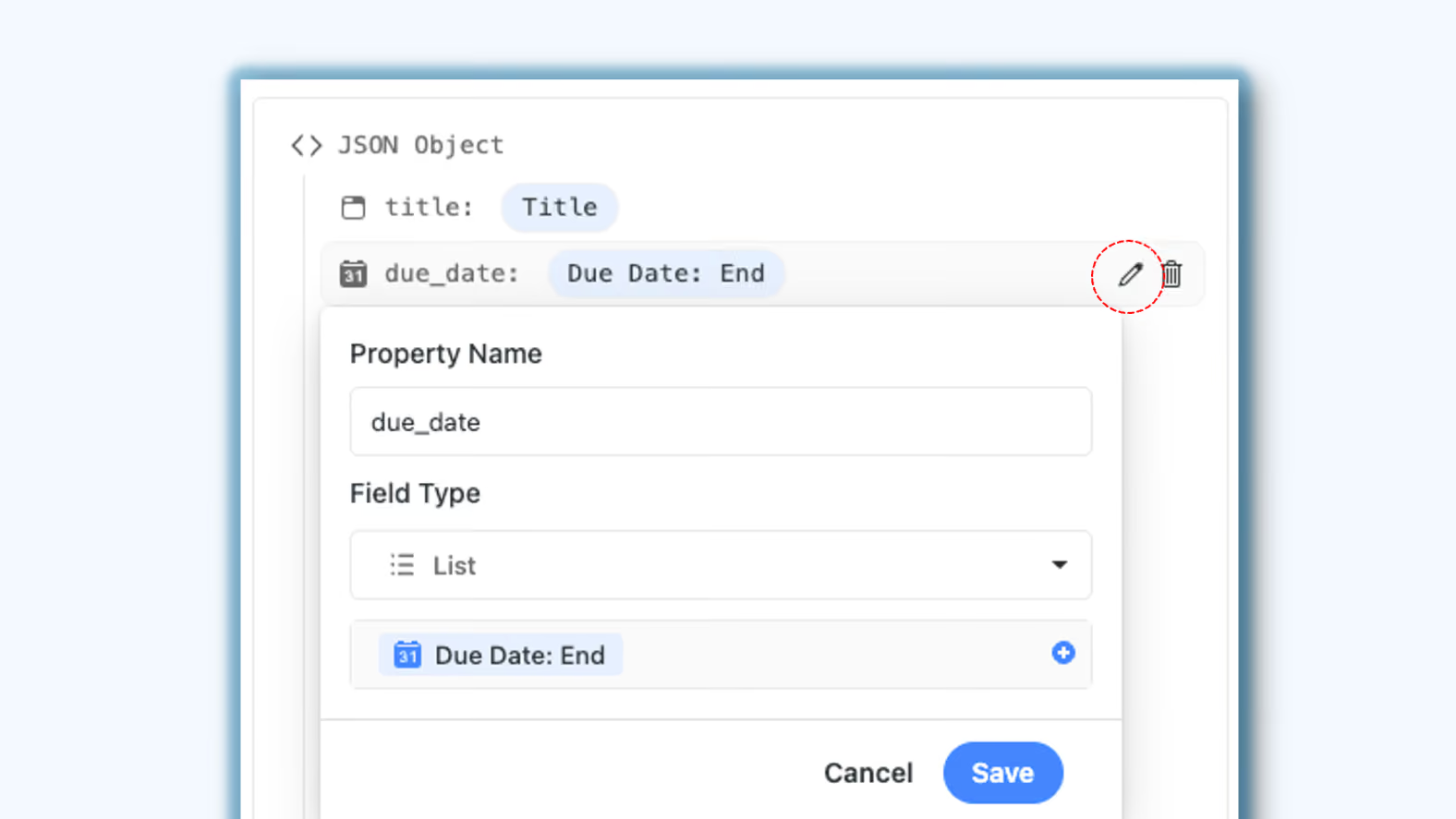
- Single-click pencil icon (or double-click on the node) opens the familiar node-configuration modal.
- Feature rolls out to every subscription tier with no extra permissions required.
How it Works
- Hover a node to reveal the new pencil icon beside the trash bin.
- Click the icon (or double-click the node) to launch the pre-populated configuration modal.
- Adjust any parameter value, then save - updates apply instantly to the JSON payload.
- The component-level enhancement means the same editing flow wherever JSON nodes appear in automation Webhooks or AI prompts.
A small change that makes it easier to manage complex automations to help you edit, save, and deploy your automations faster.
Released
June 10, 2025
Feature Improvement
More updates
The newest releases and improvements across the platform, each with its video and help article.
See all updates


Put these ideas to work
Start a free trial, or book a demo and see how it runs in SmartSuite.