



Product
Issues Management: AI-Powered Trend Analysis
Enterprise
Summarize with
In this article
Published
June 9, 2026
Issues Management now includes AI-powered trend analysis that scans your entire active issues library — across every type, source, and business unit — and surfaces meaningful trends automatically.
Key highlights
- Automated Trend Detection: An AI trend analysis automation reviews every active issue across all types, sources, and business units, then writes a structured trend record for each meaningful pattern it finds — not isolated one-offs.
- Auto-Populated Trend Records: Each trend comes back with a severity level, category/type, root-cause driver, summary, predicted impact, recommended actions, and links to the supporting issues and business units, all filled in by the AI.
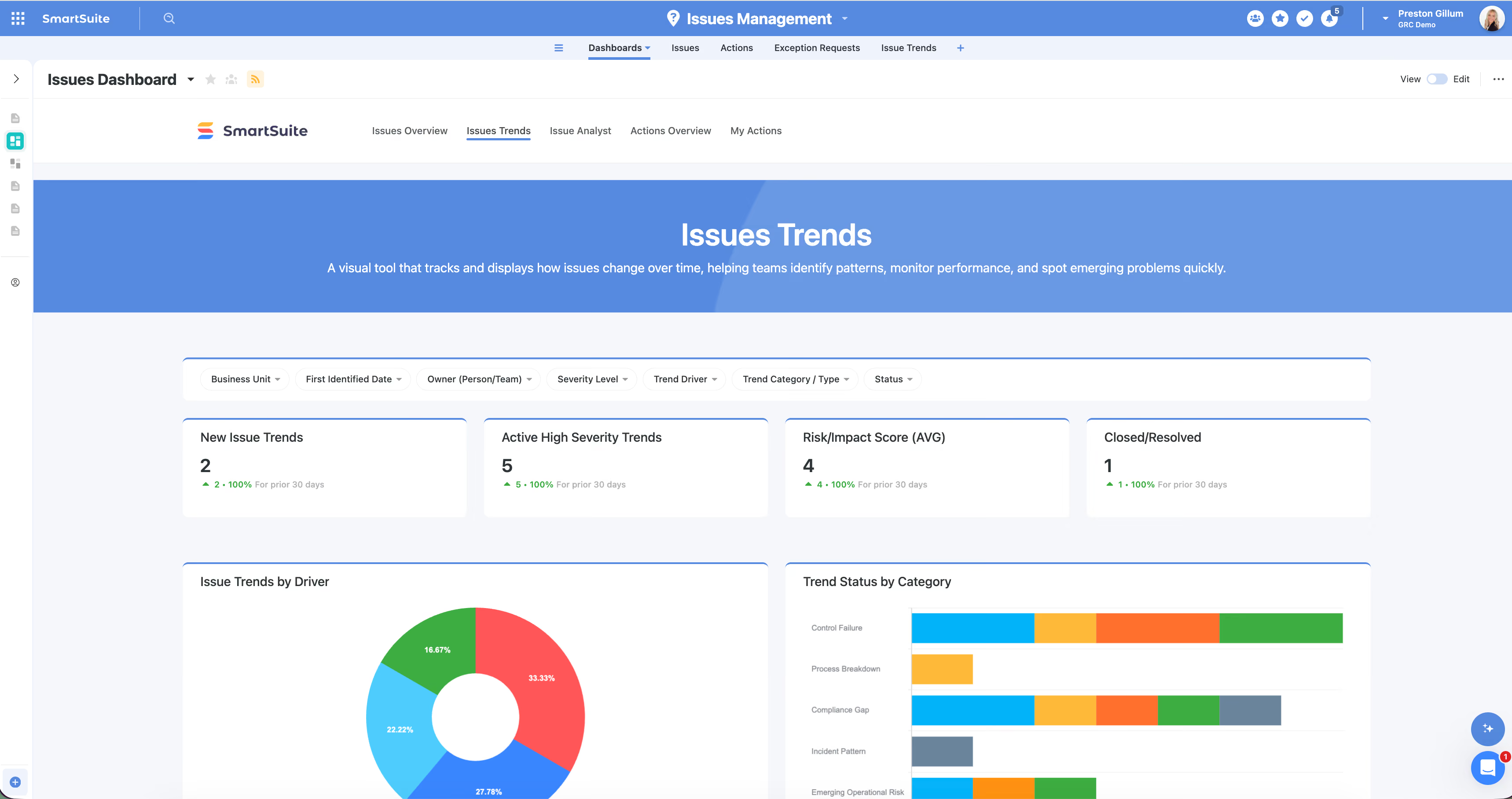
- Trends Dashboard: A one-stop dashboard rolls everything up into top-line metrics (new trends, active high-severity, average risk/impact score, closed/resolved) plus breakdowns by driver, status and category, and business unit.
- Interactive Filtering: A filter widget slices the entire dashboard live by business unit, severity, or driver, so a single rolled-up report answers many questions and can be shared for board reporting without rebuilding views.
- Bring Your Own AI Model: The analysis runs on your own authenticated model, whether a frontier model or a custom LLM, with no SmartSuite model trained on your data.
How it works
- Add the Issues Trends table: Add the Issues Trends table to your Issues Management solution, alongside your existing issues and remediation tables.
- Configure the AI Trend Analysis automation: Set the trigger to run on a schedule (daily, several times a day, weekly), continuously, or on a button click, and point it at your active issues.
- Data fed to the model: The automation feeds each issue's name, description, root cause, source, impact, status, and business-unit links into your chosen model using a prompt you can tailor.
- Review and drill-down: Review the generated trends on the dashboard and drill from any metric into the trends, then into the individual issues driving them.
- Assign actions and owners: Assign target resolution dates, recommended actions, reviewers, and escalation levels to move from insight to response.
- Replicate across GRC: Apply the same prompt-and-dashboard pattern across compliance gaps, risk areas, or incidents to bring AI trend analysis anywhere in your GRC workflows.
- Board reporting and security: Share the dashboard behind SSO for view-only board reporting, with all filtering intact.
Released
June 9, 2026
Product
More updates
The newest releases and improvements across the platform, each with its video and help article.
See all updates


Put these ideas to work
Start a free trial, or book a demo and see how it runs in SmartSuite.