



Linked Records: Dynamic Default Values
Linked Record fields can now carry a default value, so new records and form submissions arrive already linked to the right record.
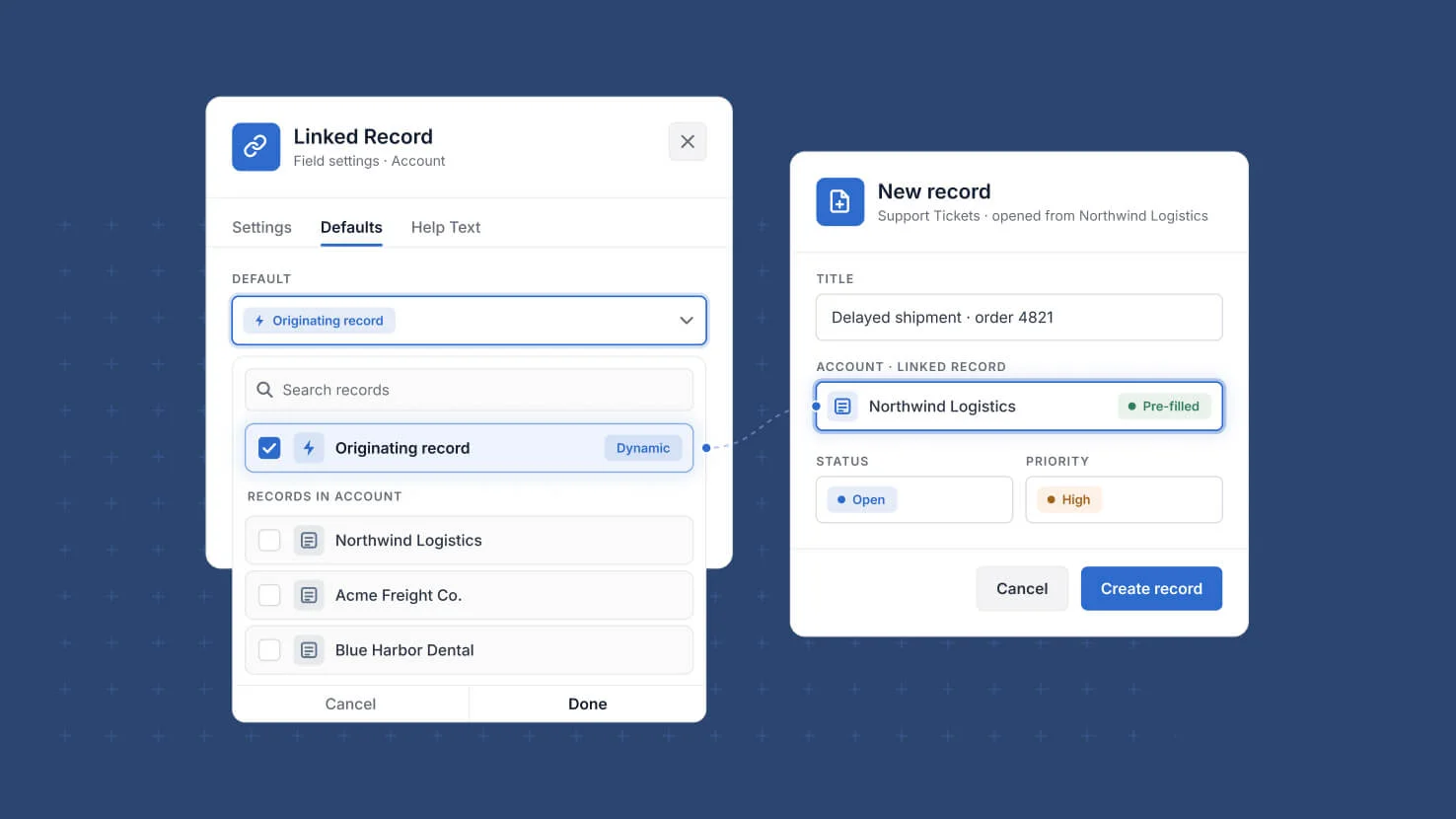
Linked Record fields can now be given a default value, so a new record or a form submission arrives already connected to the record it belongs with. A static default is chosen from a searchable list of record titles, which loads as you scroll and gains a search control once there are more than five options, and a field that accepts multiple entries can carry several defaults at once. The more interesting case is dynamic. Choosing the new Originating Record option means a record created from a button on another record links straight back to the record the button was clicked from, so a corrective action opened from a finding, or a contact created from a customer, is tied to its parent before anyone types anything. That matters for governance work, where the value of a record often depends on the relationship it carries: an evidence item with no link to the control it supports is work that has to be reconstructed later. Defaults are supported in Linked Record field settings, in a button's Create a Record action, and in forms, where an info icon explains that Originating Record applies to internal forms opened from a record. If a record used as a default is later deleted, the field reverts cleanly to no default value. Available now.
Key highlights
- Static defaults. Pick a specific record as a Linked Record field's default so every new record starts connected to the right parent.
- Originating record. A record created from a button on another record links straight back to it, with no manual lookup from the person filling it in.
- Risk and issue workflows. A corrective action or evidence record launched from a finding arrives already linked to that finding, so the audit trail back to its source is never left blank.
- Multiple defaults. Fields that accept more than one entry can carry several default linked records at once.
- Everywhere records are created. Defaults apply in field settings, in a button's Create a Record action, and in forms.
- Safe fallback. If a record used as a default is later deleted, the field reverts to no default value rather than breaking.
How it works
- Open a Linked Record field's settings and choose a default from a searchable list of record titles, which loads as you scroll.
- A search control appears once there are more than five options and filters against the full set of records, not only the titles already loaded.
- Select several records when the field allows multiple entries, and each one is applied to new records.
- Choose Originating Record in a button's Create a Record action or in a form's Linked Record default values to use the dynamic option, shown first in the list and separated by a divider.
- An info icon in forms notes that Originating Record applies to internal forms opened by a button click on a record, and the option simply has no effect anywhere there is no originating record to use.
More updates
The newest releases and improvements across the platform, each with its video and help article.
See all updates


Put these ideas to work
Start a free trial, or book a demo and see how it runs in SmartSuite.