



SmartDoc: Track Changes
Policies, procedures and other documents that carry weight can now be edited by suggestion instead of being overwritten.
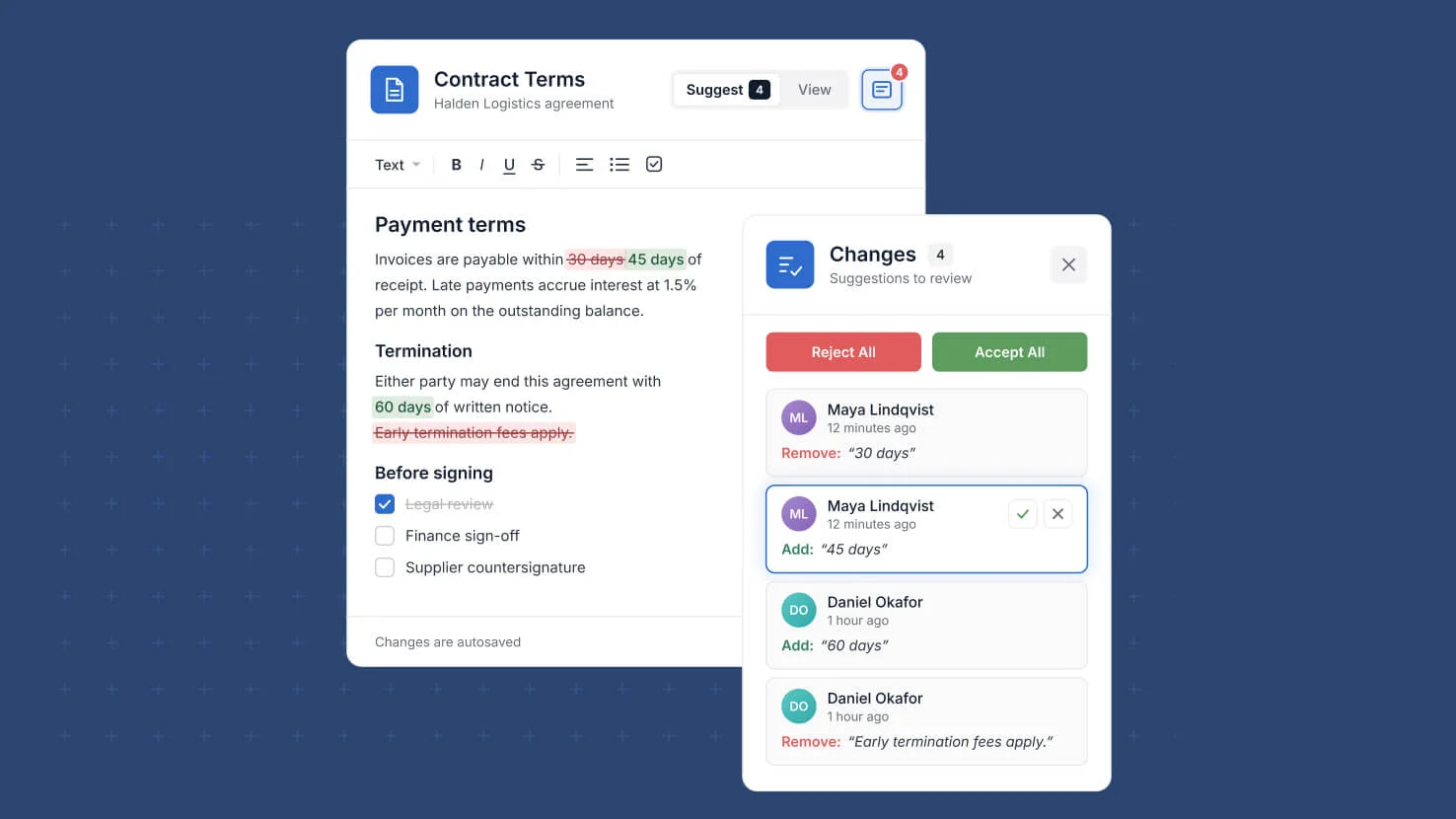
Change Tracking adds a review step to the SmartDoc field, so a policy, a procedure or a control narrative is not quietly rewritten by whoever edited it last. It is a per-field setting: open the SmartDoc field settings, switch on Enable Document Change Tracking, and choose whether everyone with edit permissions can approve suggestions or only a named set of members and teams. From that point every edit to the document is held as a suggestion rather than applied. Additions appear highlighted in green and removals in red strikethrough, and paragraph breaks, spaces and images are tracked the same way as text. On the record, the field shows a Click to Edit control with a badge counting pending suggestions and unresolved comments, and its preview always renders the approved version, so the document people read is the one that has been through review. The expanded modal opens read-only in View mode and switches to Suggest mode to edit, with a Changes panel on the right listing every suggestion and comment as a card. Approvers accept or reject one at a time or use Accept All and Reject All, and markup options let any reader see the document with markup shown, as it would read if everything were accepted, or as it stands today. Reviewers who are not approvers can still comment on a passage and reply to a suggestion, so the reasoning for a change sits beside the change itself. Writes that arrive from a form, an import, the API or an automation become suggestions as well, so nothing reaches a tracked document unreviewed. Every accept, reject and comment resolution is recorded in Change History with its author and time, searchable there and retained for three years, while the record's Activity History and Last Updated move only on approval and credit the person who proposed the change. Available now in SmartDoc field settings, off by default.
Key highlights
- Controlled document review. Switch on Change Tracking for a SmartDoc field and every edit becomes a suggestion that an approver must accept before it reaches the document.
- Named approvers. Let everyone with edit permissions accept and reject, or restrict approval to a chosen set of members and teams for policies and controlled procedures.
- Inline redlining. Additions appear in green and removals in red strikethrough, so a reviewer sees exactly what is being proposed and what it replaces.
- Discussion before decision. Comment on any passage and reply to a suggestion, so the reasoning for a change sits beside the change itself.
- Audit-ready change history. Every accept, reject and comment resolution is recorded with its author and time, searchable in the panel and retained for three years.
- Nothing slips in unreviewed. Writes from forms, imports, the API and automations are captured as suggestions as well, never applied straight to a tracked document.
How it works
- Open the SmartDoc field settings, switch on Enable Document Change Tracking, then choose who can approve and reject suggestions.
- On the record, the field shows a Click to Edit control with a badge counting pending suggestions and unresolved comments, and opens into the expanded SmartDoc modal.
- The modal opens read-only in View mode showing the approved version; switch to Suggest mode to edit, and each change you make is saved as a suggestion.
- The Changes panel lists every suggestion and comment as a card, where approvers accept or reject one at a time or use Accept All and Reject All.
- Markup options let any reader see the document with markup shown, as it would read if everything were accepted, or as it stands today.
- Activity History and Last Updated on the record move only when a suggestion is approved, and the change is credited to the person who proposed it.
More updates
The newest releases and improvements across the platform, each with its video and help article.
See all updates

Put these ideas to work
Start a free trial, or book a demo and see how it runs in SmartSuite.