



Asana Review: Is It Worth It in 2026? [In-Depth]
![Asana Review: Is It Worth It in 2026? [In-Depth]](https://cdn.prod.website-files.com/60db0944651d4b59a704ef93/6acad5abc910b3adf9e54264_6acad5a6a43009b06fe60f85_asana-review-thumbnail-image.webp)

SmartSuite provides work platform for standardizing workflows in the following areas:
-
Governance, Risk & Compliance
-
IT & Service Ops
-
Project / Portfolio Management
-
Business Operations

Figuring out if Asana is the right project management solution for your professional or organizational needs?
- Range of features: 8/10. Asana offers a good range of features, including customizable dashboards, workflow automation, AI, and dedicated portfolios, but the tool lacks collaboration functionality.
- User interface and usability: 7/10. The platform can be complicated to set up and comes with a slight learning curve – but it’s easy to use once you’ve got the hang of it.
- Security measures: 9/10. Security experts agree that Asana offers strong security measures with advanced admin controls and data protection.
- Integrations: 8/10. Asana has a comprehensive range of native integrations with various productivity apps that are easy to integrate.
- Customer support: 6/10. There are conflicting reviews of Asana’s customer support – but what stood out to me is that customer success is a paid add-on, and 24/7 support is only available for Enterprise customers when some competitors like SmartSuite include support on every plan.
- Pricing model: 7/10. Despite Asana’s generous free plan, the tool definitely sits on the more expensive side of project management solutions and hides the two-seat minimum for its Starter plan until checkout.
In this honest Asana review, I’ll go over the platform in detail, including its features, usability, security, integrations, and even customer support.
Average rating: 7.5/10.
Asana Overview
Asana is a work management platform built for large organizations that helps you track and automate your tasks through automated workflows and work portfolios.
The software lets you organize multiple projects with access to all documents, tasks, and due dates in one place, so you would not have to switch between projects every time.

I think of the platform as ideal for enterprises looking to build flexible workflows through dependencies and automation.
💡 Since the aim of this guide is to review Asana in great detail, I’ll be giving my unbiased ratings on the platform’s features, interface, security, integrations, and customer support.
Let’s dive deeper into the software’s features: 👇
Asana’s Core Features
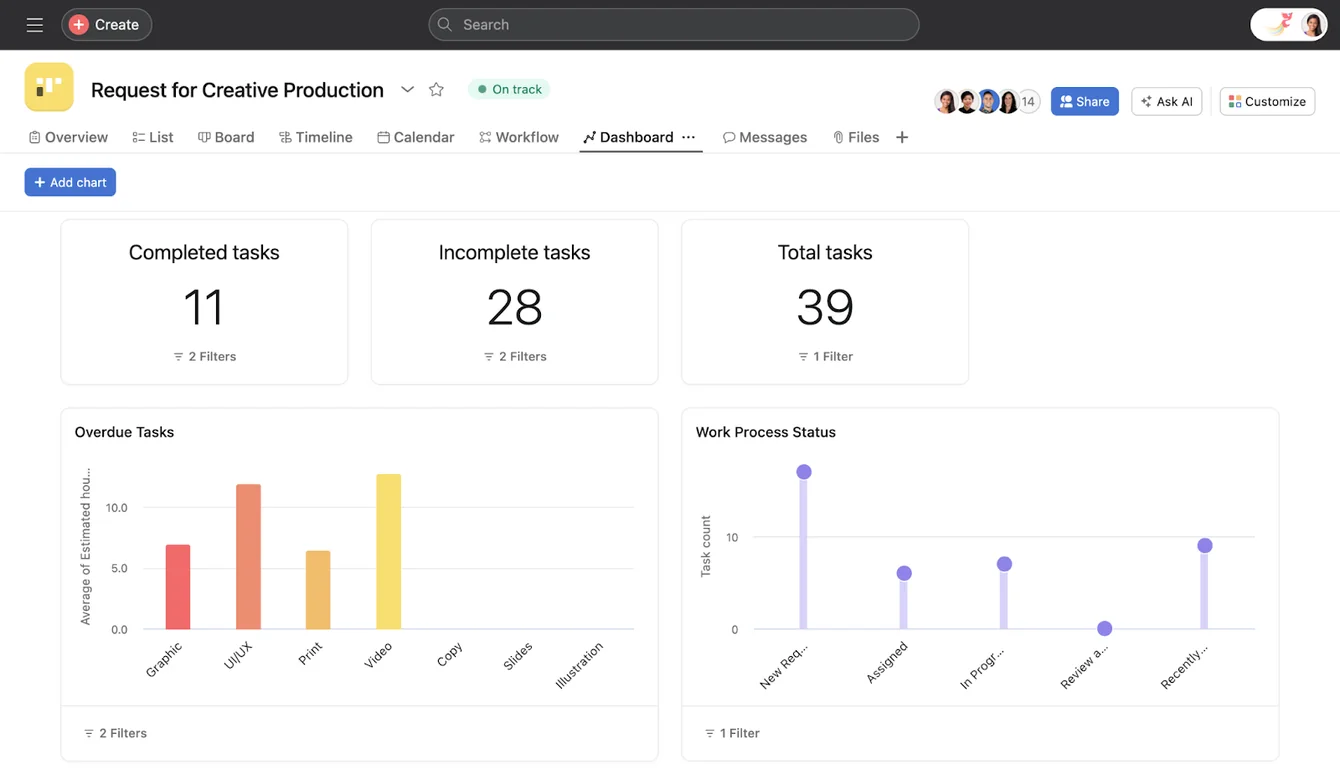
Customizable Dashboard & Data Visualization
With Asana, you create detailed custom dashboards with visual elements like line charts, bar graphs, tables, progress bars, and more.
Each dashboard can be customized, enabling you to present project information in the most preferred way to your team members and external stakeholders.
You and your team can pull data from multiple sources, and each chart gets updated in real-time.
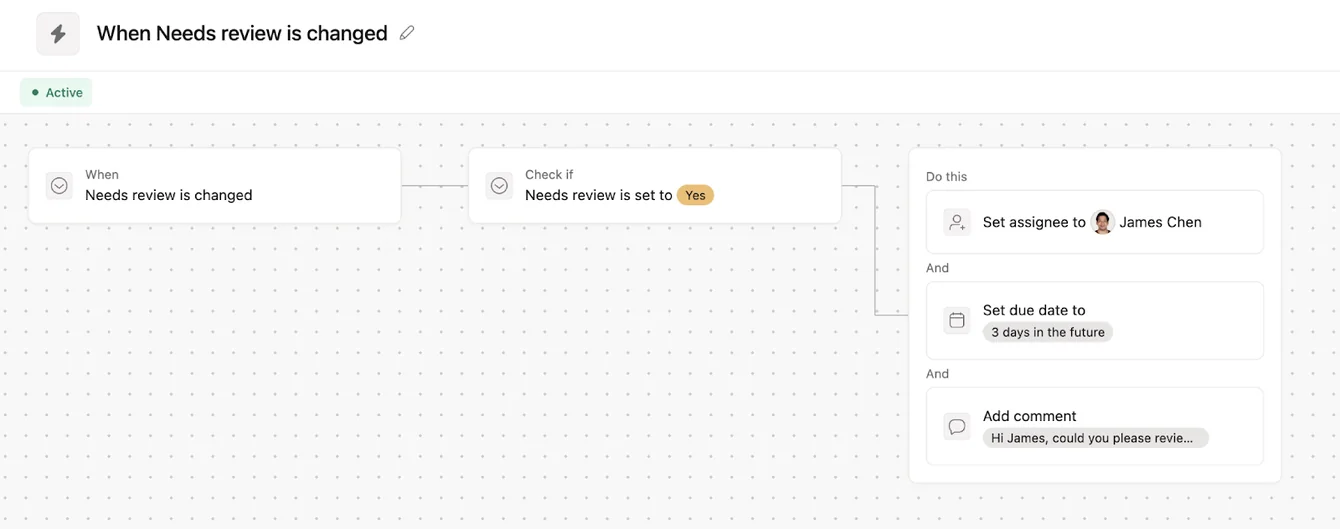
Workflow Automation
Asana gained recognition for its automated workflows. The tool helps you create and manage automated processes to eliminate manual tasks.
You can also create automation bundles catering to specific projects and use the same automation across projects, standardizing the work.
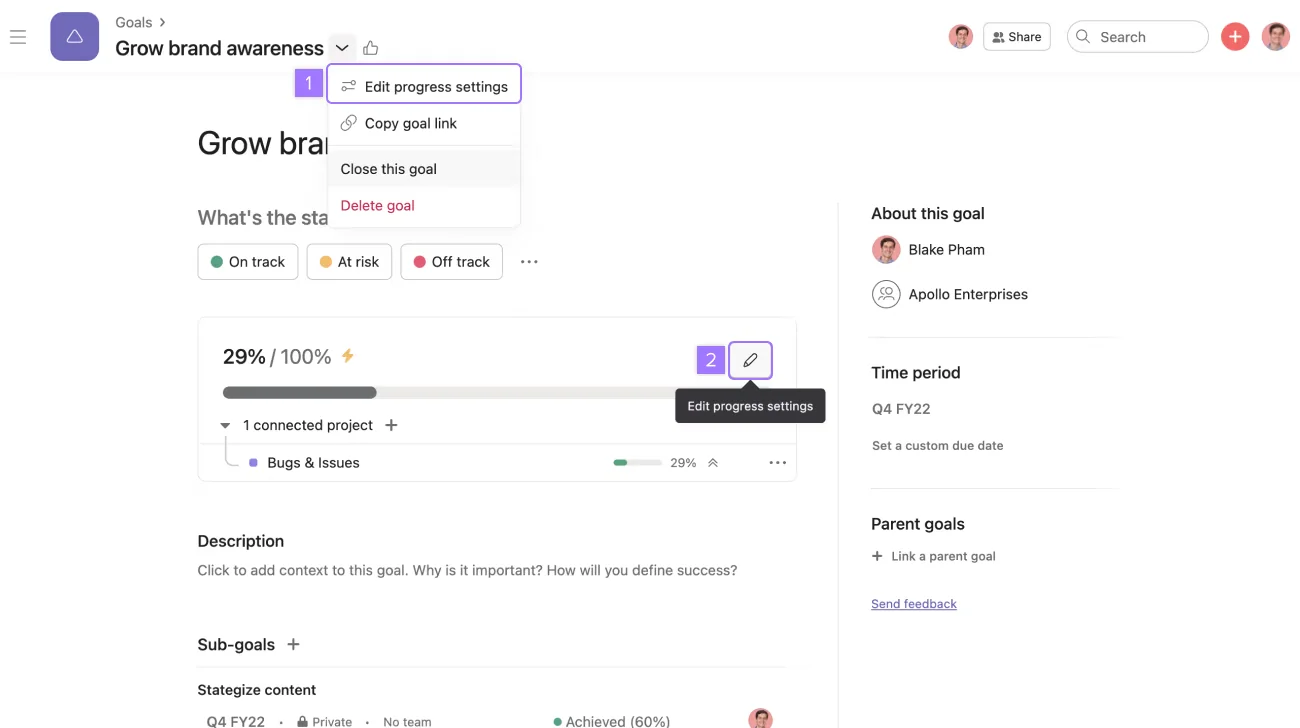
Goals & Reporting
Through Asana’s detailed reporting features, you can create project and company-wide goals and track progress over time.
The project management software helps you connect each task to the bigger goals, provide visibility into how milestones and portfolios contribute to objectives, and keep your team focused on tasks with the highest impact on the bottom line.
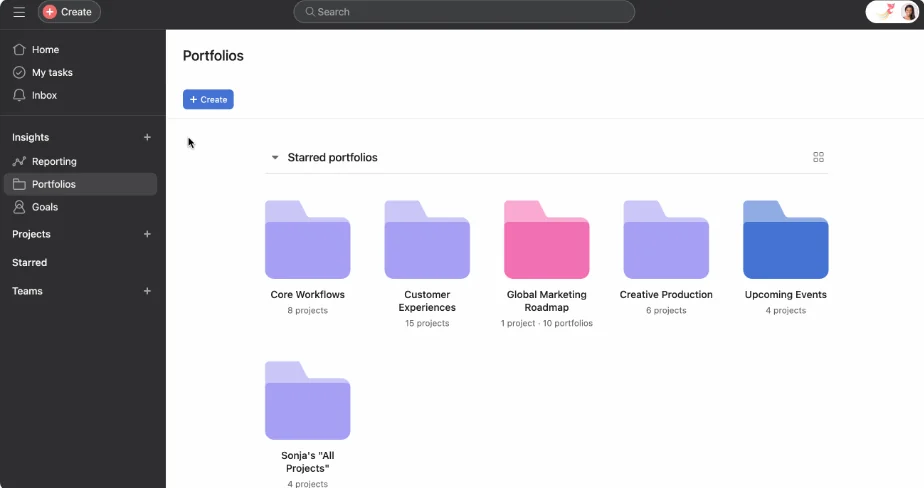
Dedicated Portfolios
You can set up Asana’s dedicated portfolios where your team can organize multiple projects – if you’re a professional services company looking for project management software.
Each portfolio can be tailored to your clients and provides an overview of work status and go-live dates.
Rating: 8/10.
Asana offers a comprehensive range of features alongside workflow automations – but the platform has limited collaboration capabilities due to their single assignee feature.
In Asana, you cannot assign a task to multiple team members.
I think that multi-assignees are necessary for collaboration. Otherwise, my team members would have to communicate via other platforms.
This adds an extra layer of complexity and can be counter-productive, as it forces workarounds.
That issue can also be seen in verified G2 reviews of Asana, which go over the fact that Asana doesn't support assigning work to a large group of individuals very well.

‘’One downside to using Asana is that it doesn't support assigning work to a large group of individuals very well. Also, if you have many tasks to complete and need to move on to the next one, you must return to the previous one before starting the new one. This can take up considerable time, especially if you're under duress.’’ - G2 Review.
Asana’s Interface: Is It Easy To Use?
Asana starts with a ‘’greeting’’ interface that provides you with an easy-to-understand overview of your outstanding tasks and projects that you’re involved in.

Inside the tasks, it’s easy to understand who’s responsible for what, the level of priority and the approvals needed – with a comment section for more details.
However, I did notice that if you have too many tasks with sub-tasks and dependencies, the platform’s interface can get cluttered and overwhelming.

Rating: 7/10.
Asana is easy to use with a user-friendly interface, but some elements of its navigation menu look a bit unclear, and the dashboards become disorderly with more tasks.
According to users of the platform, sub-tasks and dependencies further complicate task identification and reassignment.

‘’Sometimes customizing workflows, tasks and navigating the system can be overwhelming, requiring significant time and effort to set up and master the tasks set-up and the follow-up dates, but once someone spends time it gets easier to use.’’ - G2 Review.
Asana’s Security Measures
According to trusted security experts on the Internet, Asana is generally considered as secure.
The software employs advanced security measures to protect user data, including encryption and regular security audits.
In terms of security features, the platform offers:
- Multi-factor authentication, 256-bit encryption at rest and in transit and cross-regional backups even at its free plan.
- Private teams and private projects with unlimited free guests and unlimited view-only licenses.
- Admin Console and admin announcements
- SAML.
- User and group provisioning and de-provisioning (SCIM).
- Mobile data controls and guest invite controls.
- Audit log API (built to support SIEM, DLP, archiving, and eDiscovery).
- Data loss prevention (DLP) integration.

Rating: 9/10.
Considering Asana’s positive reviews online from security experts and its comprehensive range of security features, I cannot give it a score lower than 9 (assuming there’s no perfect security).
Asana’s Integrations
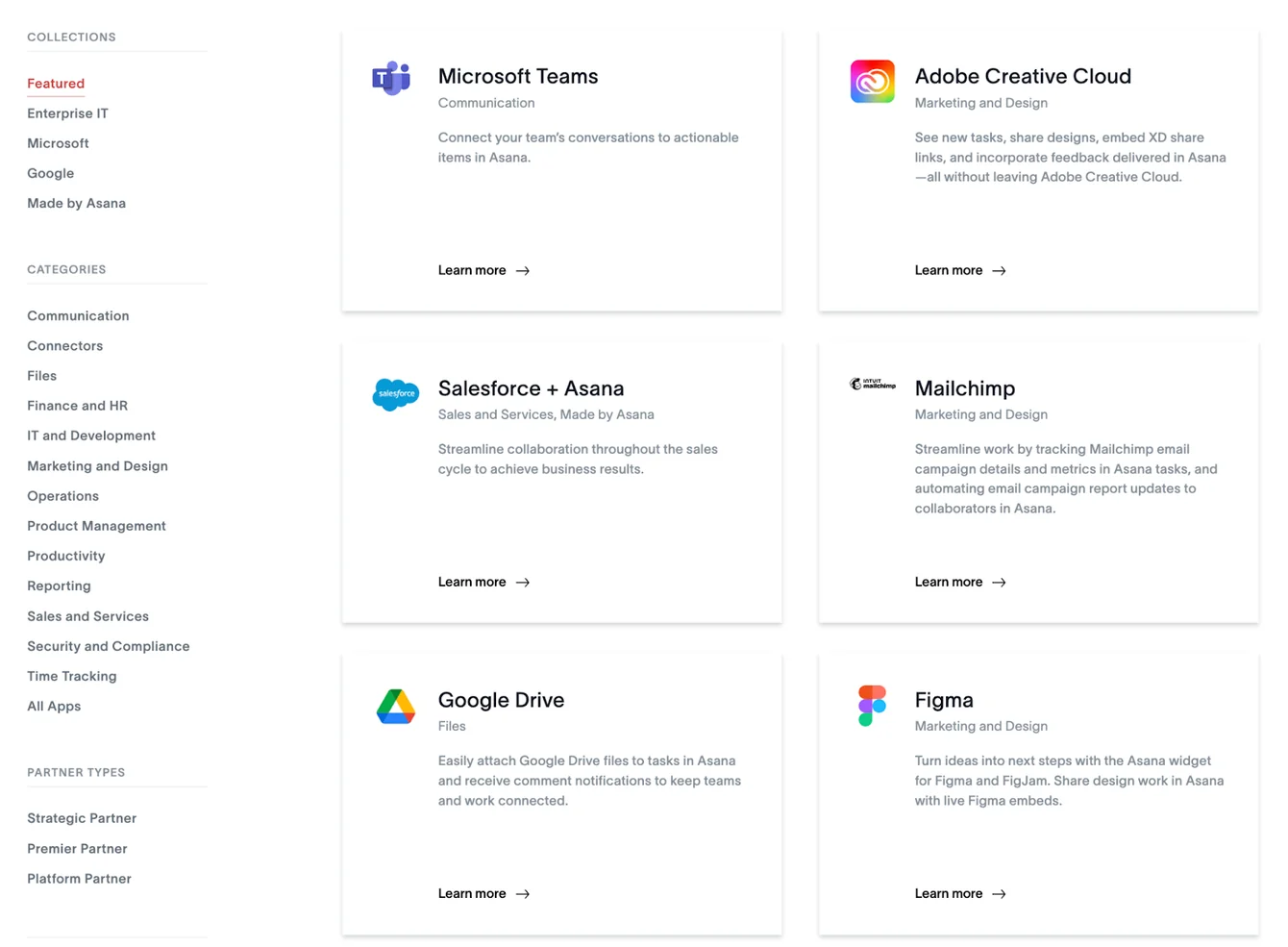
Asana offers an integration suite that consists of advanced tools for team communication, finance, productivity, and connectors.
Compared to the other alternatives on the market, Asana casts a wider net with its connectors, including Clari Connect, portable, Workato, Power BI, Tableau, and Microsoft Power Automate.
The platform also offers an open API for custom integrations.
Here are Asana’s key integrations
- Figma.
- Salesforce.
- HubSpot.
- Bynder.
- DocuSign.
- Notion.
Rating: 8/10.
Asana offers a good range of integrations to its customers that are easy to set up and implement from a technical perspective.
Customers of the platform agree with the statement above, as one verified enterprise user of the platform notes how easy it was to integrate Asana with their productivity apps.

‘’The ease of integration and implementation with Asana into my daily routine has been effortless.’’ - G2 Review.
Asana’s Customer Support
Right off the bat, I noticed that Asana offers 24/7 customer support to only Enterprise customers.
That leaves their free tier users and two other paid plans with Asana’s self-help forums, academy, webinars, and developer guides.

Asana does offer dedicated customer success support but as a paid add-on.
Some customers of the platform are happy with the level of support they were provided on the platform when it comes to setting up integrations and learning about the platform.

‘’That learning curve was worth it, though, especially since we have started setting up integrations, and know that customer support is there for us as we add more.’’ - G2 Review.
On the other hand, other users of the tool claim that the platform’s customer support can take too long to respond to their queries.

‘’Customer support is taking longer to respond.’’ - G2 Review.
Rating: 6/10.
Considering that there are conflicting reviews about Asana’s customer support and the fact that there is no 24/7 support for customers who are not on the Enterprise plans, I cannot give the tool more than 6/10 in this category.
There are competitors to Asana, like SmartSuite, that include live support on every plan.
Asana’s Pricing Model: Does It Provide A Good Value For Money?
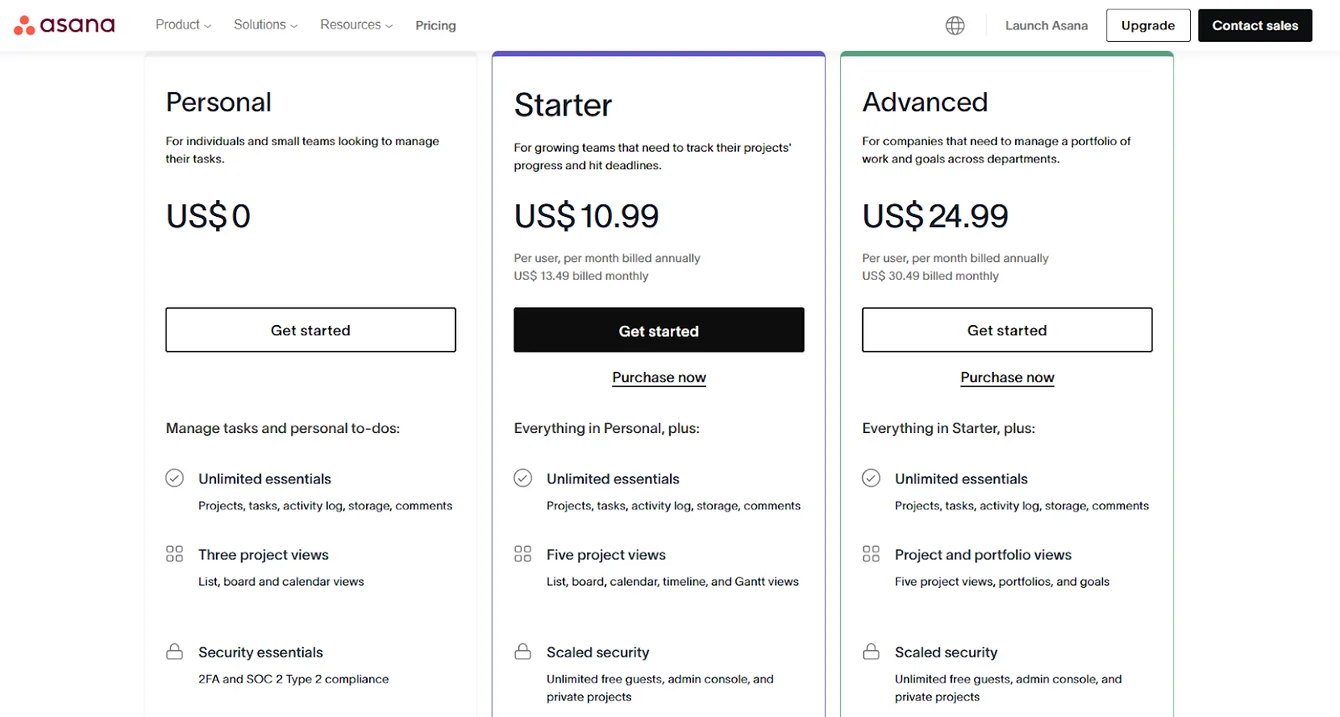
Asana offers a free Personal plan for up to 2 users with unlimited file storage (100MB per file) and three task views: board, list, and calendar.
The platform has four paid plans with a 30-day free trial:
- Starter: Starts at $10.99/user/month for up to 500 members, which includes Asana AI, private projects and teams.
- Advanced: Starts at $24.99/user/month, which includes 25,000 automations/month, 100 portfolios, universal reporting, and goal tracking.
- Enterprise: Custom pricing, which includes advanced integrations, unlimited seats, portfolio, and automation bundles.
- Enterprise +: Custom pricing, which includes audit log API, HIPAA compliance, and data loss prevention integrations.
Rating: 7/10.
Asana offers a free plan for up to 2 seats and four paid tiers for organizations of all sizes.
Despite that, the pricing can be a little confusing with a lack of transparency with hidden costs – according to some users on G2.
For instance, the tool only reveals the two-seat minimum on its Starter plan on the checkout page.
Asana doesn’t show the seat numbers on its pricing page, which can surprise users at checkout.

‘’Per user pricing can be high for a PM tool, and once adopted within an organization, every user with that specific company's email domain must have a license (guests can only be email addresses outside of the main domain).’’ - G2 Review.
How Does Asana Compare To Alternatives On The Market?

💡 You can check out our in-depth comparison of ClickUp vs. Asana vs. SmartSuite, where we cover the three leading project management solutions.
What Are Customers Saying About Asana?
Throughout this article, I’ve been showing you a glimpse of the users’ opinions on Asana – but let’s dive a bit deeper.
Key takeaways: Asana’s customers are happy with its clean and intuitive interface but are not satisfied with its lack of native time tracking and confusing timeline view.
What users love:
- Clean and intuitive interface.
- Strong goal-tracking features.
- Reliable mobile app.
- Excellent for task dependencies.

‘’One of my favorite pieces of Asana is the dashboard. It's customisable with different widgets so you can organize your workspace with a quick view of things like assigned tasks, pending statuses (color-coded by severity), forms, projects, a private notepad to jot down notes, and others. You can flip between a weekly view and a monthly view. It has a functional app that mirrors the desktop version.’’ - G2 Review.
Common complaints:
- Limited to one assignee per task.
- Timeline view can be confusing with subtasks.
- Missing native time tracking.
- Higher-tier plans are needed for essential features.

‘’No doc functionality; it's good for many things, but it's not easy to combine both table and doc functionality,y which can be very useful, especially for creating nested pages.’’ - G2 Review.

‘’There is no timeline view of the various tasks since each task is tracked on a separate line item. I wish we can turn all the tasks into a Gant chart of some sort, so we can track progress and due dates.’’ - G2 Review.
Verdict: Is Asana Really Worth It?
So far, I've rated Asana:
- Range of features: 8/10.
- User interface and usability: 7/10.
- Security measures: 9/10.
- Integrations: 8/10.
- Customer support: 6/10.
- Pricing model: 7/10.
Which gives Asana an average rating of 7.5/10 for me.
To summarize:
Asana is best suited if:
✅ Your company prioritizes goal-setting and aligning work with company objectives.
✅ You require advanced data visualization and reporting capabilities for project insights.
✅ Your team needs a clean, intuitive interface with a focus on task and project management.
Asana may not be ideal if:
❌ You're working with a tight budget, as Asana can be expensive for large teams.
❌ Your team needs extensive collaboration tools, as Asana doesn't offer competing tools in this area.
❌ You require customer success or 24/7 support without breaking the bank.
Looking For An Asana Alternative?
Asana excels with its goal tracking and strong workflow automation features but comes with a hefty price tag and a minimum of two user seats.
Across the Asana alternatives on the market in 2026, SmartSuite (that’s us) is one of the most affordable, easy-to-use, and feature-packed platforms.

- Our platform offers better task management capabilities through 40+ fields, including a linked records field.
- SmartSuite has built-in team collaboration tools like email integration, whiteboards, and a member directory.
Let’s look at some key features that make SmartSuite the best Asana alternative.
#1: Advanced Task Management
SmartSuite’s task management feature helps small—to large-sized organizations plan, manage, and track all their tasks in an intuitive dashboard.
One area where SmartSuite shines over Asana is that in our platform, you can turn anything into a task—a checklist item, comments, or sub-item.
You can also quickly assign these tasks to the right stakeholder with a due date and priority status.
Other key features that stand out about SmartSuite include:
- 7+ task views: SmartSuite offers over seven task views, including Grid, Kanban boards, Card, Calendar, Timeline, Map, and Chart. All the views are available on every plan, letting you build more flexible workspaces.

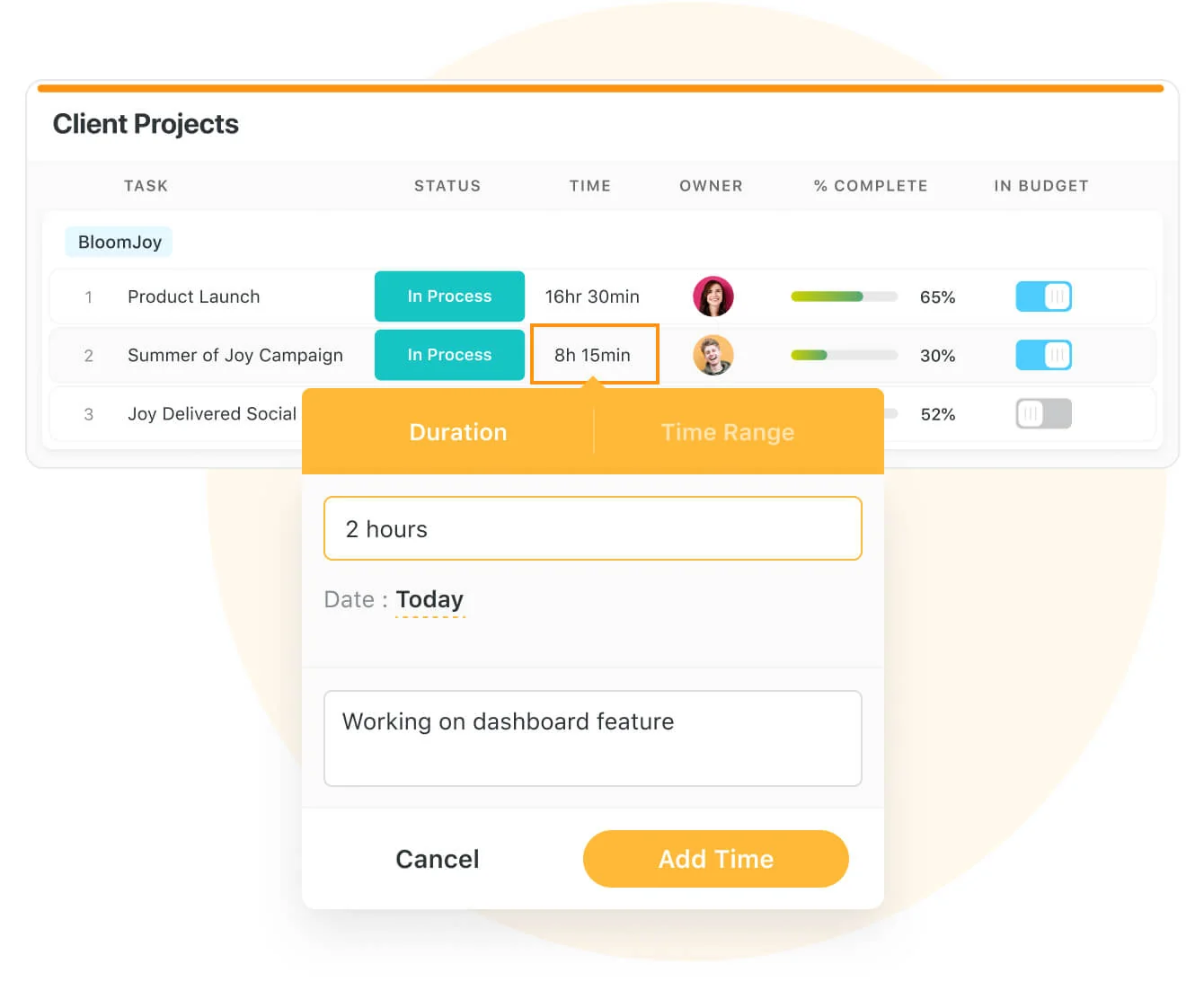
- Native time tracking: Your team can keep track of time on every task or project by adding a time field in your workspace.
You also get to generate timesheet reports to accurately view billable and non-billable hours and track your team’s productivity levels.
- Set up recurring tasks: It is possible to automate routine tasks within a specific record by setting it as a repeating task. Choose the frequency (daily, weekly, monthly), set the task status, and choose the day/date to start the repeating cycle.

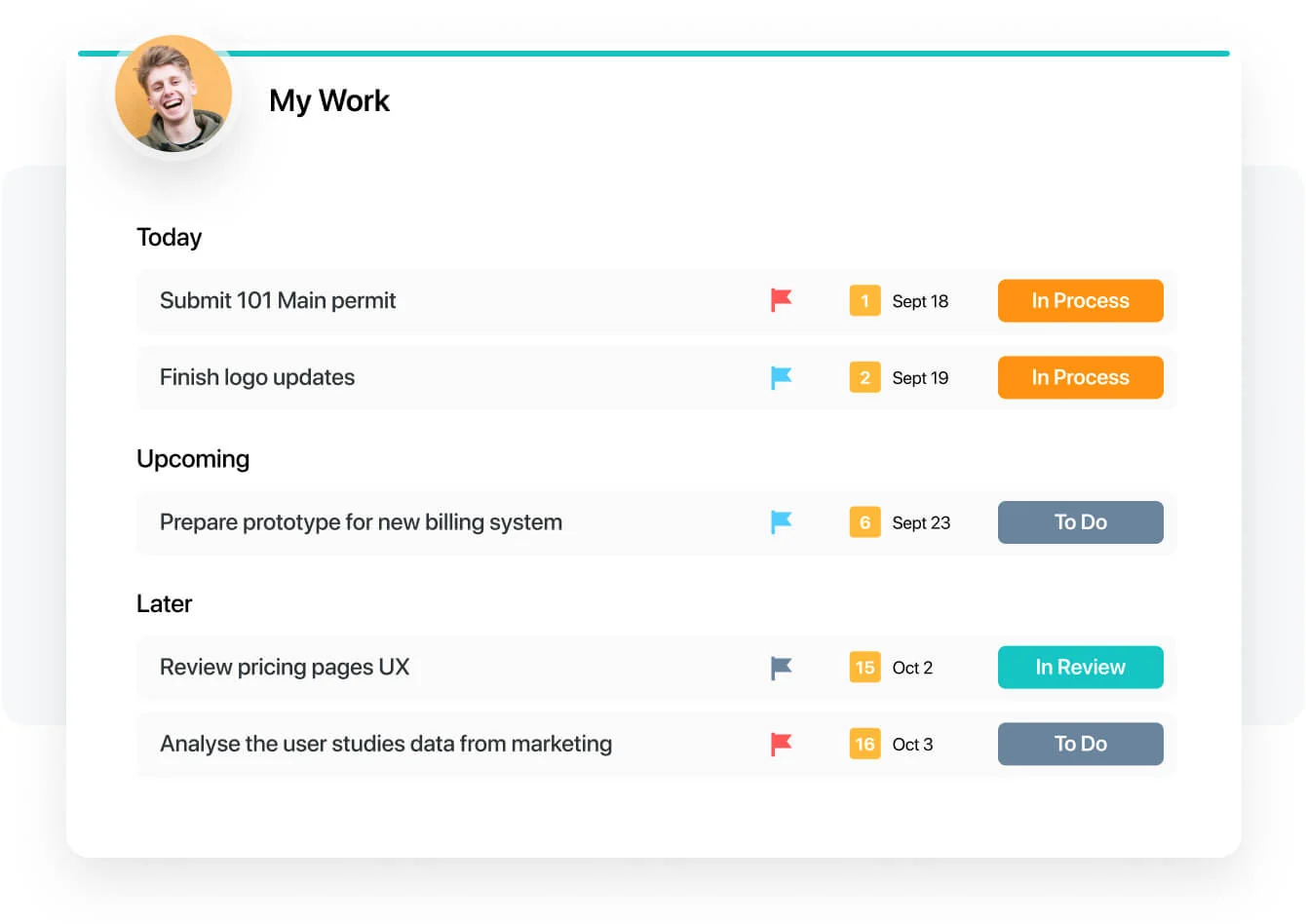
- My work section: A dedicated section where you get a granular view of all the tasks assigned to you, notifications you received, and comments that need your attention.
You can group the tasks by assigned date, priority level, or progress status. My work section creates a dedicated space, making task management a breeze for all of your team members and keeping them on their due dates.
#2. Team Collaboration
Our platform focuses on facilitating integrated communication with less contextual switching.
Unlike Asana, SmartSuite offers a comprehensive team collaboration feature that is replete with tools to ensure team members get real-time updates, share feedback or approvals, and keep external clients updated.

Some key features that boost a team’s productivity include:
- Comments to task conversion: You can convert any comment into an action item within a record or a field within a record.
Also, you can assign these tasks to team members and track their progress in real-time.

- Member’s Directory: Your leadership team will get a complete list of all your team members in a single dedicated space and get access to information such as their department, position, location, timezone, etc.
To find the right member(s), you can use grouping or filtering options without manually scrolling through the list.

- Email integration: Integrating your email account with SmartSuite and sending and receiving emails within your workspace so you do not have to switch.
And the best part? SmartSuite offers an intuitive mobile app that lets you stay in touch with your team members on the go.

#3. Flexible Automation Builder
SmartSuite includes automation on every plan, similar to Asana.
However, SmartSuite’s automation builder is much more user-friendly and lets you automate actions across workspaces—on a task or overall project level.
It gives you more power to automate and build processes that handle recurring tasks such as status updates or follow-up emails.

The automation builder offers no-code functionality to build simple one-liner sequences or multi-step flows through triggers, conditions, and actions.
Your team can choose the prebuilt actions or integrate SmartSuite with email, file storage, messaging, or SMS platforms such as Slack, Microsoft 365, and calendar apps to build custom actions.

You can, for example, authorize your account by selecting the Gmail integration action, specify your email addresses, and customize your message.
This email will be sent when the trigger and its conditions are met.

SmartSuite Pricing
Unlike Asana, SmartSuite offers a 14-day free trial of its Professional plan with no credit card required.
The trial gives you the full Professional plan: team collaboration tools, 7+ task views (Dashboard, table, boards, cards, list, calendar, and grid), time tracking, automations, and more.
We offer four paid plans:
- Team: Starts at $15 per seat/month billed annually ($20 billed monthly, minimum 3 billable users), including 8+ dashboard views, 25,000 automation runs and API calls per month, time tracking, and collaborative SmartDocs.
- Professional: Starts at $32 per seat/month billed annually ($36 billed monthly, minimum 5 billable users), including two-factor authentication, Gmail & Outlook integrations, and unlimited editors.
- Enterprise: Custom pricing (no seat minimum), including audit logs, data loss prevention, and 500,000 automation runs and API calls per month.
- Signature: Customized plan tailored to your organization’s needs and team size.

Get Started with SmartSuite For Free Today
If you want to customize your workspace to the last bit and need a tool that does it all, Asana is the ideal choice.
But with such flexibility comes a higher learning curve and a hefty price tag. The platform also lacks critical project management features, such as collaboration features.
SmartSuite’s platform helps you tackle this by offering just the right customization, native collaboration capabilities and a library of 200+ project management templates to get your projects up and running.
Here’s what's in it for your team when you try SmartSuite:
- Access to a 14-day free trial with multi-board views (Kanban, Chart, Map, Timeline, Card, and Calendar) and 40+ field types, including formula and linked record fields.
- No-code automation builder with up to 500,000 automation runs a month on Enterprise.
- Built-in productivity tools, including time tracking, status tracking, and checklists.
- Team collaboration and planning tools such as whiteboards and SmartSuite docs (unlike Asana, which does not have them).
- Resource management across projects and teams.
- 40+ field types, including the option to add your custom fields.
Start a 14-day free trial to explore all its features.
Or, if you’d like to talk to our team of experts, schedule a demo.
Read More
- 10 ClickUp Alternatives You’ll Love
- Airtable Alternatives: 10 Amazing Tools for Managing Projects Like a Pro
- ServiceNow Pricing: Is It Worth It
- 10 Best Healthcare Project Management Tools
- Top 10 Monday.com Alternatives & Competitors
- Monday.com Pricing: Is It Worth It
- ServiceNow Review: Is It Worth It
- Jira Service Management Pricing: Is It Worth It






Put these ideas to work
Start a free trial, or book a demo and see how it runs in SmartSuite.

