


Whether you manage a small team or handle enterprise-level operations, we’ll explore ClickUp's pricing tiers and find out if the tool is the right for your needs.
ClickUp is a go-to project management tool known for doing it all.
But how do its pricing plans compare: both against each other and the competition? Are there any hidden limitations? And which plan fits your needs best?
In this guide, we’ll explain everything and help you choose the right option before you dive into ClickUp.
ClickUp’s Pricing Plans
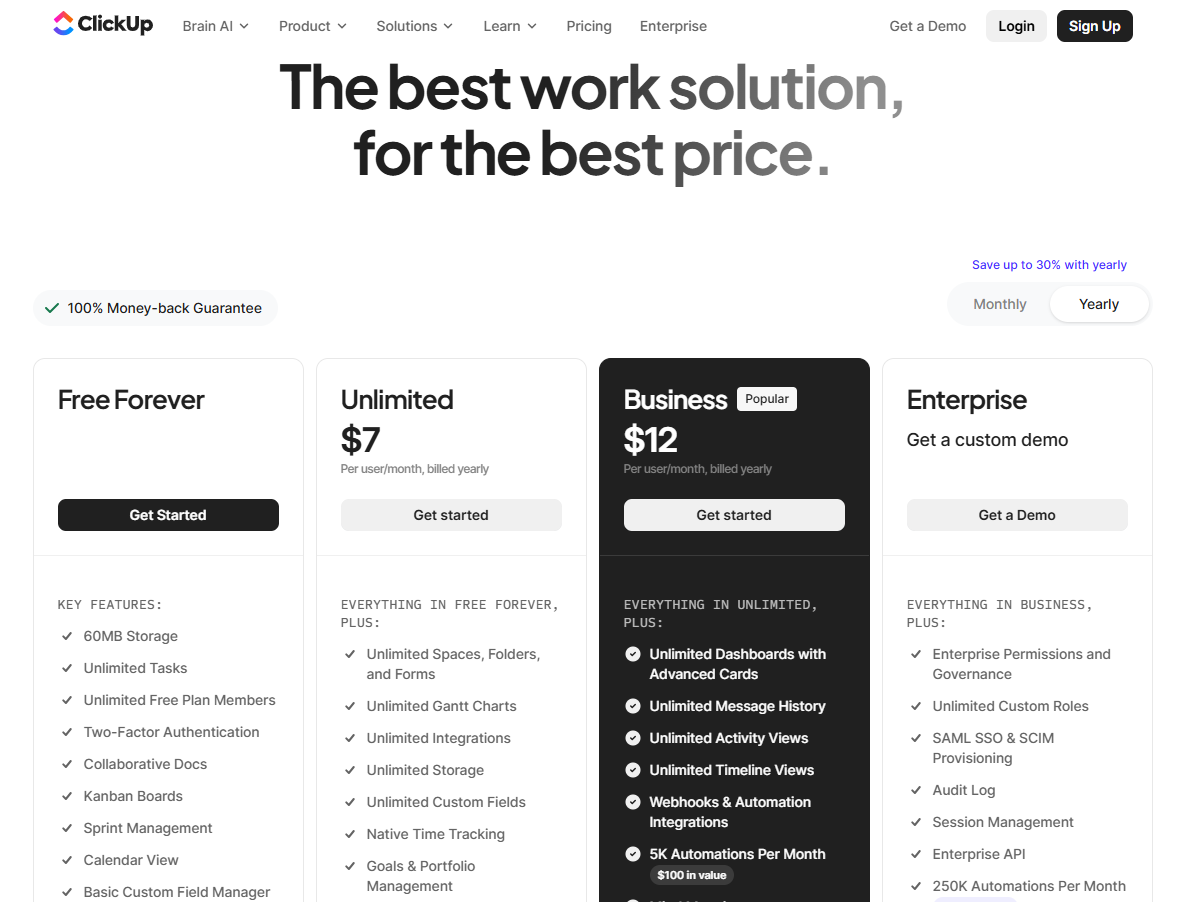
ClickUp’s pricing offers a free plan that includes unlimited task creation, access to 60 MB of storage, and collaborative docs.
The platform has three paid plans with a 14-day free trial:
- Unlimited: Starts at $7 per user/month, which includes access to unlimited custom views, timesheets, guest access, and 100 mind map creations.
- Business: Starts at $12 per user/month and adds private docs, sprint reporting, and all dashboard views.
- Enterprise: Custom price that adds white labelling, enterprise-grade security, and AI features.
Source: ClickUp.
ClickUp: Free Plan
ClickUp’s free plan is best suited for personal use as it offers generous features to get the basic project work up and running.
Here’s a rundown of what’s included in ClickUp’s free plan:
- 60 MB file storage.
- Unlimited Tasks
- Unlimited Free Plan Members
- Two-Factor Authentication
- Collaborative Docs
- Kanban Boards
- Sprint Management
- Calendar View
- Basic Custom Field Manager
- In-App Video Recording
- 24/7 Support
One standout feature is the no-user limit, meaning you can invite as many members as you want at no additional cost. The downside is that you will have no control over the permissions. Every user will have full access to your workspace.
Another downside is that ClickUp offers advanced features such as whiteboards and dashboards but with a maximum cap. For example, you get only 60 whiteboards and 100 dashboards, pushing users to upgrade to higher plans.

Source: ClickUp.
ClickUp: Unlimited Plan
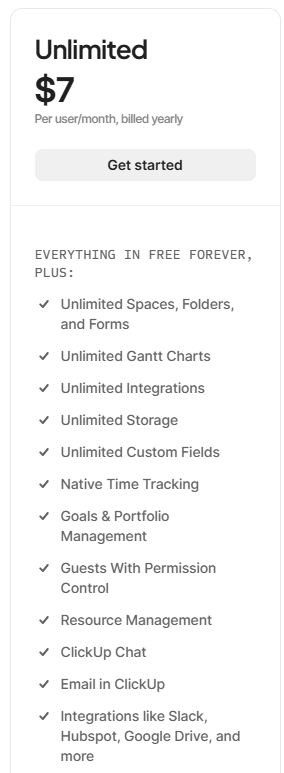
The unlimited plan starts at a low price of $10 per user/month (billed monthly) and is best suited for small teams. This plan solves the biggest limitation of free plans, i.e., no permission for guests. You can manage permission levels to share your workspaces across stakeholders. Oyster additions include unlimited storage, spaces, and Gantt charts.
User cap for some features still exists, although increased:
- Unlimited Spaces, Folders, and Forms
- Unlimited Gantt Charts
- Unlimited Integrations
- Unlimited Storage
- Unlimited Custom Fields
- Native Time Tracking
- Goals & Portfolio Management
- Guests With Permission Control
- Resource Management
- ClickUp Chat
This plan offers a higher degree of customization and advanced features for a comparatively lower per-user fee.
Source: ClickUp.
ClickUp: Business Plan
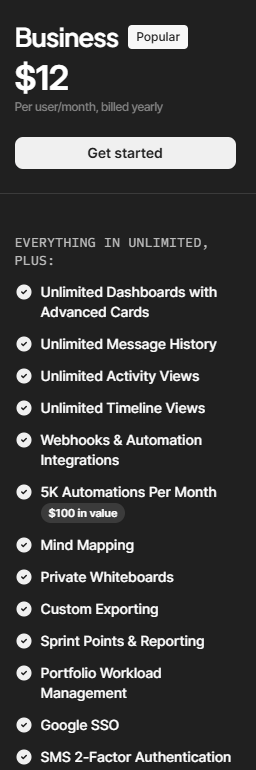
ClickUp positions its business plan as its most preferred plant for medium—to large-sized businesses. In addition to more control over workspace customization, the plan lifts nearly all use caps and offers unlimited whiteboards, mind maps, dashboards, and views.
This plan also offers more sprint and time management features, including sprint reporting, granular time estimates, and goal organization in the folder. It would be the right fit for sprint, or dev-focused teams.
Additional business plan features include:
- Unlimited Dashboards with Advanced Cards
- Unlimited Message History
- Unlimited Activity Views
- Unlimited Timeline Views
- Webhooks & Automation Integrations
- 5K Automations Per Month
Source: ClickUp.
ClickUp: Enterprise Plan
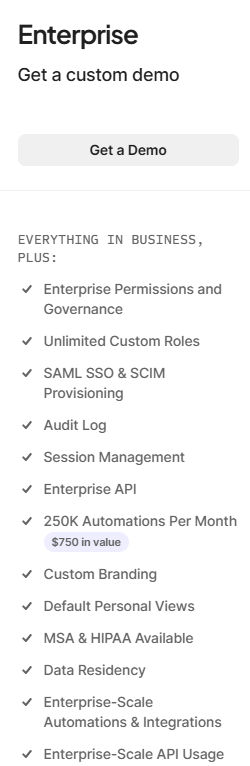
The enterprise plan offers the highest level of security, advanced integrations, and enhanced permission and control. For teams who want all this and have many seat requirements, talking to the sales team to get a custom quote would be the right choice.
Some additional capabilities that the enterprise plan includes:
- Enterprise Permissions and Governance
- Unlimited Custom Roles
- SAML SSO & SCIM Provisioning
- Audit Log
- Session Management
- Enterprise API
- 250K Automations Per Month
Source: ClickUp.
Looking for a ClickUp Alternative?
Despite being an eye-catcher, ClickUp might not be the best project management tool. Users have complained about slow loading time while managing many projects and confusing UI due to the high level of customizations.

Among the ClickUp alternatives, SmartSuite is one of the most affordable, easy-to-use, and feature-packed platforms.
- It offers better task management capabilities through 40+ fields, including a linked records field.
- It has built-in team collaboration tools like email integration, whiteboards, and a member directory.
Let’s look at some key features that make SmartSuite the best ClickUp alternative.
SmartSuite’s Key Features
#1: Advanced task management
SmartSuite’s task management feature helps small—to large-sized businesses plan, manage, and track all their tasks in an intuitive dashboard.
One key area where SmartSuite really shines over ClickUp is that in SmartSuite, you can turn anything into a task—a checklist item, comments, or sub-item. You can also quickly assign these tasks to the right stakeholder with a due date and priority status.
Other key features that stand out:
- 7+ task views: SmartSuite offers over seven task views, including Grid, Kanban boards, Card, Calendar, Timeline, Map, and Chart. All the views are available starting from its free plan, letting you build more flexible workspaces.

- Native time tracking: Keep track of time on every task or project by adding a time field in your workspace. You also get to generate timesheet reports to accurately view billable and non-billable hours and track your team’s productivity levels.

- Set up recurring tasks: Automate routine tasks within a specific record by setting it as a repeating task. Choose the frequency (daily, weekly, monthly), set the task status, and choose the day/date to start the repeating cycle.

- My work section: This is a dedicated section where you get a granular view of all the tasks assigned to you, notifications you received, and comments that need your attention.
You can group the tasks by assigned date, priority level, or progress status. My work section creates a dedicated space, making task management a breeze for all the team members and keeping them on their due dates.

#2. Integrated team collaboration
SmartSuite focuses on facilitating integrated communication with less contextual switching. Its comprehensive team collaboration feature is replete with tools to ensure team members get real-time updates, share feedback or approvals, and keep external clients updated.
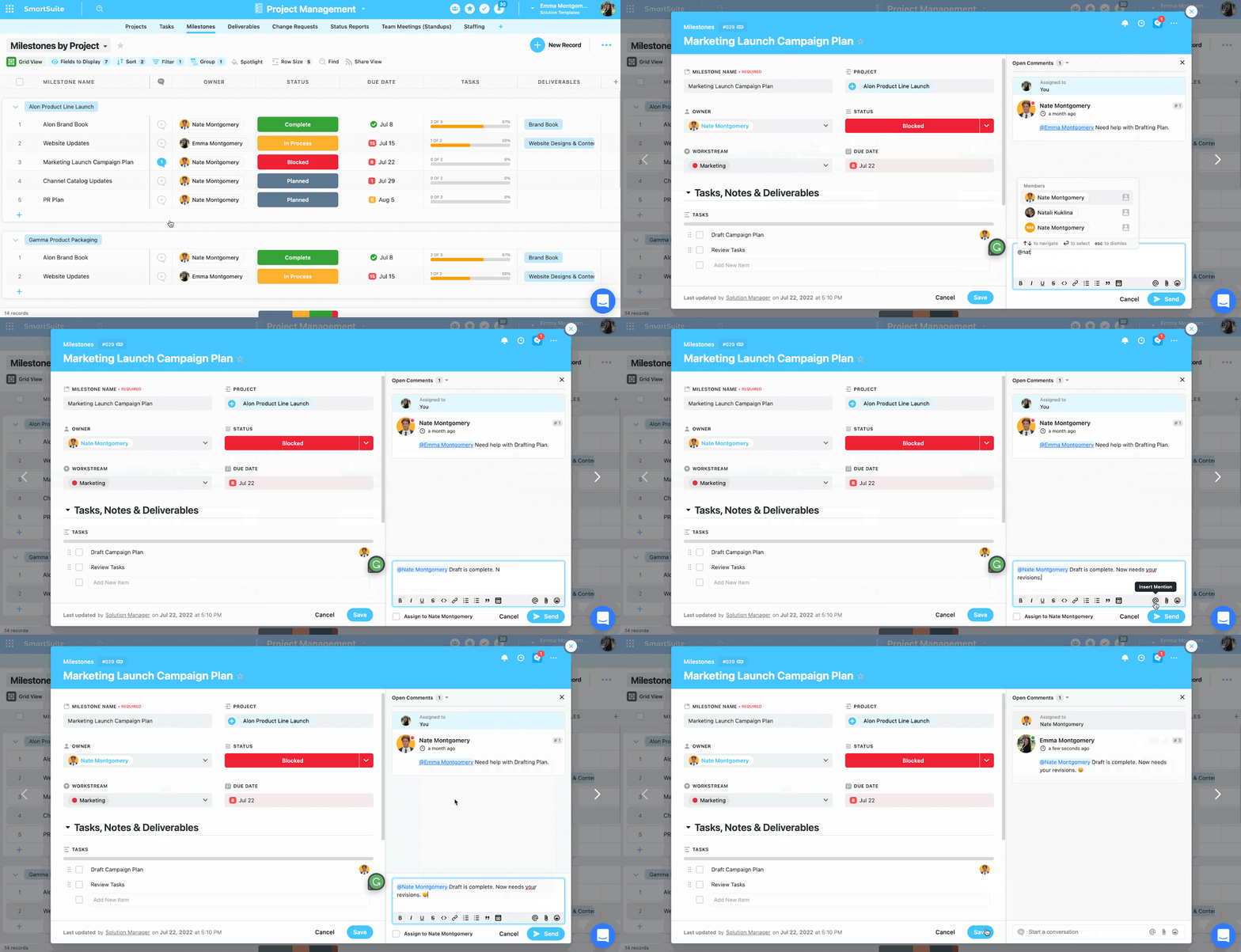
Some key features that boost a team’s productivity include:
- Comments to task conversion: Convert any comment into an action item within a record or field within a record. Also, you can assign these tasks to team members and track their progress in real-time.

- Member’s Directory: Get a complete list of all your team members in a single dedicated space and get access to information such as their department, position, location, timezone, etc. To find the right memeber/s, you can use grouping or filtering options without manually scrolling through the list.

- Email integration: Integrating your email account with SmartSuite and sending and receiving emails within your workspace. Less contextual switch, more focused work.
The best part? SmartSuite offers an intuitive mobile app that lets you stay in touch with co-workers on the go.

#3. Flexible automation builder
SmartSuite offers automation starting from its free plan, similar to ClickUp.
However, SmartSuite’s automation builder is much more user-friendly and lets you automate actions across workspaces—on a task or overall project level. It gives you more power to automate and build processes that handle recurring tasks such as status updates or follow-up emails.
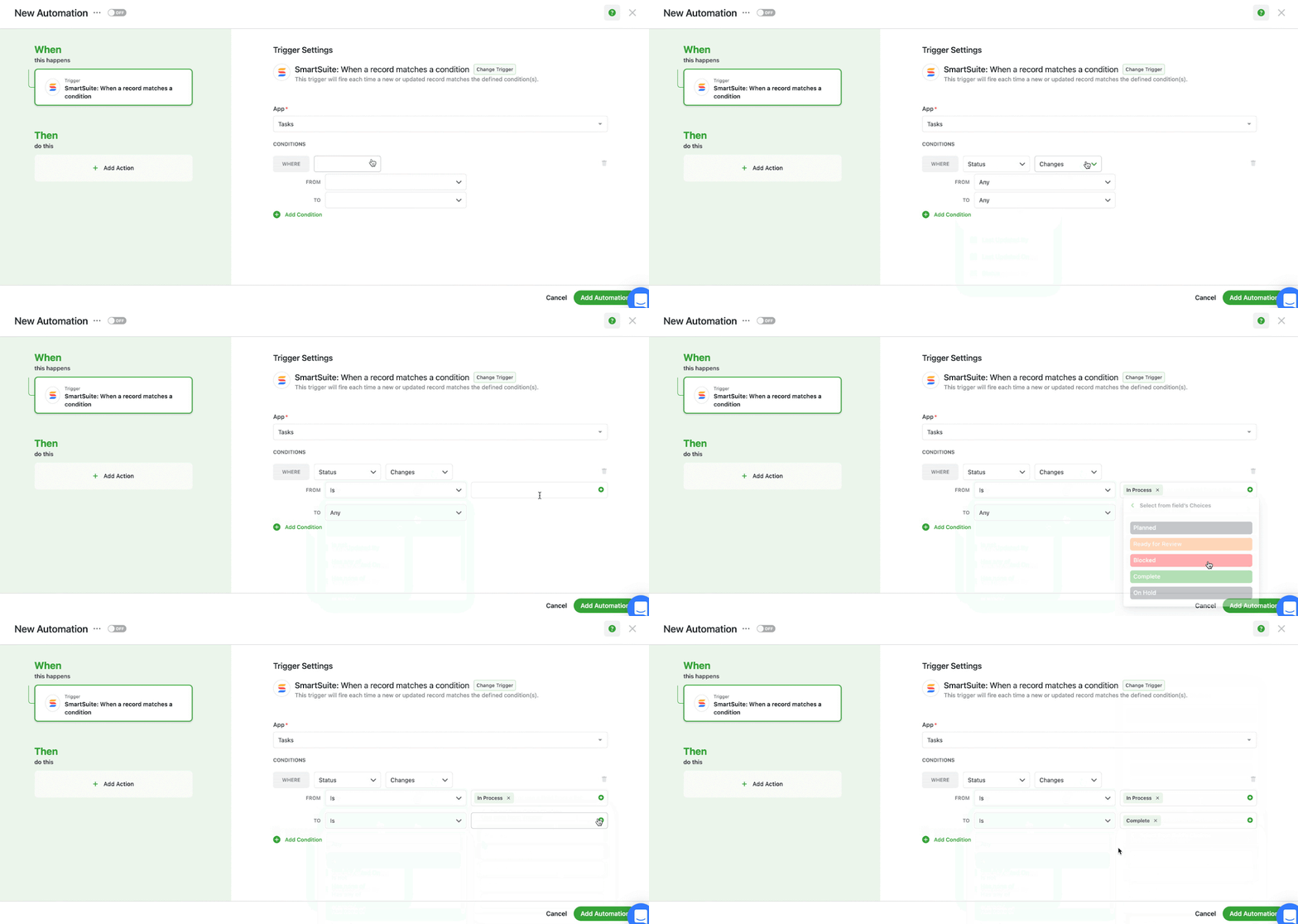
The automation builder offers no-code functionality to build simple one-liner sequences or multi-step flows through triggers, conditions, and actions. You can choose the prebuilt actions or integrate SmartSuite with email, file storage, messaging, or SMS platforms such as Slack, Microsoft Suite, Slack, and Calendars to build custom actions.

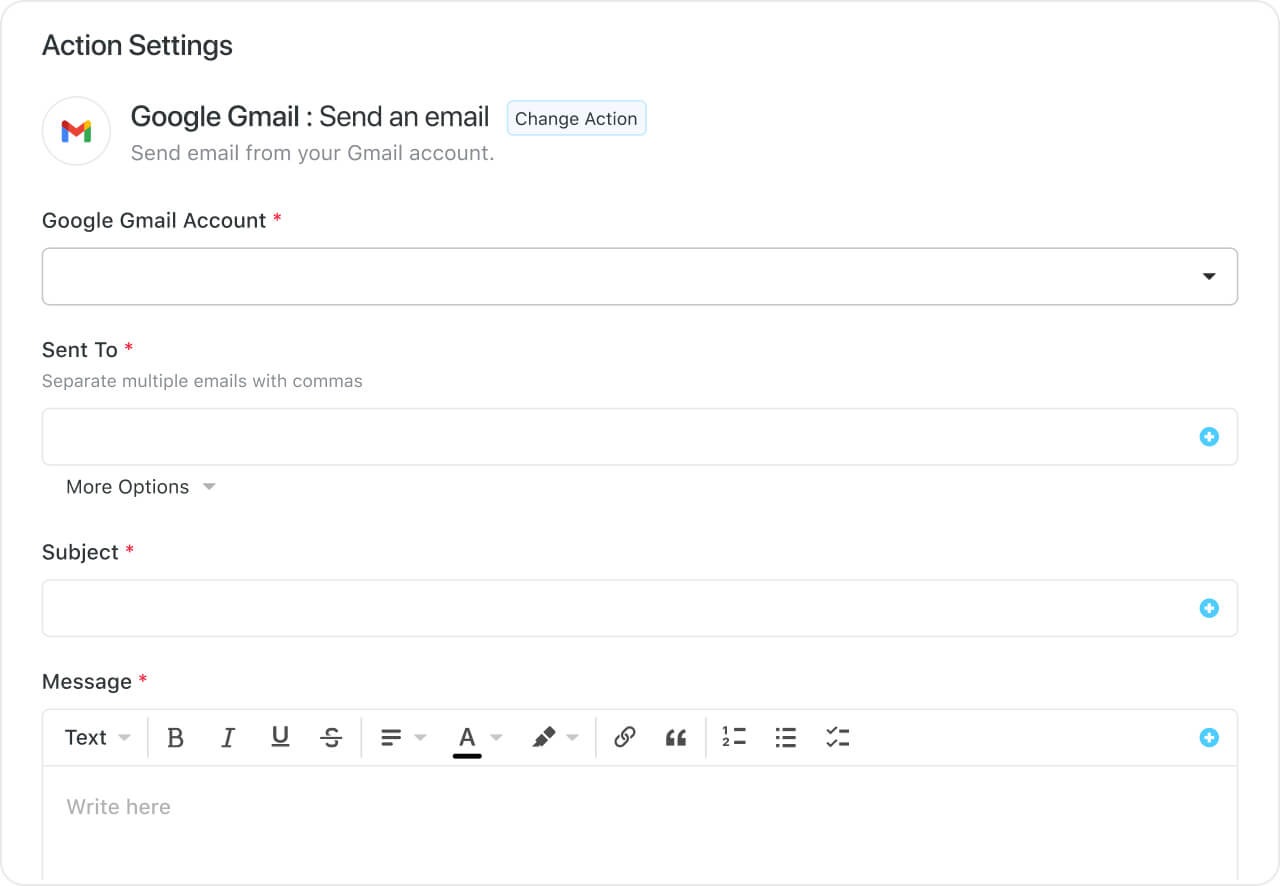
You can, for example, authorize your account by selecting the Google Gmail integration action, specify your email addresses, and customize your message. This email will be sent when the trigger and its conditions are met.
➡️ Dan Leeman also created this comprehensive guide for the best ClickUp alternatives in 2026:
SmartSuite pricing
SmartSuite follows a transparent pricing model with plans that scale alongside your team’s needs.
You can try it free for 14 days - no credit card required - before choosing a tier.
Here’s a closer look at the available options:
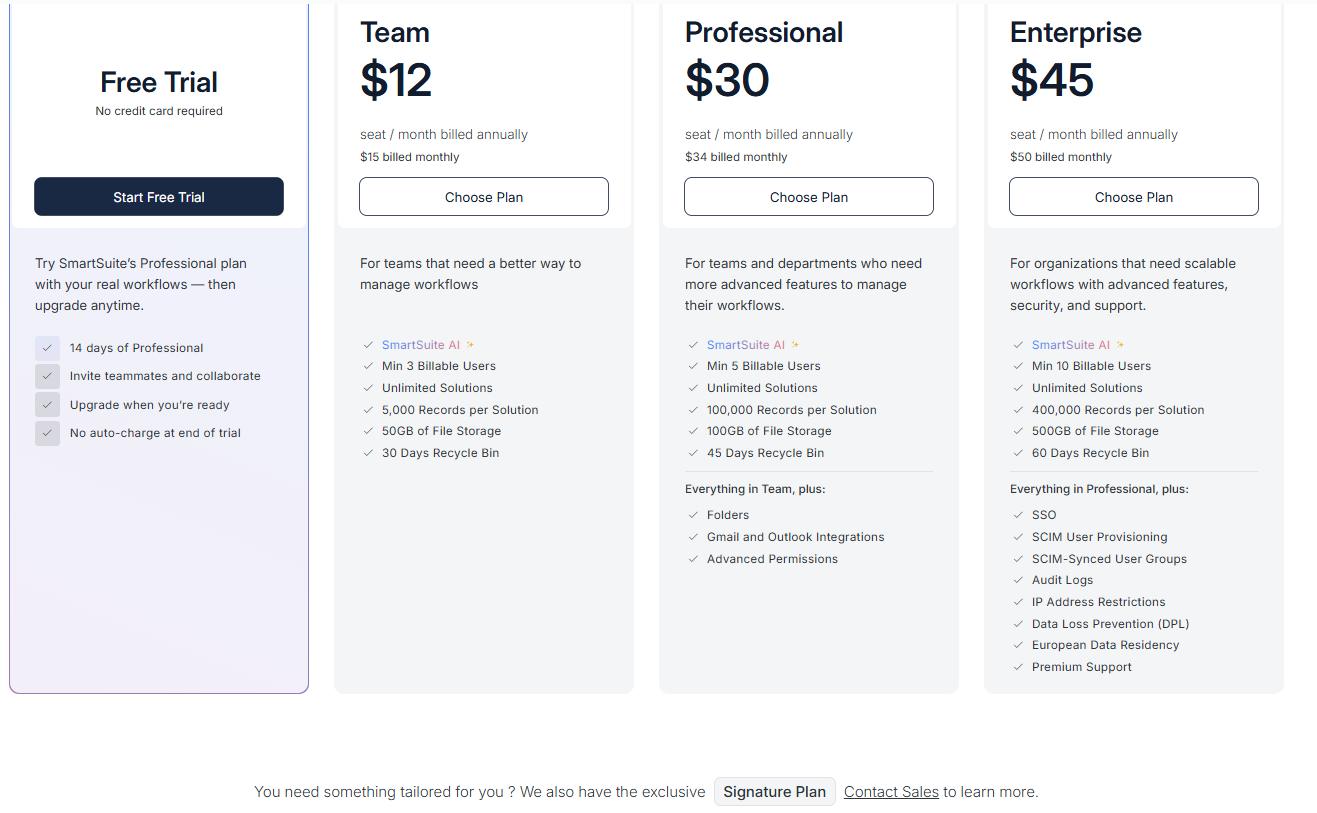
- Team: $12 per seat/month (billed annually), includes SmartSuite AI, unlimited solutions, up to 5,000 records per solution, 50 GB of file storage, a 30-day recycle bin, and core collaboration and automation features.
- Professional: $30 per seat/month, includes everything in Team, plus folders, Gmail and Outlook integrations, advanced permissions, higher record limits (100,000 per solution), 100 GB of storage, and a 45-day recycle bin.
- Enterprise: $45 per seat/month, includes everything in Professional, plus SSO, SCIM user provisioning, audit logs, IP restrictions, data loss prevention, European data residency, premium support, and higher limits (400,000 records per solution and 500 GB storage).
- Signature: Custom pricing. A tailored plan for organizations with specific requirements around scale, security, or data architecture.
Get Started with SmartSuite Today
If you want to customize your workspace to the last bit and need a tool that does it all, ClickUp is the ideal choice.
But with such flexibility comes a higher learning curve and slow loading time when your projects grow in numbers.
SmartSuite helps you tackle this by offering just the right customization and a library of 200+ project management templates to get your projects up and running. It’s also as user-friendly as it gets.
Here’s what's in it for you when you try any of SmartSuite’s plans:
- Generous free plan with features including multi-board views (Kanban, Chart, Map, Timeline, Card, and Calendar), 100 automation/month, and 40+ field types, including formula and linked record fields.
- No-code automation builder to set up to 500,00 trigger/action workflows.
- Built-in productivity tools—time tracking, status tracking, and checklists.
- Team collaboration and planning tools such as whiteboards and SmartSuite docs.
- Resource management across projects and teams.
- 40+ field types, including custom fields.
You have various options to get started with SmartSuite. Get a 14-day free trial to explore all its amazing features.
Or, if you’d like to talk to our team of experts, schedule a demo.
⚠️ Disclaimer: This article was last updated on 03/25/2026, and if there's any misinterpretation of the information, please contact us, and we will fact-check it.
Read More
- ClickUp vs. Asana
- ClickUp vs. Monday
- The 10 Best Project Management Software For Engineers
- ClickUp Review
- 10 Best Healthcare Project Management Tools
- 10 Best Project Management Software for Construction
- Top 10 Monday.com Alternatives & Competitors
- Monday.com Pricing: Is It Worth It
- ServiceNow Review: Is It Worth It
- Jira Service Management Pricing: Is It Worth It
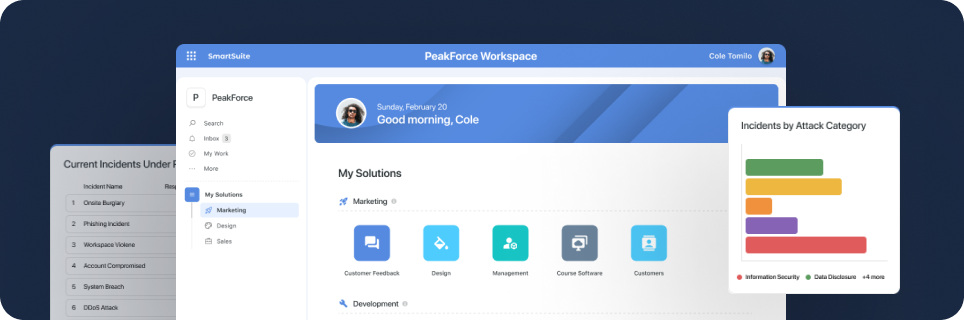
SmartSuite provides work platform for standardizing workflows in the following areas:
- Governance, Risk & Compliance
- IT & Service Ops
- Project / Portfolio Management
- Business Operations







