


This guide breaks down what automated evidence collection is, the forms it takes, the frameworks it supports, and how to set it up so your control evidence holds up when someone comes asking.
TL;DR
- Automated evidence collection is the practice of pulling proof that your controls work straight from your systems, on a schedule, without someone manually screenshotting and filing it.
- It comes in a few forms, from integration-based pulls and continuous control checks to scheduled exports and AI-assisted validation, and most programs run a mix of them.
- The point isn't just to do it quickly and forget about it: Fresh, traceable evidence is what will keep you audit-ready year-round and turns audit prep from a fire drill into a routine.
- No single "evidence collection framework" exists: You collect evidence against control frameworks like SOC 2, ISO 27001, NIST, and SOX, then run it through a monitoring approach.
- The right automated evidence collection software will depend on your scope: a compliance automation tool, an enterprise GRC suite, and a connected platform like SmartSuite each fit a different kind of program.
What is automated evidence collection?
Automated evidence collection is the work of gathering proof that your controls actually operate, straight from the systems that already hold it, without a person doing it by hand each time.
Think about what an auditor or a regulator is really asking for.
They want to see that access reviews happened, that backups ran, that vulnerabilities got patched, and that someone approved the change before it shipped.
Traditionally, a compliance lead chases all of that down.
They email an engineer for a screenshot, ping IT for a user list, dig through ticket logs the week before an audit, and paste it all into a shared drive.
Automation flips the effort.
The platform connects to your cloud accounts, identity provider, ticketing system, and code repositories, then collects the relevant artifact on a set cadence and files it against the control it supports.
So the screenshot of an access review isn't something you have to remember to take: it's pulled straight from the source and attached to the right control, timestamp and all.
Done well, this can turn evidence collection from a once-a-year scramble into a quiet background process that runs while your team does real work.
What are the different types of automated evidence collection?
Not every form of automated evidence collection works the same way, and the differences matter when you're deciding what your program needs.
Here are the main ones you'll run into:
- Integration-based collection connects directly to your tools through APIs, then pulls artifacts like user lists and configuration exports on a schedule you define.
- Continuous control monitoring goes a step further by testing whether a control is in the right state right now, then raising a flag the moment something drifts out of bounds.
- Scheduled exports and scripted pulls cover the homegrown end, where a script dumps a config file or a database query runs nightly and lands the output somewhere central.
- Agent-based collection uses lightweight software on your endpoints and servers to report device posture and patch status back to a central system.
- AI-assisted validation rides on top of the others, checking whether what you collected is current and correctly mapped before an auditor ever sees it.
Why is automated evidence collection important?
The truth not many professionals want to admit is that manual evidence collection doesn't scale, and it tends to fall apart in ways nobody spots until audit week.
You can lose most of a month to chasing screenshots before an audit, and you still won’t be guaranteed to find everything that you’ll need.
Automation can both give you that month back and also fix another issue:
A screenshot taken once a year only proves the control worked on that one day, which an experienced auditor will most likely point out.
When evidence flows on its own, a failing control surfaces as a dashboard flag in March, long before it becomes a finding in October.
The payoff I'd put above the rest is the trail it leaves behind.
Every artifact carries its own source and timestamp, linked to the control it supports, so when a regulator asks how you know a control is working, you can show them the receipts.
That move from telling to showing is what separates a program that holds up under scrutiny from one that sweats through it.
What makes automated evidence actually hold up?
Collecting evidence automatically and collecting evidence that survives an audit aren't the same thing.
Plenty of teams switch on a tool, watch artifacts pile up, then get burned when an auditor pokes at the pile and finds it thin.
Strong evidence tends to share a handful of qualities, and timeliness is the one auditors test first.
A configuration export from eight months ago does almost nothing for a control that's meant to run weekly, because it doesn't reflect the period under review.
Completeness is the next trap.
A user access list covering four of your seven critical systems leaves a gap the auditor will find faster than you will.
Traceability matters just as much: every artifact should answer, on its own, where it came from, when it was captured, which requirement it maps to, and who or what produced it.
And anything someone could have quietly edited after the fact carries less weight than an artifact pulled straight from the source with its metadata intact.
My rule of thumb is simple: if you can't explain how a piece of evidence was produced without shrugging, an auditor won't trust it either.
Where is automated evidence collection heading in 2026?
Automated evidence collection is heading toward continuous, AI-assisted evidence that proves controls work year-round, not just at audit time.
That appears to be the direction of travel from what I’ve seen in the industry, and it's worth getting straight before you spend money on tooling.
Point-in-time evidence is losing ground fast.
For years, the model was simple: gather a pile of artifacts once a year and hand them to an auditor.
Regulation has made that model harder to defend.
Rules like DORA in the EU, which began applying to financial entities in early 2025, push organizations to prove their controls work continuously, not just at audit time.
The SEC's cybersecurity disclosure expectations in the US point the same way.
AI is the change everyone's talking about, and it's quietly moving from collection into judgment.
The first generation of tools automated the gathering.
The newer breed reviews what got gathered, flags anything stale or incomplete, drafts answers to security questionnaires, and steers a human toward the gaps that actually need one.
Governance is the catch worth flagging.
An AI that silently decides a control passed is a liability, which is why credible products keep a human in the loop on anything carrying a real decision.
One more pattern is taking hold: gather an artifact once and reuse it everywhere.
A single access review, captured well, can answer for SOC 2 and ISO 27001 in the same breath.
If you're building or buying an automated evidence collection solution this year, plan for continuous and AI-assisted, and expect an auditor to eventually ask who checked the machine's work.
How to conduct an Automated Evidence Collection assessment?
An evidence collection assessment is how you map what proof your controls need against how much of it a machine can safely collect for you.
You can run it as a one-time exercise before you buy a tool, or as a recurring health check on a program you already have.
Either way, four questions carry most of the work:
Which controls need evidence, and how often?
Start by listing your controls and pinning a cadence to each one:
- A daily backup needs daily proof.
- An annual policy review needs proof once a year.
Get the cadence wrong, and you'll either drown in artifacts you don't need or come up short on the ones you do.
Where does each piece of evidence come from today?
Walk every control back to its source.
Some come from your cloud provider, some from your identity system, some from a ticketing tool, and a surprising number exist only in someone's head or a folder one person can find.
This map is the single most useful artifact of the whole exercise, because it shows you exactly what's automatable and what isn't.
What can you automate, and what stays manual?
Not everything should be automated. Anything with a clean API and a clear artifact is a strong candidate.
Judgment-heavy evidence, like a risk acceptance memo or a board approval, often stays manual on purpose.
You can draw that line deliberately so nobody assumes a control is covered when it's actually still someone's job.
How will you catch gaps before an auditor does?
The last question is about monitoring the monitor.
You can set up alerts for two failure modes above all:
- Evidence that's quietly gone stale.
- A collection job that failed without anyone noticing.
You also want to be watching for controls that have no evidence attached at all, which is the gap auditors love to find.
A pipeline that breaks without telling you is worse than no pipeline, because it hands you false confidence.
What kinds of tools can you use for Automated Evidence Collection?
The tools that handle automated evidence collection fall into a few categories, and which one fits depends on how broad your program is and how much you want to spend:
Compliance automation platforms
These platforms were built around automated evidence collection from day one:
- Vanta runs continuous control monitoring and pulls evidence automatically, with wide framework coverage and a Trust Center for sharing your security posture with customers.
- Drata centers on continuous control testing and automated access reviews, and maps one control to several standards so you avoid duplicate work.
- Secureframe handles evidence automation and ongoing monitoring for growing teams, and adds a federal module for anyone pursuing CMMC or FedRAMP.
- Sprinto leans into fast, guided SOC 2 and ISO readiness for cloud-native teams, with heavy automation around onboarding and vulnerability checks.
These platforms are excellent at what they're built for: getting you certified and keeping you audit-ready against security frameworks.
Enterprise GRC platforms
GRC tools like Archer, MetricStream, IBM OpenPages, and ServiceNow are built for large, regulated organizations that need deep risk modeling, control testing, policy management, and board-grade reporting alongside their evidence.
They're powerful and broad, and the trade-off is often the cost and the potentially longer road to value, since some of these solutions would need an implementation partner and a meaningful onboarding period.
Connected work management platforms
A newer category keeps evidence collection connected to the rest of your operations in one flexible, no-code system, and SmartSuite (that’s us) is one of them.
Our platform fits mid-market companies and growing enterprises that want compliance, risk, audit, and operations connected to real business work, and not boxed off in a specialist tool.
If your evidence program has outgrown spreadsheets but a six-figure enterprise rollout feels like overkill, SmartSuite’s AI-native work platform is worth a close look.
Our platform centralizes frameworks, controls, evidence, testing, and policies to help compliance teams eliminate manual work, improve collaboration, and stay always audit-ready.
You can shape the evidence and control workflows to match how your organization runs with our no-code solution and not the other way around.
The automation engine carries the repetitive load, firing off evidence requests on schedule and escalating a high-risk item the moment it slips. Every run gets logged for traceability.
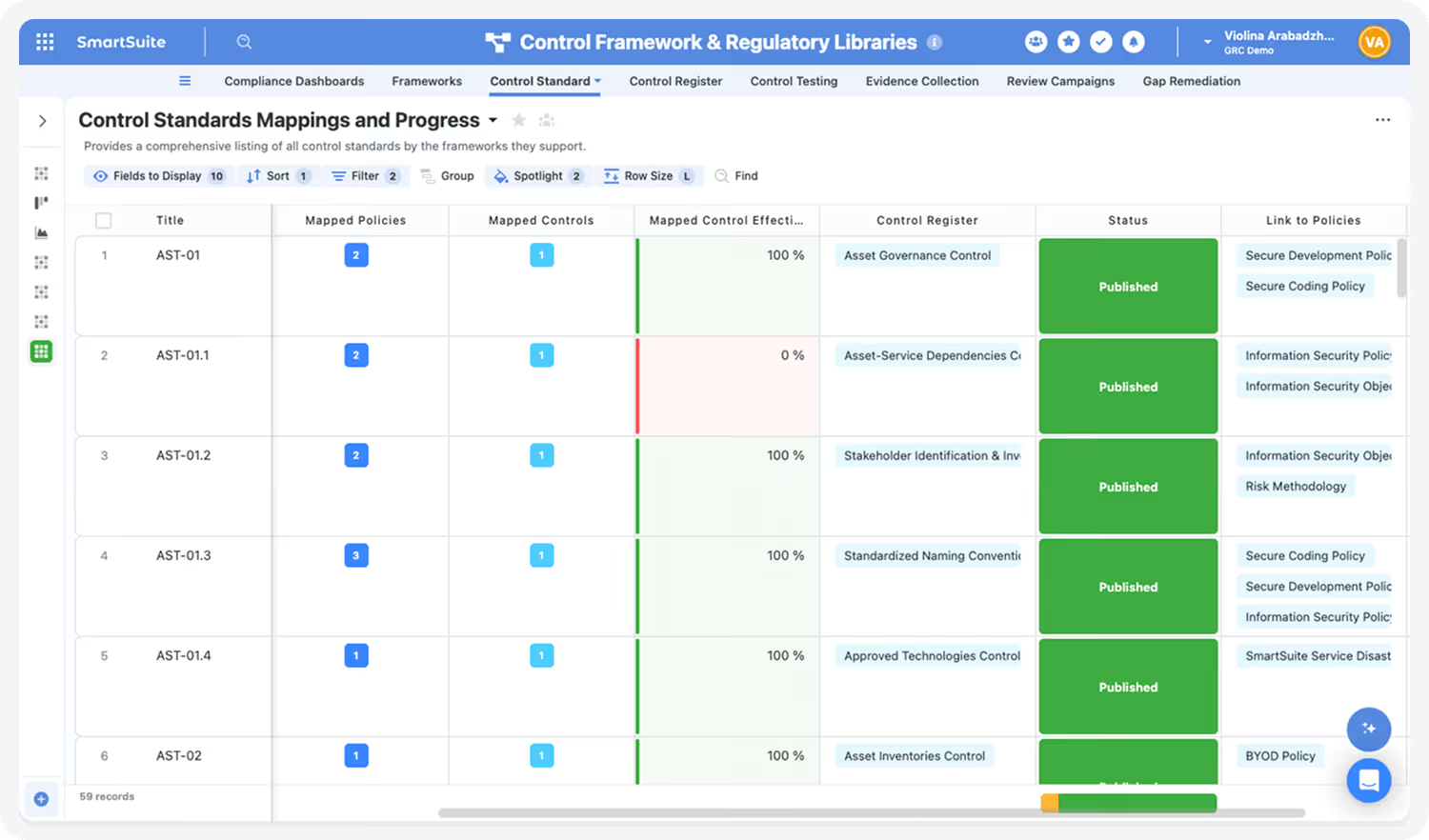
On the AI side, SmartSuite can summarize a vendor questionnaire or surface a missing detail in an incident record, while leaving the governance call itself to a person.
Reporting reads from live data and respects permissions, so a compliance lead sees current control status without exporting anything to a separate BI tool.
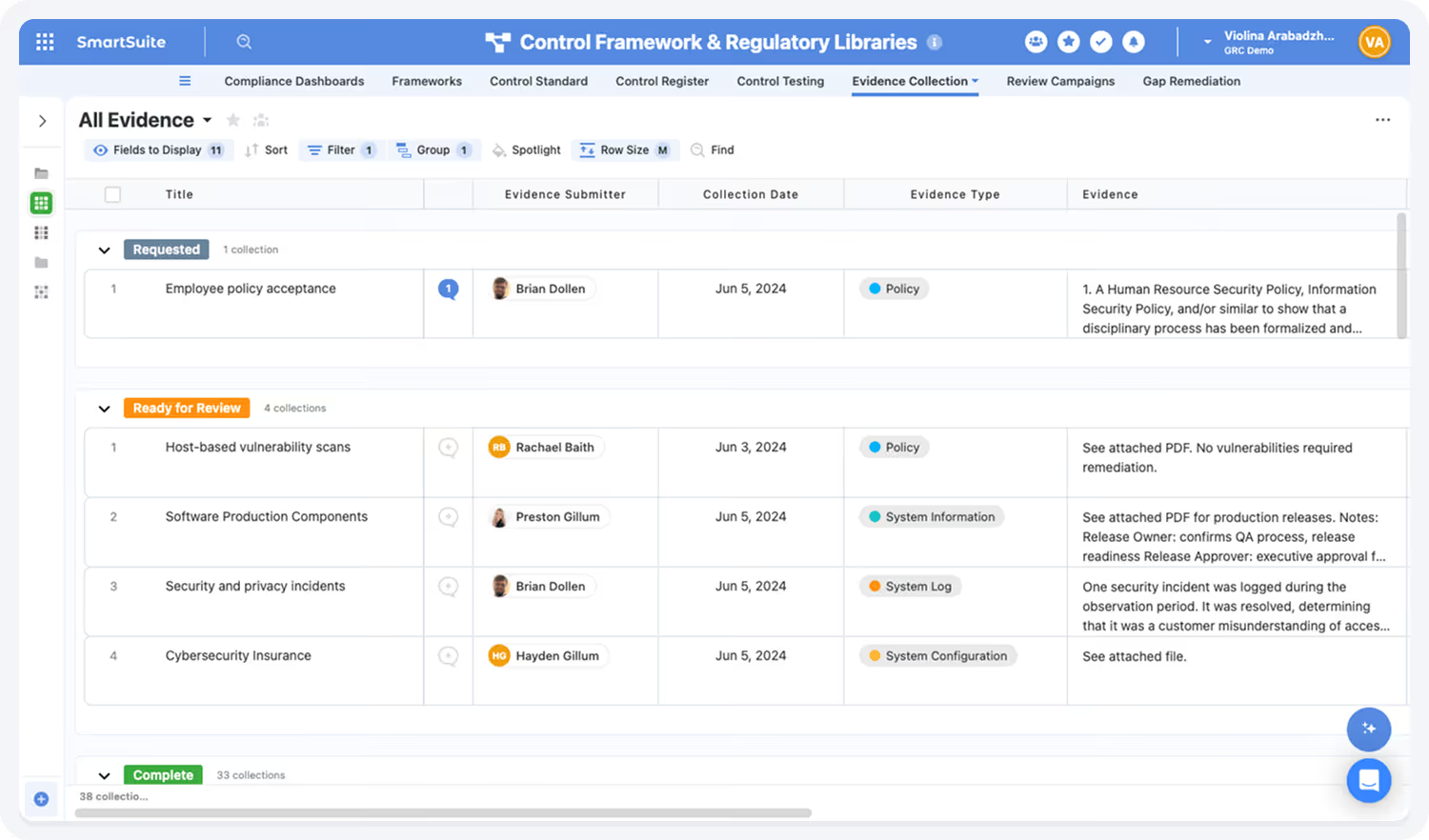
That mix tends to suit mid-market teams and regulated outfits in banking or healthcare that want their evidence tied to the wider GRC program.
Here’s how our compliance management solution looks in practice:
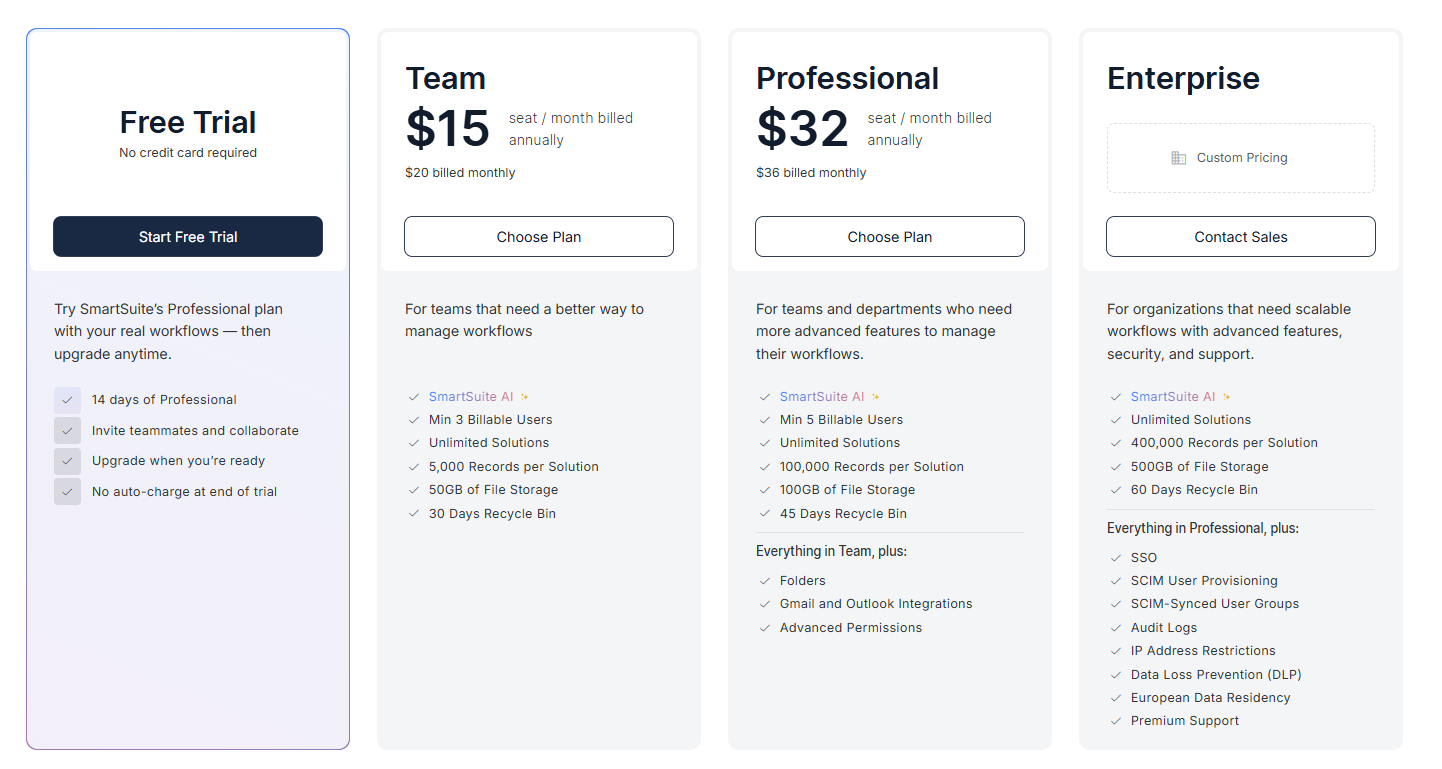
Pricing opens at $15/user/month on the Team plan, and regulated enterprises can move to solution-based pricing that structures access by department or regulatory scope.
Connecting your evidence to the rest of your GRC program
By now the categories should sort themselves by your situation:
- A team chasing SOC 2 or ISO 27001 and little else will be well served by a compliance automation tool like Vanta or Sprinto.
- A large, heavily regulated enterprise with deep risk modeling needs and the budget to match will lean toward Archer or IBM OpenPages.
The harder case is the mid-market company or scaling team in between, where evidence has to connect to risk and audit work without a year-long implementation to make it happen.
SmartSuite was built for that middle ground.
You get a no-code workspace to model the program your way, with enterprise-grade permissions and audit logs underneath, plus AI that drafts and flags but leaves the decisions to your team.
Controls, evidence, audits, incidents, vendors, and remediation are managed in one governed workspace, with dashboards that move as the work does.
So the next time someone asks you to prove a control is operating, the answer is already collected and mapped, with the capture date attached.
➡️ Start a free SmartSuite trial or book a demo to see your governance, risk, and compliance evidence working in one connected place.

SmartSuite provides work platform for standardizing workflows in the following areas:
- Governance, Risk & Compliance
- IT & Service Ops
- Project / Portfolio Management
- Business Operations







