




Scytale pricing isn't publicly listed, which makes it harder to estimate what compliance automation will actually cost your team in 2026.
In this guide, I'll break down how Scytale structures its plans, what third-party data tells us about real-world costs, and whether the investment holds up.
➡️ I'll also introduce you to a Scytale alternative with upfront pricing you can evaluate before talking to anyone, a no-code GRC workspace that connects risk and audit to real business operations, and a free trial.
TL;DR
- Scytale's pricing is fully custom and depends on your company size, the number of compliance frameworks you need, and whether you want dedicated consulting bundled into your plan.
- No free plan or free trial is available. The only way in is booking a demo with the sales team.
- Based on third-party estimates, annual contracts for small to mid-sized SaaS companies are reported to fall somewhere between $10,000 and $25,000 per year, though this is an estimated range, not a vendor-confirmed figure.
- If you need a Scytale alternative, SmartSuite offers transparent pricing you can review before speaking to sales, a no-code GRC platform that connects risk, audit, and compliance to the rest of your operations, and a 14-day free trial.
How Does Scytale Calculate Its Pricing?
Scytale doesn't publish a pricing grid.
What it does publish is a plan structure, which gives you a sense of how the tiers are organized, but no dollar amounts attached to any of them.
The platform runs across two separate tracks.
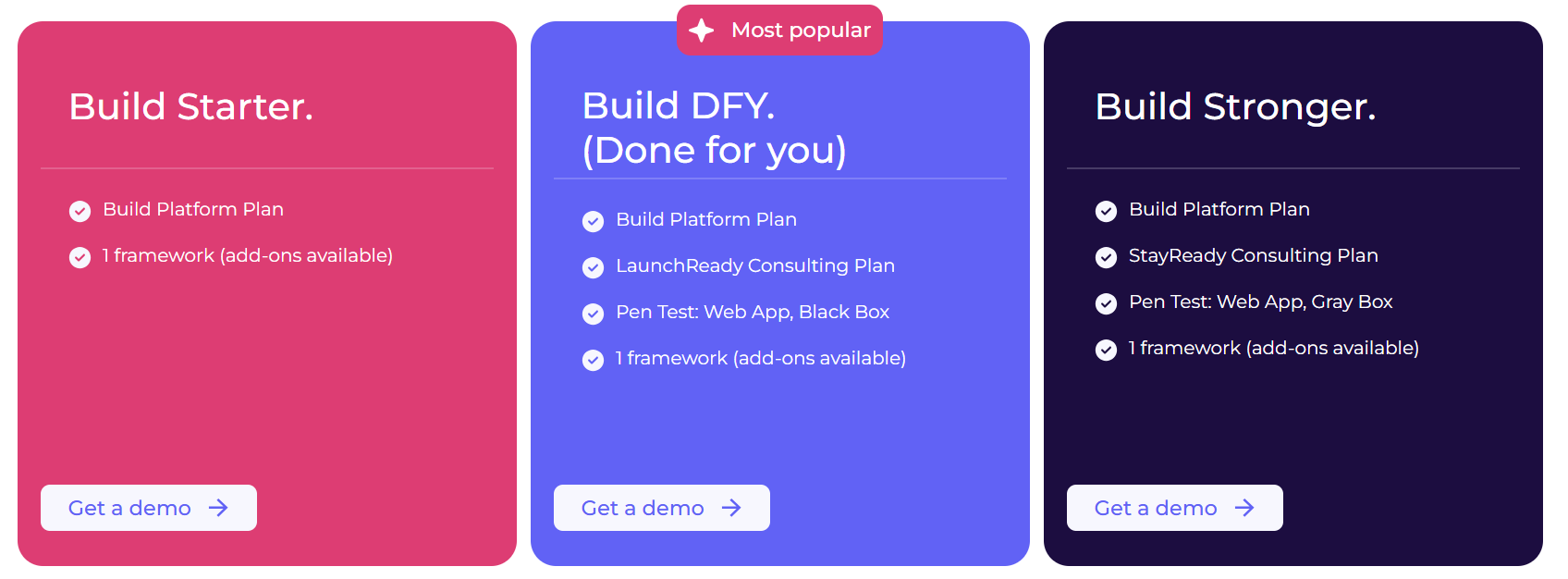
The first is a startup track with three bundled tiers:
- Build Starter: Entry-level platform access with one compliance framework included. Add-ons are available at an extra cost.
- Build DFY (Done For You): Adds Scytale's LaunchReady consulting plan, pairing you with a dedicated compliance consultant for up to six months, along with a web app penetration test and one framework. Scytale positions this as its most popular tier.
- Build Stronger: Adds the StayReady consulting plan for a full 12 months, a grey-box penetration test, and one framework.
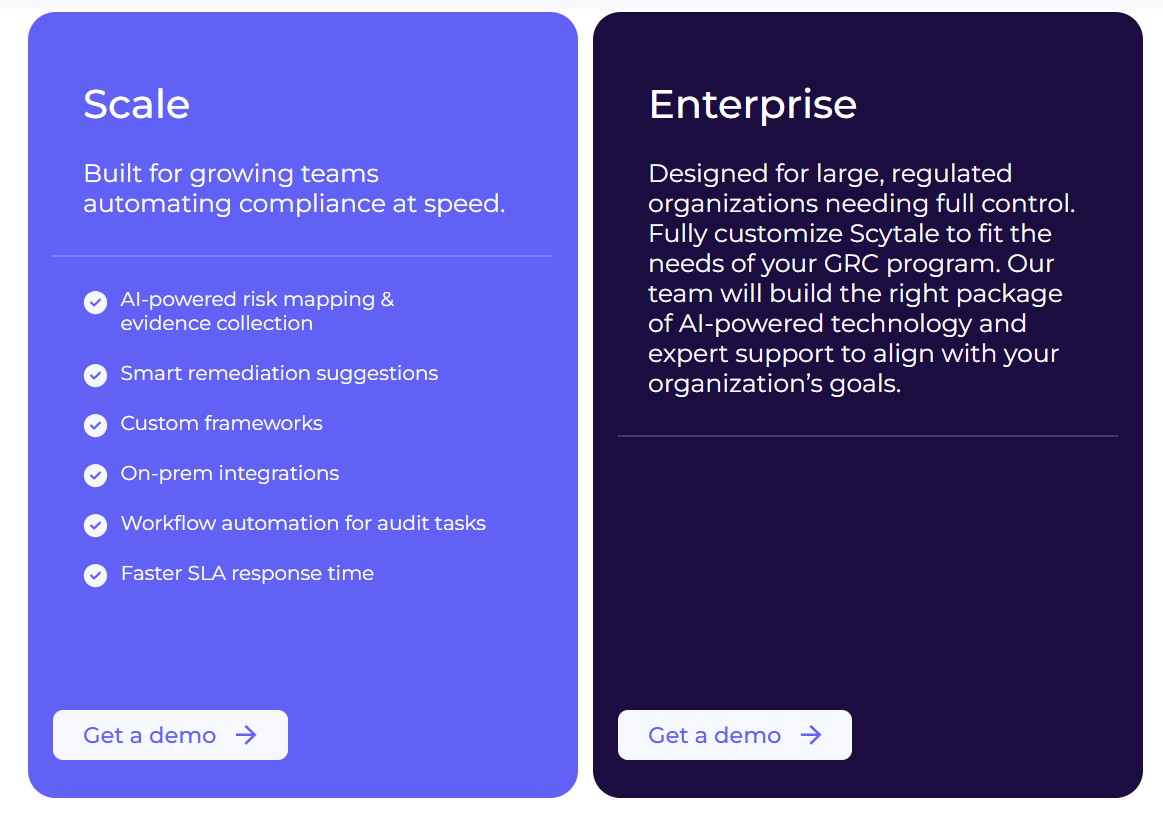
The second is a security teams track for organizations that have moved past startup-stage compliance needs:
- Scale: Built for growing teams. Includes AI-powered risk mapping, smart remediation suggestions, custom frameworks, on-premise integrations, and faster SLA response times.
- Enterprise: Fully custom. Scytale's team builds the package around your organization's specific requirements.
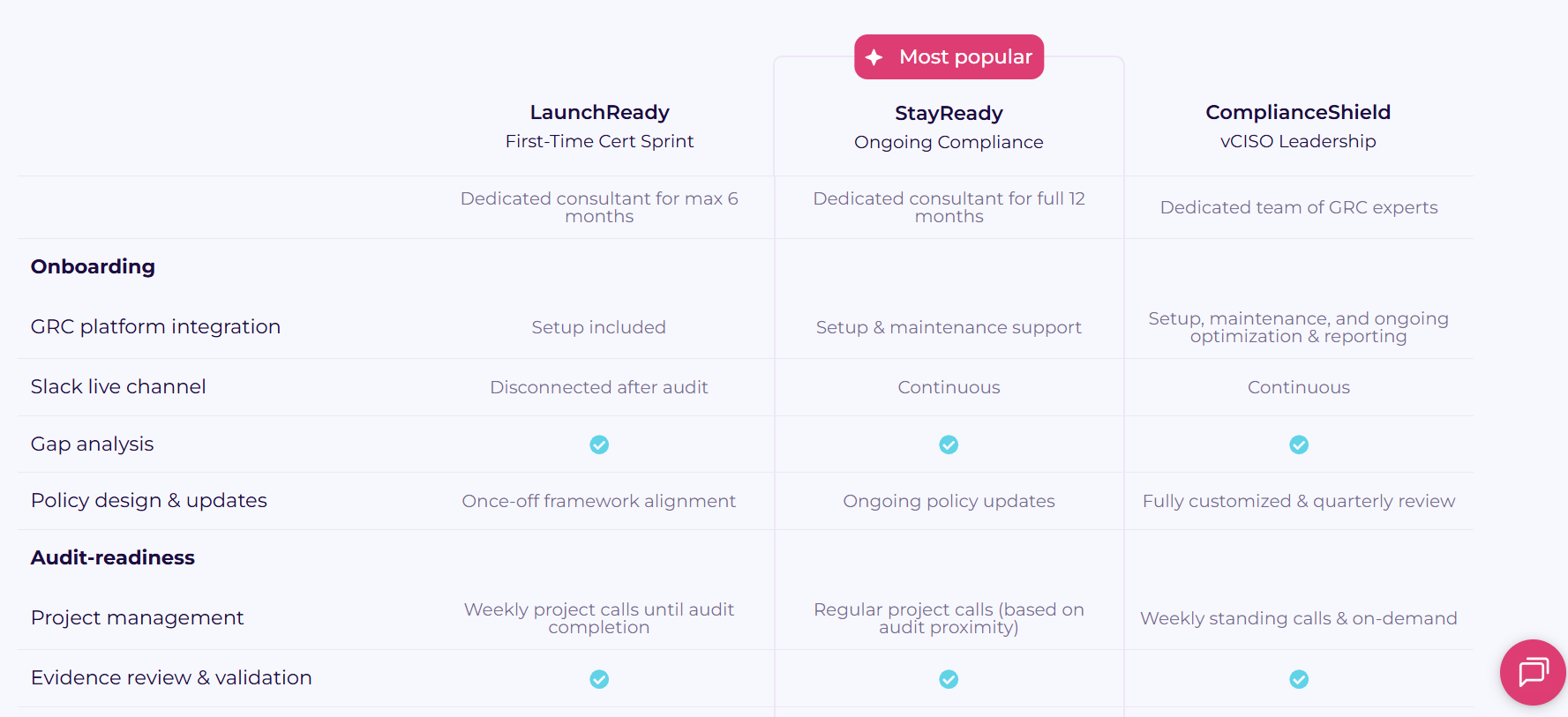
On top of the platform tiers, Scytale offers three separate consulting packages:
- LaunchReady: A first-time certification sprint with a dedicated consultant for up to six months.
- StayReady: Ongoing compliance support with a dedicated consultant for a full 12 months.
- ComplianceShield: Virtual CISO-level support with a dedicated GRC expert team.
Variables that shape the final number may be (although not confirmed): company size, how many frameworks you need, which consulting tier you select, whether you need penetration testing, and how long the contract runs.
Does Scytale Have a Free Plan or Free Trial?
Scytale doesn't offer a free plan or a self-serve free trial, or at least not one we could find.
How Much Does Scytale Really Cost?
Scytale doesn't disclose pricing publicly, so third-party data is the closest thing to a real number.
Based on AWS Marketplace contract data and third-party analysis, annual contracts for small to mid-sized SaaS companies are estimated to fall between $10,000 and $25,000 per year.
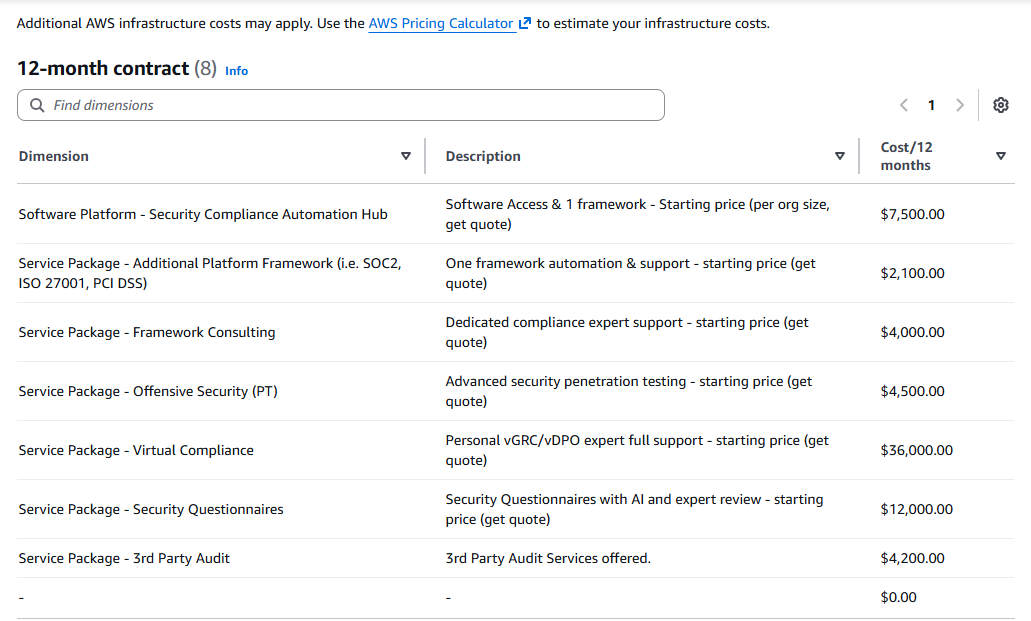
That range generally accounts for a baseline platform license, one compliance framework, and a consulting tier.
Add more frameworks, move up a consulting tier, or bring in penetration testing, and the total climbs from there.
I want to be clear: this is an estimated range based on third-party reporting, not a figure Scytale has published or confirmed publicly.
Actual quotes will vary depending on your organization's setup, and enterprise contracts can run considerably higher.
Any Surprises at Contract Renewal?
One G2 review flags something worth reading before you sign:
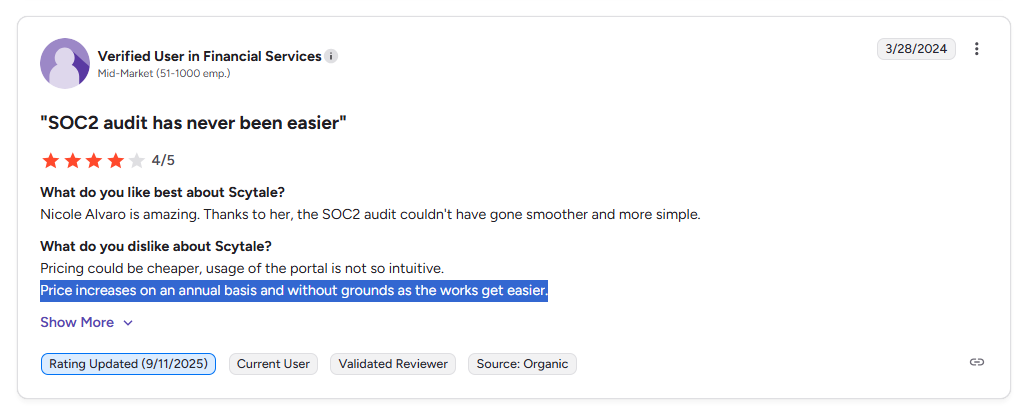
"Price increases on an annual basis and without grounds as the works get easier." — G2 Review
That's worth taking seriously.
Compliance work tends to get lighter after year one.
Once frameworks are mapped, controls are documented, and evidence collection is running, the labor involved drops significantly.
If pricing increases at renewal despite that reduction in effort, you're paying more for a program that's actually become easier to run.
Negotiating renewal caps or a multi-year rate lock at the time of initial signing is a sensible move with platforms like Scytale.
Does Scytale Provide Good Value for Money?
Scytale holds a 4.8 out of 5 on G2 across more than 578 verified reviews, and 96% of those reviewers say they'd recommend the platform.
A lot of what drives that score isn't the technology in isolation. It's the consulting layer.
Users frequently mention their dedicated advisors by name in reviews, which tells you something real about service quality.
Here's what one verified IT reviewer at a small business had to say:
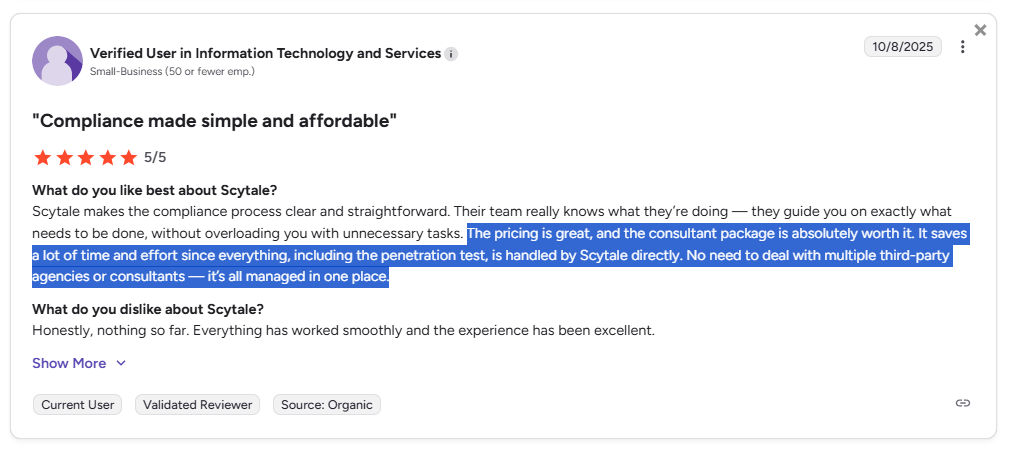
"The pricing is great, and the consultant package is absolutely worth it. It saves a lot of time and effort since everything, including the penetration test, is handled by Scytale directly. No need to deal with multiple third-party agencies or consultants — it's all managed in one place." — G2 Review
And from a separate G2 user who went through SOC 2 and ISO prep:
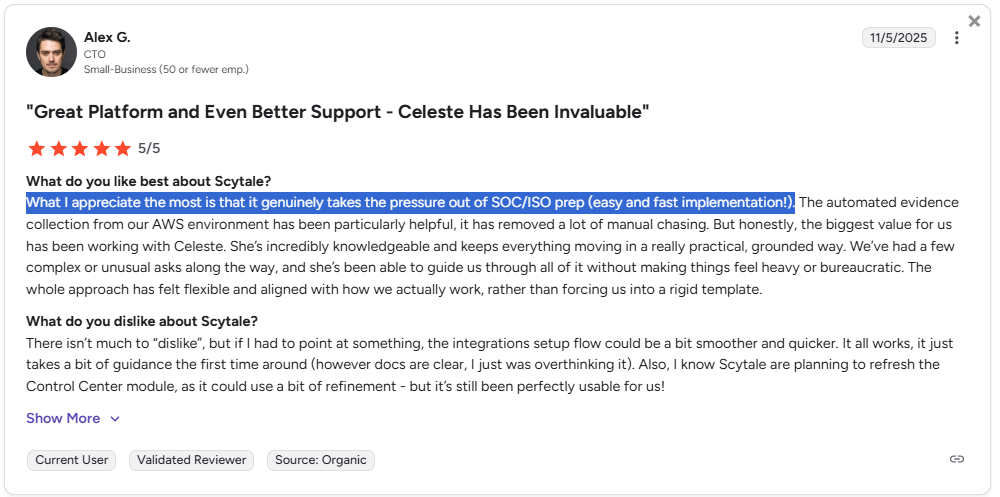
"What I appreciate the most is that it genuinely takes the pressure out of SOC/ISO prep (easy and fast implementation!)" — G2 Review
However, cost comes up on the other side of the ledger, too. One reviewer wrote:
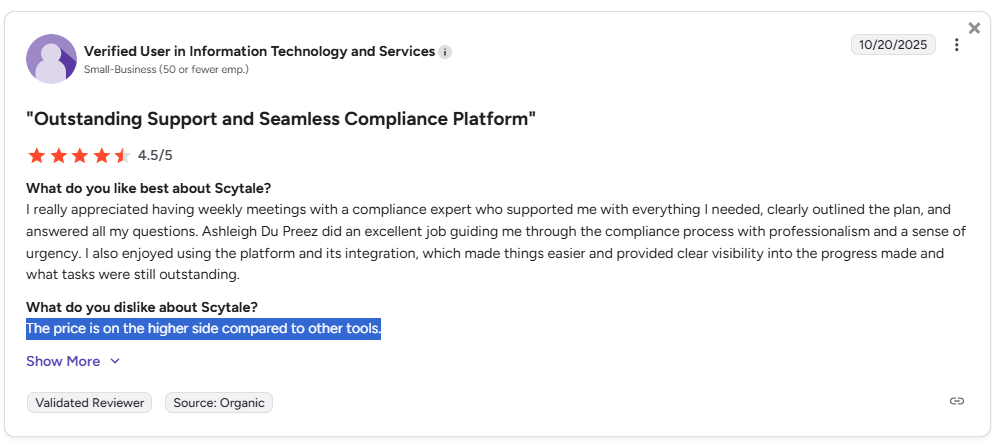
"The price is on the higher side compared to other tools." — G2 Review
The automation layer isn't universally praised either. One verified G2 reviewer flagged consistency issues with Scytale's AWS infrastructure automation:
"I find that the automation within Scytale, particularly the feature intended to automatically populate audit controls from AWS infrastructure, is unreliable. It often misses components if our implementation does not strictly align with what Scytale expects. This has led to frustrations and delays in our audit preparation process. Additionally, the support experience has been challenging. Response times are slow, often taking around two days." — G2 Review
The value question really comes down to where your team is in its compliance journey.
For a startup going through its first SOC 2 or ISO 27001 without a seasoned compliance function, Scytale's bundled consulting can reduce the total cost of ownership by removing the need for separate third-party consultants.
For a team with a mature, in-house compliance function that primarily needs software, paying for a bundled consulting tier at every renewal may be spend that no longer pays off.
Looking for a Scytale alternative?
Scytale was built for compliance certification. That's its strength and its boundary.
But a lot of compliance teams reach a point where certification-first tooling starts to feel limiting.
Once you've cleared your SOC 2 or ISO 27001, the real work begins: connecting those controls to live risk data, tying audit findings to vendor assessments, linking incidents to remediation workflows, and keeping all of it visible across the business without jumping between separate tools.
That's where Scytale's scope ends and SmartSuite's begins.
SmartSuite is a work platform that lets organizations run governance, risk, and compliance alongside the rest of their business operations, instead of managing compliance in a separate tool that doesn't talk to anything else.
Risk registers, audit programs, incident response, third-party due diligence, policy management, and operational workflows all live in the same connected platform.
Every risk is linked to the controls mapped against it. Every audit finding links to the remediation task assigned to fix it. Every vendor relationship sits next to its due diligence records and monitoring status.
There's no mandatory consulting bundled into the subscription. You get the platform. You decide how to use it.
Let's look at some of its standout features. 👇
1. A connected GRC workspace that keeps compliance tied to real work
Most compliance platforms treat governance as a separate silo. You prep evidence in one system, track risks in a spreadsheet, manage audits in email threads, and hope nothing falls through the cracks.
SmartSuite takes a different approach.
It brings risks, controls, audits, policies, incidents, vendor assessments, and remediation tasks into a single connected environment.
Your compliance program stays linked to the day-to-day operations that actually generate risk.
That means your risk register isn't just a static document. It's a living workspace where risk owners can see their assigned controls, track related audit findings, and follow remediation progress without switching tools.
Here’s what makes our GRC solution stand out:
- AI governance: Manage AI-related risks, policies, controls, and regulatory obligations in a structured environment that supports responsible AI oversight and documentation.
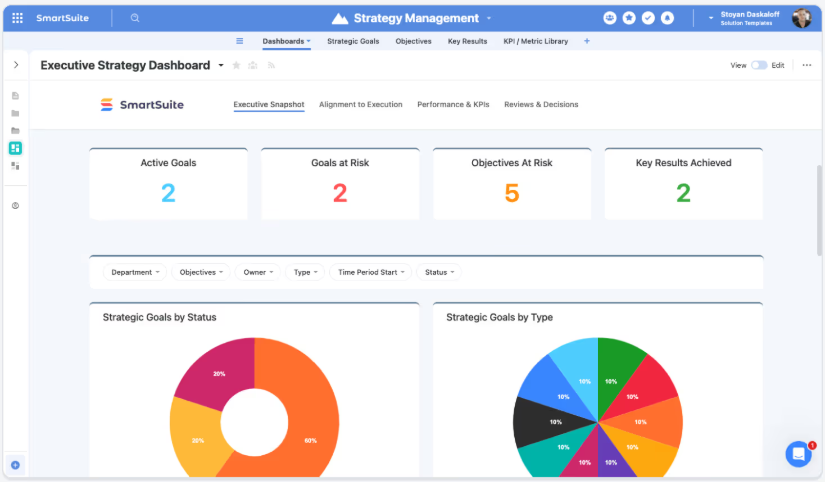
- Audit management: Plan, execute, and track internal or external audits with standardized workflows for evidence collection, testing, findings, and remediation.
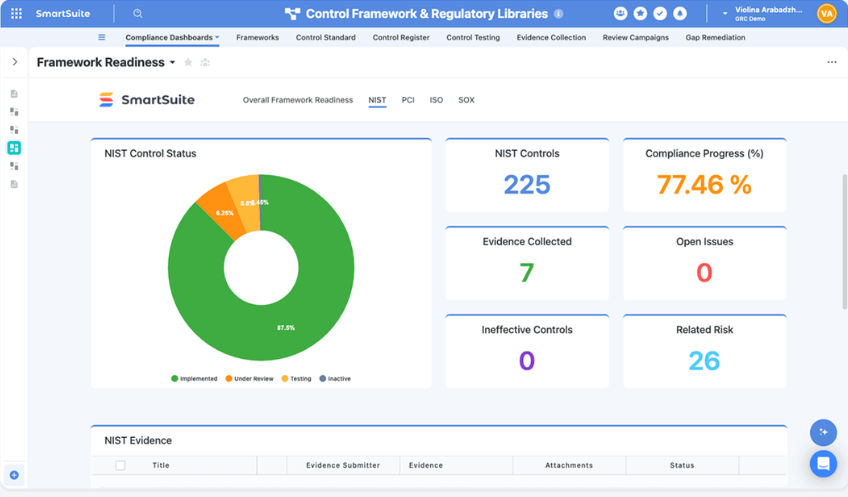
- Compliance management: Monitor regulatory requirements, map controls to frameworks, track obligations, and maintain continuous compliance readiness across standards.
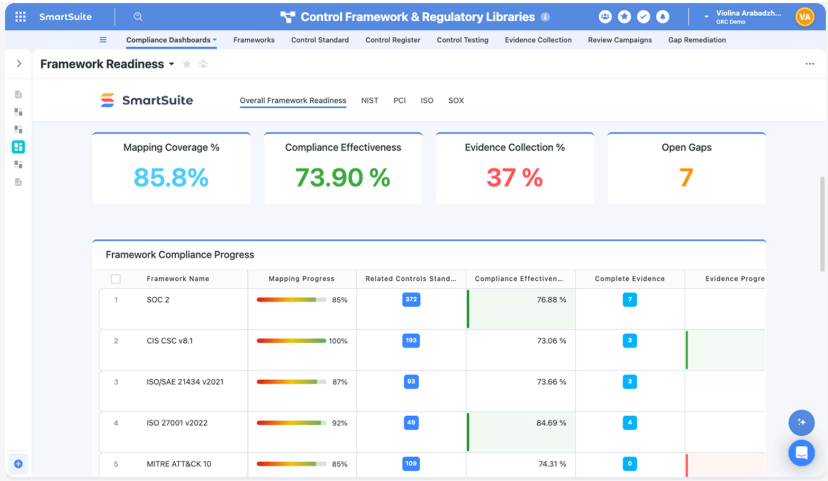
- Cyber & IT risk: Identify, assess, and mitigate cybersecurity and IT risks while linking them directly to controls, incidents, and remediation plans.
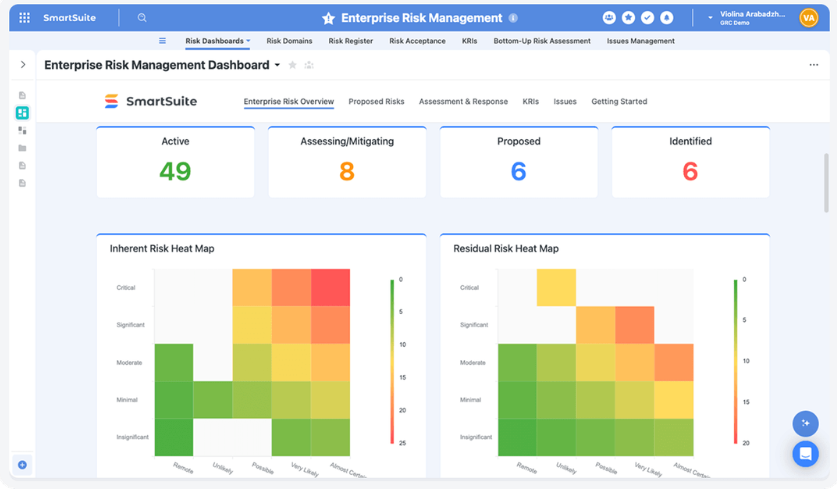
- Enterprise risk management (ERM): Centralize strategic, operational, financial, and reputational risks into a unified risk register with scoring, ownership, and monitoring.
- ESG management: Track environmental, social, and governance metrics, initiatives, and reporting requirements in one governed workspace.
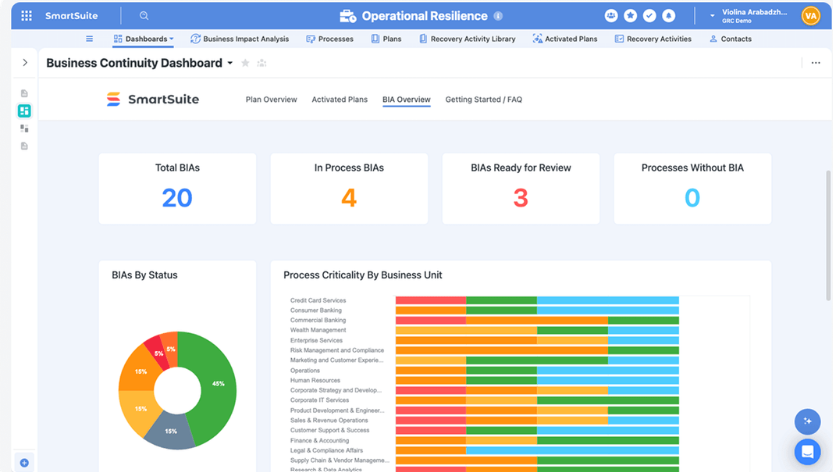
- Operational resilience: Build and maintain business continuity plans, scenario testing, and response coordination to ensure readiness during disruptions.
- Privacy management: Manage data protection obligations, privacy impact assessments, and regulatory requirements such as GDPR in a structured workflow.
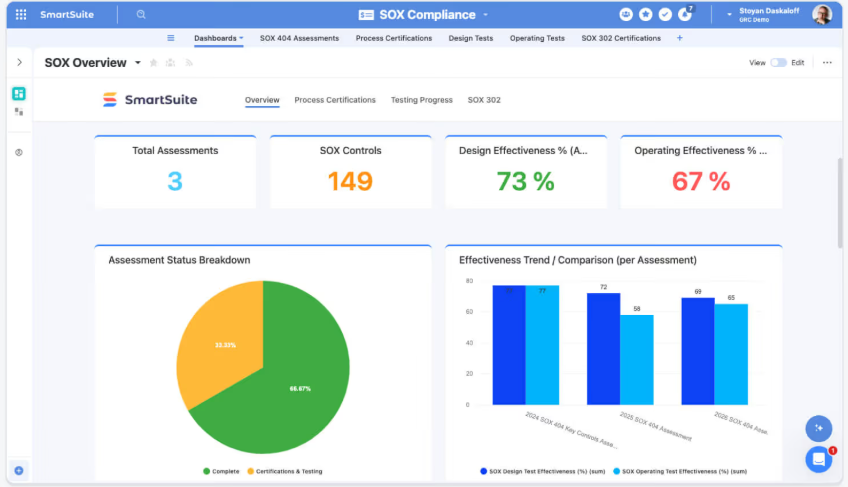
- SOX management: Standardize financial controls, testing procedures, documentation, and reporting needed for Sarbanes-Oxley compliance.
- Third-party risk management: Assess, monitor, and manage vendor and partner risk through structured due diligence, ongoing reviews, and remediation tracking.
2. No-code workflow design for compliance teams
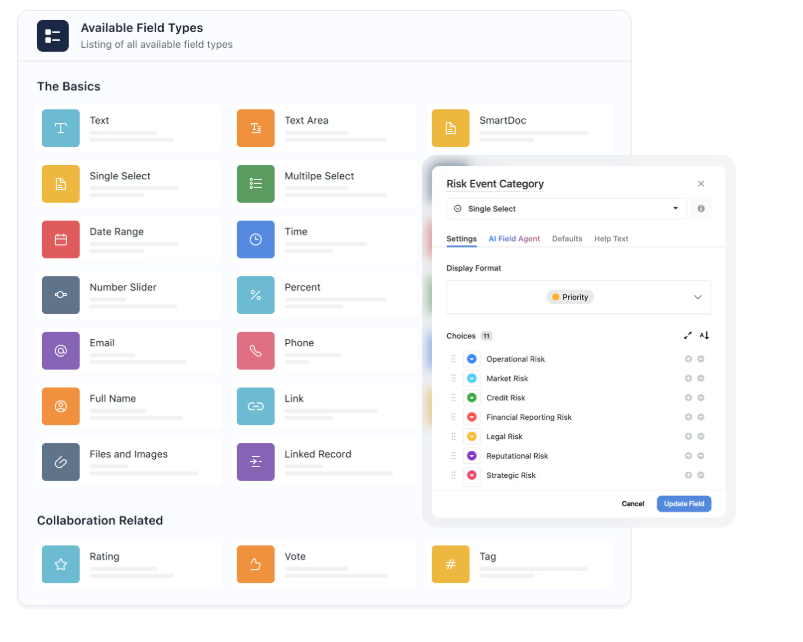
SmartSuite offers a visual workflow builder (SmartSuite Studio) that lets compliance teams model their data, design custom interfaces, and build role-specific views, all without writing a single line of code.
Key no-code customization capabilities include:
- Visual builder: Create tables, fields, linked records, layouts, and conditional logic using a drag-and-drop interface in SmartSuite Studio.

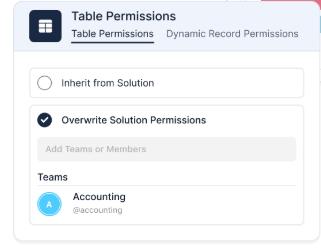
- Role-specific interfaces: Build tailored dashboards, pages, and record layouts so each team sees only what they need to act on.
- Reusable workflow patterns: Start from templates or existing solutions, then customize them to match your organization’s processes.
- Multiple work views: Switch between Grid, Kanban, Calendar, Timeline, Chart, or Map views to visualize workflows in the way that fits the task.
- Connected workflows across teams: Link multiple processes and solutions together while maintaining permissions and structure.
- Flexible data architecture: Model workflows with relational tables, linked records, and over 40 field types to support complex risk, audit, or compliance programs.
3. AI that works inside your GRC workflows
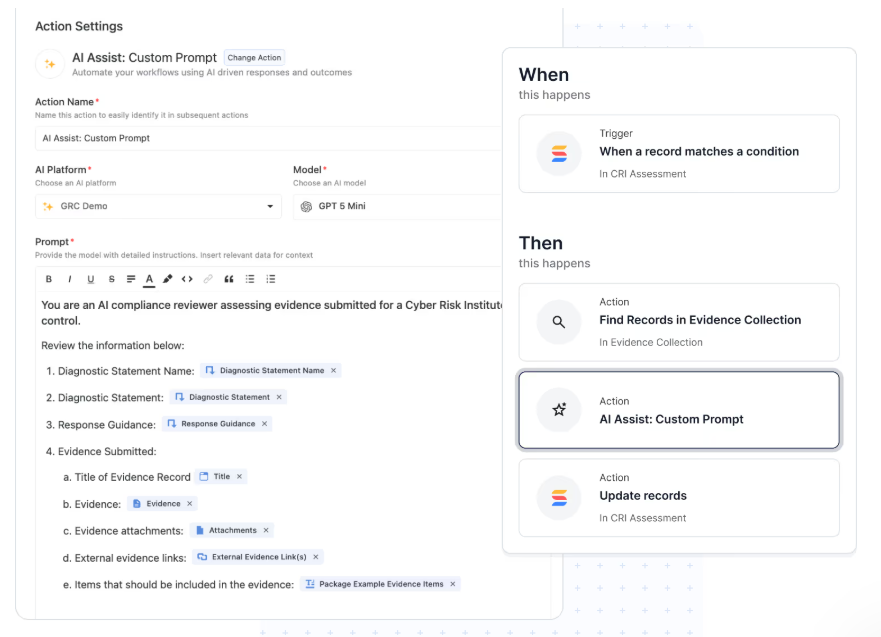
SmartSuite embeds AI directly into workflows, records, and automations. It actively contributes to how work gets done rather than just running a surface-level check.
Here's what that looks like in practice:
- AI Assist inside automations: Add AI-powered steps that enrich data, generate summaries, or structure incoming information as records move through workflows.
- SmartDoc AI content generation: Create, rewrite, translate, or summarize policies, audit notes, vendor assessments, and incident reports directly inside records.
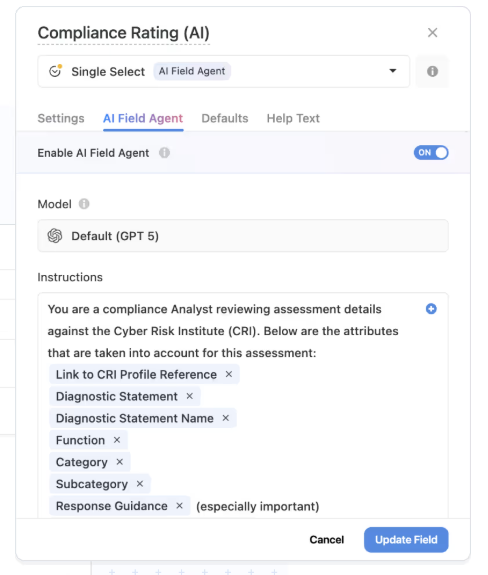
- AI Field Agent for data intelligence: Monitor records for patterns, missing context, or anomalies, and recommend updates like risk scores, priorities, or classifications.
- Third-party risk intelligence: Summarize vendor questionnaires, highlight potential risks in responses, and map findings to required controls and frameworks.
- Operational resilience & continuity insights: Summarize incidents, recovery actions, and lessons learned while surfacing gaps between plans and real-world responses.
- Human-in-the-loop governance: AI prepares suggestions, but teams review and approve decisions, maintaining accountability and auditability.
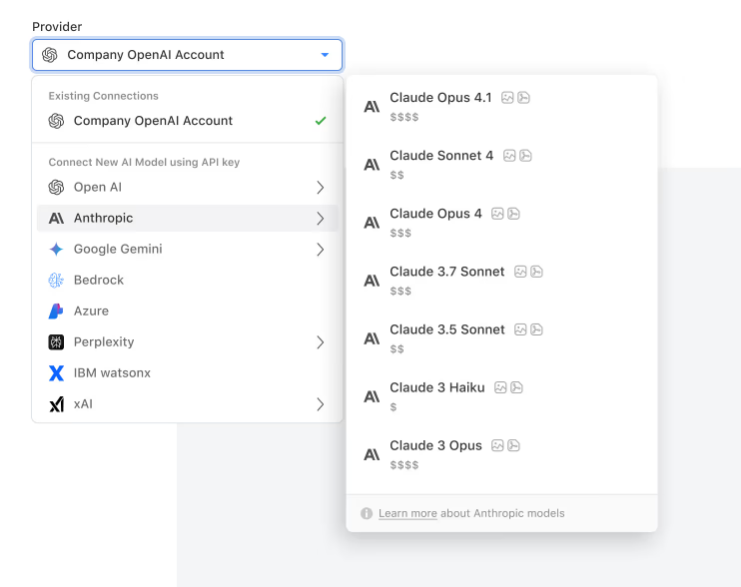
- Bring-your-own-LLM flexibility: Connect models like OpenAI, Anthropic, Gemini, Bedrock, Azure, Perplexity, or IBM WatsonX while maintaining enterprise governance.
- Permission-aware AI actions: Every AI-generated change respects role-based permissions and is logged for full transparency.
4. A workflow automation engine built for governance
Instead of relying on manual follow-ups and email reminders, SmartSuite lets teams automate the repetitive parts of compliance work using a visual, no-code builder.
You set triggers (record created, status changed, date reached), define conditions (only if priority is high, only if assigned to this team), and specify actions (send a notification, update a field, create a record in another workflow, send an email).
Here’s how it looks in practice:
- No-code workflow automation: Build simple or multi-step workflows with a visual builder to handle notifications, record updates, approvals, and task creation automatically.

- Real-time triggers & smart filters: Launch automations based on record changes, dates, webhook events, or workflow conditions like failed control tests or high-risk ratings.
- Notifications on autopilot: Send alerts in tools like Slack, Microsoft Teams, and more to keep teams aligned.
- Looping actions for large programs: Update multiple linked records at once, such as applying risk score changes across controls or closing remediation tasks automatically.
- Webhook integrations: Trigger or receive actions from external GRC, ITSM, security, or business continuity systems for end-to-end process automation.
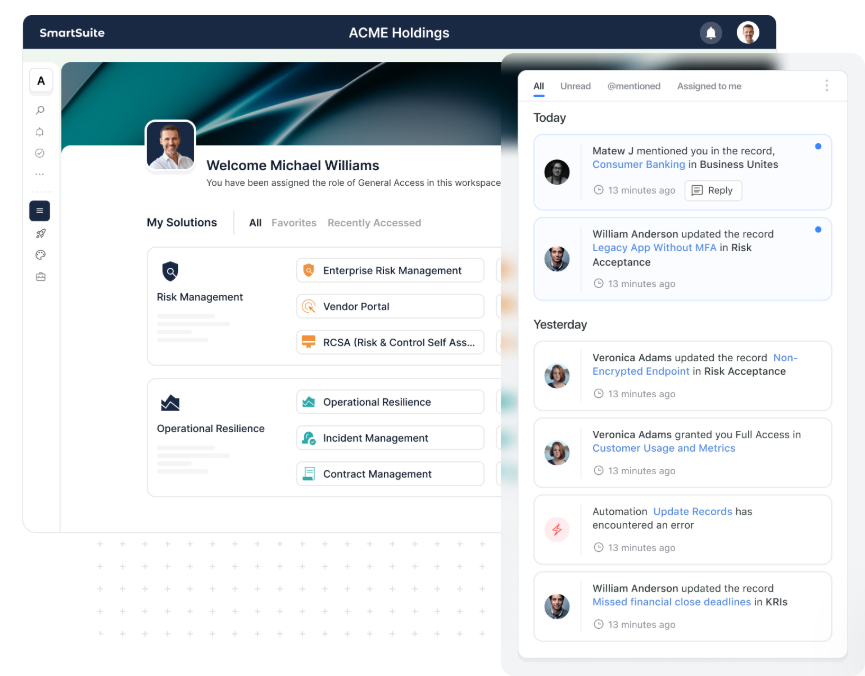
- Audit-ready automation history: Every automation run is logged with timestamps, triggers, and results to maintain full traceability and governance.
SmartSuite's Pricing
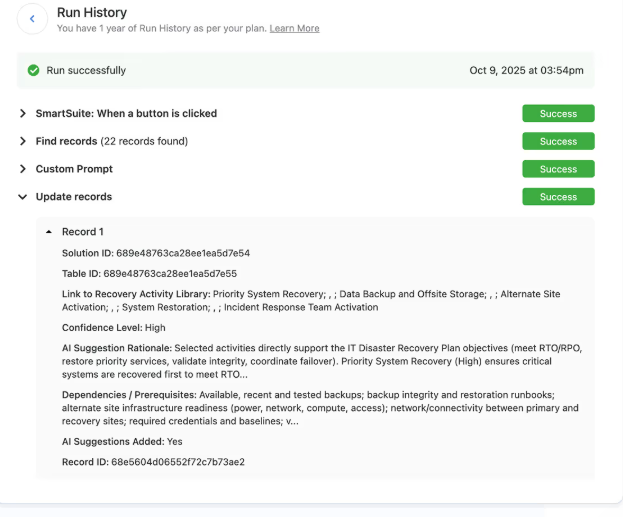
SmartSuite offers a 14-day free trial (no credit card required), making it easy to test real workflows before subscribing.
From there, SmartSuite offers two pricing models, depending on organizational size and complexity:
- User-based pricing, designed for small to mid-sized organizations that want full access to the entire platform under one license:
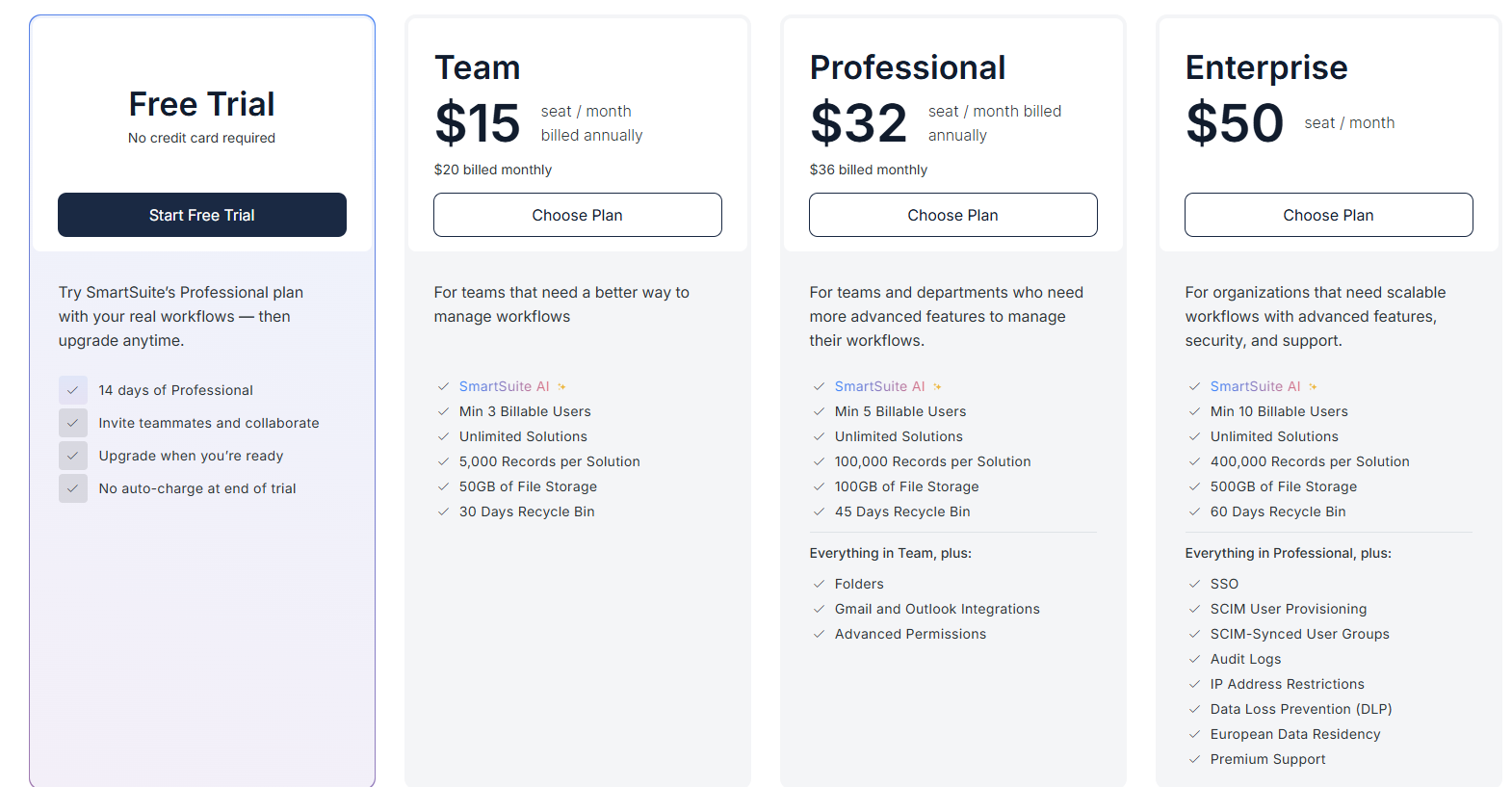
- Team: $15/user/month (minimum 3 users) includes unlimited solutions, 5,000 records per solution, and 50GB storage, and access to all core features, such as SmartSuite AI, reporting and dashboards, pre-built templates, advanced customization options, real-time collaboration, etc.
- Professional: $32/user/month (minimum 5 users), includes everything in Team and adds 100,000 records per solution, 100GB of storage, Gmail & Outlook integrations, folders, and advanced access controls.
- Enterprise: $50/user/month (minimum 10 users), includes everything in Professional and adds 400,000 records per solution, 500GB of storage, SSO, SCIM provisioning, audit logs, DLP, IP restrictions, and premium support.
Each licensed user can access all SmartSuite solutions (ITSM, ITAM, GRC, projects, operations, etc.) without paying separately for service management, asset management, or reporting modules.
- Solution-based custom-tailored pricing, built for regulated industries and large enterprises where per-user licensing across the entire platform isn’t practical. With it you can:
- License only the specific solutions you need (e.g. ITSM, GRC).
- Structure access by department, region, or regulatory requirement.
- Easily scale for thousands of users without compromising security.

How Is SmartSuite's Pricing Different From Scytale's?
Scytale requires a sales conversation before you see any numbers.
Consulting services are built into the tiers, which means the price you're quoted includes expert support whether or not that's what your team needs at this stage.
And based on user reports, that price can increase at renewal without a clear explanation tied to the work being done.
SmartSuite publishes its pricing openly.
SmartSuite offers a 14-day free trial (no credit card required), making it easy to test real workflows before subscribing.
From there, SmartSuite offers two pricing models, depending on organizational size and complexity:
- User-based pricing, designed for small to mid-sized organizations that want full access to the entire platform under one license:
- Team: $15/user/month (minimum 3 users) includes unlimited solutions, 5,000 records per solution, and 50GB storage, and access to all core features, such as SmartSuite AI, reporting and dashboards, pre-built templates, advanced customization options, real-time collaboration, etc.
- Professional: $32/user/month (minimum 5 users), includes everything in Team and adds 100,000 records per solution, 100GB of storage, Gmail & Outlook integrations, folders, and advanced access controls.
- Enterprise: $50/user/month (minimum 10 users), includes everything in Professional and adds 400,000 records per solution, 500GB of storage, SSO, SCIM provisioning, audit logs, DLP, IP restrictions, and premium support.
Each licensed user can access all SmartSuite solutions (ITSM, ITAM, GRC, projects, operations, etc.) without paying separately for service management, asset management, or reporting modules.
- Solution-based custom-tailored pricing, built for regulated industries and large enterprises where per-user licensing across the entire platform isn’t practical. With it you can:
- License only the specific solutions you need (e.g. ITSM, GRC).
- Structure access by department, region, or regulatory requirement.
- Easily scale for thousands of users without compromising security.
How Is SmartSuite Different From Scytale?
Scytale is a solid platform for what it's designed to do.
It automates evidence collection, maps controls to compliance frameworks, handles audit coordination, and wraps all of that in dedicated human consultants who guide the certification process end to end.
SmartSuite takes a different approach entirely.
Rather than centering the product around certification, it connects GRC to the broader operations of the organization.
Every risk, audit finding, vendor relationship, and compliance control is linked to the people and workflows responsible for acting on it, inside one system.
Scytale is the better fit if your primary goal is getting through a compliance certification with dedicated consultant support and you want technology and human expertise packaged together under one subscription.
SmartSuite is the better fit if you need GRC to connect to real business operations, want full control over how your workflows are structured, and need a platform that scales across risk, audit, compliance, and operational programs without mandatory consulting fees built into the price.
Ready to try a different approach to GRC?
If you need a GRC platform that goes beyond certifications and connects compliance to the way your organization actually operates, you can test SmartSuite with a free trial and explore its ready-to-use GRC solution templates.
Here's what you get when you start a SmartSuite trial:
- A 14-day free trial with all features unlocked and no credit card required.
- Transparent, published pricing you can review and compare before speaking to anyone.
- A no-code GRC workspace connecting risk, audit, compliance, and operations in one platform.
- AI embedded across workflows for policy drafting, risk summaries, anomaly detection, and evidence review.
- Real-time dashboards and reporting built on live GRC data with no additional modules needed.
- Pre-built GRC solution templates to get your program running quickly without building from scratch.
- Workflow automation for risk monitoring, audit follow-ups, incident escalation, and remediation tracking.
Start a free trial to explore SmartSuite on your own terms or, if you'd like to talk it through with our team, schedule a demo.
⚠️ Disclaimer: This article was last updated on 03/27/2026, and if there's any misinterpretation of the information, please contact us, and we will fact-check it.

SmartSuite provides work platform for standardizing workflows in the following areas:
- Governance, Risk & Compliance
- IT & Service Ops
- Project / Portfolio Management
- Business Operations







