

InvGate pricing is often praised for its flexibility and modular approach, but that doesn’t automatically mean it’s the best value for IT teams in 2026.
As service management needs expand beyond basic ticketing into automation, reporting, and cross-team workflows, many organizations are taking a closer look at what InvGate actually delivers for the price.
In this guide, I’ll break down InvGate’s pricing structure, what you get at each level, and whether it’s truly worth the investment today.
Let’s dive in!
Does InvGate offer a free plan or a trial?
While InvGate doesn’t have a free forever tier, it does offer a free trial so teams can test the platform before committing to a paid plan.
Both its service management and asset management products come with a 30-day free trial.

During this trial, you typically get full access to key features so you can evaluate things like ticketing, automation, self-service portals, and asset tracking before choosing a paid tier.
InvGate pricing plans
InvGate’s pricing is organized around two separate products: one focused on IT service management and the other on IT asset management, each with its own set of plans and pricing models:
- InvGate Service Management (ITSM):
- Starter: $17/agent/month ($999 when billed annually).
- Pro: $40/agent/month (annual only).
- Enterprise: Custom pricing for large or complex deployments.

- InvGate Asset Management (ITAM):
- Starter: $0.21/node/month ($1250 billed annually).
- Pro: $0.38/node (annual only).
- Enterprise: Custom tier for larger environments or advanced requirements.

In the following sections, I’ll break down what’s included in each tier and how pricing stacks up relative to feature value.
InvGate Starter ITSM plan
The Starter tier is InvGate’s entry-level service management plan, designed for small IT teams just beginning their ITSM journey.
At $17 per agent per month, it includes the foundational features you need to get up and running with core service desk functionality.

Here’s what’s included in Starter:
- Licensing for up to 5 agents, which is enough for a small help desk or IT team.
- Simple configuration to set up workflows without heavy complexity.
- A self-service portal where end users can submit tickets and search knowledge articles.
- Core ticket management to track and resolve service requests.
- Knowledge base to centralize help articles and reduce repeat tickets.
- Unlimited free end users and approvers/watchers, so non-agents can interact without extra cost.
- Reports and analytics to track vital KPIs and metrics.
- Service level management and SLAs to ensure requests are resolved within agreed response and resolution times.
- Approval management that lets you configure approval workflows for various requests.
- Automation for streamlining repetitive actions like ticket routing, status changes, notifications, and escalations..
- Gamification lets you use points, rankings, and performance indicators to motivate agents and encourage faster, higher-quality support.
- AI Hub includes AI-powered tools that classify requests, optimize workflows, and accelerate service delivery with less manual input.
- InvGate Asset Management integration.
- ITIL alignment allows you to structure service workflows according to ITIL best practices for incidents, requests, problems, and changes.
InvGate Pro ITSM plan
The Pro tier is InvGate’s mid-level service management package, designed for growing IT teams.
It’s available as an annual plan only, and comes at a price of $40/agent/month.

It includes everything in Starter, plus:
- Up to 50 agents.
- Custom domain with SSL.
- A no-code workflow builder to visually design and automate processes using tasks and forms.
- ESM templates that help teams launch service workflows faster across departments.
- A virtual service agent that reduces ticket volume through human-like conversations across multiple channels.
- Expanded third-party integrations to connect InvGate with more tools in your IT ecosystem.
- Deeper ITAM integrations, including native connections with Microsoft SCCM, Filewave, and Lansweeper.
- Change management to standardize change requests, approvals, and implementation workflows.
InvGate Enterprise ITSM plan
In addition to everything in the Pro tier, Enterprise unlocks advanced capabilities built for large, highly regulated, or complex organizations:

- Custom number of agents.
- On-premise hosting to deploy InvGate within your own data center for full infrastructure control.
- Concurrent licensing so licenses are shared across a pool of users rather than tied to individuals.
- Advanced security configurations to enforce stricter access controls and compliance requirements.
- Multiple SAML support to enable single sign-on across several identity providers.
- Bring your own AI to integrate and leverage external AI models within InvGate workflows.
- Analytics API (OLAP) to query and explore data for deep business intelligence use cases.
InvGate Starter ITAM plan
The Starter tier for InvGate Asset Management is aimed at small organizations or teams that need basic visibility and control over their IT assets, priced at $0.21 per node per month (about $1,250 billed annually for up to 500 nodes).

Here’s what you get in Starter ITAM:
- Asset inventory for up to 500 nodes to track devices like laptops, servers, and network equipment.
- Free and unlimited end users so your whole organization can access asset data without extra fees.
- Extensive data sources that centralize hardware, software, and cloud asset information.
- Unified inventory that brings all assets into a single, searchable repository.
- Software normalization to clean up duplicates and standardize software records.
- IT security compliance tracking so you can spot risks and enforce policies.
- User and location management to map assets to the right teams and sites.
- Asset lifecycle administration from procurement through retirement.
- Smart tags for easy organization and filtering.
- AI Hub capabilities to bring intelligence into your asset data.
- Reporting and dashboards to visualize key metrics, track performance trends, and monitor asset or service data in customizable visual panels.
InvGate Pro ITAM plan
The Pro tier in InvGate’s ITAM suite is built for mid-sized organizations that need scalable asset tracking and lifecycle management across hundreds to thousands of devices, priced at $0.38 per node per month (annual billing only).

It includes everything in Starter and adds:
- Extended asset inventory for up to 10,000 nodes.
- SSO integration to let users sign in securely with single sign-on via your identity provider.
- Remote desktop integrations to connect service tickets with tools that let agents troubleshoot devices directly.
- A CMDB for centralized visibility to map and relate assets, services, and configuration items in one place.
- Custom dashboards to create tailored visual views of the metrics and KPIs that matter most to your team.
- Licensing contract management to track software licenses, renewal dates, and compliance obligations.
- Software metering to measure actual usage of installed applications across your environment.
- No-code workflow automation to streamline repetitive ITAM processes without scripting.
- Software and configuration deployment to push software installs and configuration changes across devices from within the platform.
- More third-party integrations to connect with tools like directory services, discovery systems, and ITSM platforms.
InvGate Enterprise ITAM plan
The Enterprise tier for InvGate Asset Management is tailored to large organizations and complex IT environments that need comprehensive asset control, scalability, and advanced deployment options beyond the Pro tier.

As in the case of most enterprise-grade plans, this tier’s pricing is custom-tailored.
It includes everything in Pro and adds:
- Unlimited nodes so you can track all assets across your entire organization without caps.
- Cloud or on-premise deployment options to match your infrastructure and compliance needs.
- Custom domain with SSL for branded and secure access to your asset management portal.
- End-user onboarding and training to help your teams ramp up quickly on the platform.
- Extended network restrictions so you can segment access based on networking or security policies.
- VPN connection support to secure remote access for distributed teams and assets.
- Extended access control for more granular permissions and policy enforcement.
- Extended API limits to support deep integrations and high-volume data use cases.
Does InvGate provide good value for money in 2026?
InvGate is generally seen as a good-value ITSM solution, especially for small teams that want a service desk that’s easy to use, quick to deploy, and flexible enough to support multiple departments.
However, when you look across user feedback, a few recurring limitations come up, particularly as teams scale or demand more advanced control:
- Reporting depth. While InvGate’s reports and dashboards are easy to use, multiple reviewers note that filtering, segmentation, and advanced customization can feel limited compared to more analytics-driven platforms. For teams that rely heavily on granular performance reporting or custom executive dashboards, this can become a bottleneck over time.

- Setup complexity for certain features. Although the platform is broadly described as user-friendly, some users mention that specific functions and configurations can be difficult to set up, which may require additional training or onboarding time for staff.

- Performance and functional gaps. These include issues such as occasional UI lag when working with larger data sets and the absence of built-in remote support tools.

So, overall, InvGate provides solid value for money in 2026 for teams that prioritize usability, quick adoption, and automation.
However, teams that need highly advanced reporting, deep customization, or maximum scalability may start to feel its limits - and that’s often where alternative platforms come into the conversation.
Looking for an InvGate alternative?
If InvGate feature trade-offs don’t quite match what your team needs in 2026, it’s worth exploring alternatives that blend flexibility, automation, and broader work management capabilities, instead of just traditional ITSM functionality.
One such InvGate alternative is SmartSuite: an AI-native Work OS, designed to unify IT service management, asset tracking, governance, projects, and operational workflows in a single, configurable platform.
Next, I’ll break down SmartSuite’s key features and how they compare to InvGate’s approach, helping you evaluate whether it’s a better fit for your team’s needs, budget, and growth plans.
1. A comprehensive IT services workspace, not just another ITSM tool
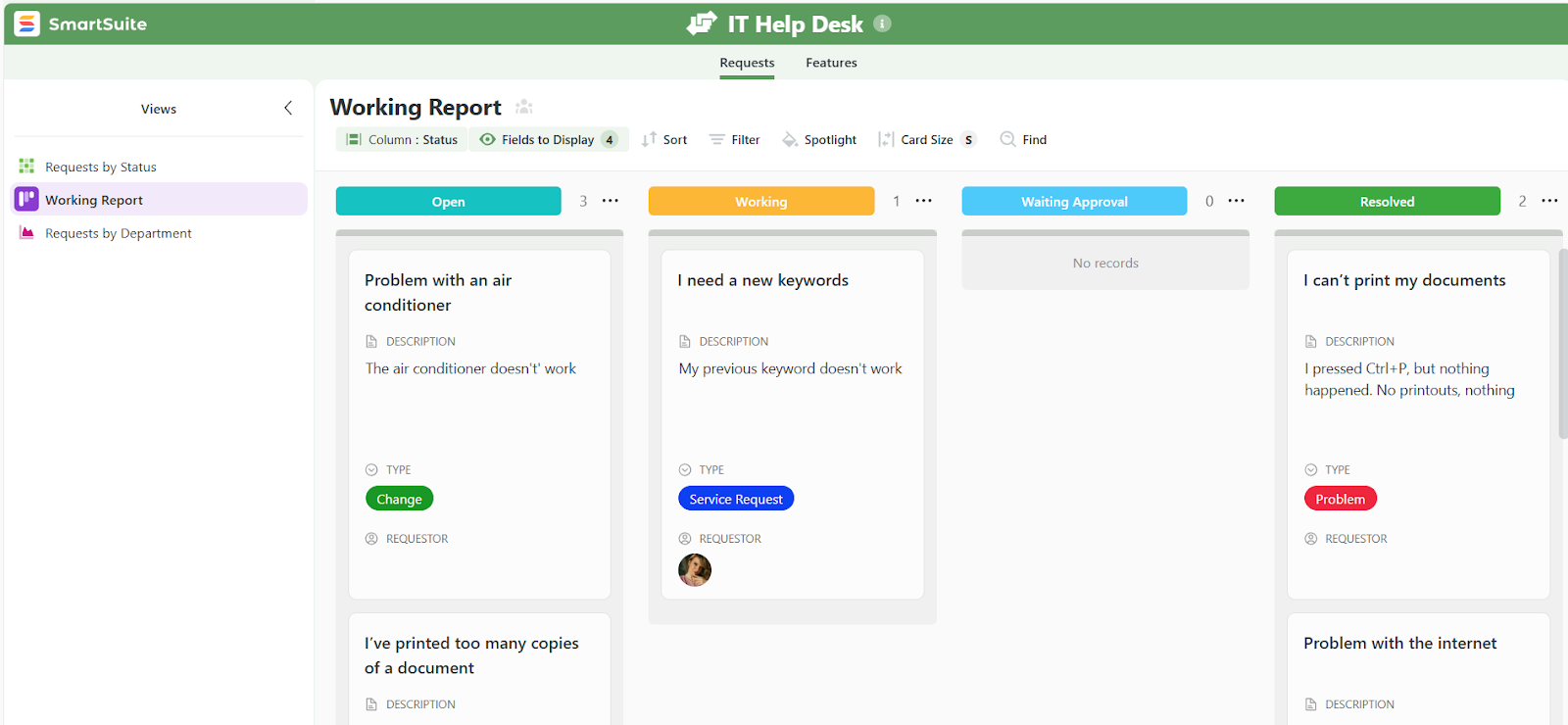
SmartSuite is built as a single platform for running all IT services, not just ticketing.
Instead of managing ITSM, ITAM, enterprise service requests, and IT operations in separate tools, SmartSuite brings them together in one connected workspace, so data, workflows, automation, and reporting stay aligned as teams scale.
You can start with just one solution, and then extend further as your IT operations scale and branch.
At a high level, SmartSuite covers four core IT service areas:
- IT Service Management (ITSM), with key capabilities including:
- Centralized service desk for incidents, service requests, and problems.
- Configurable intake forms, SLAs, approvals, routing, and escalations.
- Change and release management with visibility into risk, impact, and dependencies.
- Knowledge base and service catalog to standardize delivery and reduce ticket volume.
- Omnichannel ticket intake via email, chat, and self-service portals.
- IT Asset Management (ITAM) that provides:
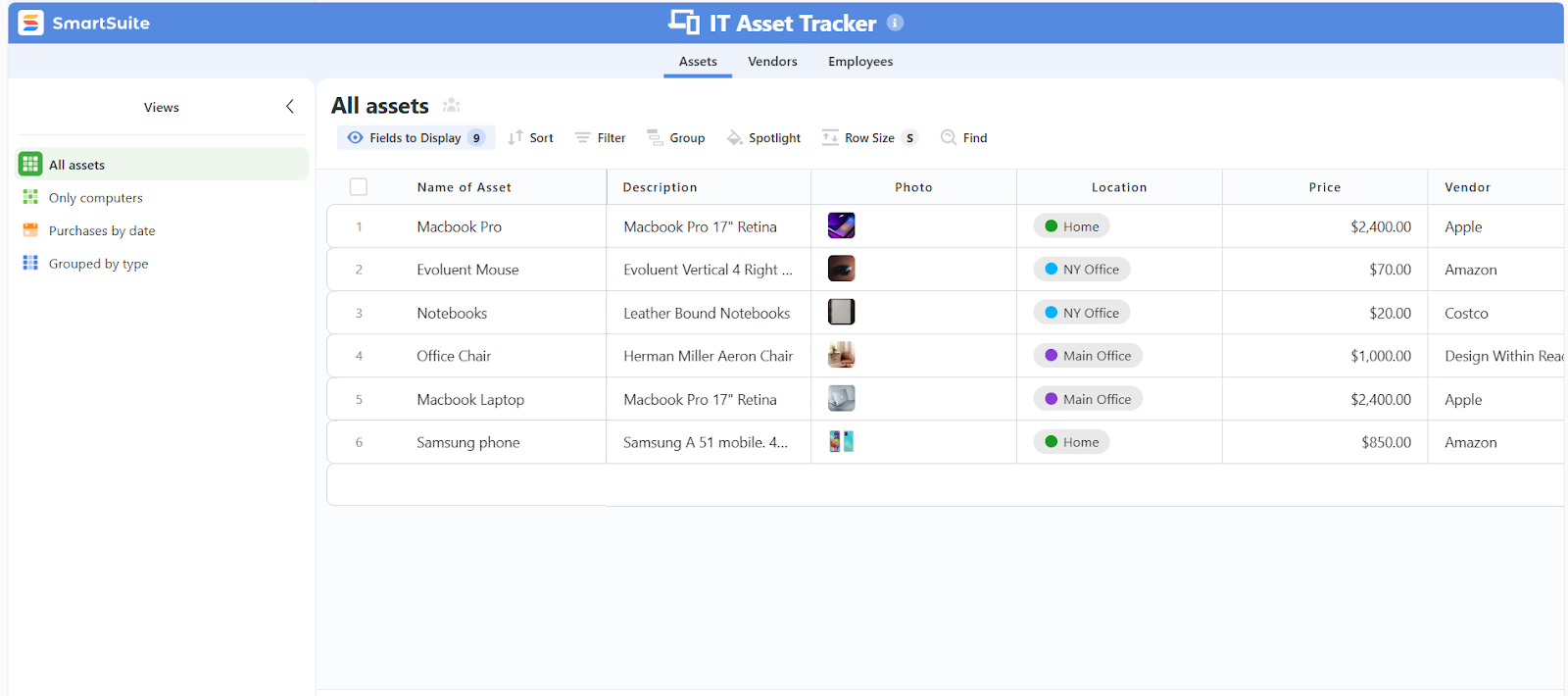
- Centralized hardware, software, and license inventory with ownership and status.
- End-to-end asset lifecycle tracking from procurement to retirement.
- Software and license visibility to reduce waste and missed renewals.
- Vendor, contract, warranty, and purchase linkage for cost context.
- Optional linkage to ITSM workflows for operational context.
- Enterprise Service Desk (ESM) including:

- A unified employee self-service portal for all internal service requests.
- Standardized intake forms with automated routing and approvals.
- SLA and OLA tracking across departments for consistent service delivery.
- Real-time dashboards for backlog, workload, and performance visibility.
- Role-based permissions and audit trails for sensitive workflows.
- IT Operations Management (ITOM) that offers:

- Shared maintenance and change calendars to avoid conflicts.
- Release and deployment tracking across environments.
- Outage and major incident workflows with structured response and communications.
- Dependency mapping to understand service impact during changes or incidents.
- Live operational dashboards for reliability trends and continuous improvement
2. Reporting and dashboards designed for connected IT service and asset workflows
Reporting is often where traditional ITSM tools start to show their limits, especially once teams need visibility across tickets, assets, SLAs, renewals, and operational risk at the same time.
SmartSuite tackles this by embedding reporting directly into every ITSM and ITAM workflow, providing teams with a unified source of truth.
Here’s what SmartSuite’s reporting capabilities include:
- Real-time reporting where charts, metrics, and lists update automatically as work progresses.
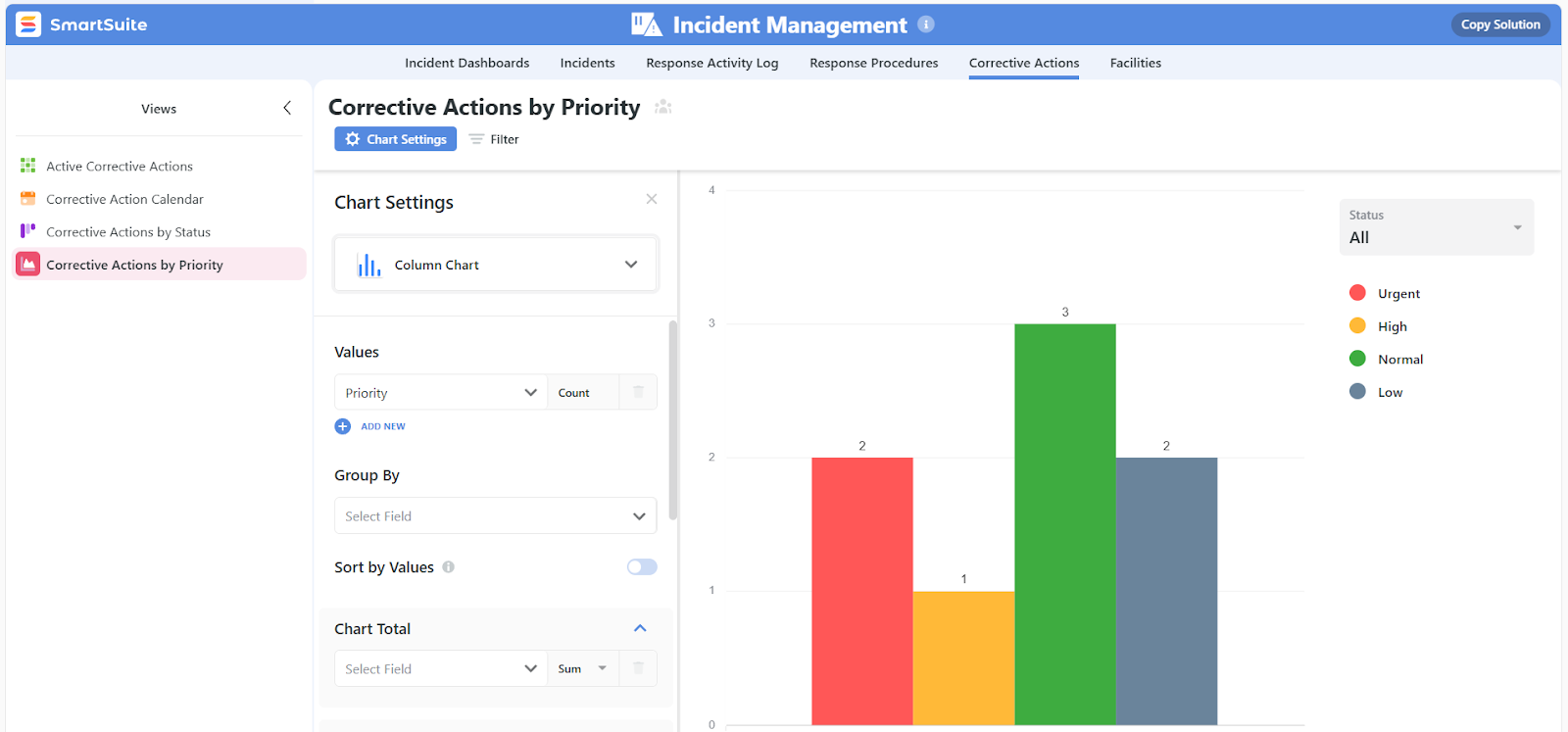
- Cross-workflow dashboards that combine ITSM and ITAM data, such as tickets, SLAs, assets, renewals, and lifecycle stages, into a single view.
- Role-aware views and dashboards that automatically adjust visibility based on permissions, ensuring each user sees only what’s relevant to their role.
- Self-service visual dashboard creation so IT teams can build and adjust reports themselves, without relying on a separate BI or analytics team.
- Multiple view types to support different workflows, including Grid, Kanban, Calendar, Timeline, Gantt, Chart, Map, Forms, and Dashboard views.

- Executive-level dashboards that surface trends across incidents, changes, assets, and operational health for leadership oversight.
3. Automation and AI that actively drive IT work forward
Instead of relying on static rules or limited actions, SmartSuite combines no-code automation with governed, model-flexible AI to help IT teams move faster, reduce manual effort, and maintain control across ITSM and ITAM processes.
Here’s what SmartSuite’s automation and AI features include:
- No-code automation builder to create simple or multi-step workflows using a visual, drag-and-drop interface.

- Real-time triggers based on record creation or updates, scheduled dates, button clicks, or inbound webhooks from external systems.
- Trigger filters to ensure automations run only when precise conditions are met, preserving data accuracy and control.
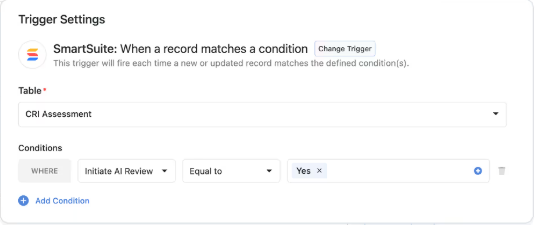
- Multi-step actions that update records, assign owners, send notifications, or call external systems in a defined sequence.
- Native integrations with tools like Slack, Microsoft Teams, Google Calendar, and email for real-time alerts and coordination.

- Automation logging and monitoring so every run is tracked with full visibility into execution status and outcomes.
- AI Assist that summarizes records, analyzes attachments, extracts insights, and populates structured fields, making automated workflows smarter and smoother.

- IT & Service Operations AI Assistants that speed up service delivery by classifying and routing tickets, generating incident timelines and summaries, turning resolutions into searchable knowledge articles, and analyzing change impact to recommend approvers and draft communications.
4. Collaboration built directly into IT service workflows
SmartSuite brings communication, decisions, and execution into one place, so teams don’t have to jump between tickets, email threads, chat tools, and documents to get work done.
Every conversation stays tied to the service request, asset, change, or task it belongs to, keeping context intact and accountability clear.
Key collaboration capabilities include:
- Contextual conversations inside records, tickets, assets, and projects, with threaded comments and @mentions.
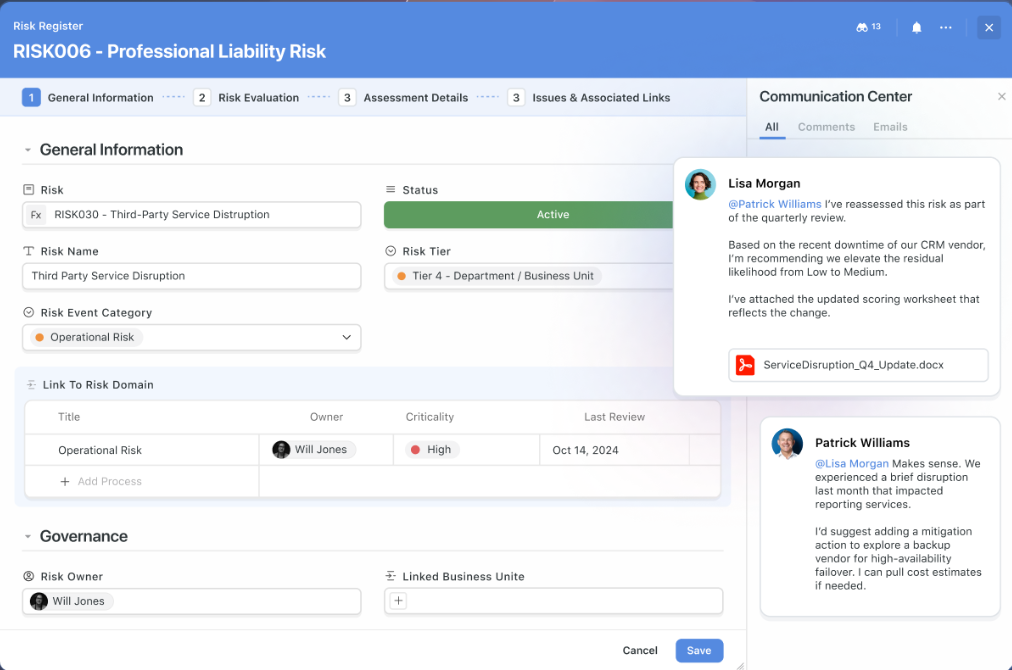
- Email-in-record communication to send, receive, and track stakeholder emails directly within the relevant workflow.
- Activity history and audit trails that show who changed what, when, and why across every service interaction.
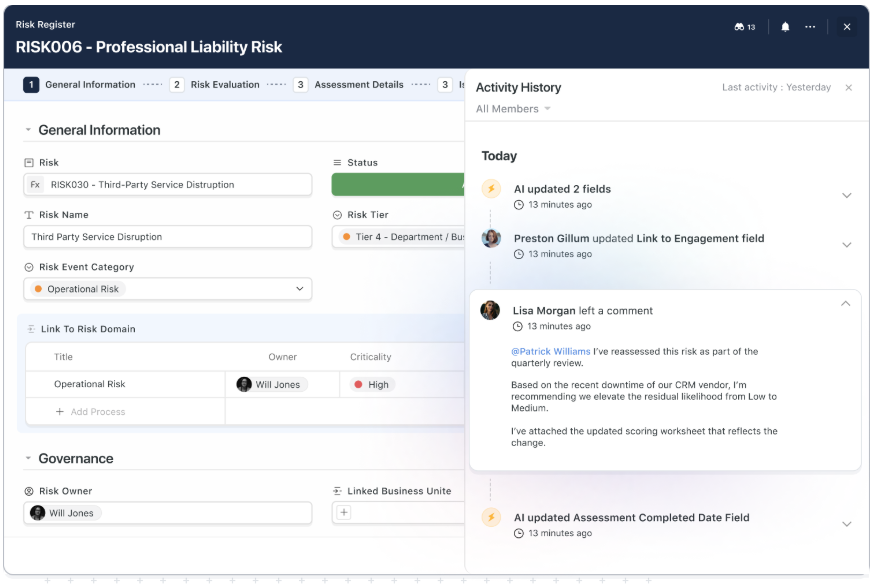
- Actionable collaboration, where comments can be turned into tasks, approvals, or workflow steps in a click.
- Smart notifications for mentions, assignments, and approvals, without overwhelming users with noise.

- Automation and AI support to summarize long threads, trigger workflows from approvals, and create follow-ups automatically.
How does SmartSuite’s pricing compare to InvGate’s?
Although there’s no free plan, SmartSuite offers a 14-day free trial of its Professional plan (no credit card required), making it easy to test real workflows before committing.
From there, SmartSuite offers two pricing models, depending on organizational size and complexity:
- User-based pricing, designed for small to mid-sized organizations that want full access to the entire platform under one license:
- Team: $12/user/month (minimum 3 users) includes unlimited solutions, 5,000 records per solution, and 50GB storage, and access to all core features, such as SmartSuite AI, reporting and dashboards, pre-built templates, advanced customization options, real-time collaboration, etc.
- Professional: $24/user/month (minimum 5 users), includes everything in Team and adds 100,000 records per solution, 100GB of storage, Gmail & Outlook integrations, folders, and advanced access controls.
- Enterprise: $45/user/month (minimum 10 users), includes everything in Professional and adds 400,000 records per solution, 500GB of storage, SSO, SCIM provisioning, audit logs, DLP, IP restrictions, and premium support.

Each licensed user can access all SmartSuite solutions (ITSM, ITAM, GRC, projects, operations, etc.), without paying separately for service management, asset management, or reporting modules.
- Solution-based custom-tailored pricing, built for regulated industries and large enterprises where per-user licensing across the entire platform isn’t practical. With it you can:
- License only the specific solutions you need (e.g. ITSM, ITAM, GRC).
- Structure access by department, region, or regulatory requirement.
- Create custom terms, governance controls, and scale-ready agreements.
- Easily scale for thousands of users without compromising security.

How is SmartSuite different from InvGate?
At a high level, the difference between InvGate and SmartSuite comes down to how each platform is designed to scale as IT operations grow more complex.
InvGate is built around a modular, product-based model. IT service management and asset management are sold as separate products, each with multiple tiers, limits, and pricing structures tied to agents or nodes.
This works well for teams that want a focused service desk or a standalone asset management tool, but it also means functionality, flexibility, and cost scale incrementally as requirements expand.
SmartSuite takes a platform-first approach.
Instead of separating ITSM, ITAM, reporting, automation, and AI into distinct products, SmartSuite provides a unified foundation where service workflows, asset data, reporting, and automation all operate within the same system.
Here’s how that difference shows up in practice:
- Platform vs. product model: InvGate splits ITSM and ITAM into two products with separate plans, limits, and pricing. SmartSuite runs ITSM and ITAM as distinct solutions on the same platform, sharing data, automation, reporting, and governance without duplication.
- Reporting depth and context: InvGate’s reporting is easy to use but more limited in advanced filtering and cross-functional visibility SmartSuite’s reporting connects service performance, asset lifecycle, SLAs, renewals, and operational data in real time, making it easier to understand impact across IT operations.
- Ease of use: Configuring certain more advanced features in InvGate requires a solid level of technical skill. SmartSuite is built for no-code visual configuration of everything from dashboards to automated workflows, making initial onboarding and advanced use effortless.
- Pricing philosophy: InvGate prices by product, role, and scale (agents for ITSM, nodes for ITAM), which can increase total cost as teams grow. SmartSuite’s pricing provides broad platform access under a single license (in addition to allowing solution-based pricing for large organizations) reducing the need to pay separately for service management, asset management, reporting, and automation as usage expands.
Which ITSM tool is the best choice for your team?
InvGate delivers solid value for teams that want a structured, easy-to-adopt ITSM or ITAM tool with clear pricing and a modular setup.
For many small teams, that’s enough.
But in 2026, service management rarely stops at ticketing.
Once automation, reporting, asset visibility, and cross-team workflows become part of day-to-day operations, the limits of product-based pricing and siloed tools start to show.
That’s where platforms like SmartSuite stand out, by giving teams a single foundation to run ITSM, ITAM, reporting, automation, and AI together, without stitching multiple systems or licenses over time.
So, if your team is outgrowing traditional service desk tools - or you want to future-proof your IT operations without increasing complexity - SmartSuite is worth a closer look.
Start a free 14-day SmartSuite trial today (no credit card required), or book a demo to see how SmartSuite supports ITSM and ITAM at scale.
Read more
- 10 Best ManageEngine Alternatives For ITSM In 2026 - A practical breakdown of the strongest ManageEngine alternatives for teams that want more flexibility, modern UX, or better scalability.
- NinjaOne Pricing: Is It Worth It In 2026? - A clear look at NinjaOne’s pricing model, what you actually get at each tier, and whether the cost makes sense for modern IT teams.
- 10 Best IT Project Management Software [2026] - A curated list of the best IT-focused project management tools, comparing strengths, trade-offs, and real-world use cases.
- Ivanti Pricing: Is It Worth It For ITSM In 2026? - An in-depth review of Ivanti’s ITSM pricing, feature tiers, and where it delivers value - or falls short - for growing organizations.
- 10 Best TeamDynamix Alternatives & Competitors In 2026 - A side-by-side look at the best TeamDynamix alternatives for teams seeking simpler configuration, better reporting, or lower total cost.
- Smartsheet vs. Basecamp vs. SmartSuite: Which Tool to Pick? [2026] - A hands-on comparison of three very different work management platforms, helping you find the one that actually fits your team’s way of working.

SmartSuite provides work platform for standardizing workflows in the following areas:
- Governance, Risk & Compliance
- IT & Service Ops
- Project / Portfolio Management
- Business Operations