



Drata Pricing: Is It Worth It In 2026? [Reviewed]
![Drata Pricing: Is It Worth It In 2026? [Reviewed]](https://cdn.prod.website-files.com/60db0944651d4b59a704ef93/6acad1a55af75170c4bc3f66_6acad1a031610a406324f7ed_drata-pricing-thumbnail-image.webp)

SmartSuite provides work platform for standardizing workflows in the following areas:
-
Governance, Risk & Compliance
-
IT & Service Ops
-
Project / Portfolio Management
-
Business Operations

Even though Drata does not publicly disclose its pricing, I still managed to find some reported pricing numbers for the platform's cost, which can help you determine if the tool is worth the investment.
In this pricing guide, I’ll cover everything that is publicly known about Drata’s pricing structure, including how they calculate their pricing and reported numbers.
💡 I’ll also introduce you to a Drata competitor that comes with a more affordable pricing structure, is quicker to set up, and has premium customer support and detailed reporting.
What are Drata’s pricing tiers?
Drata’s pricing is custom, but it has 6 GRC plans that you can choose from to get a quote:
Drata Foundation (Custom pricing):
- Up to 50 full-time employees (FTE).
- One pre-mapped framework (SOC 2, ISO 27001, Cyber Essentials, HIPAA, or GDPR).
- Pre-built integrations for direct data connections.
- Standard Risk Management and Vendor Risk Management modules.
Drata Advanced (Custom pricing):
- One additional framework (pre-mapped or fully custom).
- Custom API connections and automated tests.
- Custom fields & formula support.
Drata Enterprise (Custom pricing):
- Risk Management Pro for advanced risk workflows.
- Compliance as Code Pro for policy-as-code automation.
- Vendor Risk Management Pro with deeper assessments.
- Automated User Access Review.

Source: Drata.
SafeBase Foundation (Custom pricing):
- Trust Center Standard package with up to 25 approved domains.
- AIQA Standard package with 10 AI-powered questionnaire responses.
- Pre-built, shareable Trust Center to showcase your security posture.
SafeBase Advanced (Custom pricing):
- Trust Center Pro package for richer customization.
- Continued AIQA Standard support for ongoing questionnaires.
SafeBase Enterprise (Custom pricing):
- Trust Center Premier package with white-label portals & SLAs.
- AIQA Pro package for unlimited, AI-driven questionnaire handling.

Source: Drata.
➡️ Each plan also offers add-ons, such as extra frameworks, user access reviews, adaptive automation tests, approved domains, questionnaires, and published product portals, to tailor your compliance and trust programs even further.
How Does Drata Calculate Its Pricing?
Drata’s pricing model for its GRC platform, according to their website, is designed to scale with your evolving GRC needs, with each plan offering a fixed number of frameworks and features, with flexible add-ons.
Source: Drata.
Does Drata Have A Free Plan Or A Free Trial?
Drata does not offer a free plan for its GRC solution. There is no ongoing freemium model or free self-service version available.
That said, Drata does provide a limited free trial, typically available through direct request to the sales team.

Source: TrustRadius.
How Much Does Drata Really Cost?
Based on a range of publicly reported benchmarks, here’s what organizations can typically expect to pay for Drata’s GRC platform:
- Foundation Plan (Entry Tier): Starts around $7,000–$7,500 per year. Ideal for startups and small teams looking to automate a single framework like SOC 2 or ISO 27001.
- Advanced Plan (Mid Tier): Typically costs around $15,000 per year. Designed for growing companies that need multiple frameworks, advanced integrations, or risk features.

- Enterprise Plan (Top Tier): Generally $25,000–$50,000+ per year, depending on modules selected. This tier includes advanced GRC functions, Trust Center, vendor risk pro, and audit support.
Source: TrustRadius.
Some larger enterprises report paying $75,000 to $100,000+ per year, especially when onboarding multiple frameworks, multiple locations, or layered vendor and risk programs.
➡️ SMBs typically spend around $7.5K–$15K/year, depending on compliance goals.
➡️ Mid-market and enterprise organizations often pay between $25K–$50K+ annually, with higher quotes for expansive security, governance, or audit management requirements.
According to Vendr, the median buyer pays about $25,000/year, with reported pricing ranging from $10,250/year to $42,750/year.

Source: Vendr.
There is no charge per user or seat, and pricing does not scale with headcount. However, adding more frameworks or modules does increase the total contract value.
Any Surprises At Renewal?
There are instances where Drata tried to increase the price on renewal, with a customer claiming that they wanted to implement a 10% uplift.
Drata’s team then offered to remove that uplift if they committed to a multi-year contract or added new solutions.

Source: Vendr.
Is Drata Worth The Cost?
Customers are generally satisfied with their investment in Drata, which is why the platform has a 4.8/5 rating on G2.
Some of the users claim how happy they are with the tool’s implementation, responsive customer support, and how it saves them time from intensive manual work.

‘’It saves a lot of intensive manual work, and we use it very frequently. The support is very responsive and fast, one of the best support teams we have dealt with. The implementation phase was also easy in terms of setting up the connections, integrations, and just kicking off the process. Drata supports a wide range of integrations too!’’ – G2 Review.
However, some users have been looking to switch from Drata, due to its limited range of integrations, lack of a mobile app, and that the tool has been not as intuitive for non-technical users as people expected.
Starting off with when you’re purchasing the tool, you’ll quickly find out how limited the range of integrations is.
A verified user of the platform mentions that Drata’s default integrations are limited, as they haven't been able to connect a vulnerability scanner into the platform.

‘’The default integrations that come with Drata are a bit limited, e.g. we still haven't been able to connect a vulnerability scanner into Drata, as it comes with 14 different options by default and we use none of them. That's always an issue with these integration platforms, but it's not clear to us yet how we could build a manual API integration for this feature.’’ – G2 Review.
Apart from this, a verified user of the tool mentions that the platform is not as intuitive as you’d expect.
Tech-savvy users might have it easier, but non-technical users can find the software overwhelming and require support and training.

‘’The platform wasn’t as intuitive as we had hoped, and we often found it difficult to understand what was included or required at each step. We relied heavily on support from a third-party implementation partner and our auditor to interpret and navigate the system effectively. Without that external guidance, getting through the process would have been significantly more difficult.’’ – G2 Review.
And finally, some users of Drata are not satisfied with its lack of a mobile app. A customer of the platform mentions that a mobile app would have been a great addition to the tool for on-the-go access.

‘’Some of the integrations require a bit of fine-tuning during the initial setup, and occasional sync delays can happen. A mobile app would also be a great addition for on-the-go access.’’ – G2 Review.
Are You Looking For a Drata Alternative?
SmartSuite (that’s us) offers the best Drata alternative in 2026 with our modern, no-code project management platform that enables you to simplify complex regulatory requirements.
Perfect for banks and credit unions, our GRC software lets you streamline and automate policy creation, approval, and control assessments, all in one place.

Our platform helps you move faster, manage policies smarter, and adapt easily, without having to sign up for multiple training sessions on how to use the platform.
💡 We have recently partnered with the Cyber Risk Institute to deliver a CRI profile for U.S. Banks' compliance needs.
Let’s cover the functionality that makes SmartSuite the best choice for teams looking to make the switch from Drata: 👇
All-In-One Governance, Risk & Compliance
We believe compliance should be simple, automated, and accessible to all financial institutions, regardless of their size.
Our no-code, easy-to-use tool empowers compliance managers and CISOs to automate all GRC processes with ease.

SmartSuite helps you achieve and maintain compliance without the expense and complexity of adapting legacy GRC solutions like Drata to accommodate new compliance requirements.
Here are the use cases that you’ll get with SmartSuite:
- Create reports and dynamic dashboards: Monitor executive views into your organization's overall risk profile with charting and metrics widgets.

- Collaborate and respond to risks in real-time: Instantly engage key stakeholders in a real-time discussion of potential threats or vulnerabilities.
Our software will also let you get immediate updates when critical information is available.

- Automate policy creation, real-time approval, and control assessments: Streamline risk management by building an integrated program on a single platform.
- Keep risk and compliance data secure: Define your teams and manage access to information across all GRC practice areas.

- Integrate with your existing systems: Our GRC software lets you integrate with existing systems and data to consolidate and centralize your data.

- Automate for accuracy and efficiency: Remove inefficiencies and the chance for human error by automating repeatable workflows.
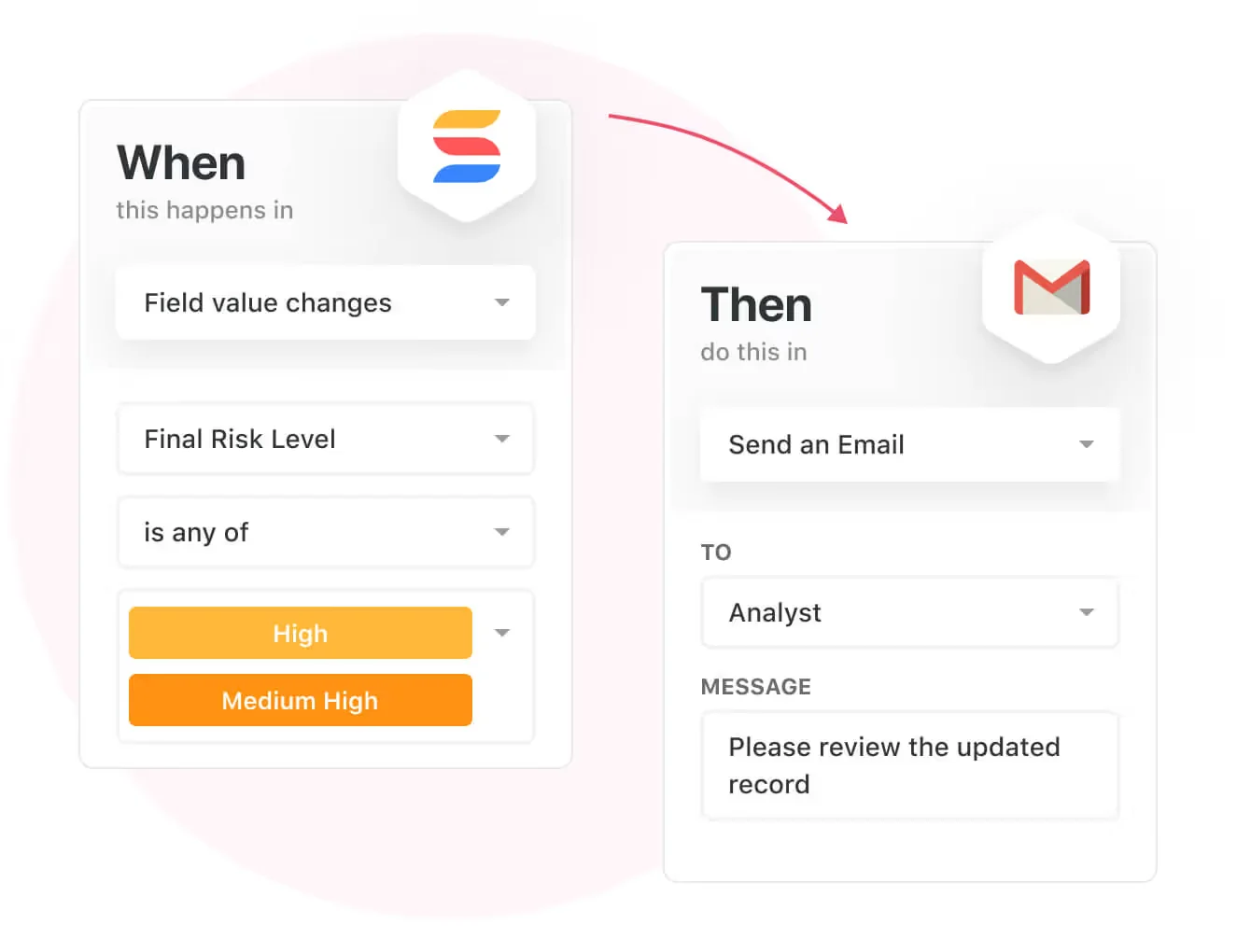
SmartSuite's no-code automation builder provides you with a visual interface that makes it easy to respond to events and take action.
That means your compliance team can customize your GRC workflows without technical resources.
- Monitor, measure and score: Create risk calculations and metrics to evaluate every aspect of risk.

- Policy management: It’s possible to establish a strong foundation from the get-go with streamlined and flexible policy management.
You’ll be able to assign ownership, manage revisions, and ensure your policies consistently align with key business initiatives and regulatory requirements.

- PSTOS Compliance Tracker: Designed for regulatory compliance and built on SmartSuite.
This solution focuses on data security as the core of compliance frameworks with services such as compliance readiness, virtual CISO, and IT security implementation.
Learn more about it from this webinar that we did on the topic:
Prioritize & Mitigate Risks
With SmartSuite, you can create a centralized risk register to effectively identify potential risks to your organization.
You will be able to properly assess threats and establish risk mitigation strategies inside SmartSuite.

Your team can ensure that the appropriate controls are in place and measure their effectiveness by evaluating risk indicators and displaying results in SmartSuite’s rollup reports and dashboards.
💡 Pro Tip: Teams that use our platform use automation to move tasks through defined workflow stages that comply with their policies and procedures.

We understand how crucial threat management is and the need to respond quickly to incidents.
SmartSuite lets you centralize incident response and threat mitigation by linking incidents to assets and organizational data to offer context during your investigations.
Your compliance team can also set up automation with our no-code automation builder to escalate critical events to make sure that your team is aware of active risks to your organization.

Out-Of-The-Box GRC Templates
Our team has prepared a few GRC templates for compliance teams looking to get started right away, instead of building everything from scratch.
Our general risk management template includes a:
- Risk register, where you can break down the risks, the risk owner, the annual loss expectancy, risk event category, risk type, volatility, and status.

- Issue assessments, where you’ll be able to see a comprehensive breakdown of each risk.

- Action plans, where you can describe the actions (best practices) to mitigate the risks.

- A separate tab for control standards, your findings, exception requests, risk assessment by type, and risk assessment issues.

You can customize our risk management template here.
Alternatively, check out and customize our 14 other risk management templates for various use cases, such as contract management, policy management, and incident management.

How is SmartSuite different from Drata?
SmartSuite and Drata both support core GRC capability, but they take very different approaches.
While Drata is built around traditional, consultant-led deployment, SmartSuite comes with a faster, more flexible experience designed for modern teams.
Here’s how they compare:
- Ease of use - SmartSuite is built with non-technical users in mind, with an intuitive, drag-and-drop interface that makes configuring workflows, dashboards, and automations easy. With Drata, on the other hand, your team will need training and technical support to get started and learn how to use it.
- Customization and flexibility - With over 40 field types and visual automation builders, SmartSuite lets you fully customize your GRC setup, with no IT help needed. In contrast, customizing Drata usually requires support from their services team or internal technical expertise.
- Dashboards and reporting - SmartSuite offers dynamic, real-time dashboards and reports with drill-down capability and rich visual widgets.
- Pricing and transparency - SmartSuite provides flat, transparent pricing with a 14-day free trial and no hidden fees. Drata does not publish pricing and charges a flat fee that you negotiate with them.
➡️ If you’re looking for a comprehensive GRC solution that’s easier to use, quicker to set up, and more affordable as you grow, SmartSuite is the superior choice.
Our solution gives you everything you need to manage governance, risk, and compliance in one flexible platform, without the heavy lift.
💡 Case Study: Find out how MediaLab transformed operations, minimized risk, and saved $40,000+ per year by cutting software costs.
How Is SmartSuite’s Pricing Different From Drata’s?
Unlike Drata, SmartSuite offers a 14-day free trial of its Professional plan (no credit card required), with automations, team collaboration, multi-dashboard views, and more with affordable per-seat pricing.
There are three per-seat plans plus a per-solution Signature plan, all available through the 14-day free trial:
- Team: $15/user/month billed annually ($20 billed monthly, minimum 3 users), including 5,000 records per solution, 50GB of file storage, and 25,000 automation runs and API calls per month.
- Professional: $32/user/month billed annually ($36 billed monthly, minimum 5 users), adding 100,000 records per solution, 100GB of file storage, two-factor authentication, and Gmail & Outlook integrations.
- Enterprise: Custom pricing with no seat minimum, adding 400,000 records per solution, 500GB of file storage, audit logs, data loss prevention, SSO, and SCIM provisioning.
- Signature: A customized plan tailored to your organization’s needs and team size with no predefined limits.

Next Steps: Get Started With SmartSuite & Our Risk Management Templates For Free
If you’re looking to build GRC workflows and prioritize and mitigate risks, you can give SmartSuite a chance with our 14-day free trial and ready-to-use GRC templates.
SmartSuite’s risk management solution offers just the right customization, native collaboration capabilities and a library of 200+ project management templates to help compliance teams create and maintain a project management workflow.
Here’s what's in it for your team when you try SmartSuite:
- A 14-day free trial of the Professional plan with multi-board views (Kanban, Chart, Map, Timeline, Card, and Calendar), automations, and 40+ field types, including formula and linked record fields.
- No-code automation builder to set up to 500,000 trigger/action workflows.
- Built-in productivity tools, including time tracking, status tracking, and checklists.
- Team collaboration and planning tools such as whiteboards and SmartSuite docs.
- Resource management across projects and teams.
- 40+ field types, including the option to add your custom fields.
Start a 14-day free trial to explore all its features.
Or, if you’d like to talk to our experts, schedule a demo.
⚠️ Disclaimer: This article was last updated on 11 Dec 2025 and if there's any misinterpretation of the information, please contact us and we will fact check it.
Read More
- 10 Best OneTrust Alternatives For GRC In 2026: Find out the best OneTrust alternatives on the market.
- OneTrust Pricing: Is It Worth It In 2026?: A useful guide if you are interested in uncovering how much OneTrust really costs and if it’s worth the money.
- 10 Best ArcherIRM Alternatives For GRC In 2026: The complete guide to the best ArcherIRM alternatives on the market.
- ArcherIRM Pricing: Is It Worth It In 2026?: Find out how much ArcherIRM really costs and if it’s worth the money.






Put these ideas to work
Start a free trial, or book a demo and see how it runs in SmartSuite.

