



Riskonnect Pricing: Is It Worth It In 2026? [Reviewed]
![Riskonnect Pricing: Is It Worth It In 2026? [Reviewed]](https://cdn.prod.website-files.com/60db0944651d4b59a704ef93/6acad2c76cd44b3ad4d65660_6acad2c311963fdadfb56108_riskonnect-pricing-thumbnail-image.webp)

SmartSuite provides work platform for standardizing workflows in the following areas:
-
Governance, Risk & Compliance
-
IT & Service Ops
-
Project / Portfolio Management
-
Business Operations

Although Riskonnect does not publicly disclose its pricing on its website, I still found some reported pricing numbers for the cost of the software to help you determine if the platform is the right risk management choice for your organization.
In this guide, I’ll cover everything that is known about Riskonnect’s pricing structure, including how they calculate their pricing and reported numbers.
💡 I’ll also introduce you to a Riskonnect alternative that has a more affordable pricing structure, is quick to set up, and comes with premium customer support without paying 6 figures a year.
Does Riskonnect Have A Free Plan Or A Free Trial?
Riskonnect does not offer a free plan or a lifetime free version of its enterprise-grade risk management software.
➡️ While some sources indicate that free trials may be available upon request, I found that availability appears to be inconsistent.

Source: Capterra.
This is because the platform requires contacting sales for all pricing quotes and trial access.
You can use a vendor like SelectHub to request a free trial of Riskonnect.

Source: SelectHub.
How Much Does Riskonnect Really Cost?
According to Riskonnect itself, its pricing varies significantly depending on scale and requirements:
- Starting Costs: Enterprise implementations begin at $283,000 annually for licensing fees.
- Implementation Costs: One-time implementation typically ranges from $258,000 (Riskonnect services) plus $142,000 (customer internal costs).

Source: Riskonnect.
Is Riskonnect Worth The Cost?
Despite the cost, there’s also an opportunity for a return on investment. A case study of a financial services firm revealed:
- Total 3-year investment: $683,000.
- Annual licensing: $283,000.
- Implementation costs: $400,000 total.
- 3-year ROI: 280% ($2.6 million in benefits).

Source: Riskonnect.
However, when you’re purchasing the tool, the average reported implementation time is about 10 months.

Source: G2.
Apart from the initial implementation, a user of Riskonnect notes that requested changes post-implementation can take between 2-3 weeks to be completed.

“Requested changes can sometimes take two or three weeks to implement.” – G2 Review.
Next up, some users feel overwhelmed with the platform’s sea of features, especially when starting out with the tool.
That’d also make wider user adoption more difficult in the long run when you have to train each employee how to utilize the software.

“The only dislike I would say I have is in the beginning when using the platform, it can be overwhelming because there is access to so much information, but the more I have worked in it, the ability to work it comes a lot more naturally.” – G2 Review.
Are You Looking For a Riskonnect Alternative?
SmartSuite (that’s us) offers the best Riskonnect alternative for risk management with our modern, no-code project management solutions that help you simplify complex regulatory requirements.
Perfect for banks and credit unions, our GRC software lets you streamline and automate policy creation, approval, and control assessments, all in one place.

Our platform helps you move faster, manage policies smarter, and adapt easily, without having to sign up for multiple training sessions on how to use the platform.
💡 We have recently partnered with the Cyber Risk Institute to deliver a CRI profile for U.S. Banks' compliance needs.
Let’s go over the functionality that makes SmartSuite the best choice for teams looking to make the switch from Riskonnect: 👇
Comprehensive Risk Management
Tools like Riskonnect make it so that the best GRC software can be accessible only to the biggest of enterprises.
However, we believe compliance should be simple, automated, and accessible to all financial institutions, regardless of their size.
Our no-code, easy-to-use platform empowers compliance managers and CISOs to automate all GRC processes with ease.

SmartSuite helps you achieve and maintain compliance without the expense and complexity of adapting legacy GRC solutions like Riskonnect to accommodate new compliance requirements.
Here are the use cases that you’ll get with SmartSuite:
- Create reports and dynamic dashboards: Monitor executive views into your organization's overall risk profile with charting and metrics widgets.

- Collaborate and respond to risks in real-time: Instantly engage key stakeholders in a real-time discussion of potential threats or vulnerabilities.
Our software will also let you get immediate updates when critical information is available.

- Automate policy creation, real-time approval, and control assessments: Streamline risk management by building an integrated program on a single platform.
- Keep risk and compliance data secure: Define your teams and manage access to information across all GRC practice areas.

- Integrate with your existing systems: Our GRC software lets you integrate with existing systems and data to consolidate and centralize your data.

- Automate for accuracy and efficiency: Remove inefficiencies and the chance for human error by automating repeatable workflows.
SmartSuite's no-code automation builder provides you with a visual interface that makes it easy to respond to events and take action.
That means your compliance team can customize your GRC workflows without technical resources.
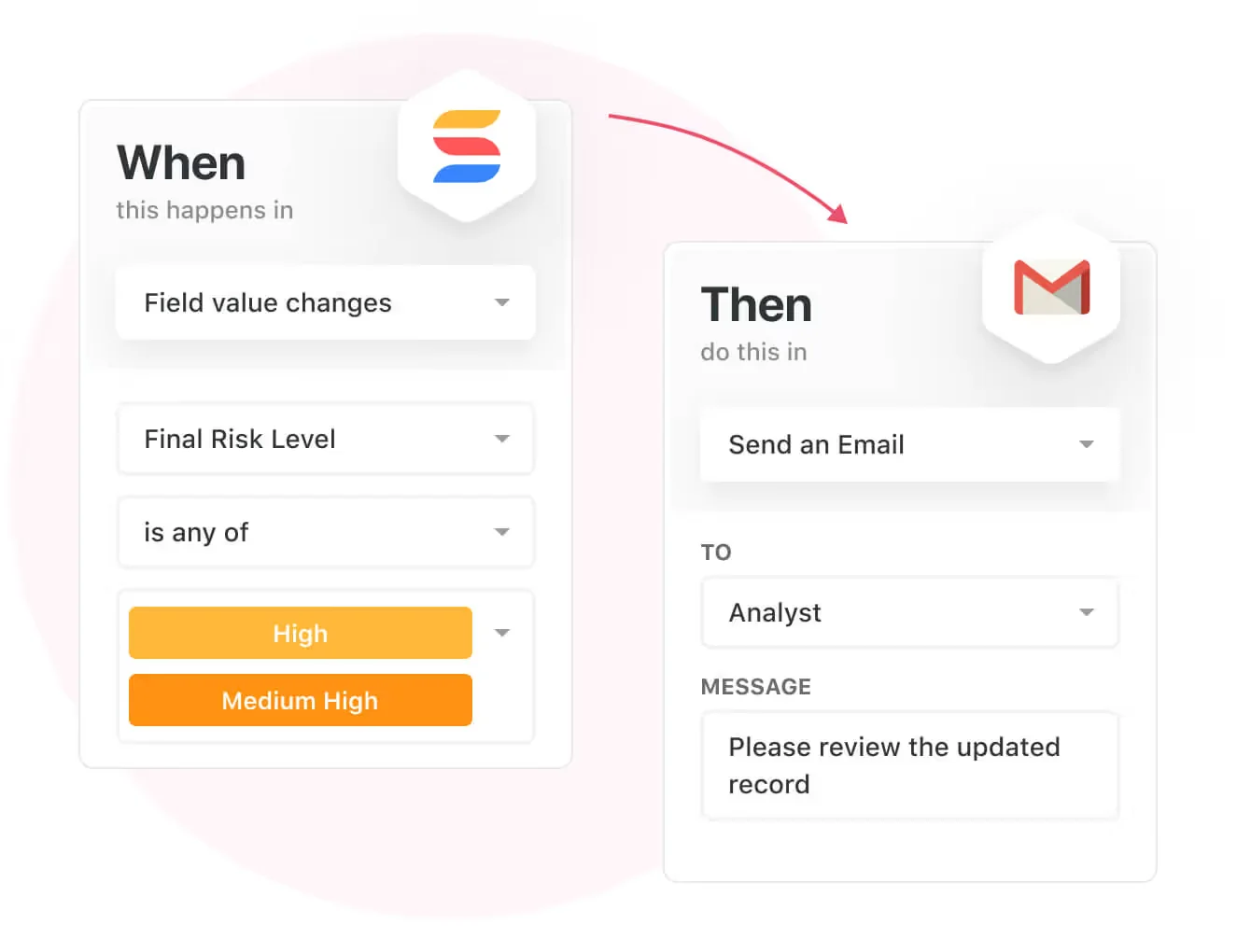
- Monitor, measure and score: Create risk calculations and metrics to evaluate every aspect of risk.

- Policy management: It’s possible to establish a strong foundation from the get-go with streamlined and flexible policy management.
You’ll be able to assign ownership, manage revisions, and ensure your policies consistently align with key business initiatives and regulatory requirements.

- PSTOS Compliance Tracker: Designed for regulatory compliance and built on SmartSuite.
This solution focuses on data security as the core of compliance frameworks with services such as compliance readiness, virtual CISO, and IT security implementation.
Learn more about it from this webinar that we did on the topic:
Prioritize & Mitigate Risks
With SmartSuite, you can create a centralized risk register to effectively identify potential risks to your organization.
You will be able to properly assess threats and establish risk mitigation strategies inside SmartSuite.

Your team can ensure that the appropriate controls are in place and measure their effectiveness by evaluating risk indicators and displaying results in SmartSuite’s rollup reports and dashboards.
💡 Pro Tip: Teams that use our platform use automation to move tasks through defined workflow stages that comply with their policies and procedures.

We understand how crucial threat management is and the need to respond quickly to incidents.
SmartSuite lets you centralize incident response and threat mitigation by linking incidents to assets and organizational data to offer context during your investigations.
Your compliance team can also set up automation with our no-code automation builder to escalate critical events to make sure that your team is aware of active risks to your organization.

Ready-To-Use GRC Templates
Our team has prepared a few GRC templates for compliance teams looking to get started right away, instead of building everything from scratch.
Our general risk management template includes a:
- Risk register, where you can break down the risks, the risk owner, the annual loss expectancy, risk event category, risk type, volatility, and status.

- Issue assessments, where you’ll be able to see a comprehensive breakdown of each risk.

- Action plans, where you can describe the actions (best practices) to mitigate the risks.

- A separate tab for control standards, your findings, exception requests, risk assessment by type, and risk assessment issues.

You can customize our risk management template here.
Alternatively, check out and customize our 14 other risk management templates for various use cases, such as contract management, policy management, and incident management.

How is SmartSuite a good solution?
SmartSuite offers a solution for compliance leaders with:
- A modern software with an intuitive interface that does not confuse your team or require training.
- An affordable and transparent per-seat pricing model with a 14-day free trial to help you get started.
- Automated workflows that can help your team build multi-step automations to trigger actions at the right time.
- Customer support and account management will help your team with setting up the automation inside the platform, without being billed tens of thousands of dollars separately.
💡 Case Study: Find out how MediaLab transformed operations, minimized risk, and saved $40,000+ per year by cutting software costs.
How Is SmartSuite’s Pricing Different From Riskonnect’s?
SmartSuite offers a 14-day free trial of its Professional plan (no credit card required), with automations, team collaboration, multi-dashboard views, and more.
There are three per-seat plans plus a per-solution Signature plan, all available through the 14-day free trial:
- Team: $15/user/month billed annually ($20 billed monthly, minimum 3 users), including 5,000 records per solution, 50GB of file storage, and 25,000 automation runs and API calls per month.
- Professional: $32/user/month billed annually ($36 billed monthly, minimum 5 users), adding 100,000 records per solution, 100GB of file storage, two-factor authentication, and Gmail & Outlook integrations.
- Enterprise: Custom pricing with no seat minimum, adding 400,000 records per solution, 500GB of file storage, audit logs, data loss prevention, SSO, and SCIM provisioning.
- Signature: A customized plan tailored to your organization’s needs and team size with no predefined limits.

Next Steps: Get Started With SmartSuite & Our Risk Management Templates For Free
If you’re looking to build governance, risk, and compliance workstreams and effectively prioritize and mitigate risks, you can give SmartSuite a chance with our 14-day free trial and ready-to-use GRC templates.
SmartSuite’s risk management solution offers just the right customization, native collaboration capabilities and a library of 200+ project management templates to help compliance teams create and maintain a project management workflow.
Here’s what's in it for your team when you try SmartSuite:
- A 14-day free trial of the Professional plan with multi-board views (Kanban, Chart, Map, Timeline, Card, and Calendar), automations, and 40+ field types, including formula and linked record fields.
- No-code automation builder for trigger/action workflows.
- Built-in productivity tools, including time tracking, status tracking, and checklists.
- Team collaboration and planning tools such as SmartDocs, comments, and @mentions.
- Resource management across projects and teams.
- 40+ field types, including the option to add your custom fields.
Start a 14-day free trial to explore all its features.
Or, if you’d like to talk to our experts, schedule a demo.
⚠️ Disclaimer: This article was last updated on November 21, 2025 and if there's any misinterpretation of the information, please contact us and we will fact check it.
Read More
- 10 Best OneTrust Alternatives For GRC In 2026: Find out the best OneTrust alternatives on the market.
- OneTrust Pricing: Is It Worth It In 2026?: A useful guide if you are interested in uncovering how much OneTrust really costs and if it’s worth the money.
- 10 Best ArcherIRM Alternatives For GRC In 2026: The complete guide to the best ArcherIRM alternatives on the market.
- ArcherIRM Pricing: Is It Worth It In 2026?: Find out how much ArcherIRM really costs and if it’s worth the money.






Put these ideas to work
Start a free trial, or book a demo and see how it runs in SmartSuite.

