



10 Best Riskonnect Alternatives For GRC In 2026


SmartSuite provides work platform for standardizing workflows in the following areas:
-
Governance, Risk & Compliance
-
IT & Service Ops
-
Project / Portfolio Management
-
Business Operations

Are you looking for Riskonnect alternatives to better manage your governance, risk, and compliance workflows?
- SmartSuite offers the best alternative to Riskonnect with its modern UI, no-code automation, short implementation time, and ready-to-use GRC templates.
- Enterprise-grade solutions like MetricStream and IBM OpenPages are best for large organizations looking for AI-powered insights and global regulatory tracking.
- On the other hand, tools like LogicGate and Optro (formerly AuditBoard) can help you automate workflows, unify audit and compliance, and improve team collaboration without the high costs of Riskonnect.
Riskonnect’s risk management solution helps you understand each risk, how that risk relates to others, and what it means for the decisions you have to make.
In this article, I’ll cover the 10 best Riskonnect alternatives in 2026 that can help you manage policies, track compliance efforts, and ensure regulatory alignment.
Before we start, I want to go over some of the main reasons why some users from both SMEs and corporations have been looking to switch from Riskonnect: ⤵️
What are some of the reasons why compliance leaders are looking to switch from Riskonnect?
The main reasons why some customers have been looking to switch from Riskonnect include the fact that requested changes can take 2-3 weeks to implement and also an initial steep learning curve.
But don’t get me wrong, I’m not trying to claim that Riskonnect is a bad platform that you need to run from.
Hundreds of satisfied enterprises appreciate the platform’s AI-powered tools that provide contextual insights, advanced analytics, and intuitive dashboards.

Source of image: Capterra.
However, some customers have been dissatisfied with the risk management platform for several reasons:
#1: Requested changes can take 2-3 weeks to implement
A verified user of the platform notes that requested changes post-implementation can take between 2-3 weeks to be completed.

“Requested changes can sometimes take two or three weeks to implement.” – G2 Review.
#2: Deep learning curve to the point where it feels overwhelming
Secondly, some customers of the platform are feeling overwhelmed with the platform’s sea of features, especially when starting out with the tool.
That’d also make wider user adoption more difficult in the long run when you have to train each employee how to utilize the software.

“The only dislike I would say I have is in the beginning when using the platform, it can be overwhelming because there is access to so much information, but the more I have worked in it, the ability to work it comes a lot more naturally.” – G2 Review.
What are the best Riskonnect alternatives for GRC in 2026?
Here are the 10 best Riskonnect alternatives for governance, risk, and compliance that I shortlisted after reviewing 30+ tools:
#1: SmartSuite: Best for banks and credit unions looking to launch GRC workflows in days. Our platform lets you manage policies, audits, risks, and compliance in a unified, customizable platform.
#2: Fusion Risk Management: Best for enterprises looking for a Salesforce‑based risk and resilience management platform.
#3: MetricStream: Best for companies looking for an all-in-one platform to manage risk across the world.
#4: IBM OpenPages: Best for organizations looking for an AI-powered GRC platform that integrates various risk and compliance functions.
#5: SAP GRC: Best for organizations looking for an integrated, automated GRC and cybersecurity across systems.
#6: LogicGate: Best for Enterprises looking for integrated GRC management with real-time risk insights.
#7: Optro (formerly AuditBoard): Best for organizations looking to uncover insights, track trends, and support data-driven decisions.
#8: ServiceNow GRC: Best for organizations looking for integrated risk management and compliance automation.
#9: Onspring: Best for enterprises looking to manage governance frameworks (including ISO, NIST & CMMC).
#10: SAI360: Best for enterprises looking to unify risk, compliance, and ethics management into one customizable platform.
#1: What makes SmartSuite the best Riskonnect alternative?
SmartSuite (that’s us) offers the best Riskonnect alternative for risk management teams with our modern, no-code project management platform that helps you simplify complex regulatory requirements.
Perfect for banks and credit unions, our GRC software lets you streamline and automate policy creation, approval, and control assessments, all in one place.

SmartSuite helps you move faster, manage policies smarter, and adapt easily, without having to sign up for multiple training sessions on how to use the platform.
💡 We have recently partnered with the Cyber Risk Institute to deliver a CRI profile for U.S. Banks' compliance needs.
Let’s go over the functionality that makes SmartSuite the best choice for teams looking to make the switch from Riskonnect: 👇
All-In-One Risk Management
Tools like Riskonnect make it so that the best GRC software can be accessible only to the biggest of enterprises.
However, I believe that compliance should be simple, automated, and accessible to all financial institutions, regardless of their size.
Our no-code, easy-to-use platform empowers compliance managers and CISOs to automate all GRC processes with ease.

SmartSuite helps you achieve and maintain compliance without the expense and complexity of adapting legacy GRC solutions like Riskonnect to accommodate new compliance requirements.
Here are the use cases that you’ll get with SmartSuite:
- Create reports and dynamic dashboards: You can monitor executive views into your organization's overall risk profile with charting and metrics widgets.

- Collaborate and respond to risks in real-time: Instantly engage key stakeholders in a real-time discussion of potential threats or vulnerabilities.
Our tool will also let you get immediate updates when critical information is available.

- Automate policy creation, real-time approval, and control assessments: Streamline risk management by building an integrated program on a single platform.
- Keep risk and compliance data secure: Define your teams and manage access to information across all GRC practice areas.

- Integrate with your existing systems: Our GRC software lets you integrate with existing systems and data to consolidate and centralize your data.

- Automate for accuracy and efficiency: Remove inefficiencies and the chance for human error by automating repeatable workflows.
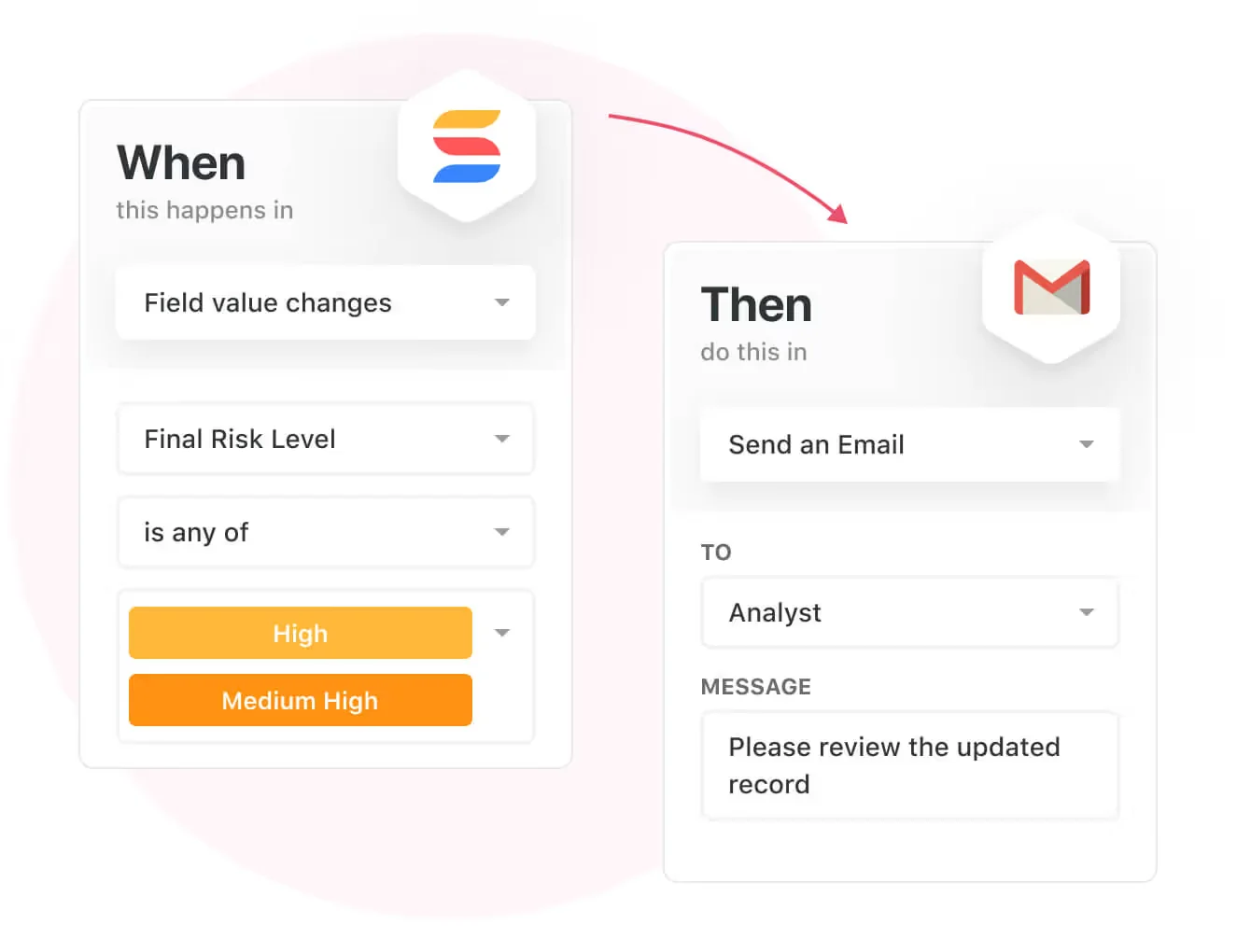
SmartSuite's no-code automation builder provides you with a visual interface that makes it easy to respond to events and take action.
That means your compliance team can customize your GRC workflows without technical resources.
- Monitor, measure and score: Create risk calculations and metrics to evaluate every aspect of risk.

- Policy management: It’s possible to establish a strong foundation from the get-go with streamlined and flexible policy management.
You’ll be able to assign ownership, manage revisions, and ensure your policies consistently align with key business initiatives and regulatory requirements.

- PSTOS Compliance Tracker: Designed for regulatory compliance and built on SmartSuite.
This solution focuses on data security as the core of compliance frameworks with services such as compliance readiness, virtual CISO, and IT security implementation.
Learn more about it from this webinar that we did on the topic:
Prioritize & Mitigate Risks
With SmartSuite, you can create a centralized risk register to effectively identify potential risks to your organization.
You will be able to properly assess threats and establish risk mitigation strategies inside SmartSuite.

Your team can ensure that the appropriate controls are in place and measure their effectiveness by evaluating risk indicators and displaying results in SmartSuite’s rollup reports and dashboards.
💡 Pro Tip: Teams that use our platform use automation to move tasks through defined workflow stages that comply with their policies and procedures.

We understand how crucial threat management is and the need to respond quickly to incidents.
SmartSuite lets you centralize incident response and threat mitigation by linking incidents to assets and organizational data to offer context during your investigations.
Your compliance team can also set up automation with our no-code automation builder to escalate critical events to make sure that your team is aware of active risks to your organization.

Pre-Built GRC Templates
Our team has prepared a few GRC templates for compliance teams looking to get started right away, instead of building everything from scratch.
Our general risk management template includes a:
- Risk register, where you can break down the risks, the risk owner, the annual loss expectancy, risk event category, risk type, volatility, and status.

- Issue assessments, where you’ll be able to see a comprehensive breakdown of each risk.

- Action plans, where you can describe the actions (best practices) to mitigate the risks.

- A separate tab for control standards, your findings, exception requests, risk assessment by type, and risk assessment issues.

You can customize our risk management template here.
Alternatively, check out and customize our 14 other risk management templates for various use cases, such as contract management, policy management, and incident management.

What stands out about SmartSuite?
SmartSuite offers a solution for compliance leaders with:
- A modern software with an intuitive interface that does not confuse your team or require training.
- An affordable and transparent per-seat pricing model with a 14-day free trial to help you get started.
- Automated workflows that can help your team build multi-step automations to trigger actions at the right time.
- Dedicated customer support and account management will help your team with setting up the automation inside the platform.
💡 Case Study: Find out how MediaLab transformed operations, minimized risk, and saved $40,000+ per year by cutting software costs.
Pricing
Unlike Riskonnect, SmartSuite offers a 14-day free trial of its Professional plan (no credit card required), with automations, team collaboration, multi-dashboard views, and more.
There are three per-seat plans plus a per-solution Signature plan, all available through the 14-day free trial:
- Team: $15/user/month billed annually ($20 billed monthly, minimum 3 users), including 5,000 records per solution, 50GB of file storage, and 25,000 automation runs and API calls per month.
- Professional: $32/user/month billed annually ($36 billed monthly, minimum 5 users), adding 100,000 records per solution, 100GB of file storage, two-factor authentication, and Gmail & Outlook integrations.
- Enterprise: Custom pricing with no seat minimum, adding 400,000 records per solution, 500GB of file storage, audit logs, data loss prevention, SSO, and SCIM provisioning.
- Signature: A customized plan tailored to your organization’s needs and team size with no predefined limits.

Pros & Cons
✅ A 14-day free trial of the Professional plan with access to advanced features and unlimited solutions.
✅ 15 out-of-the-box GRC templates for various use cases.
✅ Dynamic dashboards and reports that are easy to build and navigate, unlike some alternatives that require you to hire consultants to do it.
✅ All-in-one document and file management.
✅ You’ll be able to automate risk scoring, compliance tracking, audits, and vendor reviews.
✅ A modern solution with an intuitive user interface.
❌ Fewer native integrations when compared to other platforms in this list.
#2: Who is Fusion Risk Management best for?
Best for: Enterprises looking for a Salesforce‑based risk and resilience management platform.
Similar to: MetricStream, SAP GRC.

The Fusion Framework System delivers a proactive, data‑driven approach to operational resilience so you can anticipate, prepare, respond, and learn from any disruption.
Built on Salesforce, the platform is a viable Riskonnect alternative as it brings together insights and personalized toolsets to make your organization more risk‑aware.
Features

- A data framework with insights and personalized interfaces that guide teams through anticipation, preparation, response, and learning phases.
- Access and integrate data from any system quickly using a unified API platform, hundreds of prebuilt Salesforce connectors, and purpose‑built integrations (e.g., emergency notification, CMDB, situational intelligence).
- Access proven methodology, accelerators, tools, and training from Fusion’s advisors to achieve your resilience objectives faster.
- Flexibly create unique experiences and workflows. You can configure the platform with no code to further customize it.
Standout Feature: Integrated Data Model

What stood out to me about Fusion is that it lets you connect daily operations, frontline activities, and boardroom reporting to help you create clarity out of chaos.
Pricing
Fusion’s Risk Management solution does not currently disclose its pricing, so you’d have to contact their team to see the product in action and get a quote.

Pros & Cons
✅ You’ll be able to access proven methodology, accelerators, tools, and training from Fusion’s advisors.
✅ Consolidation of all risk-related information into a single, accessible location.
✅ Many users find the platform intuitive and easy to navigate, covering the weaknesses of Riskonnect.
❌ High implementation cost.
❌ Challenging learning curve, similar to Riskonnect.
#3: Who is MetricStream best for?
Best for: Companies looking for an all-in-one platform to manage risk across the world.
Similar to: LogicGate, SAP GRC.

MetricStream offers an integrated all-in-one GRC solution that helps you centralize risk, compliance, audit, and 3rd party management.
The platform offers a nice alternative to Riskonnect for organizations looking to break down silos, automate workflows, and deliver real-time insights.
Features

- Standardized enterprise-wide risk management frameworks that come with advanced analytics and real-time reporting.
- Out-of-the-box regulatory change tracking, policy alignment, and impact assessments to help you minimize compliance violations.
- Cyber risk intelligence and unified IT risk management to proactively address threats and ensure regulatory compliance.
- Centralized third-party risk management, including performance tracking and business continuity risk assessment.
Standout Feature: AI-powered insights (AiSPIRE)

MetricStream stood out to me with its AI-powered insights solution, AiSPIRE, which can be used for predictive risk identification, duplicate control detection, and cognitive recommendations.
Pricing
MetricStream does not disclose its pricing structure, so you’d have to contact them to get a product demo and a quote.
However, I did some digging and created an in-depth MetricStream pricing guide, where I found some reported numbers:
- Small enterprise deployment costs between $75,000 - $150,000 per year.
- Medium enterprise deployment costs between $250,000 - $500,000 per year.
- Large enterprise deployment can cost between $750,000 - $1,000,000 per year.

Pros & Cons
✅ Real-time cyber risk intelligence capabilities.
✅ Advanced analytics alongside real-time reporting.
✅ An AI-powered insights tool, AiSPIRE, that you can use for predictive risk identification.
❌ The platform’s pricing structure is not SME-friendly, according to user reviews.
❌ Similar to Riskonnect, the tool’s interface can be hard to navigate, which is why some users look for MetricStream alternatives.
#4: Who is IBM OpenPages best for?
Best for: Organizations looking for an AI-powered GRC platform that integrates various risk and compliance functions.
Similar to: SAI360.

IBM OpenPages offers an AI-powered risk management solution that centralizes siloed risk management functions within a single environment.
The platform is a good Riskonnect alternative as it helps organizations identify, manage, monitor, and report on risk and regulatory compliance.
Features

- Specialized modules for operational risk, regulatory compliance, policy management, IT governance, internal audit, and third-party risk management.
- Utilizes IBM Watson for natural language processing and machine learning (ML) to provide predictive analytics and automate classifications.
- Features a drag-and-drop workflow editor that lets you automate GRC processes to improve time-to-value and reduce manual effort.
Standout Feature: IBM Cognos Analytics (Predictive Insights)

IBM OpenPages stood out to me with its valuable insights into the state of risk across the organization with its IBM Cognos Analytics for self-service data exploration.
Pricing
IBM OpenPages’ pricing can be a little confusing, but there are 4 ways to purchase the solution:
- As a SaaS solution: Essentials Edition starts at $3,300, and the Standard one starts at $6,050.
- As an On-cloud solution: the Single Solution starts at $6,250, and the Enterprise one starts at $9,000.
- As part of IBM Cloud Pak for Data: the Single Solution starts at $162,000, and the Solution Bundle starts at $207,000.
- As On-Premises: You need to contact their team for a quote.

Regardless of which package you choose in the end, each will include a core set of IBM OpenPages features, such as its AI features, workflow automation, integrated reports, etc.
Pros & Cons
✅ Scalable architecture that was designed to scale to tens of thousands of users.
✅ Enhances efficiency and accuracy through bespoke AI models and automated processes.
✅ Get valuable insights into the state of risk across the organization with its IBM Cognos Analytics.
❌ The platform has high implementation costs that make it prohibitive for SMEs.
❌ There are reported limited customization options, which is why some users have been looking for IBM OpenPages alternatives.
#5: SAP GRC
Best for: Organizations looking for an integrated, automated GRC and cybersecurity across systems.
Similar to: ArcherIRM.

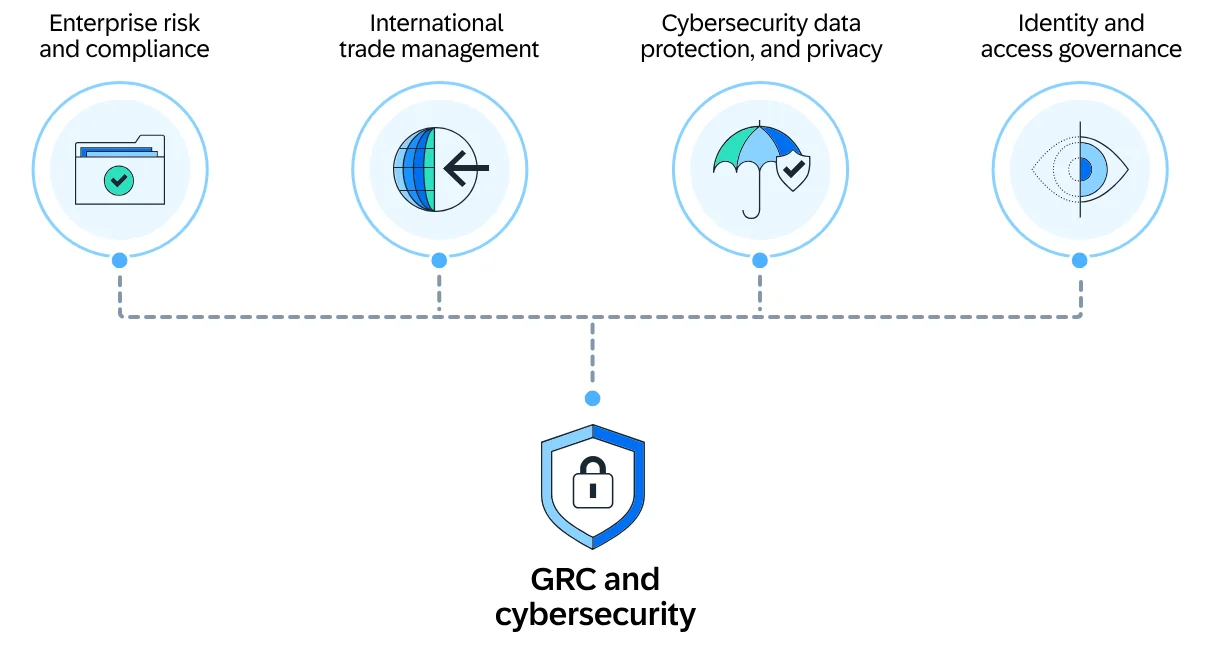
SAP has a GRC platform that helps enterprises better manage GRC workflows with predictive insights into risks and real-time monitoring of threats.
The platform is a solid Riskonnect alternative for companies looking to align operations, risk management, and audit processes using the tool’s AI-driven analytics and centralized oversight.
Features
- Detection of anomalies and risks through AI-powered insights to help you make better decisions.
- Compliance automation helps you streamline documentation, testing, and remediation of critical process risks and controls.
- Centralized visibility into risks, controls, and business impacts across SAP’s S/4HANA environments.
Standout Feature: Fraud Detection & Predictive Analysis
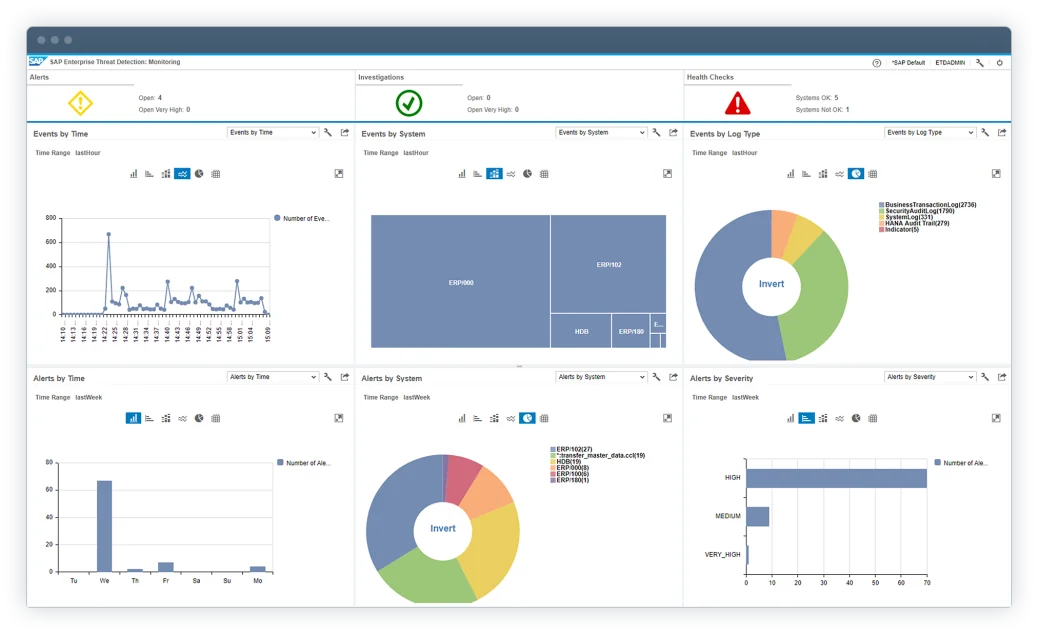
SAP’s GRC offers fraud detection that screens transactional data in real-time using AI and customizable rules to uncover fraud, policy violations, and suspicious patterns.
Pricing
SAP’s GRC solution does not disclose its pricing tiers, so you’d have to contact their team for a demo and a personalized quote.
Pros & Cons
✅ Identify, assess, and mitigate risks with the tool’s all-in-one solution.
✅ Integrates well with other SAP GRC modules and core systems like S/4HANA.
✅ Customizable rules to uncover fraud, policy violations, and suspicious patterns.
❌ The UI can feel dated and complex for new users, according to G2 reviews.
❌ Expensive when compared to similar solutions in the market.
#6: LogicGate
Best for: Enterprises looking for integrated GRC management with real-time risk insights.
Similar to: SAP GRC.

LogicGate is a GRC platform that helps you centralize your GRC processes into a unified framework to automate your workflows and quantify risks.
The platform is a solid Riskonnect alternative for teams looking to scale while reducing manual effort with the tool’s AI capabilities.
Features

- Real-time risk quantification: Prioritize risks by financial impact and business-criticality.
- Centralized risk repository for visibility across governance, compliance, and third-party risks.
- Pre-built templates that your team can start with to automate compliance reporting, as well as audit trails.
Standout Feature: Spark AI

LogicGate offers AI-powered insights that help you predict risk and support your decision-making.
➡️ Spark AI also helps you generate executive summaries, which I found to be ideal for busy executives looking for a quick update.
Pricing
Similar to Riskonnect, LogicGate does not publicly disclose its pricing, so you’d have to book a personalized demo with their team to get a quote.
➡️ You can take a look at our in-depth LogicGate pricing review, where we found some reported numbers and also discuss whether it has good value for money.

Pros & Cons
✅ AI-powered insights that help you predict risk and support your decision-making.
✅ LogicGate Risk Cloud automates control follow-up tasks.
✅ Customers of the platform appreciate how responsive the customer service team has been.
❌ LogicGate users find the calculation functionality complicated, particularly with labels and percentages.
❌ The reporting features have limitations, which is why some users have been looking for LogicGate alternatives.
#7: Optro (formerly AuditBoard)
Best for: Organizations looking to uncover insights, track trends, and support data-driven decisions.
Similar to: SAP GRC.

Optro (formerly AuditBoard; auditboard.com now redirects to optro.ai) offers a GRC platform that helps teams break down silos between audit, risk, and compliance teams to help them to build resilience and improve operational efficiency.
The platform is a viable alternative to Riskonnect for organizations looking for customizable reports and pre-built dashboards.
Features

- A comprehensive view of organizational risk that connects your audit, risk, and compliance teams.
- Advanced insights that help you optimize risk and compliance models.
- Customizable reports and out-of-the-box dashboards that help uncover insights, track trends, and support data-driven decisions.
- Integrated workflows and APIs that help you streamline data collection and task management through integrations.
Standout Feature: Ready-To-Use 30+ Frameworks

Optro offers access to its preloaded library of 30+ frameworks (including SOC 2, ISO 27001, and GDPR) to help you stay audit-ready as your company scales.
Pricing
Optro has not yet disclosed its pricing, so you’d have to contact them to book a demo and get a quote.

Pros & Cons
✅ Access to a single view of organizational risk.
✅ Modern interface with proper AI capabilities.
✅ Access to a preloaded library of 30+ frameworks to help you stay ready for audits.
❌ Expensive: Vendr’s buyer data puts the median Optro (formerly AuditBoard) contract at about $45,947 a year, which is why some people have been looking for AuditBoard alternatives.
❌ Some customers of the platform find it difficult to use.
#8: ServiceNow GRC
Best for: Organizations looking for integrated risk management and compliance automation.
Similar to: Onspring.

ServiceNow offers a GRC platform that provides organizations with a unified approach to governance, risk, and compliance, integrating data and workflows.
The platform is a good alternative to Riskonnect for teams looking to automate manual processes and deliver AI-powered insights for real-time risk mitigation.
Features

- Eliminate silos by centralizing enterprise risk and compliance data into one source.
- No-code workflow automation that enables cross-functional risk response and compliance management without having to hire consultants.
- The GRC suite operates on ServiceNow’s Now Platform, which enables direct data sharing and real-time collaboration across all GRC products.
- 3rd party risk management that helps you identify and mitigate risks from external vendors and partners.
➡️ You can learn more about ServiceNow in our comprehensive ServiceNow review.
Standout Feature: AI-Powered Actionable Insights

ServiceNow stood out to me with its AI-powered actionable insights that accelerate decision-making with predictive analytics and process optimization.
Pricing
ServiceNow’s pricing is not disclosed, so you’d have to book a demo with their team.
We found ServiceNow customer and public reviews, which show that the average cost of ServiceNow contracts can range between $50,000 and $500,000 annually.
Apparently, the pricing structure depends on the number of licenses, features, and other configuration requirements.

Pros & Cons
✅ Comprehensive risk, audit, and compliance management features.
✅ Real-time risk monitoring and prioritization.
✅ A good range of native integrations with other tools.
❌ Steep learning curve and complexity, with users citing that the platform can be difficult to configure and learn, unlike some ServiceNow alternatives.
❌ Training, skills development, and ongoing support can be costly, unlike some alternatives on the market.
#9: Onspring
Best for: Enterprises looking to manage governance frameworks (including ISO, NIST & CMMC).
Similar to: LogicGate, SAP GRC.

Onspring offers a comprehensive GRC solution that comes with a comprehensive set of connected programs that scale as your GRC ecosystem expands.
The platform offers a solid alternative to Riskonnect for companies looking to create multi-path risk management workflows.
Features

- Automate lifecycle workflows, compliance testing, and attestations across your organization.
- Create a comprehensive risk register and automate risk assessments.
- Assess, tier, and track vendors and integrate criticality ratings from cyber and financial monitoring services.
- Strong reporting that helps you gauge performance with live dashboards of key metrics, risk scores, and audit activity status.
Standout Feature: Surveys for Easy Assessments

Onspring lets you use its point-and-click survey builder to build and send surveys to internal, external & third-party recipients.
It then automatically collects and scores results, assigns risk scores, and can be customized to trigger follow-up actions.
Pricing
Onspring has 3 different pricing models that you can choose from based on which one better fits your needs:
- Pricing per user seat, where all users get access to all products on Onspring’s platform.
- Pricing by product, where your team (with unlimited users) selects only a portion of the features to access.
- A hybrid model, where some users have unlimited access to the platform, while other users have limited access to other features.

After choosing your pricing model, Onspring offers four paid tiers – Bronze, Silver, Gold, and Platinum – each adding more capacity and features:
- The Bronze plan includes core no-code workflow tools, basic reports, and modest storage limits.
- Upgrading to Silver and Gold adds increased database/attachment storage, extra API call capacity, additional admin training seats, and development/test environments.
- The Platinum tier provides maximum storage, the highest API limits, priority support, and all non-production environments (dev, test, sandbox).

Pros & Cons
✅ Good flexibility and customization options, according to G2 reviews.
✅ The platform is easy to learn, and the no-code build makes it easier to set up the solution, covering the weakness of Riskonnect.
✅ Strong reporting with live dashboards.
❌ Expensive per-seat pricing, which is why some users have been looking for Onspring alternatives.
❌ Similar to Riskonnect, the tool has an outdated interface that can be hard to use for some users.
#10: SAI360
Best for: Enterprises looking to unify risk, compliance, and ethics management into one customizable platform.
Similar to: MetricStream.

SAI360’s GRC platform comes with pre-configured modules and advanced analytics to help you manage risk and ensure regulatory alignment.
Its cloud-based platform is a nice alternative to Riskonnect for enterprises looking to enhance security and streamline workflows.
Features

- 20+ GRC modules for enterprise risk, IT risk, third-party risk, internal audit, business continuity, policy, and incident management.
- Use AI to improve reporting, risk assessment, and operational efficiency.
- Built-in e-learning so your team can be well-prepared to meet regulatory demands.
- Pre-mapped frameworks and controls aligned with global regulations for faster deployment and easier compliance.
Standout Feature: Integrated GRC from Every Angle

SAI360 stood out to me with its holistic, enterprise-wide approach that can help you unify risk, compliance, and ethics management into one customizable system.
Pricing
SAI360 does not currently disclose its pricing, so you’d have to contact them to get a product demo and a quote.

Pros & Cons
✅ AI-powered reporting, risk assessment, and operational efficiency for enterprises.
✅ A holistic approach that helps your team unify risk, compliance, and ethics management.
✅ 20+ ready-to-use GRC modules that you can get started with without having to set up the platform for months, covering the main weakness of Riskonnect.
❌ The platform is described as outdated and difficult to manage by user reviews.
❌ Admins are not able to easily modify fields or workflows, which has made some customers upset with the tool.
Get Started With SmartSuite & Our Ready-To-Use GRC Templates For Free
That was it from our complete list of the 10 best Riskonnect alternatives on the market for compliance teams.
If you are looking to build workstreams to prioritize and mitigate risks, you should give SmartSuite a chance with our 14-day free trial and ready-to-use GRC templates.
SmartSuite’s platform offers just the right customization, native collaboration capabilities and a library of 200+ project management templates to help compliance teams create and maintain a project management workflow.
Here’s what's in it for your team when you try SmartSuite:
- A 14-day free trial of the Professional plan with multi-board views (Kanban, Chart, Map, Timeline, Card, and Calendar), automations, and 40+ field types, including formula and linked record fields.
- No-code automation builder for trigger/action workflows.
- Built-in productivity tools, including time tracking, status tracking, and checklists.
- Team collaboration and planning tools such as SmartDocs, comments, and @mentions.
- Resource management across projects and teams.
- 40+ field types, including the option to add your custom fields.
Start a 14-day free trial to explore all its features.
Or, if you’d like to talk to our team of experts, schedule a demo.
⚠️ Disclaimer: This article was last updated on November 21, 2025 and if there's any misinterpretation of the information, please contact us and we will fact check it.
Read More
- 10 Best OneTrust Alternatives For GRC In 2026: Find out the best OneTrust alternatives on the market.
- OneTrust Pricing: Is It Worth It In 2026?: A useful guide if you are interested in uncovering how much OneTrust really costs and if it’s worth the money.
- 10 Best ArcherIRM Alternatives For GRC In 2026: The complete guide to the best ArcherIRM alternatives on the market.
- ArcherIRM Pricing: Is It Worth It In 2026?: Find out how much ArcherIRM really costs and if it’s worth the money.






Put these ideas to work
Start a free trial, or book a demo and see how it runs in SmartSuite.

