


Choosing the right GRC software in 2026 means evaluating how different governance, risk, and compliance platforms handle your specific needs.
That includes management of the compliance framework, enterprise risk registers, internal audit workflows, third-party risk oversight, and regulatory reporting.
In this guide, I'll cover three things: the different categories of GRC software on the market, the evaluation factors that matter most for each category, and a step-by-step process for narrowing your shortlist to the right vendor.
What are the different types of GRC software?
The market has split into three distinct categories, each designed for a different kind of buyer and a different stage of GRC maturity:
1. Compliance automation platforms
These tools exist to get you audit-ready fast.
They focus heavily on frameworks like SOC 2, ISO 27001, HIPAA, and GDPR, and they automate the tedious stuff: evidence collection, control monitoring, and audit prep.
Think of them as purpose-built machines for certification.
You plug in your cloud infrastructure, your HR tools, your identity provider, and the platform maps everything to your framework of choice so you can pass an audit without drowning in spreadsheets.
Vendors in this category include tools like Drata, Vanta, Secureframe, Sprinto, Scytale, Scrut Automation, and Thoropass.
The tradeoff?
Most compliance automation tools are narrow by design.
They're excellent at getting you through SOC 2 or ISO 27001, but they struggle once you need broader risk management, internal audit workflows, or operational GRC beyond certifications.
If your compliance needs grow, you may find yourself duct-taping a compliance automation tool to something else.
2. Enterprise GRC suites
On the opposite end of the spectrum, you've got the traditional enterprise GRC platforms.
These are the big, established systems designed for heavily regulated industries: banking, insurance, energy, and healthcare.
They cover everything. Risk registers, policy management, audit lifecycle, regulatory change tracking, incident management, third-party risk, ESG reporting, and usually a lot more.
They've been around for years, and they integrate deeply into complex enterprise architectures.
Vendors here include ServiceNow GRC, SAP GRC, IBM OpenPages, MetricStream, Diligent, Optro, Workiva, SAI360, Pathlock, and Archer IRM.
The tradeoff in this case?
Complexity and cost. Enterprise suites often take months to implement, require dedicated administrators, come with a price tag that locks out small and mid-sized organizations, and demand ongoing vendor involvement for even basic changes.
User interfaces tend to feel dated, and getting anything customized usually means raising a support ticket and waiting.
3. Connected, no-code GRC operating systems
This is the newer category, and in my experience, it's where the market is heading.
These platforms let you manage GRC workflows in a flexible, configurable environment that connects compliance to broader business operations instead of keeping it in a silo.
They're built on no-code or low-code foundations, so your team can design risk registers, audit workflows, and control frameworks without waiting on IT or the vendor's professional services team
And because they're not single-purpose tools, they can scale across departments and use cases.
Vendors in this space include SmartSuite, LogicGate, Onspring, Hyperproof, StandardFusion, Protecht, SureCloud, VComply, OneTrust, and ZenGRC.
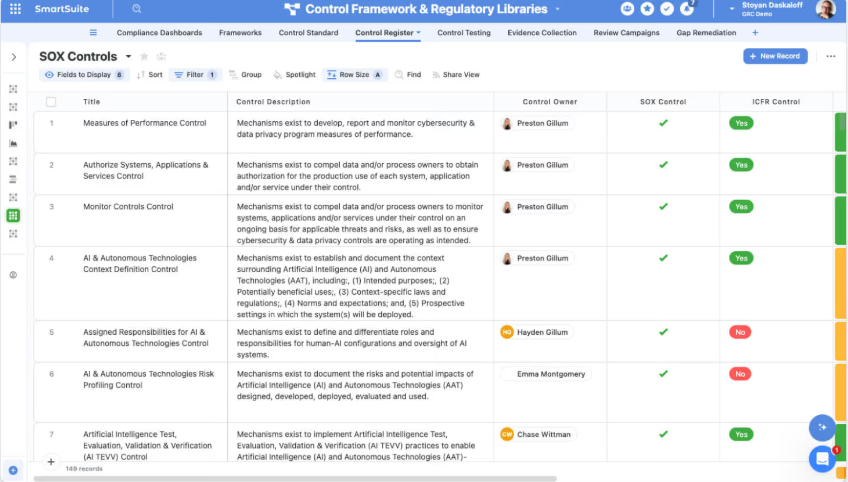
The tradeoff in tools like these?
Because these platforms are flexible, you'll need someone on the team who's willing to set up workflows and configure the system to match your processes.
That said, the setup burden is dramatically smaller than what you'd face with an enterprise suite, and you don't lose the power.
This third category is where I see the strongest long-term value for most organizations, because you're not locked into a rigid system and you're not limited to a narrow compliance-only scope.
What factors to evaluate when selecting GRC software?
The evaluation criteria shift depending on which type of GRC tool you're considering.
A compliance automation platform and an enterprise suite are solving different problems, so grading them on the same scorecard doesn't make sense.
Here's how I'd approach each category:
Evaluating compliance automation platforms
If you're looking at tools like Drata, Vanta, Secureframe, Sprinto, Thoropass, Scytale, or Scrut Automation, the evaluation should center on speed to audit, automation depth, framework coverage, and scalability beyond a single certification.
These are the factors that matter most:
- Framework coverage and expansion path: Check which frameworks the platform supports out of the box.
SOC 2 and ISO 27001 are table stakes, but if you'll need HIPAA, GDPR, NIST 800-53, PCI DSS, or CMMC down the line, make sure the tool can handle that without a full reconfiguration.
A tool like Drata, for example, supports a wide range of frameworks, while a platform like Thoropass focuses more on bundled audit services with a smaller set of certifications.
- Integration depth with your tech stack: Compliance automation lives or dies by how well it plugs into your existing tools.
Can it pull evidence automatically from AWS, Azure, GCP, Okta, GitHub, Jira, and your HRIS?
Vanta and Drata tend to lead on integration count, but integration quality matters more than quantity.
A platform that connects to 200 tools but pulls unreliable data from half of them isn't helping you.
- Audit workflow and auditor access:
Some platforms, like Thoropass, bundle in-house auditors directly into the product. Others give external auditors a portal to review evidence.
Think about whether you want the vendor managing the audit relationship or if you prefer to keep that separate.
- Scalability beyond a single certification: This is where most compliance automation tools hit a ceiling.
If you start with SOC 2 and later need to layer on enterprise risk management, third-party vendor assessments, or internal audit workflows, will the platform grow with you? Or will you need a second tool?
Most GRC tools in this category struggle with that jump, which is something to consider before you sign a multi-year contract.
Evaluating enterprise GRC suites
If you're exploring platforms like ServiceNow GRC, SAP GRC, or IBM OpenPages, the evaluation shifts toward depth, ecosystem fit, implementation complexity, and total cost of ownership.
Here's what to focus on:
- Existing ecosystem fit: Enterprise GRC tools work best when they're embedded in the systems your teams already use.
ServiceNow GRC makes the most sense for organizations already running on the Now Platform.
SAP GRC is designed for companies deep in the SAP ecosystem.
If you're forcing a square peg into a round hole with your infrastructure, you'll spend more time on integrations than on actual risk management.
- Native support for your risk and compliance frameworks: If your organization follows COSO ERM or ISO 31000 for risk management, or NIST RMF and COBIT for IT governance, make sure the platform natively maps to those frameworks.
You don't want to spend months on manual configuration just to get basic control mappings in place.
Enterprise suites like IBM OpenPages and MetricStream tend to ship with pre-built framework libraries.
SAI360 includes ready-to-use GRC modules with pre-mapped regulatory content.
But "native support" can mean different things, so ask specifically: does the platform include pre-built control mappings, or does your team need to build them from scratch?
- Implementation timeline and professional services costs: I've seen enterprise GRC rollouts take anywhere from 4 to 18 months.
Factor in professional services fees, training costs, and the internal FTE time you'll need for configuration
IBM OpenPages and MetricStream implementations, for example, can be multi-quarter projects for large organizations.
- User experience for non-GRC users: A GRC tool doesn't just serve your risk and compliance team.
Business unit leaders, IT staff, and operational managers will need to interact with it, whether that's completing assessments, acknowledging policies, or logging incidents.
If the UI feels like it was designed in 2010 and takes 3 hours of training to learn, adoption will suffer.
This is a real concern with tools like SAP GRC and older versions of Archer IRM, where the interface complexity turns off non-specialist users.
- Analytics and board-level reporting: At the enterprise level, your executives and board members need clear, real-time visibility into risk posture, compliance status, audit progress, and remediation trends.
Diligent has traditionally been strong here because of its board management heritage.
Workiva excels at connected financial and compliance reporting.
If the platform can't produce executive dashboards that your CFO or board actually wants to look at, it's not doing its job.
- Customization without vendor dependency: One of the biggest frustrations I hear from GRC teams running enterprise suites is that even small changes require a support request and a multi-week wait.
Adding a field to a risk assessment form, tweaking an approval workflow, updating a report layout, none of it should need the vendor's intervention.
If your regulatory environment shifts or your risk framework evolves, can your own team update workflows, fields, and reports?
Or are you at the mercy of a professional services queue?
This is where platforms like Optro and Workiva can feel limiting compared to more configurable options.
Evaluating connected, no-code GRC operating systems
This is the category where tools like SmartSuite, LogicGate, and Onspring compete.
And it's the category where I believe most mid-market and scaling organizations should be spending their evaluation time.
Here's why, and what to look for:
- No-code flexibility and workflow ownership: The single most important factor in this category is whether your team can build, modify, and own GRC workflows without needing the vendor's professional services or a developer.
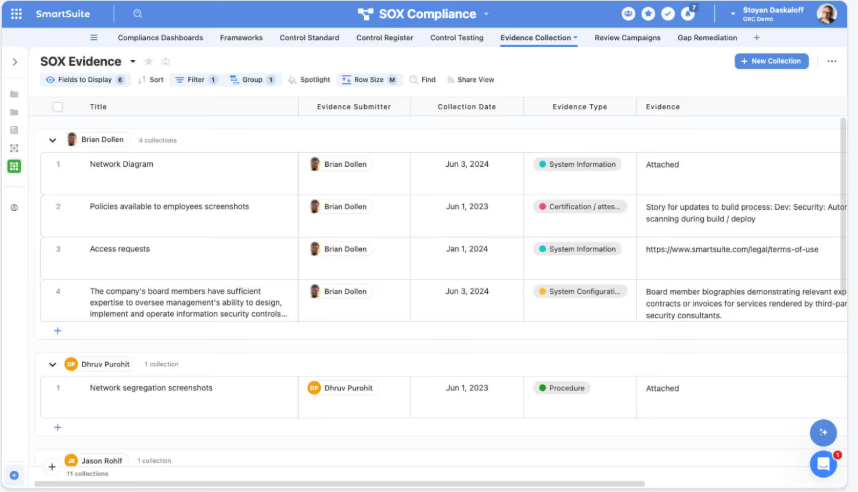
SmartSuite stands out here because its visual builder lets you design data models, workflow logic, role-specific interfaces, and automations from scratch, using drag-and-drop tools and over 40 field types.
LogicGate offers strong no-code capabilities too, though its graph database model has a steeper learning curve.
Onspring is configurable, but it can feel limited in how deeply you can customize data relationships.
- Connected GRC scope, not just compliance: This is where connected platforms pull ahead of compliance automation tools and rival enterprise suites.
The right platform should let you manage the full GRC spectrum: enterprise risk management aligned to COSO ERM or ISO 31000, internal audit, cyber risk, third-party risk, and policy management.
It should also handle incident management, SOX compliance, operational resilience, and emerging areas like AI governance and ESG tracking.
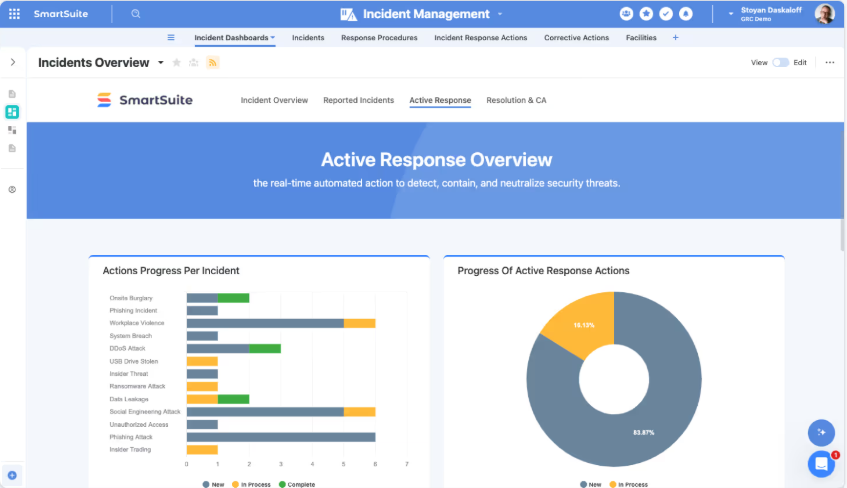
SmartSuite covers all of these in one connected workspace, so risks, controls, audits, incidents, and remediation tasks stay linked to the actual business operations they relate to.
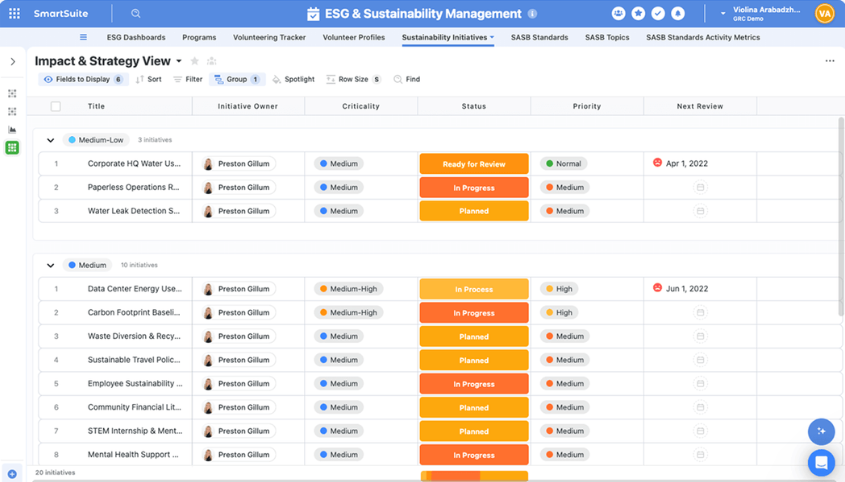
No separate modules to buy and no integrations to maintain between siloed tools.
That's a meaningful advantage over platforms like Hyperproof, which is strong on compliance automation but thinner on enterprise risk and operational workflows, or VComply, which handles core GRC well but doesn't extend into broader operational management.
- AI that actually works inside your GRC workflows: In 2026, every vendor claims to have AI.
The question is whether that AI lives inside your actual workflows or if it's a chatbot bolted onto the side.
I’d look for AI that can classify incoming risk events, summarize vendor questionnaire responses, flag anomalies in control testing, and generate first-draft audit findings, all within the workflow itself.
SmartSuite embeds AI directly into automations, records, and reporting, so those capabilities aren't separate tools but steps in your existing processes.
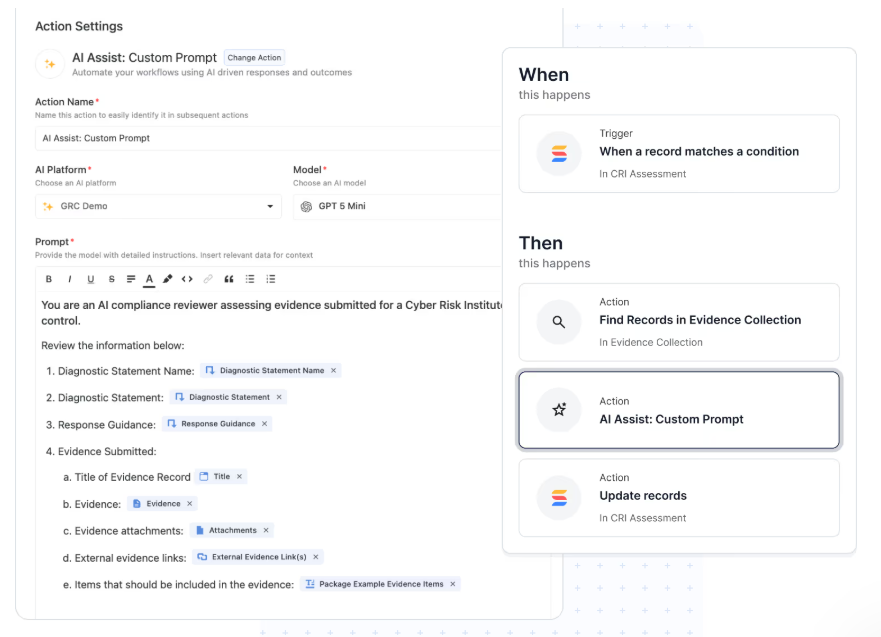
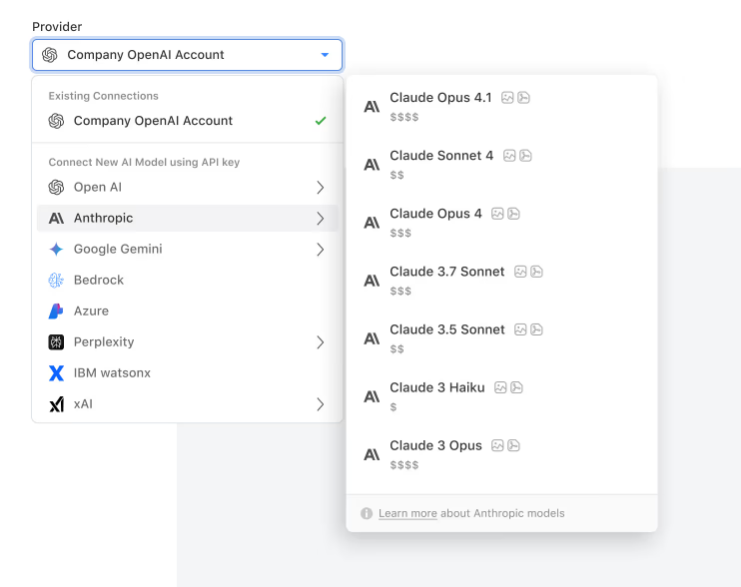
It also supports bring-your-own-LLM, letting you connect OpenAI, Anthropic, Google Gemini, or IBM WatsonX while keeping enterprise governance over model access and data handling.
LogicGate has Spark AI, which provides helpful risk insights and executive summaries, while Hyperproof offers AI for guided program setup and evidence suggestions.
- Real-time reporting built into workflows: Reporting shouldn't require a separate BI tool, manual exports, or a data analyst to build a dashboard.
SmartSuite's reporting sits on top of live data, so when a risk score changes or a control fails, the dashboard updates instantly.
Executives get role-aware views, auditors get audit-specific dashboards, and teams get operational visibility, all without leaving the platform.
- Pricing transparency and total cost of ownership: Enterprise suites like ServiceNow GRC can run between $40,000+ and $500,000+ annually, based on publicly reported contract data.
Most compliance automation platforms don't disclose pricing either. Connected platforms vary widely, so getting a clear cost picture before you commit is essential.
SmartSuite stands apart with fully transparent, published pricing starting at $15/user/month, and every licensed user gets access to all solutions (GRC, ITSM, project management, operations) without paying for separate modules.
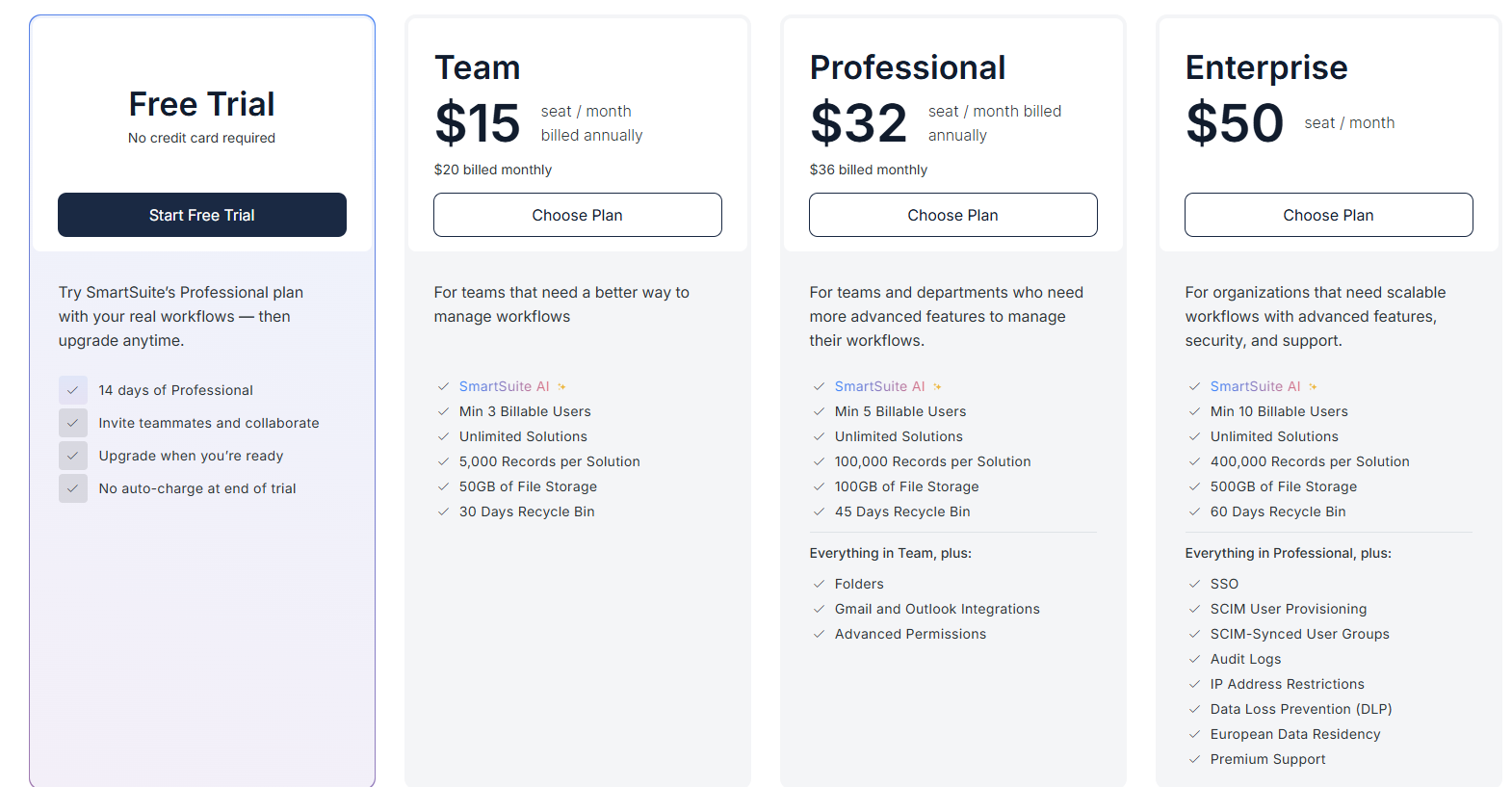
Onspring uses a tiered model (Bronze through Platinum) with separate charges per pricing structure.
➡️ Over a 3-year period, the cost difference between a modular pricing platform and an all-in-one platform like SmartSuite can be substantial.
- User experience for the whole organization: A GRC platform that only your compliance team can use is only half the solution.
Business users who need to fill out risk assessments, acknowledge policies, or report incidents should be able to do so without a training session.
If the interface confuses them, they'll stop using it, and your data quality falls apart.
SmartSuite's interface was designed with this in mind.
Our platform offers role-specific views, intuitive navigation, and 15 different work views (Grid, Kanban, Timeline, Calendar, Chart, and more) that let each person interact with data the way that fits them best.
What are the steps to take to select the right GRC tool?
Here's the approach I'd recommend, based on what I've seen work across organizations of different sizes.
Step 1: Audit your current state before you look at vendors
Before you open a single vendor website, document what you're working with right now.
- What frameworks do you comply with?
- What processes are manual?
- Where do things break?
- Who in your organization interacts with GRC data, and how often?
The goal here isn't a 50-page report. It's a clear, honest picture of your gaps.
If your compliance team is running audits out of spreadsheets and your risk register lives in a shared drive that nobody updates, you know where the pain is.
Step 2: Define what you need GRC to do in 12 months and in 36 months
Your immediate needs might be passing a SOC 2 audit or centralizing your risk register.
But your 36-month needs might include third-party risk management, operational resilience planning, and board-level risk reporting.
If you only buy for the next quarter, you'll outgrow the tool before your contract renewal.
This is the most common mistake I see teams make, and it's exactly why compliance automation tools feel limiting after the first year.
Step 3: Categorize vendors by type before you start demos
Once you know your scope, sort vendors into the three categories I outlined earlier: compliance automation, enterprise GRC suites, and connected GRC operating systems.
Don't demo all three types. Pick the category that matches your size, maturity, and 36-month roadmap, then shortlist 3 to 4 vendors within that category.
Step 4: Get decision-makers involved early, not at the end
I've watched GRC tool evaluations stall for months because the risk team picked a platform, then had to re-justify it to the CIO or CFO.
Bring your key stakeholders into the evaluation before demos start.
Agree on the criteria, the budget, and the timeline upfront, so when you make a recommendation, you're not starting over.
Step 5: Run a real pilot, not just a slide deck review
Most GRC vendors offer demos. Fewer offer genuine trial environments where you can build your own workflows. But that's exactly what you need.
A 30-minute demo with pre-built data tells you almost nothing about how a tool will handle your specific processes.
Ask for sandbox access. Build a real risk register. Set up a control monitoring workflow.
Try to create a dashboard that your VP of Compliance would actually use. That's how you find out if a platform works for your team.
SmartSuite, for example, offers a 14-day free trial with no credit card required, so you can test real GRC workflows before committing.
Step 6: Don't let price be the deciding factor, but don't ignore total cost either.
The cheapest GRC tool isn't always the best deal.
If you save $10,000 a year on licensing but spend 200 hours fighting with the platform to get it to do what you need, you've lost more than you saved.
At the same time, don't accept opaque pricing as normal.
Ask for a full cost breakdown: licensing, implementation, professional services, training, add-on modules, and annual increases.
Then compare that against the actual value each platform delivers.
Step 7: Think about data and analytics from day one.
You're going to put a lot of data into this system. Risk assessments, control evidence, audit findings, incident reports, vendor evaluations.
The tool should make it easy to get that data out in a way that's useful, not just stored.
- Can you spin up a live dashboard in under a minute that shows exactly where your risks stand?
- Can you generate board-ready reports without first exporting everything to a spreadsheet?
- Can you get a single-screen view of your compliance posture across every active framework?
If the answer to any of those is "only with a separate BI tool" or "only after a custom integration," that's a red flag.
Common GRC tool selection mistakes (and how to avoid them)
I've watched enough GRC evaluations go sideways to recognize the patterns. The tools usually aren't the problem. The selection process is.
Here are the mistakes that come up again and again.
Buying for this quarter's audit instead of next year's risk program
This is the single most common mistake, and it's the most expensive one to fix.
A team needs to pass SOC 2, so they grab a compliance automation platform like Drata, Vanta, or Secureframe.
Six months later, the board asks for an enterprise risk dashboard. The compliance tool can't do it.
Now you're buying a second platform, migrating data, and explaining to leadership why the "GRC tool" you just purchased doesn't actually cover GRC.
The fix is simple but requires discipline: map your needs for the next 36 months, not just the next quarter.
If enterprise risk, third-party vendor assessments, or operational resilience are on the horizon, start with a platform that handles those from day one.
Letting the demo sell you instead of running a real pilot
Every GRC platform looks great in a 30-minute demo. Pre-built data, perfect workflows, and a sales engineer who knows exactly where to click.
But a demo doesn't tell you what happens when your compliance analyst tries to build a custom risk assessment workflow on a Tuesday afternoon with no help.
It doesn't tell you how the system handles your messy, real-world data. It doesn't reveal the limitations that only show up when you push past the defaults.
If a vendor won't give you sandbox access or a free trial, that should give you pause.
You wouldn't buy a car without a test drive, and you shouldn't commit to a platform your team will live in for years without testing it with your actual workflows.
Choosing based on feature count instead of workflow fit
Enterprise GRC suites like ServiceNow GRC, IBM OpenPages, and MetricStream have enormous feature lists. Hundreds of modules, thousands of configuration options. On paper, they do everything.
In practice, your team will use maybe 20% of those features. The other 80% is complexity you're paying for but never touching.
The better question isn't "does this tool have the most features?" but "can this tool handle our specific processes without forcing us to change how we work?"
A platform like SmartSuite or LogicGate with strong no-code customization might cover your exact needs with a fraction of the overhead.
You're building workflows that match your organization instead of conforming to someone else's template.
Underestimating the cost of poor user adoption
You can pick the most capable GRC platform on the market, and it still fails if nobody outside the compliance team uses it.
Risk assessments need input from business unit leaders. Policy acknowledgments need participation from every employee.
Incident reports need to come from operational staff who may never log into the GRC system otherwise.
If any of those groups find the tool confusing or slow, they'll default to email, spreadsheets, or just not doing it. And your risk data becomes incomplete.
This is why user experience isn't a "nice to have" in GRC. It's a make-or-break factor.
Tools like SAP GRC and older versions of Archer IRM consistently struggle with this, while platforms like SmartSuite, Hyperproof, and Vanta tend to score higher on usability.
Ignoring total cost of ownership and focusing only on licensing
A $30,000/year license for a GRC platform can easily become $150,000/year.
Once you add implementation consulting, admin training, professional services for customization, and the internal hours your team spends maintaining it, the real number looks nothing like the sticker price.
I've seen organizations pick a tool because the per-seat price looked low, then get hit with thousands of dollars in onboarding fees and a 6-month timeline before anyone could actually use it.
Always ask for the full cost picture: licensing, implementation, ongoing support, training, add-on modules, and annual price increases.
Then compare that against platforms with transparent, all-inclusive pricing. SmartSuite, for example, starts at $15/user/month and includes access to all solutions (GRC, ITSM, project management, operations) without separate module fees.
Ready to build a GRC program that actually works? Start with SmartSuite.
Choosing a GRC solution is not a small decision.
The platform you pick will shape how your organization manages risk, runs audits, tracks compliance, and reports to the board for the next several years.
The problem is that the GRC market has gotten crowded and confusing.
You've got compliance automation startups built for SOC 2 and ISO 27001 certifications.
Legacy enterprise suites designed for heavily regulated industries.
And a newer breed of connected GRC platforms like SmartSuite that approach governance and risk from a more flexible, no-code angle.
If you've read this far, you probably recognize the pattern.
Most GRC tools force you to choose between two extremes.
You either pick a compliance automation platform that gets you certified fast but can't scale beyond audits, or you commit to an enterprise suite that takes months to deploy and costs a fortune to customize.
SmartSuite is different.
It's a connected GRC operating system that brings risk, audit, compliance, cyber, third-party risk, operational resilience, ESG, and AI governance into one workspace.
Here's what that means in practice:
- Build any GRC workflow you need using visual, no-code tools that your team controls, not the vendor's professional services queue.
- Connect compliance to real operations so risks, controls, incidents, and remediation tasks don't live in a silo but stay tied to the work happening across your organization.
- Get real-time dashboards and reporting that update automatically as data changes, with role-aware views for executives, auditors, and operational teams.
- Use AI inside your workflows, not as a chatbot on the side, to classify risks, summarize vendor assessments, flag control gaps, and automate repetitive compliance tasks.
- Start at $15/user/month with fully transparent pricing, where every licensed user gets access to all SmartSuite solutions, including GRC, ITSM, project management, and operations, without paying for separate modules.
Whether your team is building its first risk register or managing complex, multi-framework compliance across departments, SmartSuite gives you the flexibility to start where you are and grow without hitting a wall.
Start a free SmartSuite trial or book a demo to see how your team can manage governance, risk, and compliance in one place.

SmartSuite provides work platform for standardizing workflows in the following areas:
- Governance, Risk & Compliance
- IT & Service Ops
- Project / Portfolio Management
- Business Operations







