


.jpg)

Are you looking for ServiceNow alternatives in 2026 for ITSM?
After evaluating numerous ServiceNow alternatives for organizations worldwide, I've identified superior options for teams finding ServiceNow too complex or expensive. These ServiceNow alternatives deliver comparable ITSM functionality without requiring specialized support resources.
When implementing ServiceNow alternatives in 2026, I've documented how the right ServiceNow alternative transforms service delivery while significantly reducing costs. Organizations consistently report that these ServiceNow alternatives offer more intuitive interfaces and faster deployment than ServiceNow's lengthy implementation process.
Why Look for ServiceNow Alternatives?
ServiceNow undoubtedly helps you create smooth and organized workflows for managing your data, IT systems, and services.
The platform, however, isn’t suitable for every team. Let’s go over some of the drawbacks of the solution.
Below are the top two reasons (according to verified reviews) to consider ServiceNow alternatives and competitors in 2026:
ServiceNow’s costs will sneak up on you

ServiceNow requires regular maintenance, updates, and support to run smoothly and securely. And these ongoing services often attract extra fees, adding to the total cost.
Setting up and integrating ServiceNow into a company’s existing systems can be expensive and time-consuming. Often, companies hire specialized consultants to ensure everything goes smoothly, which adds even more to the overall cost.
ServiceNow lacks low-code UI/UX flexibility

ServiceNow is quite rigid and tough to customize.
Often, users tailor their workflows to suit the tool, which can result in inefficiencies and a decrease in overall productivity.
This tool isn't your best option if you value customizing workflows to suit specific processes.
What Are the Best ServiceNow Alternatives & Competitors in 2026?
After extensively testing dozens of ITSM platforms, I've identified these 10 ServiceNow alternatives as the most effective replacements for organizations seeking better value. These top ServiceNow alternatives deliver comparable functionality at lower price points, with many ServiceNow competitors offering more intuitive interfaces and faster implementation.
The best alternatives to ServiceNow for ITSM include SmartSuite wihth its no-code comprehensive ITSM software, Freshservice, and Jira Service Management.
My evaluation of ServiceNow alternatives focused specifically on workflow automation capabilities, user experience, customization options, and total cost of ownership—the key factors organizations consider when selecting ServiceNow alternatives in 2026.
1. SmartSuite
SmartSuite offers the best ServiceNow alternative in 2026, featuring our no-code, easy-to-use software that helps streamline critical IT processes, organise projects, and eliminate traditional obstacles in the tech landscape.
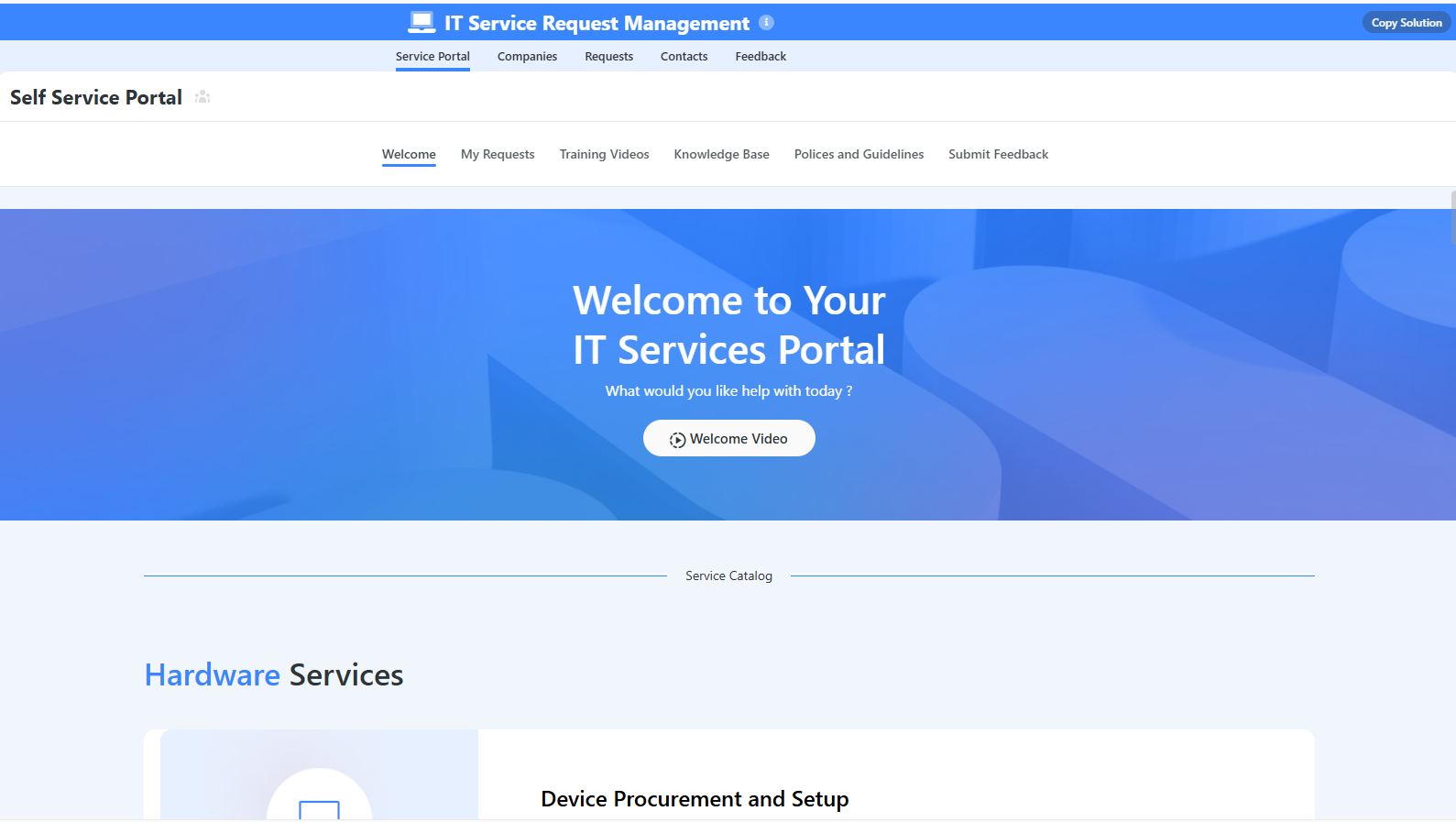
Here’s a quick walkthrough of the tool and our solution for IT leaders:
Full disclosure: While SmartSuite is our platform, we’ll share an unbiased view of the tool’s abilities and why it stands out from other ServiceNow alternatives.
Let’s go over the features that make SmartSuite the best choice for small and large IT teams looking for a SeriviceNow alternative: 👇
1. A connected work operating system built on relational data and AI
SmartSuite is built as a connected work management system that combines structured data, automation, AI, and governance into one platform, aiming to reduce tool sprawl and allow organizations to tackle all their workflows from a single point of control.
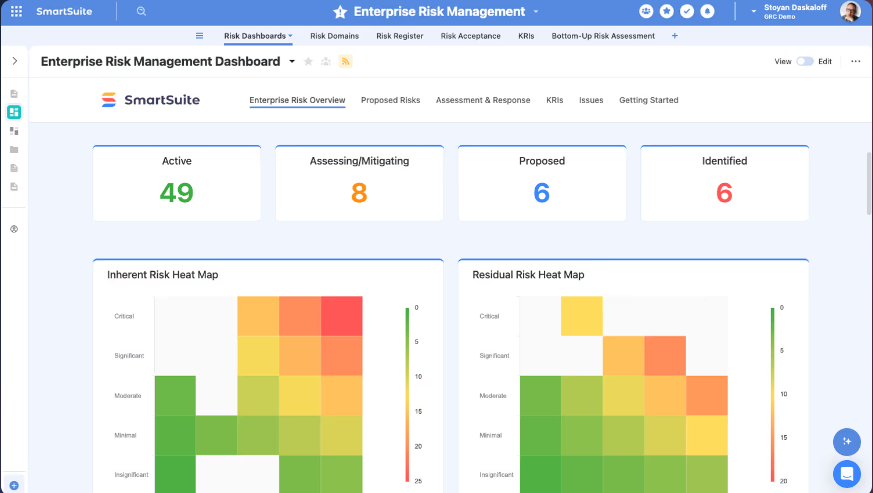
Rather than forcing teams into either spreadsheet-style execution or heavy enterprise service frameworks, SmartSuite focuses on designing connected workflows that adapt to any industry, process, or AI model while maintaining enterprise-grade visibility and control.
Here’s what lies at the foundation of SmartSuite’s platform:
- Relational data architecture: Workflows are built on structured tables, fields, and records that stay linked across projects, operations, or governance processes, helping teams maintain one consistent source of truth without duplicating data.
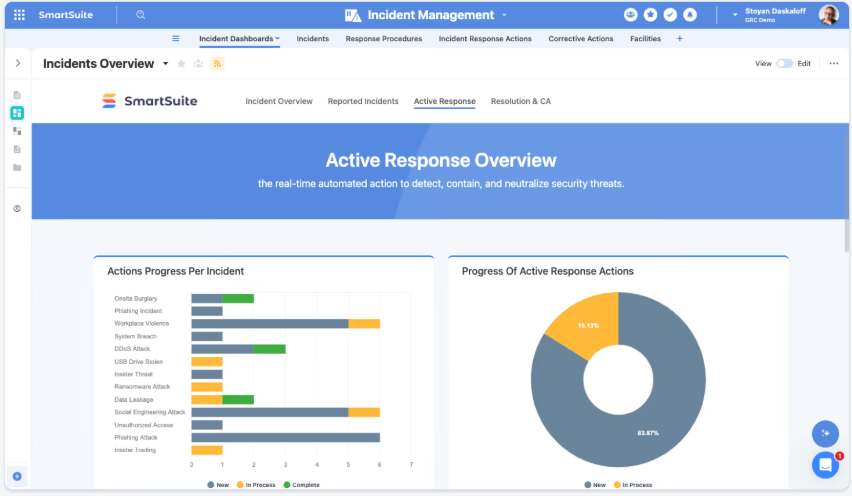
- Visual workflow design: Teams can map out processes step-by-step using structured progression, customizable layouts, and clear hierarchy, making it easier to adapt workflows as business needs evolve.
- Built-in automation engine: Multi-step automations use triggers, conditions, and actions to move work forward automatically, reducing manual handoffs and keeping processes running end-to-end.

- Embedded AI capabilities: Intelligence sits inside workflows to analyze information, assist with decisions, and automate complex tasks while staying governed within the platform.
- Contextual collaboration: Conversations, files, mentions, and activity history live directly inside records, so teams work together in context instead of relying on disconnected tools.
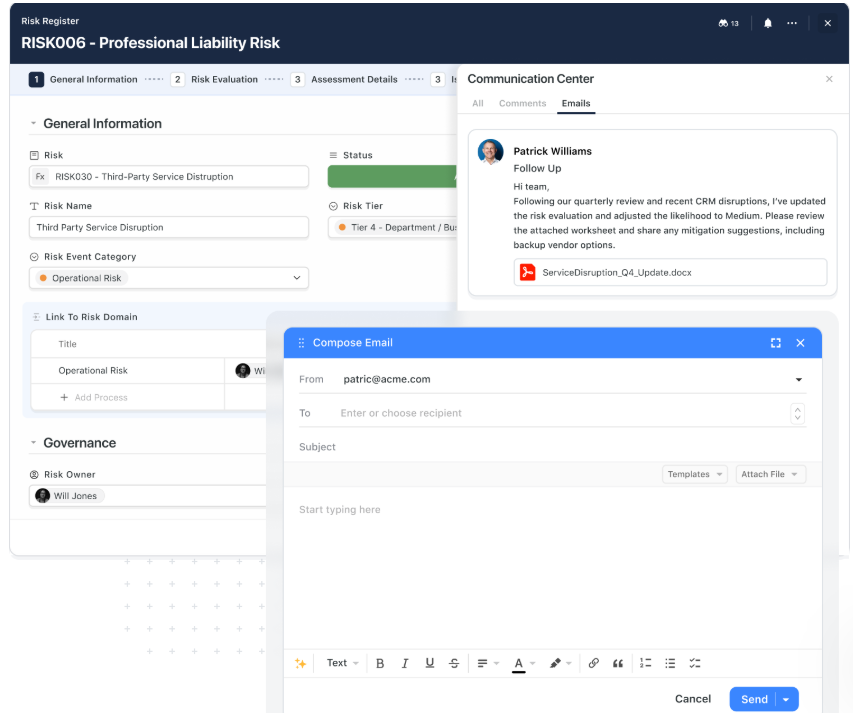
- Real-time reporting and dashboards: Charts, analytics, and portfolio views update instantly as data changes, giving leadership and teams continuous visibility into performance and progress.
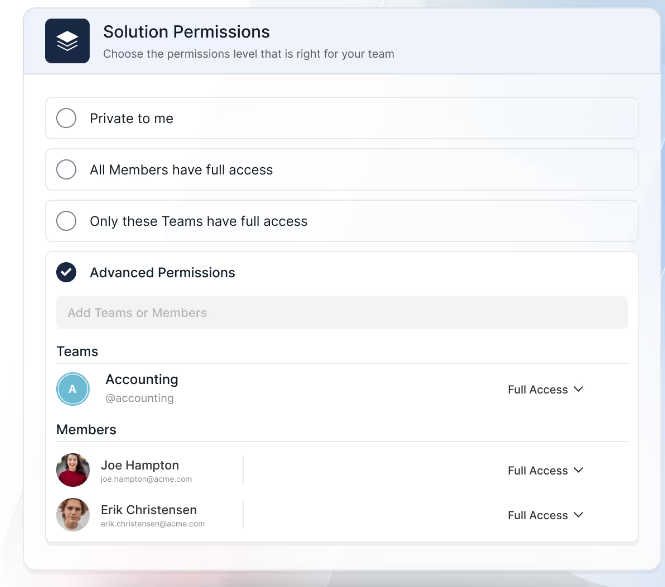
- Governance and security controls: Role-based permissions, audit trails, validation rules, and compliance-ready safeguards help organizations scale workflows while keeping data protected and accountable.
2. Purpose-built Solutions designed to scale with your workflows
Instead of offering a single rigid product, SmartSuite organizes its platform into Solutions - structured environments designed around major business functions.
Each Solution combines workflows, data models, automation, dashboards, and governance so organizations can standardize execution while still adapting processes as they evolve.
There are four pre-built Solutions within SmartSuite:
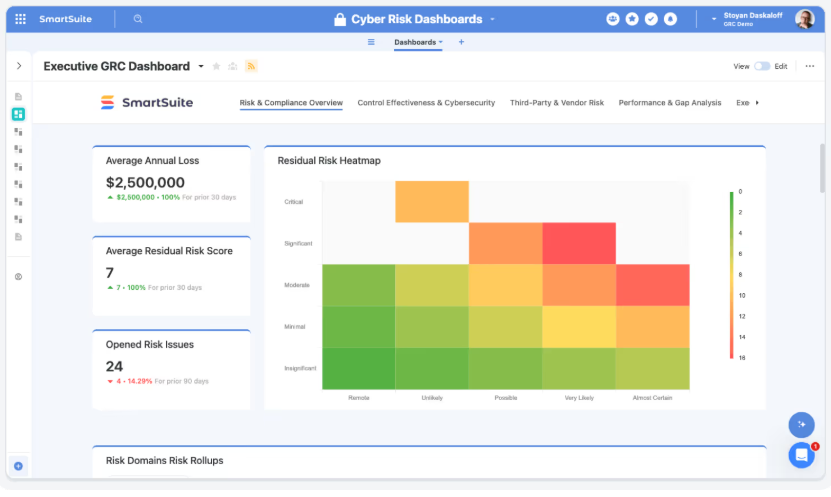
- GRC & Operational Resilience: Designed to unify governance, risk, compliance, audit, cybersecurity, and resilience workflows into one system of record. Teams can manage risks, controls, policies, audits, third-party risk, and continuity planning while maintaining full traceability and real-time visibility into exposure, testing, and remediation efforts.
- IT & Service Operations (ITSM & Enterprise Service Delivery): Centralizes incidents, service requests, assets, and operational workflows across IT and shared service teams like HR or Finance. Includes automation for routing, SLAs, approvals, and escalations, along with reporting that tracks service performance and operational health without adding extra tools.
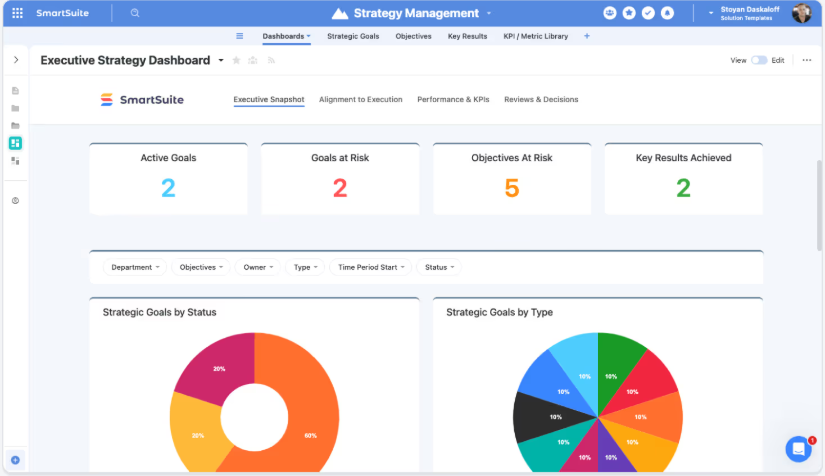
- Projects & Portfolios: Connects project execution with portfolio governance and strategic planning so teams can manage demand intake, track dependencies and risks, and align initiatives with OKRs. Leaders gain real-time visibility into delivery progress, financial performance, and resource capacity through unified dashboards.
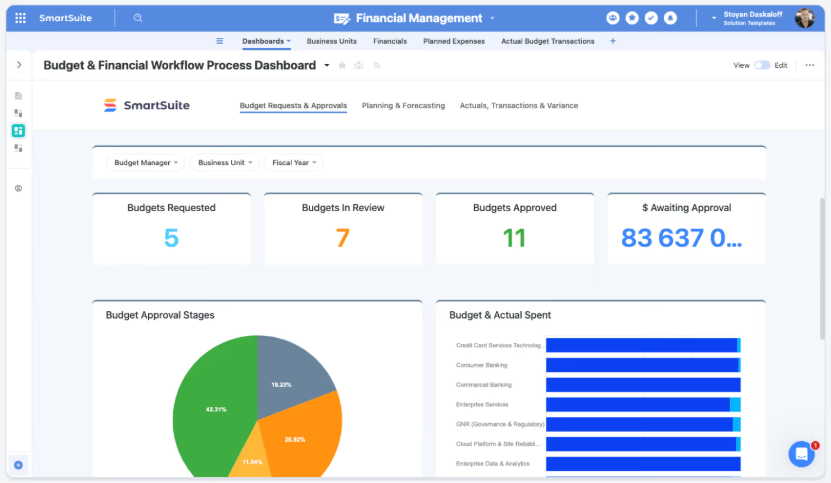
- Business Operations: Provides a flexible environment for cross-functional workflows such as marketing ops, HR, procurement, finance, product management, and customer operations. Teams can standardize intake, approvals, and execution across departments while replacing spreadsheets and disconnected point solutions with one connected operational layer.
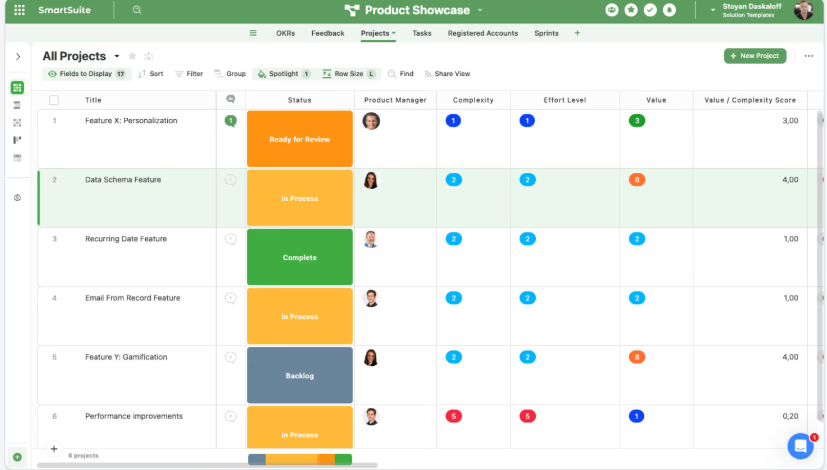
Each of these solutions is fully configurable, meaning that you can easily tailor it to your unique organizational needs, without writing a single line of code.
3. Build your own workflows with a no-code, fully customizable foundation
Beyond its packaged Solutions, SmartSuite gives teams the freedom to design completely custom workflows from scratch, making it adaptable to virtually any industry, process, or operational model.
Instead of locking users into predefined structures, the platform lets you create new Solutions using familiar building blocks like fields, tables, layouts, and reports, so teams can organize work exactly how they need it without writing code.
Here’s how SmartSuite makes it possible:
- Flexible solution builder: Create new workflows by combining tables, fields, and record layouts, allowing teams to structure anything from sales pipelines to compliance processes or internal operations.
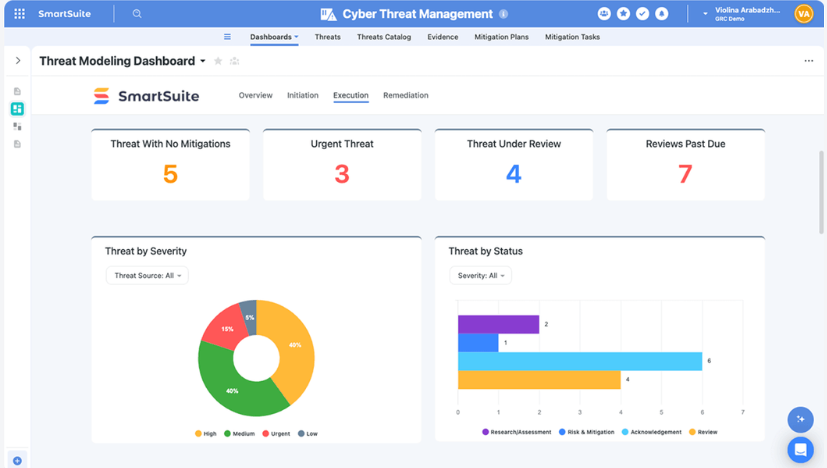
- 40+ customizable field types: Capture everything from simple text and dates to advanced formulas, linked records, signatures, and rich documents with validation controls to maintain clean data.
- Visual page styling and layouts: Customize how information appears using grids, timelines, boards, calendars, maps, Gantt charts, or dashboards so each workflow matches the way teams actually work.
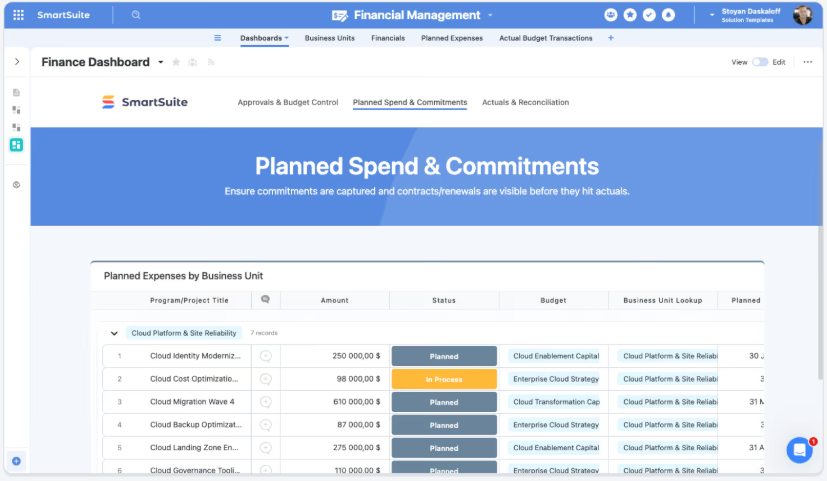
- Real-time reporting and dashboards: Build reports and visualizations directly from your workflow data to track assignments, priorities, and performance without needing external analytics tools.
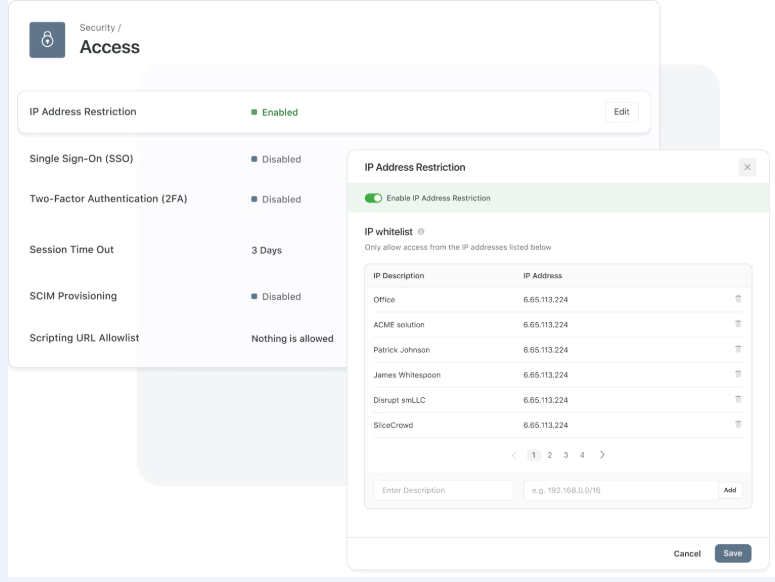
- Granular permissions and role control: Define who can access, edit, or view specific parts of a workflow, ensuring sensitive information stays governed as processes scale.
- Automation-ready workflows: Add triggers and actions to automate status changes, notifications, and handoffs, turning custom solutions into fully operational systems with minimal setup.
4. Intelligent workflow automation with real-time triggers and AI actions
SmartSuite’s automation engine is designed to move work forward automatically by connecting triggers, conditions, and multi-step actions into structured workflows.
Using a visual drag-and-drop builder, teams can automate everything from notifications and approvals to data syncing and cross-system coordination without writing code.

Because automation runs directly on relational data, workflows stay connected across projects, operations, and governance processes instead of operating in isolation.
Here’s what makes SmartSuite automation stand out:
- Real-time triggers: Automations can start when records change, dates arrive, buttons are clicked, or external systems send webhooks, keeping workflows responsive to real business events.
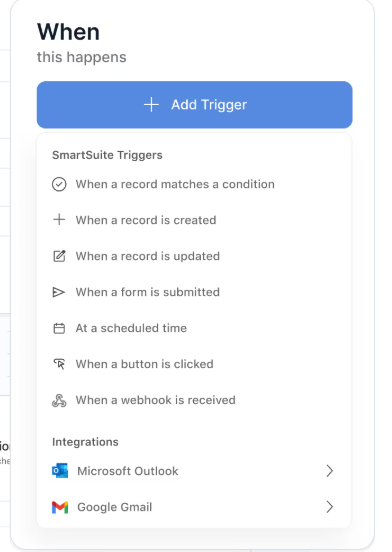
- Precision filtering: Visual filters ensure actions run only when specific criteria are met, helping teams avoid unnecessary updates while maintaining data accuracy.
- Multi-step action orchestration: One automation can update records, assign work, notify teams in Slack or Microsoft Teams, create meetings, or trigger external systems in a defined sequence.
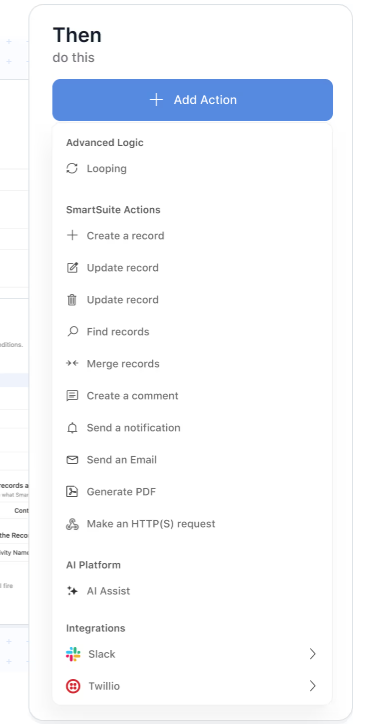
- AI Assist inside workflows: Built-in AI actions can analyze attachments, generate summaries, calculate values, or enrich data during an automation, turning AI into an active part of execution.
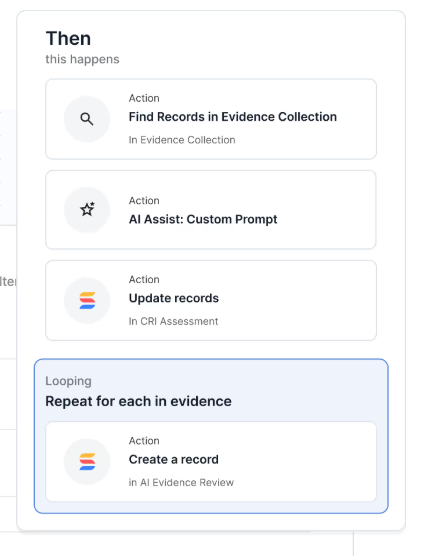
- Looping across related records: Automations can repeat actions across linked items, for example updating all related controls when a risk level changes, without breaking relationships or workflows.
5. Embedded AI that operates directly inside workflows
SmartSuite’s AI is built into the platform’s architecture rather than added as a separate assistant, allowing intelligence to work directly within records, automations, and data models.
Because AI runs on structured relationships and governed permissions, teams can accelerate decisions, automate complex steps, and extract insights while keeping full control over how models are used across the organization.
The platform also supports a bring-your-own-LLM approach, including OpenAI, Gemini, Anthropic, Bedrock, Azure, IBM WatsonX, and more, so companies can align AI usage with their security and governance requirements.
SmartSuite AI enhances execution by providing:
- Intelligent workflow execution: AI can classify requests, summarize inputs, recommend next steps, and help route work automatically as part of everyday processes.
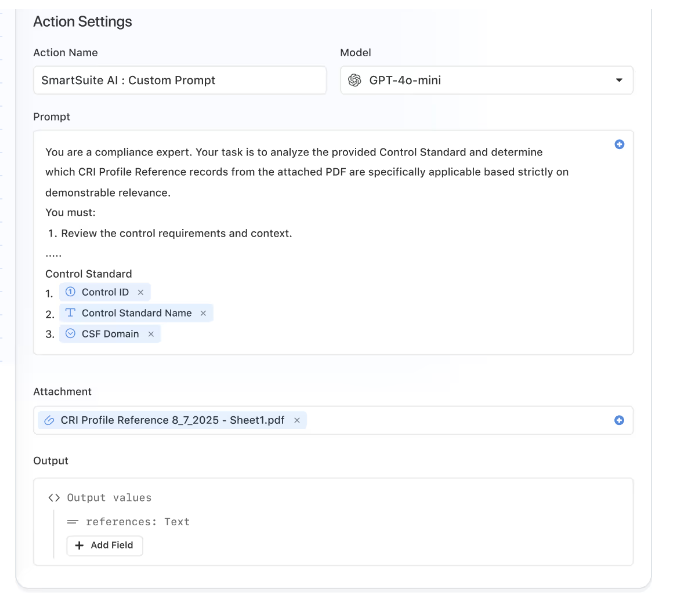
- Context-aware business insights: Because AI operates on relational data, it can surface risks, detect anomalies, and highlight bottlenecks grounded in real operational context.
- SmartDoc AI for content workflows: Create, summarize, translate, or refine communications directly inside records without leaving the platform.
- AI Field Agent: Monitor datasets for missing information, suggest priorities or risk scores, and help keep records accurate at scale.
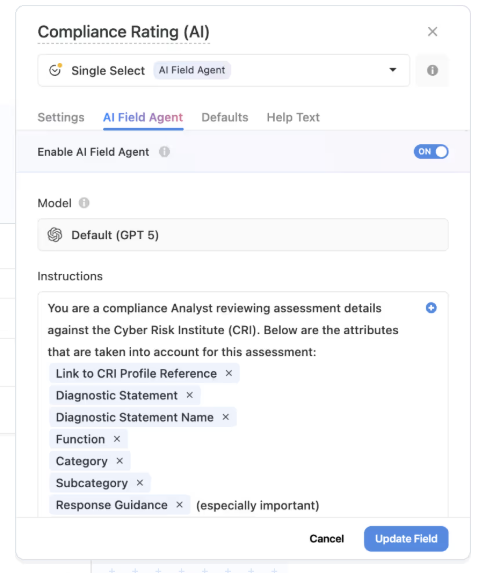
- Human-in-the-loop governance: AI proposes insights and updates while users review and approve changes, ensuring transparency and control.
SmartSuite pricing plans
SmartSuite offers a 14-day free trial of its Professional plan (no credit card required), so you can test real workflows before subscribing.
SmartSuite has two pricing models depending on your organization's size and complexity:
User-based pricing, built for small to mid-sized teams that want full platform access under one license:
- Team: $12/user/month (minimum 3 users), includes unlimited solutions, 5,000 records per solution, 50GB storage, SmartSuite AI, dashboards, pre-built templates, and real-time collaboration.
- Professional: $24/user/month (minimum 5 users), includes everything in Team and adds 100,000 records per solution, 100GB storage, Gmail and Outlook integrations, folders, and advanced access controls.
- Enterprise: $45/user/month (minimum 10 users), includes everything in Professional and adds 400,000 records per solution, 500GB storage, SSO, SCIM provisioning, audit logs, DLP, IP restrictions, and premium support.

Each licensed user gets access to every SmartSuite solution (ITSM, ITAM, GRC, projects, operations) without paying extra for modules.
Solution-based custom pricing, built for large enterprises and regulated industries where per-user licensing across the entire platform isn't practical:
- License only the specific solutions you need (e.g., ITSM, ITAM, GRC).
- Structure access by department, region, or regulatory requirement.
- Scale easily for thousands of users without compromising security.

Why do we think SmartSuite is the best alternative to ServiceNow?

Unlike ServiceNow, SmartSuite offers countless work templates that help you get started without needing to tap into technical teams or consultants.
Furthermore, the platform lets every department manage and automate processes within SmartSuite, whereas ServiceNow cannot easily support non-IT processes.

SmartSuite takes a no-code-first approach.
Our pricing is published on our website, dashboards are visual and real-time, and you can configure workflows, reporting, and automation without SQL or external help.
It connects ITSM, ITAM, ESM, and operational workflows in one AI-native workspace with 200+ ready-to-use templates.
Ready to try out the tool? Click here to get started.
Pros & Cons
✅ Connects ITSM, ITAM, and operational workflows in one platform instead of separate tools.
✅ Visual, no-code dashboards and reports that don't require SQL.
✅ Over 200 pre-built templates across IT, GRC, and business workflows.
✅ AI built into workflows for triage, summarization, and pattern detection.
✅ Transparent pricing with all core features in the entry tier.
✅ Fast to set up, with an intuitive interface that non-technical teams can use.
❌ No mid-tier between Team and Professional plans.

2. Freshservice & Freshdesk
Best for: Helping IT teams automate and streamline service desk operations.
Similar to: Jira and Zendesk.

Freshservice helps organizations streamline their IT operations and service delivery.
The cloud-based platform provides features like a ticketing system, self-service portal, knowledge base, asset management, and more.
Unlike Servicenow, Freshservice offers IT and business teams a less technical and cost-effective platform for improved productivity, operational transparency, and increased ROI.
Combined with Freshdesk, it can be a solid option for IT management and technical support.
Key Features

- Ticketing System: A centralized platform to track and manage IT support requests efficiently, ensuring timely resolutions.
- Self-Service Portal: Enables users to independently find solutions and submit requests, reducing the workload on IT teams.
- Asset Management: Monitors and manages IT assets, including hardware and software, to optimize utilization and maintenance.
- Omnichannel support: Freshdesk allows customers to reach out via multiple channels like email, phone, chat, social media, and more.
- Automation: Freshdesk automates tasks like ticket assignments, repetitive responses, and workflow management to improve efficiency.
Pricing plans
As with every Freshworks products, pricing is affordable and varies based on the number of agents you have on the platform, along with which features you’d like included.
Note that advanced support capabilities like custom roles and customer segmens are only available on premium plans. Freshdesk and Freshsuite both have the same price per agent.
Choose from 4 plans, all of which have a free trial:
- Starts at $19 per month billed annually, or $29 billed monthly.
- Growth: $49 per month billed annually or $59 billed monthly.
- Pro: $95 per month billed annually, or $115 billed monthly.
- Enterprise: $119 per month billed annually, or $145 billed monthly.

Pros and Cons
✅ The platform’s interface is simple to set up and customize.
✅ Strong automation capabilities.
✅ Seamless integration with other Freshworks products and third-party tools.
❌ Lack of direct integration with HR and recruiting software.
❌ Outdated support resources.
❌ Slow customer support.
3. Jira Service Management
Best for: IT service management (ITSM) and enterprise service management (ESM).
Similar to: Freshservice and Zendesk.

Jira Service Management solution enables teams to easily receive, track, manage, and resolve customer requests.
The platform is designed to bring together IT, development, operations, and business teams to collaborate.
Contrary to ServiceNow, Jira is easy to implement, integrate, and scale in the long run.
Key features

- Request Management: Allows teams to manage work across various channels, this way, your employees and customers will receive the help they need quickly.
- Incident Management: Enables development and IT operations teams to respond rapidly to incidents, resolve them, and continuously learn from them.
- Plugins: Offers a wide variety of plugins for additional integrations, workflow enhancements, reporting, and automation.
Pricing
Jira Service Management offers four pricing plans:
- Free: $0, for up to 3 agents, basic features.
- Standard: $17.65 per agent/month, includes custom-branded help center, alerts, on-call schedules, unlimited email notifications, and 9/5 support.
- Premium: $44.27 per agent/month, adds AI-powered services, virtual agent, asset and configuration management, advanced alert integrations, and 24/7 support.
- Enterprise: Custom pricing, adds advanced analytics, security, and unlimited automations, with up to 150 instances and 24/7 dedicated support.

Pros and Cons
✅ Centralized incident ticketing system that provides full visibility into ongoing issues.
✅ Robust automation features to establish predefined workflows and triggers.
❌ Dependence on plugins for certain features, which some users find inconvenient.
❌ Non-technical users don’t tend to enjoy Jira’s interface.
4. ClickUp
Best for: Project management, team collaboration, and task organization.
Similar to: Asana, Monday.com and Basecamp.

ClickUp provides an all-in-one platform that combines features like tasks, documents, goals, and chat in one place for increased productivity.
In comparison to ServiceNow, Clickup has a highly customizable and flexible interface that you can tweak to suit the needs of your team.
It’s not purpose-built for IT, and may lack some of ServiceNow’s automation and code-generating capabilities, but many IT teams prefer it’s simple interface with lots of features.
Key features

- Task and project management: ClickUp provides a range of task management features like Gantt charts, Kanban boards, and custom automation to help teams plan, track, and deliver projects effectively.
- Collaboration: ClickUp provides tools like real-time editing, comments, and mentions.
- Reporting and visibility: ClickUp offers dashboards, workload views, and goal tracking to provide teams with better visibility of project progress.
Pricing
ClickUp offers the following pricing plans:
- Free Forever: $0, suitable for personal use, includes 100MB storage and essential features.
- Unlimited: $7 per user/month, ideal for small teams, offers unlimited storage, integrations, dashboards, and more.
- Business: $12 per user/month, best for mid-sized teams, adds advanced time tracking, automations, and more.
- Enterprise: Custom pricing, designed for large teams, includes white labeling, advanced permissions, and dedicated support.

Pros and Cons
✅ Offers excellent flexibility and customization options to fit different team needs.
✅ Effective for monitoring jobs and projects, especially for smaller teams.
✅ Affordable.
❌ Some users have reported challenges with the desktop app and integrations.
❌ Doesn’t support complex process automation.
5. Zendesk
Best for: Customer service management for handling support tickets across multiple channels.
Similar to: Freshdesk, Zoho Desk.

Zendesk is a customer service tool that helps organizations deliver better customer experiences.
In comparison to ServiceNow, Zendesk focuses on providing a centralized ticketing system to organize customer inquiries and support requests across multiple channels like email, chat, phone, and social media.
Key Features

- Multi-channel support: This allows customers to reach out via email, chat, phone, social media, and more.
- Live chat: For effective customer support and engagement.
- Automation: To streamline workflows, route tickets, and provide quick resolutions.
Pricing plans
Zendesk offers four main basic pricing plans:
- Suite Team: $55 per agent/month, includes basic support features.
- Suite Growth: $89 per agent/month, adds advanced tools like multiple ticket forms and SLAs.
- Suite Professional: $115 per agent/month, includes custom analytics and skills-based routing.
- Suite Enterprise: $169 per agent/month, offers advanced customization and compliance features.

💡 Note that Zendesk’s cost is sneaky, as some of the IT support capabilities will need to purchased as add-ons.

Pros and Cons
✅ Offers features like live chat, ticketing, knowledge base, automation and analytics.
✅ Customizable to meet specific business needs.
❌ Ticket management could be improved, with users wanting more filters and the ability to create folders.
❌ Extra costs can scale quickly.
6. HelpScout
Best for: Personalized services for customers.
Similar to: Zendesk and Freshdesk.

HelpScout helps organizations deliver efficient, personal support to their customers through shared inbox platform that leverages AI to help support reps handle more tickets.
It’s a good ServiceNow alternatives for teams that want to handle simple support tickets without getting too technical.
Key features

- Automation: Freshdesk automates tasks like ticket assignments, repetitive responses, and workflow management to improve efficiency.
- Self-service: The tool provides a knowledge base and community forums to enable customers to find answers independently.
- Customization: Freshdesk can be customized to fit the specific needs of a business.
Pricing plans
Help Scout offers three pricing plans:
- Standard: $22 per user/month, includes 2 shared inboxes, 1 knowledge base, automated workflows, and basic reporting.
- Plus: $44 per user/month, adds 5 shared inboxes, 2 knowledge bases, 25 light users, advanced permissions, and custom reporting.
- Pro: $65 per user/month, offers 25 shared inboxes, 10 knowledge bases, 50 light users, enterprise security, HIPAA compliance, and dedicated support.
Unlike ServiceNow, which targets large enterprises with extensive ITSM capabilities and complex workflows, Help Scout focuses on providing simpler, more affordable customer support tools suitable for smaller teams.

Pros and Cons
✅ Extremely easy to learn and use, with a simple and intuitive interface.
✅ Offers useful workflows to automate actions like sending notifications for bad customer ratings.
❌ The user interface could be improved for tracking open, in-progress, and resolved tickets.
❌ Does not support live tehnical support features like screen control and risk identification.
7. SysAid
Best for: ITSM for automated ticketing, asset management, and workflow automation.
Similar to: Atera, SolarWinds Service Desk.

SysAid is an IT service management (ITSM) solution that helps organizations deliver exceptional automated service.
The tool delivers a knowledge base to help customers find answers to common questions and a conversational AI chatbot to provide instant support.
SysAid is a better alternative to ServiceNow for teams looking for a flexible solution with a drag-and-drop workflow builder.
Key features
- Automated help desk and ticketing system: SysAid allows users to create and monitor support tickets, with features like automatic ticket creation from emails and self-service portals for users to report issues.
- Asset management: SysAid enables tracking and management of hardware, software, and other IT assets across the organization.
- Workflow automation: SysAid can automate various IT processes like employee onboarding, patch management, and more.
Pricing plans
SysAid doesn’t disclose pricing on its website. You must contact their sales team to get a quote. Unlike ServiceNow, however, it offers more flexible and customizable plans and has free trials.
SysAid offers three main pricing plans:
- Help Desk: Designed for lean teams, includes incident management, self-service portal, service catalog, asset management, and basic reporting.
- ITSM: For mid-sized organizations, includes all Help Desk features plus ITIL package, workflow automation, third-party integrations, and advanced SLA management.
- Enterprise: For large teams, includes all ITSM features with unlimited agents, automation rules, and custom columns, plus premium service.

Pros and Cons
✅ Robust help desk functionality for managing incidents, requests, and problems.
✅ Customize workflows and reports to meet company needs.
✅ Effective search function.
❌ Workflows can be difficult to create and modify.
❌ Outdated user interface.
❌ Long implementation process.
8. Atera
Best for: Remote monitoring and management (RMM), and IT automation for IT departments.
Similar to: SolarWinds Service Desk, SysAid.

Atera is an all-in-one IT management platform that offers remote monitoring and management, professional services automation, and remote access abilities for IT professionals and managed service providers.
Atera is a better alternative to ServiceNow for teams without excessive training. The platform provides an intuitive interface that enables IT teams to easily navigate and manage tasks, and has recently gotten an AI upgrade that customers love.
Key features

- Remote Monitoring and Management (RMM): Atera’s RMM software offers full visibility and control over IT infrastructure to allow users monitor and manage devices, servers, and networks proactively.
- Patch Management: Atera automates software patching and updates for Windows, Mac, and various applications to keep systems secure and up-to-date.
- Helpdesk and Ticketing: Atera’s integrated helpdesk and ticketing system enables IT teams to manage support requests and incidents efficiently.
Pricing plans
Atera offers two main pricing plans for IT departments:
- Professional: $149 per technician/month (billed annually) or $169 (billed monthly). This plan includes unlimited devices, remote monitoring, patch management, helpdesk, ticketing, and automation tools.
- Power: $169 per technician/month (billed annually) or $199 (billed monthly), which adds advanced security features, network discovery, and more customization options.
Compared to ServiceNow, which provides comprehensive ITSM solutions for large enterprises, Atera focuses on a pay-per-technician model, making it more cost-effective for smaller IT teams.

Pros and cons
✅ Effective patch management and security scanning.
✅ Intuitive user interface and easy deployment.
✅ Action AI flags issues to IT support representatives.
❌ Limited mobile app functionality.
❌ Basic reporting capabilities.
9. SolarWinds Service Desk
Best for: ITSM focusing on incident, asset management, and ticketing.
Similar to: Freshservice and Zendesk.

SolarWinds Service Desk provides an AI-powered knowledge base to help your team with the resources they need to solve problems efficiently.
Plus, the tool provides a cheaper alternative to help you cut costs while improving your team’s productivity.
Unlike ServiceNow, you can set up the solution in a few days and fit it seamlessly into your existing workflows, but the interface is outdated and clunky.
Key Features

- Incident Management: Automates ticket routing, prioritization, and reporting to efficiently track and resolve IT incidents.
- Change Management: Implements a structured approach to managing changes, ensuring compliance with organizational policies and industry standards.
- IT Asset Management: Provides comprehensive visibility into IT assets, including hardware, software, and licenses, enabling effective lifecycle management and cost optimization.
Pricing plans
SolarWinds Service Desk offers three pricing plans:
- Essentials: $39 per technician/month, includes incident management, knowledge base, service portal, asset management, and SLA management.
- Advanced: $79 per technician/month, adds custom fields, advanced automations, virtual agent, network discovery, and API access.
- Premier: $99 per technician/month, includes visual CMDB, advanced support, and up to 1,500 API calls per user per minute.
All plans support unlimited users and provide 24/7 live chat support.

Pros and Cons
✅ Easy implementation.
✅ Vast automation options.
❌ Navigation can sometimes be confusing.
❌ Outdated interface.
Conclusion
We've examined both the strengths and limitations of the ServiceNow platform alongside the best ServiceNow alternatives available in 2026.
By now, you should have identified which ServiceNow alternative best addresses your specific needs. Many organizations find that SmartSuite stands out among ServiceNow alternatives for its ability to consolidate multiple workflows into a single platform.
Unlike other ServiceNow alternatives that focus solely on ITSM, SmartSuite enables teams to collaborate in one unified environment rather than managing work across disconnected systems.
Sign up for SmartSuite and make your dream of an all-inclusive workspace a reality.
Read More
- 10 ClickUp Alternatives You’ll Love
- Airtable Alternatives: 10 Amazing Tools for Managing Projects Like a Pro
- ServiceNow Pricing: Is It Worth It
- 10 Best Healthcare Project Management Tools
- Top 10 Monday.com Alternatives & Competitors
- Monday.com Pricing: Is It Worth It
- ServiceNow Review: Is It Worth It
- Jira Service Management Pricing: Is It Worth It

SmartSuite provides work platform for standardizing workflows in the following areas:
- Governance, Risk & Compliance
- IT & Service Ops
- Project / Portfolio Management
- Business Operations







